
RasTech Pi Zero 2W Kit
4.2Editor score
Affordable entry-level option
Essential adapters included
Compact aluminum heatsink
This guide compares the best Bedt Raspberry Pi Zero 2 W Kit options available in October 2026 to help you find the perfect starter solution for your projects.
Selecting the right Bedt Raspberry Pi Zero 2 W Kit is essential for embarking on your embedded computing journey. A high-quality kit provides the necessary components to get started quickly without hunting for individual parts separately. These kits often include adapters, headers, and cooling solutions that enhance usability and performance for various applications.
Our team evaluated ten top-rated kits based on component quality, compatibility, and overall value. We analyzed user feedback, technical specifications, and inclusion lists to ensure each pick meets rigorous standards. This list covers everything from basic starter packs to comprehensive solutions designed for hobbyists and professionals alike.
Each pick highlights unique strengths and ideal use cases to help you make an informed decision. Note that availability and pricing fluctuate frequently so verify current details before purchasing. We aim to provide transparent insights into what makes each kit stand out in the crowded market of single-board computer accessories.
4.2Editor score

4.6Editor score

5.0Editor score
This side-by-side comparison breaks down the key specifications and inclusions of each kit to help you identify the best fit for your specific needs.


This kit offers a powerful entry point into single-board computing with a quad-core 64-bit ARM processor. It delivers five times the performance of the original Zero, making it suitable for demanding tasks. The inclusion of a heatsink and essential adapters adds significant value for immediate project deployment.
We may earn a commission when you buy through this link, at no additional cost to you.
The built-in Wi-Fi and Bluetooth support enable seamless wireless communication for IoT and smart home applications. The aluminum heatsink helps dissipate heat effectively ensuring stable performance under heavy workloads. This makes it ideal for multimedia applications and streaming where consistent thermal management is crucial.
While the kit lacks a power supply and SD card these are often items users already possess or prefer to select individually. The compact size allows for integration into space-constrained projects without compromising on capability. The 40-pin header provides ample room for GPIO expansion and customization.
This kit is best suited for hobbyists and professionals seeking a reliable core component for their builds. It balances performance and value exceptionally well making it our top recommendation for most users. We recommend pairing it with a quality power source and SD card for a complete setup.
The quad-core processor provides substantial speed improvements for multitasking and complex computations.
Integrated Wi-Fi and Bluetooth allow for flexible networking without additional dongles.
We may earn a commission when you buy through this link, at no additional cost to you.
This kit stands out as a cost-effective solution for those starting their journey with the Raspberry Pi Zero 2 W. It includes the board along with essential adapters to connect displays and peripherals. The aluminum heatsink ensures that the board remains cool during operation which is vital for longevity.
We may earn a commission when you buy through this link, at no additional cost to you.
The included Mini HDMI to Standard HDMI adapter and Micro USB OTG cable provide essential interfaces for immediate use. This setup is ideal for learning programming and electronics without needing to source every component separately. The compact size makes it perfect for embedded applications and space-constrained projects.
While the rating is slightly lower than premium options it still offers solid value for the price. Users should ensure they have a compatible power supply and SD card as these are not included. The thermal management is handled well by the included aluminum piece.
We recommend this kit for students and hobbyists on a tight budget who need a working setup quickly. It provides all the necessary interfaces to get started without unnecessary extras. It is a practical choice for basic automation and educational tools.
Includes HDMI and USB OTG adapters to connect displays and peripherals immediately.
Provides an aluminum heatsink to maintain stability without high costs.
We may earn a commission when you buy through this link, at no additional cost to you.
This kit earns a perfect rating from users due to its thoughtful inclusions and high-quality components. The pre-soldered header eliminates the need for manual soldering making it ideal for beginners and experts alike. The silver heatsink provides efficient cooling ensuring stable performance under heavy workloads.
We may earn a commission when you buy through this link, at no additional cost to you.
Performance is significantly enhanced with the quad-core 64-bit ARM Cortex-A53 processor clocked at 1GHz. Wireless connectivity is seamless with built-in Wi-Fi and Bluetooth support perfect for IoT projects. The compact size allows it to fit into any project including home automation and media centers.
While it is priced higher than basic kits the value provided by the pre-soldered header is substantial. This reduces the risk of damage during assembly and speeds up project setup time. Users should still procure a compatible power supply as it is not part of the package.
We recommend this kit for those who want a hassle-free experience and top-tier reliability. It is particularly useful for professionals who value time and precision in their builds. The high user satisfaction rate confirms its quality and performance.
Eliminates manual soldering requirements to speed up setup and reduce assembly risk.
Includes a silver heatsink to maintain optimal operating temperatures under load.
We may earn a commission when you buy through this link, at no additional cost to you.
This product focuses on providing a reliable board with a color-coded header for easier GPIO access. The quad-core processor delivers up to five times the multi-threaded performance of the original Zero. The shielded RF enclosure ensures reliable wireless communication in various environments.
We may earn a commission when you buy through this link, at no additional cost to you.
It supports 1080p30 video output and OpenGL ES graphics making it capable for multimedia tasks. The HAT-compatible 40-pin header allows for extensive expansion with cameras and sensors. Power is supplied via a standard micro USB port which is common and easy to source.
Users should note that this is primarily the board with a header rather than a full kit with cases. The color coding helps in identifying pins quickly reducing wiring errors during development. It is a great upgrade path for existing Raspberry Pi users.
We recommend this option for developers who need reliable GPIO access and wireless compliance. It is suitable for embedded designs where space is limited. Ensure you have separate accessories like power and storage as they are not included.
Simplifies wiring by clearly marking pin functions with distinct colors.
Provides better wireless reliability through improved RF compliance in the enclosure.
We may earn a commission when you buy through this link, at no additional cost to you.
This kit is an excellent companion for anyone wanting to expand their Raspberry Pi Zero 2 W project library. It includes 223 items ranging from sensors to modules covering a wide variety of use cases. The 128 projects offer step-by-step guides to help you learn electronics and coding.
We may earn a commission when you buy through this link, at no additional cost to you.
The digital tutorial is extensive providing detailed explanations and code for Python C and Java. It allows you to build complex systems from simple circuits making it a valuable educational tool. The kit is compatible with the Zero 2 W but the board itself must be purchased separately.
Users should be aware that this is a peripheral kit and not a standalone computer setup. It is designed to add functionality to an existing board rather than replace it. The comprehensive code library helps automate tasks and manage sensors efficiently.
We recommend this for educators and students looking to create diverse learning scenarios. It transforms a basic board into a full-fledged robotics and IoT workstation. Pair it with a board kit for a complete learning experience.
Offers 128 projects with code and schematics to accelerate learning.
Provides code examples in Python C and Java for flexible development.
We may earn a commission when you buy through this link, at no additional cost to you.
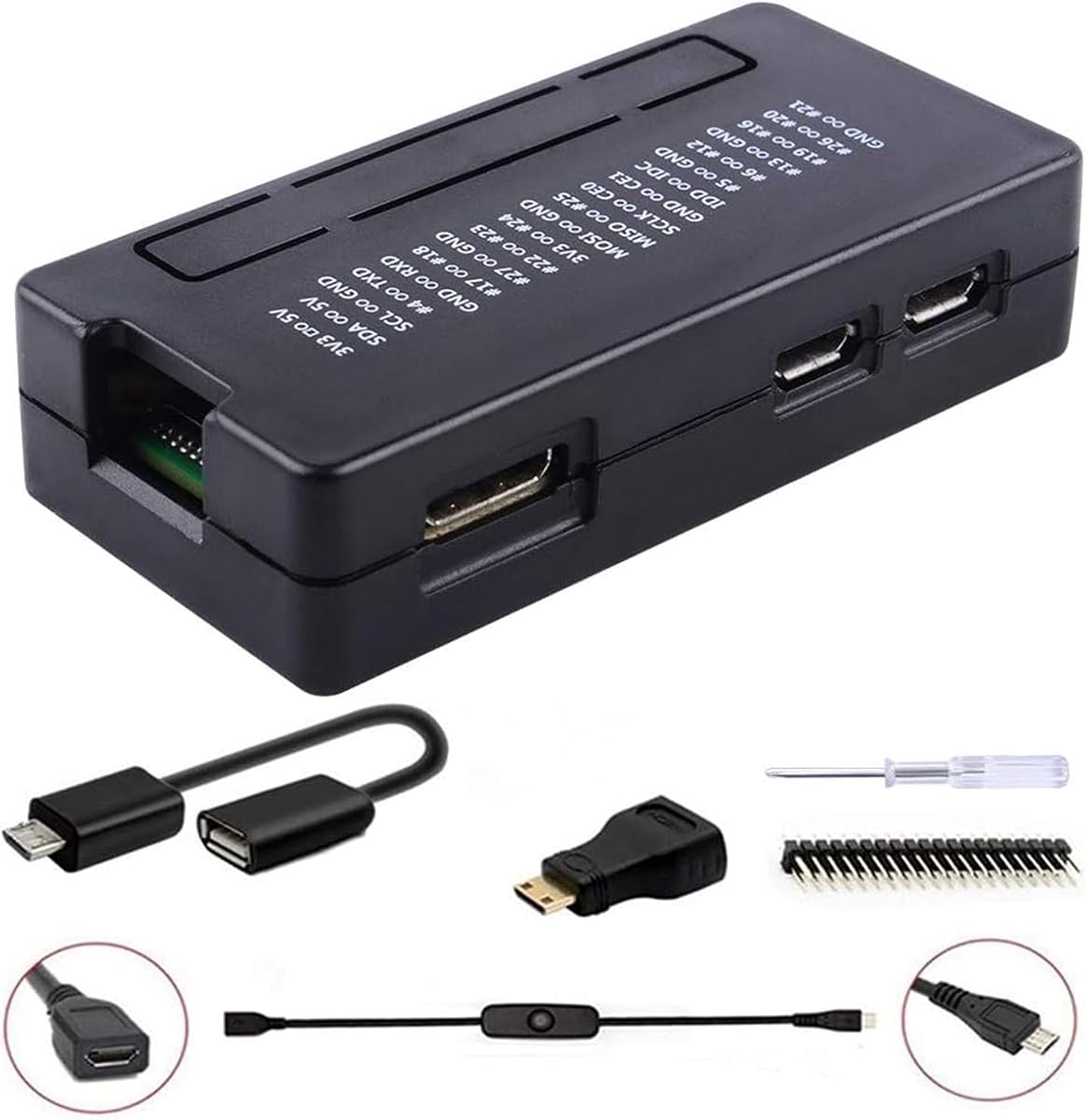
This kit provides a durable aluminum case designed to manage heat effectively for the Pi Zero 2. The included on/off switch cable makes it easier to shut down the device safely without unplugging. It also includes an OTG hub allowing multiple USB devices to be connected to the micro USB port.
We may earn a commission when you buy through this link, at no additional cost to you.
The thermal tape and pin header ensure secure mounting and connectivity out of the box. This setup is perfect for users who want a polished look and better thermal performance. The screwdriver included simplifies the assembly process significantly.
Users should note that the board is sold separately so plan your budget accordingly. The case is designed to be compact and maintain access to all ports. It is a great addition to a basic kit to improve aesthetics and safety.
We recommend this for projects where physical protection and thermal management are priorities. It is ideal for permanent installations or devices that run for extended periods. The switch cable adds a convenient layer of control.
Uses aluminum material to dissipate heat and protect the board from damage.
Includes a switch cable to allow safe shutdown without unplugging the unit.
We may earn a commission when you buy through this link, at no additional cost to you.
While this kit targets the Pico 2 W it is worth mentioning for those interested in RISC-V architecture. It includes the board along with extensive components and tutorials for various projects. The dual RISC-V cores offer unique performance characteristics compared to ARM-based boards.
We may earn a commission when you buy through this link, at no additional cost to you.
The tutorial is comprehensive with step-by-step guides covering basic electronics knowledge. It includes code for MicroPython C and Java making it versatile for developers. The 224 items allow for a wide range of experiments and builds.
Users should note this is a different board family than the Raspberry Pi Zero 2 W. It serves as a viable alternative if you want wireless capabilities with a microcontroller focus. The included board saves the step of sourcing hardware separately.
We recommend this for learners wanting to explore microcontrollers and RISC-V architecture. It is excellent for educational purposes and prototyping. Ensure you choose the right board family for your specific needs.
Offers dual hazard3 RISC-V cores for experimental and efficient computing.
Includes 767 pages of tutorials to help users learn electronics effectively.
We may earn a commission when you buy through this link, at no additional cost to you.
This kit offers a comprehensive set of accessories including a power supply and USB hub. It helps turn your board into a fully connected workstation with easy access to ports. The case design allows for easy installation and access to all connection points.
We may earn a commission when you buy through this link, at no additional cost to you.
The included heatsink improves thermal performance during intensive tasks. The GPIO header makes it easy to connect to expansion boards and sensors. Users appreciate the convenience of having the power supply included to complete the setup.
Note that the board itself is not included in this package. This kit is intended to augment an existing board with essential peripherals. The switch cable adds safety by allowing controlled shutdowns.
We recommend this for users who have a board but need reliable power and connectivity. It is particularly useful for home automation setups where hubs and power are critical. Pair with a board for a complete solution.
Includes a power supply to ensure reliable power delivery to the board.
Includes a 4 port USB hub to connect multiple peripherals simultaneously.
We may earn a commission when you buy through this link, at no additional cost to you.
This alternative board offers higher specs with 4GB LPDDR4 memory and a powerful Allwinner CPU. It supports dual-band Wi-Fi and Bluetooth 5.0 providing modern wireless capabilities. The board supports Android 12 TV and various Ubuntu versions offering flexible OS options.
We may earn a commission when you buy through this link, at no additional cost to you.
The compact design maintains the form factor of the Zero series making it a direct fit for cases. It is suitable for smart screen casting devices and smart home applications. The included onboard antenna ensures reliable signal strength for wireless communication.
Users should note the different hardware ecosystem and compatibility with Raspberry Pi HATs. It is a strong alternative if you need more RAM and processing power. The open-source nature allows for deep customization and development.
We recommend this for advanced users needing more resources for Android TV or heavy Linux workloads. It is a powerful upgrade from the standard Zero 2 W. Ensure you verify software compatibility before purchasing.
Up to 4GB LPDDR4 RAM enables more demanding applications and multitasking.
Includes dual-band Wi-Fi 5 and Bluetooth 5.0 for fast wireless links.
We may earn a commission when you buy through this link, at no additional cost to you.
This basic starter kit provides an acrylic case and essential adapters for your board. It is designed for users who need a simple enclosure and connectivity options. The switch cable allows for easier power management without unplugging the device.
We may earn a commission when you buy through this link, at no additional cost to you.
The case includes covers and screws for secure installation. It ensures that you have access to all ports without removing the board. The included screwdriver makes the setup process convenient and ready to use quickly.
Users should note the board is not included so verify compatibility with your hardware. It is a practical solution for protecting the board from dust and scratches. The adapters help connect to standard displays and USB peripherals.
We recommend this for users needing a basic protective solution at a low cost. It is ideal for temporary setups or prototypes where advanced cooling is not required. Pair with a board for a complete package.
Provides an acrylic case to protect the board from dust and damage.
Includes HDMI and OTG adapters to connect displays and peripherals easily.
We may earn a commission when you buy through this link, at no additional cost to you.
Choosing the right kit involves evaluating several factors to ensure you get the components needed for your specific project goals and budget constraints.
Look for kits that clearly specify the quad-core 64-bit ARM Cortex-A53 processor to ensure you are getting the improved performance over previous models. This specification is critical for running more demanding tasks like video processing or IoT applications without lag.
Prioritize kits that highlight the 512MB RAM limit to understand the memory capacity for your specific software requirements.
Check if the kit includes essential adapters like Mini HDMI to Standard HDMI and Micro USB OTG cables to connect to your existing peripherals. These items are often sold separately and can add significant cost if not included in the package.
Ensure the included adapters match the ports on your specific Zero 2 W board to avoid compatibility issues.
Verify that the kit includes a heatsink to help dissipate heat during operation which is vital for maintaining stable performance. Without proper cooling the board may throttle performance or overheat under heavy loads.
Consider kits with aluminum heatsinks as they are more effective at cooling than plastic options.
Look for kits that include a pre-soldered GPIO header to save you the hassle of soldering manually and reducing the risk of damage. This feature is particularly valuable for beginners who may not have soldering equipment or experience.
If you are soldering yourself ensure the kit provides a high-quality unpopulated header for your connections.
Many kits do not include a power supply or SD card so check these details to avoid unexpected additional costs. You may need to source these items separately based on your specific voltage and storage requirements.
Prioritize kits that clearly state whether power or storage is included to budget effectively for your project.
Decide whether you need a protective case included or if you prefer to use a bare board for your specific application. Kits with cases offer better physical protection but may limit access to ports during use.
Check that the case allows access to all ports if you plan to use USB and HDMI connections regularly.
Some kits provide extensive digital tutorials or documentation that can help you get started quickly. This educational value is especially useful for beginners who need guidance on wiring and code setup.
Look for kits that include online resources or step-by-step guides to support your learning process effectively.
Confirm that the kit is explicitly compatible with the Raspberry Pi Zero 2 W model you own or plan to buy. Accessories designed for other Zero models may not fit the specific dimensions or port placements.
Review the product description carefully to ensure the kit matches your specific hardware version and needs.
Begin by installing the operating system on a compatible micro SD card using a dedicated tool like Raspberry Pi Imager. Insert the card into the board and connect the board to a display via the Mini HDMI adapter before applying power.
Once the board boots up connect to the network using the built-in Wi-Fi to install any necessary software and updates. Use a USB keyboard and mouse connected through the OTG adapter to set up your user account and configure settings.
To maintain performance ensure the heatsink remains clean and free of dust to allow efficient cooling. Regularly back up your SD card content to prevent data loss and avoid overloading the board with unnecessary processes.
Most kits do not include a power supply so you will need to source a compatible micro USB power adapter separately. Check the specific product description as some case kits may include this accessory. Always use a high-quality power source to avoid potential hardware issues.
If you have soldering experience you can solder the header yourself but many kits now include pre-soldered headers for convenience. This saves time and reduces the risk of damaging the board. Verify what is included before purchasing if you prefer a hassle-free setup.
The Raspberry Pi Zero 2 W maintains the same form factor as the original Zero so it fits into most existing Zero cases. However always check the dimensions and port alignment to ensure compatibility. The case kits listed are designed to accommodate these specific boards.
You can run a variety of Linux distributions specifically optimized for the Pi Zero 2 W like Raspberry Pi OS. The board supports various versions of Debian and Ubuntu depending on your project needs. Ensure you choose a lightweight OS to match the hardware capabilities.
Yes the built-in Wi-Fi and Bluetooth make these kits excellent for Internet of Things and home automation projects. You can connect to smart home networks and control devices remotely using the available connectivity. The compact size is also perfect for embedded IoT deployments.
The Raspberry Pi Zero 2 W features 512MB of LPDDR2 SDRAM which is sufficient for basic computing tasks and light applications. This memory capacity is standard for this model and limits heavy multitasking compared to larger Pi models. It remains efficient for many hobbyist and industrial projects.
Choosing the right Bedt Raspberry Pi Zero 2 W Kit depends on your specific needs whether you value budget or premium inclusions. Our top picks offer a range of options from basic kits to comprehensive packages with pre-soldered headers and essential adapters.
Prioritize kits that include necessary components like heatsinks and adapters to reduce additional costs and setup time. A well-rounded kit can save you the hassle of sourcing individual parts separately for your project.
Always check current pricing and availability before purchasing as details may change frequently. Selecting the right combination of components ensures a smooth start to your embedded computing journey.