
ARCTIC P8 Silent
4.6Editor score
Optimized for static pressure
Virtually silent motor design
High quality bearing technology
Discover the top 80mm case fans for quiet cooling and airflow. This guide compares ten leading models for performance, noise, and reliability in small builds.
Choosing the right 80mm case fan is crucial for maintaining optimal temperatures in compact computer systems. These small fans play a vital role in airflow management, ensuring that heat does not build up inside tight chassis environments where space is limited and ventilation is key.
We evaluated ten highly rated models based on their acoustic performance, static pressure capabilities, and overall durability. Our analysis focuses on real-world specifications and user feedback to help you identify which fan delivers the best balance of cooling efficiency and quiet operation for your specific setup.
Each selection below highlights unique strengths such as PWM control, bearing types, and bundle options. While we strive for accuracy, please note that product availability and pricing can fluctuate over time. Always verify current details before making your final purchase decision to ensure you get the best value.
4.6Editor score

4.9Editor score

4.8Editor score
This side-by-side comparison allows you to quickly assess the key specifications of all ten selected fans. We have organized the data to highlight differences in speed, noise levels, and bearing types so you can find the perfect match for your cooling needs.



The Noctua NF-A8 PWM stands out as the premier choice for those seeking top-tier quiet cooling in an 80mm form factor. With a stellar rating near perfect marks, this fan delivers outstanding performance through advanced acoustic optimization and flow acceleration channels that maximize efficiency.
We may earn a commission when you buy through this link, at no additional cost to you.
Its design focuses heavily on reducing noise while maintaining high static pressure, making it ideal for compact chassis or radiators. The 4-pin PWM header allows for automatic speed control, ensuring the fan slows down significantly when full power is not required for thermal management.
While the price is higher than generic alternatives, the build quality and included accessories like extension cables and anti-vibration mounts justify the investment. The only minor drawback is the signature brown color, which might not suit black-focused builds without customization.
If you prioritize silence and reliability above all else, this fan is the definitive recommendation for your system. It excels in scenarios where thermal noise is a primary concern, offering a premium experience that few competitors can match in this specific size category.
The frame incorporates specialized design elements that smooth out airflow and reduce turbulence, resulting in significantly lower noise levels even at higher speeds.
These channels on the fan blades accelerate the air between them, increasing total airflow and static pressure without increasing noise generation.
We may earn a commission when you buy through this link, at no additional cost to you.
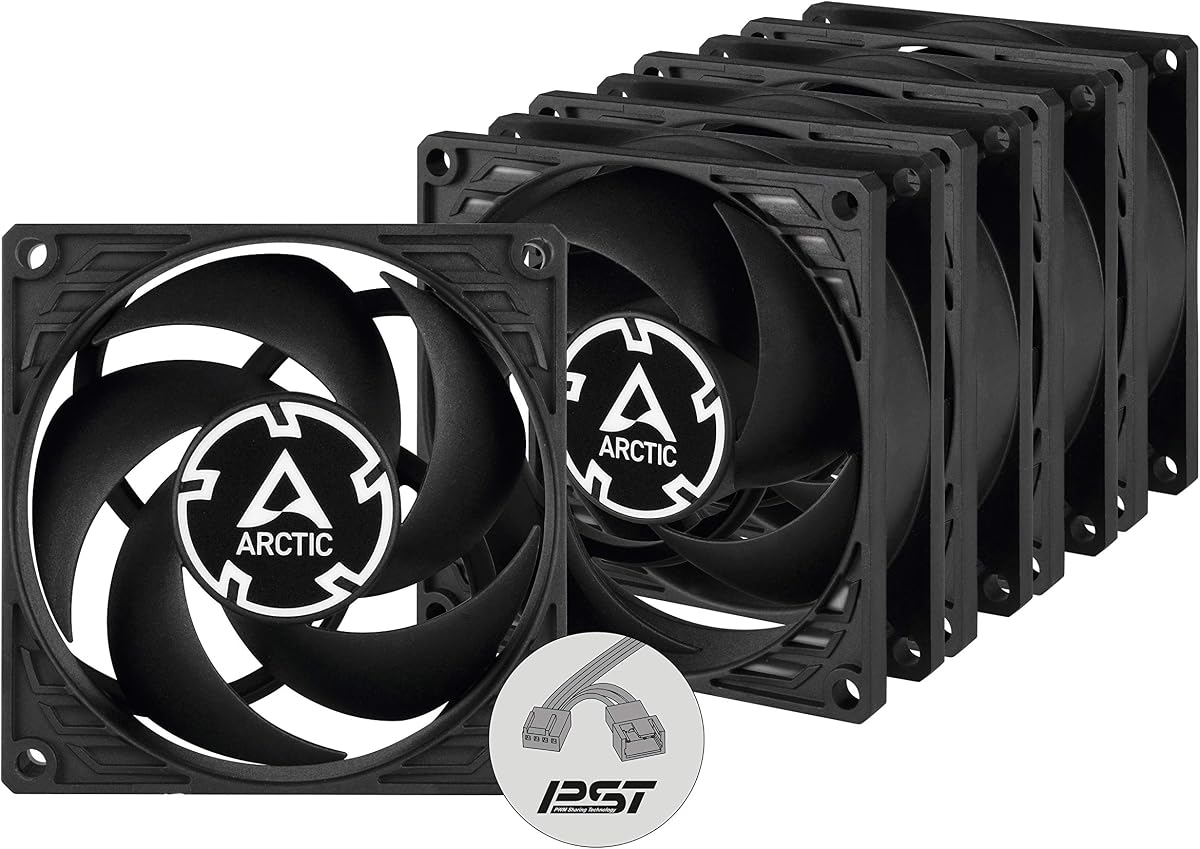
This five-pack option from ARCTIC offers incredible value for users needing multiple fans for a complete system overhaul. The P8 model is specifically designed with static pressure in mind, making it highly effective when pushing air through restricted areas like heatsinks or dust filters.
We may earn a commission when you buy through this link, at no additional cost to you.
The fan features a Fluid Dynamic Bearing that promises a long service life while maintaining quiet operation. Its blades have been redesigned to optimize performance, ensuring that air moves efficiently even against resistance without causing excessive vibration or noise.
Although it uses a 3-pin connector which lacks advanced PWM speed control compared to 4-pin models, the motor quality ensures stable operation. The main consideration is the maximum speed of 3000 RPM, which can generate higher noise levels if run at full throttle constantly.
For builders on a budget or those needing to populate a larger case with multiple exhaust points, this bundle is a pragmatic choice. It balances cost and performance effectively, providing solid cooling power without the premium price tag of boutique brands.
This bearing technology uses an oil capsule to avoid lubricant leakage, offering the quietness of sleeve bearings with a significantly extended service life.
The blade geometry and motor tuning are optimized to push air through dense radiator fins or case filters without losing significant airflow volume.
We may earn a commission when you buy through this link, at no additional cost to you.
The ARCTIC P8 PWM PST enhances the standard P8 with PWM Sharing Technology, allowing all connected fans to be controlled synchronously from a single header. This is a significant advantage for users who want to manage multiple fans without using up valuable motherboard headers or controllers.
We may earn a commission when you buy through this link, at no additional cost to you.
Powered by a next-generation Neodym-Iron-Boron magnet ring, the motor is highly efficient and runs with minimal vibration. The wide speed range allows for very low operation at idle, ensuring silence when full cooling power is not needed, while ramping up effectively under load.
One trade-off is the cabling complexity required to daisy chain the fans together for PST functionality, which might clutter tight builds if not managed well. Additionally, the price is higher than the standard P8 pack, reflecting the added technological convenience and performance benefits.
This fan is ideal for enthusiasts building small form factor PCs who need precise control over cooling zones without compromising on noise. The ability to synchronize speeds simplifies thermal management and ensures consistent airflow across all intake and exhaust points in the case.
This feature allows you to control multiple fans from a single PWM header, reducing cable clutter and ensuring synchronized fan speed adjustments automatically.
The motor utilizes advanced magnetic technology to reduce friction and energy consumption, resulting in cooler operation and longer motor lifespan.
We may earn a commission when you buy through this link, at no additional cost to you.
The NF-R8 redux is a streamlined version of Noctua's legendary R8 series, offering high-end quality at a more attractive price point. It retains the essential performance characteristics of the top-tier models while making concessions on packaging and included accessories to lower the cost for budget-conscious buyers.
We may earn a commission when you buy through this link, at no additional cost to you.
With a maximum speed of 1800 RPM and a noise level capped at 17.1 dB, it provides a very balanced approach to cooling. It is widely recommended by hardware magazines and has accumulated thousands of satisfied users due to its reliable performance over many years of production.
While it lacks some accessories included in the A-series packages, it supports a wide range of optional Noctua accessories like S-ATA adaptors and extension cables if needed. This modularity allows users to customize the solution based on their specific needs without overpaying for features they might not use.
For those who want the reliability of Noctua but do not need the absolute latest design tweaks or premium packaging, this is a smart choice. It is particularly effective for general chassis ventilation or replacing old fans in servers and NAS devices where consistency matters most.
The redux series focuses on delivering core performance and quality without the extra cost of premium packaging or extensive accessory bundles.
The fan is optimized to maintain strong airflow even in situations with high air resistance, making it suitable for dense filters or heatsinks.
We may earn a commission when you buy through this link, at no additional cost to you.
The Kingwin 80mm Silent Fan is designed primarily for users who need a quiet replacement without spending much money. It targets office desktops and home servers where low noise is a priority, using a design that minimizes vibration and noise during standard operation.
We may earn a commission when you buy through this link, at no additional cost to you.
It features an optimized blade design intended to deliver maximum airflow while keeping noise levels low. The bearing is marketed as a long life type, ensuring that the fan remains operational for extended periods without requiring replacement or maintenance.
However, the product lacks detailed technical specifications like exact RPM or noise ratings compared to premium brands, which makes precise comparisons difficult. It also does not support PWM speed control, meaning it typically runs at a fixed speed which might be loud if not adequately insulated in the case.
If you need a simple, affordable replacement for an old noisy fan in a non-critical application, this model serves its purpose well. It is particularly popular for mining rigs or secondary systems where absolute peak performance is less important than basic functional reliability.
The blades are shaped to move air efficiently while reducing the frequency of air turbulence that often causes noise and vibration in standard fans.
This fan is built to standard 80mm mounting specifications, ensuring it fits most cases and CPU coolers that use this common size.
We may earn a commission when you buy through this link, at no additional cost to you.
The ARCTIC P8 Silent is optimized for users who prioritize silence above maximum airflow performance. With a noise level of 0.08 Sone, it operates at a level that is barely noticeable even in quiet environments, making it perfect for home theater PCs or office machines.
We may earn a commission when you buy through this link, at no additional cost to you.
Its motor is developed in Germany to reduce friction and noise at low fan speeds. This attention to acoustic detail ensures that the fan is virtually silent during idle times while still providing enough pressure to push air through radiators or dense heatsinks effectively.
The trade-off is a lower maximum speed of 1600 RPM compared to the standard P8, which reduces maximum airflow. While this is acceptable for most low-power builds, it may struggle to provide enough cooling for high heat output systems that demand aggressive cooling speeds.
If you are looking for a cost-effective fan that prioritizes quiet operation and reliability without sacrificing too much cooling power, this is an excellent choice. It strikes a great balance between price and acoustic performance, often outperforming more expensive budget fans in noise tests.
The motor uses specialized bearings and balancing to reduce noise sources significantly, resulting in smooth and quiet operation even at high speeds.
Developed with German engineering standards, the fan emphasizes precision manufacturing to ensure consistent quality and acoustic performance across all units.
We may earn a commission when you buy through this link, at no additional cost to you.
The Noctua NF-A8 PWM chromax.Black.swap brings the legendary performance of the A-series fan in an all-black aesthetic design. It is ideal for builders who need high performance but want to avoid the classic brown Noctua look for a more monochrome build theme.
We may earn a commission when you buy through this link, at no additional cost to you.
It retains the same flow acceleration channels and acoustic optimization as the original A-series, ensuring superior cooling performance and quiet operation. A unique feature is the inclusion of swappable colored vibration pads that allow you to match the fan to your specific color scheme exactly.
While the performance is top-tier, the price is higher than standard versions due to the aesthetic customization features. Also, while the frame is black, the fan blades inside remain brown, which might be visible in some cases depending on lighting conditions.
If you are building a high-end system where every component matters visually as well as functionally, this fan is the perfect fit. It offers the best of both worlds with premium cooling technology and design flexibility that few other manufacturers can match in the 80mm space.
The frame and accessories are all black to match dark case interiors, providing a clean and cohesive look that complements modern PC builds.
The package includes multiple colored anti-vibration pads so you can customize the fan frame color to match your build theme perfectly.
We may earn a commission when you buy through this link, at no additional cost to you.
This five-pack version of the ARCTIC P8 Silent offers a cost-effective way to outfit multiple chassis with fans. It is specifically targeted at those needing a batch replacement or bulk install for a server or home lab environment where noise is a major concern.
We may earn a commission when you buy through this link, at no additional cost to you.
The fans share the same silent motor and optimized frame design as the single unit, ensuring consistent low noise across all units. The static pressure optimization means they are still effective at pushing air through radiators or filters despite their focus on acoustics.
The main limitation is the standard 3-pin connector and the 1600 RPM speed ceiling, which restricts advanced speed control. However, for passive or static setups where the fan runs at a fixed low speed, this is rarely an issue and ensures simplicity in cabling.
For those needing multiple quiet fans without paying for advanced PWM features on every single one, this bundle is a practical solution. It provides reliable cooling performance at a low noise floor, making it a solid choice for budget builds focused on silence.
Buying in a pack reduces the cost per fan significantly, making it affordable to ventilate multiple compartments in a large or server chassis.
The motor engineering prioritizes smooth spinning at low speeds to eliminate the hum and buzz common in cheaper generic fan units.
We may earn a commission when you buy through this link, at no additional cost to you.
The ARCTIC P8 Max is designed to deliver maximum cooling power, reaching speeds up to 5000 RPM in specific conditions. It is targeted at server racks and high-density compute environments where heat dissipation is critical and noise is less of a priority than cooling efficiency.
We may earn a commission when you buy through this link, at no additional cost to you.
It uses a Fluid Dynamic Bearing to ensure long service life even under the stress of high speeds. The PWM control allows the speed to be adjusted from 500 to 5000 RPM, providing flexibility depending on the thermal demands of the system at any given time.
While the performance is outstanding for heat dissipation, this fan can be quite loud at maximum settings. It is not recommended for silent home PCs but shines in cases where thermal stability is required regardless of acoustic output levels.
If you are dealing with high heat density in a small 80mm space, such as a 2U server rack, this fan offers the best performance available. It ensures that components stay cool even under heavy load without needing bulky cooling solutions that might not fit.
This fan is built to push air at very high speeds, making it capable of moving more air per minute than any other standard 80mm fan.
It is specifically optimized for 2U server racks where space is tight and component density is high, requiring aggressive cooling to prevent overheating.
We may earn a commission when you buy through this link, at no additional cost to you.
The Thermalright TL-8015 is unique for its ultra-thin 15mm profile, making it ideal for slim CPU coolers or tight cases where depth is restricted. It provides a solid balance of performance and noise, utilizing advanced bearing technology to maintain durability.
We may earn a commission when you buy through this link, at no additional cost to you.
With a maximum speed of 2200 RPM and PWM support, it allows for automatic speed regulation based on system temperature. The S-FDB V2 bearings are designed to reduce noise and prevent blade shaking, ensuring consistent operation and longevity over time.
While it is thinner than the standard 25mm depth, it still delivers excellent airflow of 28.4 CFM. The noise level is slightly higher than top-tier options but remains acceptable for most users looking for a reliable budget-friendly cooling solution for small spaces.
If you need a fan that fits into tight clearance spaces without compromising too much on airflow, this is a strong contender. It offers great value for those who require a thinner profile for specific hardware compatibility or compact case designs.
At only 15mm thick, this fan fits into slots where standard fans would not, allowing for flexible mounting in constrained chassis.
These specialized bearings are engineered to minimize friction and vibration, extending the lifespan of the fan while keeping noise low.
We may earn a commission when you buy through this link, at no additional cost to you.
Selecting the right 80mm case fan requires balancing noise, airflow, and physical dimensions to suit your build needs.
Airflow measures how much air moves through an open space, while static pressure measures the ability to push air through resistance. For cases with open grilles, airflow is key; for radiators or dense filters, static pressure is more important.
Look for specs like CFM for airflow and mmH2O for static pressure to match your specific installation requirements.
Fans come in 3-pin and 4-pin variants. 3-pin fans run at fixed speeds unless the motherboard supports DC control, whereas 4-pin PWM fans allow for precise speed control based on temperature sensors.
Ensure your motherboard supports the connector type you choose to enable automatic speed control for optimal noise and thermal management.
Bearing type significantly affects lifespan and noise. Fluid Dynamic Bearings and Sleeve Bearings are common, with Fluid Dynamic generally offering longer life and quieter operation over time compared to standard sleeve types.
Higher quality bearings reduce friction, which means less heat generation and longer operational life for the fan unit.
Noise is measured in decibels (dB) or sones. Lower numbers mean quieter operation, but be aware that noise increases with fan speed. Some fans are designed specifically to run quieter at lower speeds.
Prioritize models that specify low dB ratings if your PC is in a quiet environment like a bedroom or office.
Standard 80mm fans are usually 25mm thick, but some are thinner at 15mm. Check your case or cooler clearance to ensure the fan will fit physically without obstruction.
Measure the available space carefully before purchasing to avoid incompatibility issues with tight mounts.
Many premium fans include anti-vibration mounts and screws to reduce rattling. These accessories can significantly lower noise by preventing the fan from transmitting vibrations to the chassis.
Check what is included in the box to see if you need to buy additional mounting hardware separately.
Install the fan securely using the provided screws or mounts to prevent rattling. Ensure the direction of airflow matches your case's intake or exhaust plan.
Keep the fan blades clean by dusting them regularly with compressed air. Accumulated dust can increase noise and reduce airflow efficiency over time.
If you hear unusual noises, check the fan connections. Replacing a worn out bearing fan is a simple task that restores quiet and efficient cooling.
A 4-pin fan uses Pulse Width Modulation (PWM) to control speed directly through a digital signal, while a 3-pin fan relies on voltage changes. This means 4-pin fans offer more precise control over speed and noise levels based on temperature.
Not necessarily. High-quality fans like Noctua or ARCTIC are designed to be very quiet even at full speed. Noise depends largely on bearing quality and the RPM at which the fan operates.
Most fans have an arrow on the frame indicating airflow direction. Usually, the side with the motor hub pushes air out, while the opposite side pulls it in.
Yes, you can use a Y-splitter cable or a controller to connect multiple fans to a single motherboard header. However, ensure the total current draw does not exceed the header's limit.
Anti-vibration mounts are highly recommended for noisy cases. They absorb vibrations that cause rattling and make the fan quieter and more comfortable to use.
Most quality fans last several years. High-end models often list an MTTF of 150,000 hours or more. However, dust buildup and heat can reduce lifespan over time.
We have explored ten top-rated options ranging from budget bundles to premium models like the Noctua NF-A8. Each has unique strengths depending on your specific cooling and noise needs.
Prioritize your needs: choose the Noctua A8 for silence, the ARCTIC P8 for value, or the P8 Max for raw performance. Always match the fan to your specific airflow or static pressure requirements.
Remember that prices and availability change frequently. Check current listings and verify compatibility before finalizing your purchase to ensure you get the best product for your build.