
Cooling Fan for Nintendo Switch 1/2
4.6Editor score
Adjustable fan speed control
LED temperature display included
Micro USB powered design
This guide compares ten external cooling fans for Nintendo Switch docks to prevent overheating during long gaming sessions and extend system lifespan effectivel
External cooling fans for Nintendo Switch docks are essential accessories that help maintain optimal operating temperatures during extended play sessions. Overheating can lead to performance throttling or system malfunctions which disrupt gameplay enjoyment significantly. A dedicated cooler ensures your console runs smoothly while protecting the hardware from unnecessary stress over time.
We evaluated ten top-rated cooling solutions based on fan performance design compatibility noise levels and ease of installation. Each product was assessed for how well it integrates with existing dock setups without obstructing ventilation or requiring complex setup procedures. This thorough comparison helps you find the right accessory for your specific gaming needs and preferences.
Each pick below highlights key features performance ratings and practical considerations to guide your decision-making process. While prices fluctuate frequently in online marketplaces you will find accurate product information directly from current listings. Always verify compatibility with your specific Switch model before purchasing to ensure seamless integration and optimal cooling results.
4.6Editor score
4.4Editor score

4.4Editor score
This side-by-side comparison outlines the primary specifications and key benefits of each cooling solution to help you quickly identify the best match for your setup.


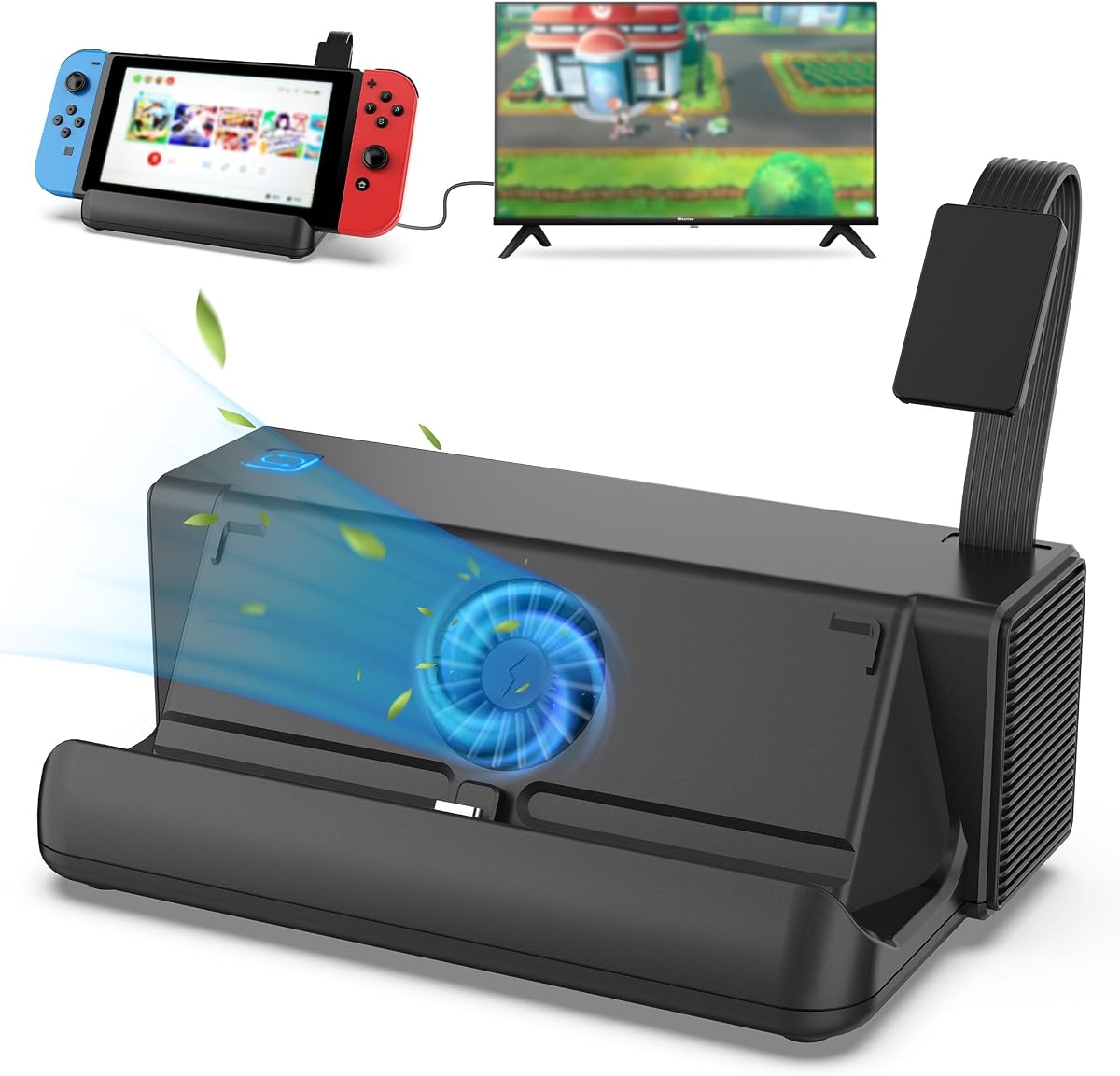
This cooling fan stands out as an affordable solution for preventing overheating during long gaming sessions on the original Switch model. Its digital display shows both fan speed and exhaust temperature allowing you to monitor system health in real time. The package includes a fixed pad and joystick caps adding value beyond just cooling functionality.
We may earn a commission when you buy through this link, at no additional cost to you.
The adjustable fan speed ranges from 510 RPM up to 6000 RPM providing flexibility for different thermal needs. When set below 2400 RPM the unit operates nearly silently making it ideal for quiet gameplay environments. Installation is straightforward using the included Micro USB cable which plugs directly into the console stand.
While the Micro USB port is less common than USB-C today it ensures compatibility with existing adapters. The noise level increases at maximum speed but remains acceptable given the cooling performance achieved. The anti-slip sponge pads protect your console from scratches while securing the fan in place.
Gamers looking for a cost-effective way to extend their Switch lifespan will appreciate this unit practical design. The lifetime warranty shows manufacturer confidence in product durability. For budget-conscious users wanting reliable temperature control this fan delivers strong value without breaking the bank.
The LED display provides instant feedback on exhaust temperature so you know exactly when cooling is most needed.
Below 2400 RPM the fan operates almost silently allowing immersive gameplay without distracting background noise.
We may earn a commission when you buy through this link, at no additional cost to you.
This cooler uses three high-speed fans to deliver strong ventilation performance designed specifically for the original Switch dock. The triple fan setup accelerates heat removal effectively preventing overheating during extended gaming marathons. Installation requires no additional tools as you simply insert it behind the dock and connect to the USB port.
We may earn a commission when you buy through this link, at no additional cost to you.
The adjustable fan speed offers Turbo and Normal options along with an off switch to match your needs. Turbo mode provides maximum cooling when playing demanding titles while Normal mode maintains a quieter profile. The compact design ensures it fits neatly into entertainment cabinets without taking up excessive space.
While the rating is lower than other options the core functionality remains solid for basic cooling needs. The lack of advanced features like temperature displays does not diminish its effectiveness at heat removal. Users seeking a simple plug-and-play solution will find this model straightforward to integrate.
This fan is best suited for those prioritizing raw cooling power over advanced monitoring features. The three fans work together to keep the console within safe operating ranges consistently. For original Switch owners needing reliable heat management this unit provides dependable performance at a moderate price point.
Three internal fans work in unison to maximize airflow and reduce console temperature faster than single fan units.
No tools are needed for installation allowing you to attach and connect the cooler within minutes.
We may earn a commission when you buy through this link, at no additional cost to you.
This cooling stand is specifically designed for the upcoming Switch 2 dock offering dual fans that activate automatically when connected. The 3-stage cooling adjustment lets you match airflow intensity to your gaming session needs. Built-in card slots allow you to keep favorite games accessible without cluttering your desk surface.
We may earn a commission when you buy through this link, at no additional cost to you.
The three USB expansion ports provide convenient connectivity for controllers smartphones and headsets without extra hubs. RGB light modes add a visual flair that can be synchronized with game scenes for an immersive setup. Pressing the button switches between cooling levels ensuring efficient heat dissipation during intense gameplay.
While designed for future hardware the cooling performance shows forward thinking in thermal management design. The auto function removes the need for manual intervention allowing true hands-free cooling operation. Users who value aesthetics alongside functionality will appreciate the customizable lighting options.
This stand is ideal for enthusiasts preparing for the next console generation. The combination of cooling storage and connectivity makes it a comprehensive solution for a gaming station. For those wanting to future-proof their setup this dual-fan dock offers significant advantages over basic coolers.
The fan operates automatically when the console is docked eliminating the need for manual power switching.
USB-A and USB-C output ports let you connect multiple accessories without sacrificing power or data ports.
We may earn a commission when you buy through this link, at no additional cost to you.
This base stand incorporates three cooling fans to effectively dissipate heat and keep your console cool during gaming. The simple side switch lets you toggle between Turbo Normal or off modes to control airflow and noise levels. Construction from superior materials ensures the unit remains sturdy during regular use and handling.
We may earn a commission when you buy through this link, at no additional cost to you.
The small and compact design makes it easy to set up and use without occupying too much space. It works well for users who need reliable cooling without extra bells or whistles. The USB power connection ensures compatibility with most dock configurations and power adapters available.
While it lacks advanced features like digital displays the core cooling function is dependable and efficient. The turbo mode provides extra power when playing graphically demanding games for hours. Users looking for a no-fuss solution will find this model meets their basic thermal needs.
This fan is best for gamers who want straightforward cooling performance at a reasonable cost. The three fans provide adequate ventilation to prevent overheating without complex setup. For anyone needing a reliable backup cooler this unit offers consistent performance and durability over time.
Constructed from superior materials this stand withstands daily use without warping or cracking over time.
The side switch allows quick mode changes without needing to reach behind the unit during gaming.
We may earn a commission when you buy through this link, at no additional cost to you.
This all-in-one docking station replaces the standard dock with added cooling and game storage capabilities. The built-in cooling fan maintains optimal performance during extended sessions while preventing overheating risks. A unique feature allows you to switch between four active game cards with a single button press without swapping them manually.
We may earn a commission when you buy through this link, at no additional cost to you.
Eight total storage slots keep your library organized and accessible at any time. Independent power switches for the fan and card reader let you turn off unused features to save energy and reduce noise. The dual mode support works for both desktop and TV setups delivering 1080P HDMI output.
The convenience of integrated card switching eliminates physical wear on your console ports over time. USB ports support wired controllers and accessories ensuring full functionality for home entertainment setups. The compact portable design makes it easy to transport between locations without extra accessories.
This dock is perfect for users who want maximum functionality in a single unit. The cooling system works silently to maintain system health during marathon gaming sessions. For those tired of managing multiple accessories this dock consolidates cooling and storage into one streamlined device.
Switch between active game cards instantly with a single press protecting console ports from wear and tear.
Separate switches allow you to disable unused features like the fan to save energy during rest periods.
We may earn a commission when you buy through this link, at no additional cost to you.
This replacement cooler is designed specifically for the 2021 OLED dock ensuring a perfect fit and optimal cooling. High-efficiency fans blow air directly onto the base surface to dissipate heat faster and avoid overheating. The shell is made from durable ABS material that remains lightweight yet sturdy for long-term use.
We may earn a commission when you buy through this link, at no additional cost to you.
Fourteen game card slots on top provide extensive storage for your library making it easy to grab cards. The design follows the official base cover shape allowing seamless integration without tools. A control button lets you turn the fan on or off as needed for temperature management.
The integrated blue light effect matches the opening timing to add a tech-inspired look to your setup. Even during charging while playing the system stays cool after hours of use improving delay performance. The Type-C cable ensures you have the correct connector for modern power sources.
This fan is ideal for OLED owners who want a replacement that matches the original form factor. The cooling performance addresses common thermal issues seen in original docks effectively. For those prioritizing aesthetics and functionality this unit offers a premium upgrade experience.
Fans blow directly onto the console base surface to remove heat more effectively than ambient cooling.
Fourteen slots provide generous capacity for your physical game collection keeping the desk organized.
We may earn a commission when you buy through this link, at no additional cost to you.
This fan is designed specifically for the Switch OLED model offering a simple way to enhance cooling. The high-speed fan increases air circulation inside the base to achieve effective heat dissipation. A switch on the side turns the fan and lighting effects on or off simultaneously for convenience.
We may earn a commission when you buy through this link, at no additional cost to you.
The adapter TYPE-C power supply connects easily to the dock providing stable power without extra cables. Installation requires placing the unit on the base in the correct orientation which takes moments. The blue LED inside creates a lighting effect that matches the fan operation status.
Users appreciate the quiet performance that doesn't distract during immersive gameplay sessions. The design focuses on delivering efficient airflow without complex controls or unnecessary features. It is a straightforward upgrade for those noticing heat issues with their standard dock.
This fan works well for OLED users wanting a minimalistic cooling addition. The power supply is integrated into the setup ensuring no loose connections or adapters. For those valuing quiet operation this fan balances cooling effectiveness with low noise output effectively.
The blue LED turns on and off exactly with the fan providing a unified visual and functional experience.
A dedicated TYPE-C cable connects directly to the dock for reliable power without adapters.
We may earn a commission when you buy through this link, at no additional cost to you.
This cooling fan features a smart auto on-off function that starts when your Switch 2 is in use. It includes three customizable wind speeds ranging from 4000 to 6000 RPM to match different gaming scenarios. The vertical air duct aligns perfectly with the console inlet delivering efficient heat removal.
We may earn a commission when you buy through this link, at no additional cost to you.
A premium 45mm turbine fan generates ample airflow while the optimized blade structure reduces operating noise. The sleek minimalist design avoids redundant parts keeping the setup clean and functional. Secure mounting is achieved with a wide base and residue-free nano tape for stable placement.
Auto operation means you do not need to manually start or stop the cooling process. This hands-free convenience ensures your system stays cool without intervention during long sessions. The vertical duct design directs air exactly where it is needed for maximum efficiency.
This fan is perfect for future Switch 2 owners wanting smart thermal management. The three speeds let you balance noise and cooling power as needed. For those valuing convenience and modern design this unit offers an innovative approach to console cooling.
The fan starts and stops automatically with the console so you never forget to turn it on.
Alignment with the console inlet ensures direct cooling without wasted airflow or noise.
We may earn a commission when you buy through this link, at no additional cost to you.
This cooling stand offers a fanless silent design that boosts airflow around the Switch 2 Dock without noise. The elevated hollowed-out structure allows air to circulate effectively reducing overheating risks significantly. Made from sturdy black acrylic it provides a clean and sleek appearance for any setup.
We may earn a commission when you buy through this link, at no additional cost to you.
Non-slip silicone pads lock the dock in place preventing scratches and movement during use. Installation is effortless since you simply place the dock on the stand with no tools needed. The passive cooling approach means no electricity is required for operation or maintenance.
Silent operation is ideal for quiet gaming environments where mechanical noise would be distracting. The stand elevates the dock to ensure vents remain unobstructed for natural heat dissipation. Users who dislike fan noise will appreciate this quiet alternative to active cooling fans.
This stand is best for those wanting a silent upgrade for their Switch 2 dock. The high build quality ensures long-term stability and protection for your console. For anyone seeking passive thermal enhancement this acrylic stand offers a simple and effective solution.
Without fans the stand operates completely silently making it perfect for quiet rooms.
The hollowed-out design allows air to flow freely around vents to reduce heat buildup.
We may earn a commission when you buy through this link, at no additional cost to you.
This cooling fan fits the original dock station and provides effective temperature reduction to prevent lag. An LED display shows real-time fan speed and exhaust temperature for clear monitoring during use. Three physical buttons support power on/off and speed adjustment for easy daily operation and control.
We may earn a commission when you buy through this link, at no additional cost to you.
Speed adjustment ranges from 510 to 6000 RPM to meet different heat dissipation needs. Below 2400 RPM the fan runs nearly silent balancing cooling performance with low noise. The package includes a fixed stabilizer pad to prevent the console from being scratched.
The vertical stand design ensures proper alignment for cooling efficiency without blocking vents. Lifetime warranty and customer service coverage provide peace of mind for your purchase. Compatibility with OLED models expands its utility beyond basic standard Switch configurations.
This fan is ideal for users wanting monitoring features at a competitive price. The silent low-speed mode makes it suitable for long gaming sessions without distraction. For anyone needing reliable cooling with display feedback this unit offers strong value and functionality.
The LED display keeps you informed of current RPM and temperature to adjust settings on the fly.
Running below 2400 RPM keeps noise low while still providing effective cooling for standard use.
We may earn a commission when you buy through this link, at no additional cost to you.
Choosing the right cooling accessory requires understanding how fan performance design and compatibility affect your specific console setup and gaming habits.
Ensure the cooler is designed for your specific Switch model whether standard OLED or the newer Switch 2 dock. Ill-fitting units can block ventilation or fail to align with the dock openings reducing cooling effectiveness. Check manufacturer specifications to confirm the device matches your hardware version perfectly.
Always verify compatibility with your specific Switch model before purchasing to ensure seamless integration and optimal cooling results.
Look for adjustable speed options to balance cooling power with noise levels based on your environment. Lower speeds work well for quiet rooms while high speeds maximize heat removal during intense gaming sessions. Consider products that offer silent modes below 2400 RPM for undisturbed play.
Lower speeds work well for quiet rooms while high speeds maximize heat removal during intense gaming sessions.
Most external fans use USB or Micro USB connections which plug into the dock for power. Ensure your dock has available USB ports or consider models with USB-C compatibility for modern adapters. Avoid units that require external wall adapters to simplify setup.
Ensure your dock has available USB ports or consider models with USB-C compatibility for modern adapters.
Some units include LED displays showing real-time temperature and fan speed for better system monitoring. These features help you react to thermal spikes quickly preventing unexpected shutdowns during gameplay. While not essential digital readouts add significant value for proactive maintenance.
These features help you react to thermal spikes quickly preventing unexpected shutdowns during gameplay.
Opt for coolers made from sturdy ABS or acrylic materials that withstand daily use and heat exposure. Lightweight shells reduce strain on the dock while durable construction prevents cracking over time. Look for non-slip pads to secure the fan and protect your console from scratches.
Look for non-slip pads to secure the fan and protect your console from scratches.
Consider models with card slots storage compartments or RGB lighting if you want extra functionality. Some docking stations combine cooling with card switching tech offering an all-in-one solution. Decide if these extras justify the cost based on your personal preference.
Decide if these extras justify the cost based on your personal preference.
Check for lifetime warranties or 24-hour support guarantees that indicate manufacturer confidence. Reliable customer service helps resolve issues quickly if the unit malfunctions after purchase. A solid warranty can save money in the long run for hardware accessories.
Reliable customer service helps resolve issues quickly if the unit malfunctions after purchase.
Choose coolers that require no tools and offer simple plug-and-play setup. Units with adhesive-free or tape options allow for easy removal and repositioning as needed. Avoid models with complex brackets that make cleaning or maintenance difficult over time.
Units with adhesive-free or tape options allow for easy removal and repositioning as needed.
Begin by ensuring your console dock is unplugged before connecting the cooling unit. Insert the fan adapter into the appropriate port on the dock and secure it firmly with any included brackets. Once powered on check that the fans spin freely without obstruction.
Monitor the LED display if available to track temperature and RPM during gameplay sessions. Adjust the speed using the control buttons to match cooling needs without excessive noise. Leave enough space around the dock to allow for proper air circulation.
Regularly clean the fan blades and intake vents with a soft brush or compressed air to remove dust. Accumulated dust can reduce airflow and increase noise over time leading to less efficient cooling. Store the unit in a dry place when not in use to prevent material damage.
An external fan is recommended if you frequently play demanding games for long periods. Overheating can cause performance throttling which slows down games. A fan helps maintain optimal temperatures for smooth performance and extends hardware lifespan.
Using external accessories generally does not void Nintendo's hardware warranty unless they cause physical damage. Ensure the fan fits properly and does not obstruct official ports. If damage occurs due to the accessory you may be liable for repairs.
Noise levels vary by model and speed setting. Units operating below 2400 RPM are nearly silent while max speeds may produce a noticeable hum. Look for models with adjustable speeds to balance cooling power and quiet operation.
Yes but you must choose a model specifically designed for the OLED dock or one with adjustable compatibility. Standard fans may not fit perfectly due to design differences. Check product descriptions to confirm OLED support before purchasing.
Unplug the unit and use a soft brush or compressed air to remove dust from blades and vents. Wipe the shell with a dry cloth to avoid water damage. Clean monthly to maintain performance and reduce noise.
Most fans work simultaneously while the console charges using separate power inputs. Ensure the dock has a USB port available for the fan. Avoid blocking the charging cable to maintain proper power delivery to the console.
A low speed setting around 510 to 2400 RPM provides effective cooling without loud noise. This range is ideal for bedrooms or quiet living rooms. Higher speeds are reserved for intensive gaming when silence is less of a concern.
We have reviewed ten top cooling solutions ranging from budget-friendly single fans to advanced all-in-one docking stations. The ZMBESUP Dock offers the most versatility with card storage and built-in cooling. For pure cooling the Cooling Fan for Nintendo Switch 1/2 delivers strong value.
Prioritize compatibility and noise levels to match your gaming habits and environment. If you play for hours daily look for adjustable speeds and digital monitoring. For quiet rooms consider silent fanless options or low-speed modes.
Prices change frequently so verify current listings before purchasing to ensure you get the best deal. Always check return policies and warranty terms for added protection on your investment. Taking the right cooling step ensures your Switch stays cool and reliable for years.