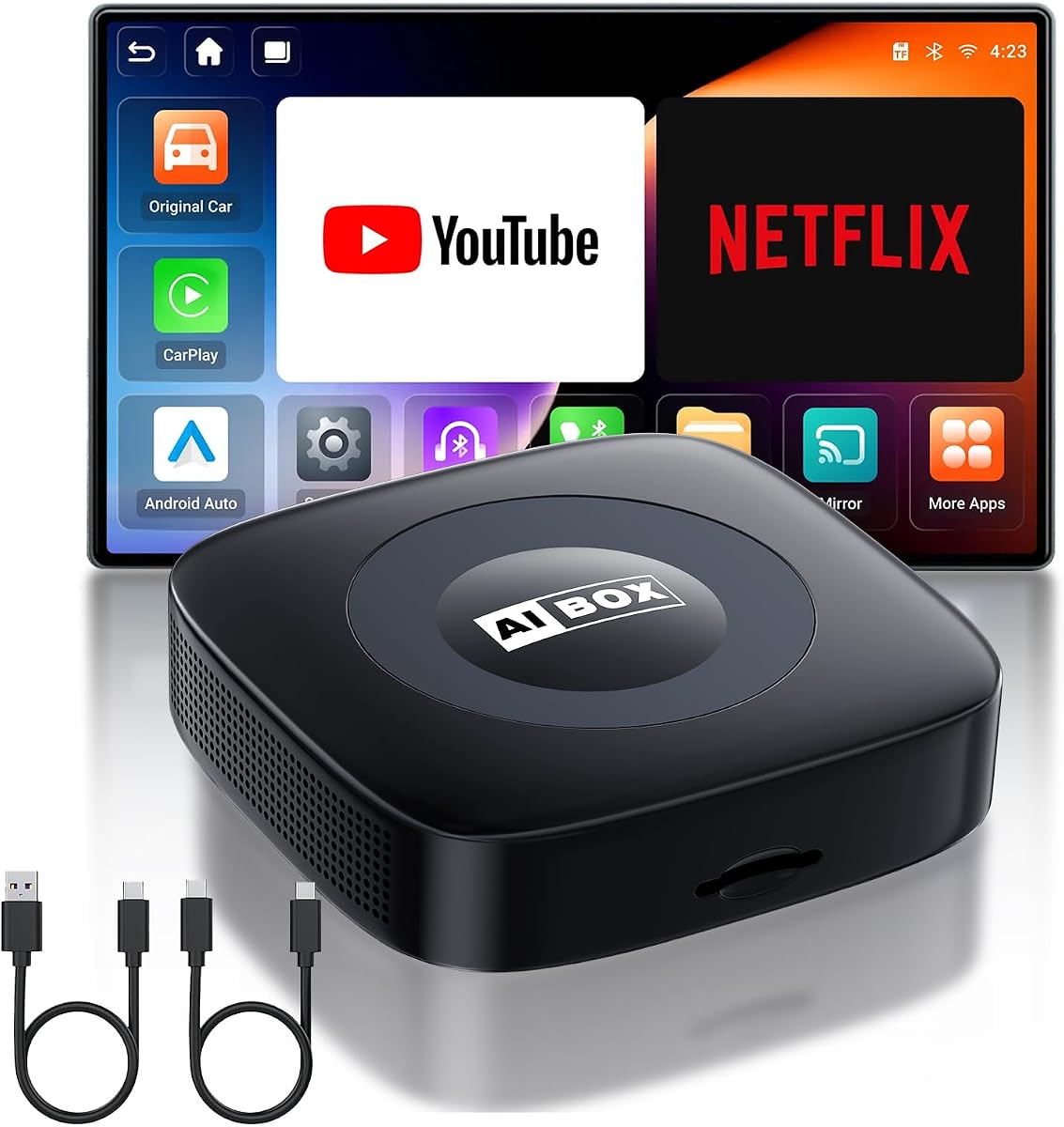
AI Box Carplay 2026 Upgraded
5.0Editor score
Affordable pricing under fifty dollars
WiFi 6 and Bluetooth 5.3
Supports 1200 plus car models
Discover the best Carplay Box with Google Play for 2026. We compare top models with Google Play, streaming apps, and wireless features to upgrade your ride.
Transform your factory wired CarPlay into a full Android smart hub with a Carplay Box with Google Play. These devices let you install favorite apps, stream video, and enjoy true wireless freedom directly on your car screen.
We evaluated ten top models based on performance, connectivity, app support, and ease of use. Our comparison focuses on devices that unlock Google Play, offer stable streaming, and integrate seamlessly with OEM wired systems.
Each pick highlights unique strengths like AI assistance, 5G Wi-Fi, or compact design. Note that prices fluctuate frequently, so check current listings before buying to ensure you get the best deal available today.
5.0Editor score

4.7Editor score

3.7Editor score
This side-by-side comparison outlines the core specs of all ten reviewed models. Use this table to quickly identify hardware, connectivity options, and system features before making your final selection.


The AI Box Wireless CarPlay Adapter transforms your wired interface into a full Android hub. With a strong 4.7 rating, it stands out for giving you real Play Store access right from the box. This means you can install the exact apps you want instead of relying on preloaded ones.
We may earn a commission when you buy through this link, at no additional cost to you.
Its standout quality is seamless connectivity. Once you pair via Bluetooth, the device reconnects automatically every time you start your engine. The full Android system ensures you can download TikTok, YouTube, or any other app. Screen mirroring lets you cast your phone contents easily when needed.
The main trade-off is that video playback works best when the car is parked. This is a legal safety feature found in many such boxes. For most users, this is acceptable since streaming is usually for passengers or waiting periods. The setup remains simple with no extra apps required.
This box is ideal for drivers who want true freedom to install any app. If your car has factory wired CarPlay and you crave Google Play access, this model delivers that experience reliably. It balances performance and ease of use better than many rivals.
In short, it is the top pick for those prioritizing app flexibility. You get a robust Android experience without complex wiring or coding. Just plug it into your USB port and enjoy the expanded interface. This makes it a strong choice for modernizing older vehicles.
Unlike preloaded boxes, this device lets you browse and install apps from the official store. You are not limited to a fixed set of streaming services.
After one-time pairing, the adapter reconnects automatically every time you start your car. This saves you time and removes the need to search for devices each trip.
We may earn a commission when you buy through this link, at no additional cost to you.
The AI Box Carplay 2026 Upgraded offers exceptional value for drivers on a budget. With a perfect 5.0 rating, it combines modern specs like WiFi 6 and Bluetooth 5.3 at a very accessible cost. This model proves you do not need to spend a fortune for reliable wireless CarPlay upgrades.
We may earn a commission when you buy through this link, at no additional cost to you.
Its quad-core H618 chip delivers smooth performance for daily tasks. The device supports both iPhone and Android users, making it a flexible choice for mixed households. The compact size means it tucks neatly into your console without cluttering space. A three-year warranty adds confidence to the purchase.
While storage is limited to 16GB, this is usually enough for essential apps and updates. The lack of a SIM slot means you rely on hotspots, which is standard for this price tier. For most users, streaming via hotspot is sufficient for parked entertainment during breaks.
This box is perfect for those seeking a straightforward, cost-effective upgrade. If your priority is basic wireless freedom plus offline playback via TF card, this unit delivers. It avoids unnecessary complexity while keeping connection speed high.
Ultimately, it is the top budget pick. You get stable streaming and auto-connect features without overspending. The latest connectivity standards ensure it remains relevant as networks evolve. For cost-conscious shoppers, this box offers the best balance of price and performance.
With WiFi 6 and Bluetooth 5.3, this box provides faster and more stable connections. These standards ensure smoother streaming even in crowded Wi-Fi environments.
Its small, portable body reduces cable clutter and optimizes interior space. This design makes it easy to store when not in use or to keep permanently installed.
We may earn a commission when you buy through this link, at no additional cost to you.
The LAMTTO Wireless CarPlay Adapter brings premium AI capabilities with its Gemini co-pilot. It offers 4GB RAM and 32GB storage for smoother multitasking than basic boxes. This model appeals to users who want advanced voice assistance and expandable display options via HDMI.
We may earn a commission when you buy through this link, at no additional cost to you.
Gemini AI adds a smart layer to your drive. You can ask for multi-stop trip planning or control smart home devices hands-free. The HDMI output lets you mirror content to rear headrest screens, making it ideal for families. Its generous RAM reduces lag during heavy use.
Despite its premium features, it has a lower user rating due to occasional connectivity issues. The higher price may deter budget shoppers. However, for those needing AI assistance and external display support, it provides unique functionality not found in other standard adapters.
This box is best for tech enthusiasts seeking a smart home hub on wheels. If you value voice-driven navigation and want to expand video to backseat passengers, this stands out. Its Play Store access ensures you can download any needed apps.
In short, it is the top premium pick. You get cutting-edge AI and superior hardware specs. While the price is higher, the added features like HDMI and Gemini justify it for specific use cases. It turns your car screen into a powerful tablet.
Gemini helps plan routes answer questions and control smart devices hands-free. It makes the box a true smart assistant rather than just a media player.
The HDMI port lets you connect external monitors or headrest displays. This allows backseat passengers to watch content while the driver keeps navigation on the main screen.
We may earn a commission when you buy through this link, at no additional cost to you.
The AI Box CarPlay 3-in-1 delivers reliable performance with a premium aluminum build. With a 4.5 rating, it is known for stable Dual-Band Wi-Fi connections that minimize lag. This makes it a strong choice for drivers who need consistent streaming for navigation or music.
We may earn a commission when you buy through this link, at no additional cost to you.
Its heat-dissipating alloy housing keeps the device cool during long drives. The box supports USB playback for offline media when signal is weak. OTA updates ensure you always have the latest app versions without manual intervention. Auto-connect keeps your daily commute hassle-free.
Like many units, it does not work with BMW or Tesla systems. It requires a factory wired CarPlay connection. For most other OEMs this is not an issue. The zero latency claim stands out for real-time music playback.
This box is best for reliability-focused buyers. If you want a durable device that handles heat and connection well, this fits. It avoids flashy extras but delivers solid streaming and navigation performance. It is a trustworthy upgrade for long road trips.
Ultimately, it ranks high for build and stability. The aluminum casing ensures longevity. While not the cheapest, it offers peace of mind for daily use. For those prioritizing consistent performance over AI features, this is a top contender.
Dual-Band Wi-Fi allows simultaneous stable operation of navigation and streaming. This prevents dropouts when you use multiple apps at once on the screen.
The aluminum alloy housing handles extreme temperatures and heat dissipation. This design ensures the box lasts longer and stays stable in hot summers or cold winters.
We may earn a commission when you buy through this link, at no additional cost to you.
This 5-in-1 adapter stands out for letting you switch easily between CarPlay and Android Auto. It has built-in Netflix and YouTube apps plus a TF slot for offline media. With a 4.4 rating, it offers great versatility for families using different phone systems.
We may earn a commission when you buy through this link, at no additional cost to you.
The dual system support means no need for two separate adapters. You can switch modes freely depending on who is driving. The 4.2GHz processor ensures smooth streaming for movies during stops. TF slot allows 256GB card support for large video libraries.
Storage is limited to 16GB internal, which is fine for essential apps. It does not support simultaneous streaming with navigation, so you must choose modes. But for most use cases the offline capability is a huge plus for long trips without signal.
This box is ideal for households with both iPhone and Android users. If you want one device that adapts to every passenger's phone, this fits well. Its plug-and-play setup makes it easy to install without tech skills.
In short, it is the top choice for flexible switching. You get dual OS support and offline playback in a simple package. The processor speed ensures lag-free operation. For cost-conscious families needing versatility, this adapter is a strong pick.
The device supports CarPlay and Android Auto, allowing you to switch between systems easily. This makes it perfect for households with mixed devices.
A built-in TF card slot lets you play videos or music without Wi-Fi. This ensures entertainment continues even in areas with weak mobile signal.
We may earn a commission when you buy through this link, at no additional cost to you.
The CarlinKit 3-in-1 AI Box offers high-end specs like an 8-core processor and Android 13 OS. With 64GB storage and a SIM slot for 4G, it enables independent internet access. This model is great for users who want full Android performance and offline connectivity.
We may earn a commission when you buy through this link, at no additional cost to you.
Its 8-core platform supports demanding apps and multitasking smoothly. The SIM card slot means you do not rely solely on phone hotspots. Bluetooth integration for music and calls enhances safety by keeping you hands-free. The large storage lets you download entire shows for trips.
Activation for SIM data adds a step to setup. The higher price reflects these advanced capabilities. But for those wanting a self-contained solution with Android updates and large storage, the value is clear. It provides a full tablet experience in the car.
This box is best for power users needing robust performance. If you want to download apps from Play and run them without hotspot dependency, this fits. It is a solid choice for tech-savvy drivers seeking maximum freedom.
In short, it is a high-performance option. You get an advanced OS and internal data capability. While not budget-friendly, it delivers a true standalone smart hub. For those prioritizing specs and independence, this box leads the pack.
Inserting a SIM card provides 4G internet without needing a phone hotspot. This ensures your streaming and apps stay online even if your phone runs out of data.
The latest OS offers better security and access to newer apps. It ensures your box remains compatible with modern app versions for years to come.
We may earn a commission when you buy through this link, at no additional cost to you.
The 2026 Upgraded Magic Box 3.0 is a compact unit with strong 5G Wi-Fi. It supports HDMI output for external video and a USB port for transfer. With a perfect 5.0 rating, it balances small size with high performance. Ideal for those needing a discreet upgrade.
We may earn a commission when you buy through this link, at no additional cost to you.
The small design makes it easy to hide in the console. It works as a CarPlay Android Auto upgrade and streaming box. HDMI lets you connect headrests. This is great for family road trips. The USB transfer helps play offline files when needed.
Lack of SIM slot means you rely on hotspots. But 5G ensures fast data speeds. The heat-dissipating housing keeps it cool in use. Its perfect rating suggests high reliability and customer satisfaction. The compact footprint is a major plus for modern interiors.
This box is best for drivers needing a clean upgrade. If you want HDMI and good streaming in a small unit, this fits well. Its design ensures it does not clutter your console. It is a top pick for space-saving needs.
In short, it combines compact size with powerful connectivity. You get 5G speed and HDMI in a small frame. The warranty adds confidence. For those prioritizing discreet installation, this box is a strong contender.
Its compact body looks neat in the car and is easy to place. The well-structured housing helps support heat dissipation during long use.
Connect to external screens for camping or road trips. The HDMI video output adds versatility beyond standard car screen entertainment.
We may earn a commission when you buy through this link, at no additional cost to you.
This LAMTTO adapter features Gemini AI for hands-free routes and reminders. It supports dual-band Wi-Fi for smooth streaming and HD media output for rear screens. With a 4.0 rating, it offers advanced voice features. Great for families needing voice control.
We may earn a commission when you buy through this link, at no additional cost to you.
Gemini AI adds value by handling tasks like podcasts or jokes hands-free. The Wi-Fi keeps Netflix and YouTube buffered-free. Auto-connect and OTA updates simplify daily use. It converts your wired interface to wireless while adding a smart assistant layer.
Note that it requires a factory wired CarPlay system. It does not work with built-in wireless models. But for compatible cars, this is a robust upgrade. The voice assistant helps keep eyes on the road while managing tasks.
This box is best for safety-focused drivers. If you want voice-driven assistance plus reliable streaming, this fits. The media output helps families. It bridges the gap between basic adapters and smart hubs.
In short, it is a smart upgrade pick. You get AI voice and stable streaming. The HDMI port adds versatility. For those seeking hands-free convenience and entertainment, this adapter is a strong choice.
Gemini answers questions and sets reminders hands-free. It keeps passengers entertained with stories and jokes while you stay focused on driving.
Dual-band Wi-Fi runs navigation and streaming simultaneously. This ensures smooth playback while you follow maps without interruption.
We may earn a commission when you buy through this link, at no additional cost to you.
This adapter offers a full Android 13 system with 8-core power and 4G SIM. It includes ScenePilot AI for driving insights and Bluetooth lock for privacy. With a perfect 5.0 rating, it stands out for smart ecosystem features. Ideal for shared vehicles.
We may earn a commission when you buy through this link, at no additional cost to you.
The SIM trial ensures connectivity even without hotspot. ScenePilot blends voice help and trip logging. Privacy lock protects accounts when leaving the car. 8-core ensures smooth app launches. It transforms your wired setup into a secure smart hub.
It requires OEM touch screens and excludes some Subarus. But for compatible cars, this offers unmatched AI depth. Privacy tools are unique. The full OS allows extensive customization. It is a top pick for tech-driven shared driving.
This box is best for security-focused users. If you want to protect personal data while adding AI help, this fits. The SIM support ensures you stay online. It adds a new layer of intelligence to your ride.
In short, it combines privacy with powerful AI. You get advanced security and ecosystem features. For those prioritizing data safety and smart tools, this is a top contender.
ScenePilot provides voice assistance and trip logging for smarter driving. It keeps you informed and entertained with integrated apps and tools.
Bluetooth lock helps protect personal accounts when you leave the vehicle. This is vital for shared vehicles or family use where privacy matters.
We may earn a commission when you buy through this link, at no additional cost to you.
The 6-in-1 Magic Video Box focuses on offline playback via TF card. It supports built-in Netflix and YouTube plus dual OS switching. With a 3.8 rating, it is reliable for basic needs. Good for areas with no signal. The TF card supports 256GB.
We may earn a commission when you buy through this link, at no additional cost to you.
It auto-connects to phone for streaming when possible. Dual system switching handles both iPhone and Android users. The processor ensures lag-free playback. However, it does not support downloading other apps beyond preloaded ones. This limits flexibility.
Offline media capability makes it ideal for rural trips. You can load files beforehand. But lack of app store access is a trade-off. Still, for simple streaming and offline needs, it works well. Auto-connect keeps it simple to use.
This box is best for offline-first users. If you mostly rely on stored content, this fits well. The price is accessible. It is a solid choice for basic media needs without complex setup.
In short, it is the top pick for offline playback. You get TF card support and built-in apps. For those needing reliable media without constant internet, this adapter is a good option.
TF card slot supports offline video and music playback. This makes long drives more enjoyable for both drivers and passengers.
Supports CarPlay and Android Auto in one device. You can switch freely between systems depending on your phone.
We may earn a commission when you buy through this link, at no additional cost to you.
Choosing the right box involves checking specs like RAM storage and connectivity. These factors determine speed and app support in your specific vehicle.
A full Android system with Google Play Store access is vital for app freedom. Look for versions like Android 13 for better app compatibility and security. This ensures you can install any streaming or utility app you need.
Prioritize boxes that run a full Android OS over fixed systems. This flexibility is key to long-term usefulness and app updates.
RAM affects multitasking speed while storage determines how many apps you can install. 4GB RAM and 32GB storage offer a good balance for smooth performance. Lower specs may cause lag when running navigation and video together.
Opt for boxes with at least 2GB RAM and 16GB storage. More memory helps avoid stalling during app switching or heavy streaming.
Look for Dual-Band Wi-Fi and Bluetooth 5.3 for stable connections. Some models offer 4G SIM slots for data independence. Wi-Fi 6 ensures faster speeds in crowded networks. A stable link is crucial for zero-latency video.
Choose devices with modern Wi-Fi and Bluetooth standards. SIM slots add value for long trips where phone hotspots are unreliable.
TF card or USB support lets you play files without internet. This is vital for rural areas with weak signals. Look for boxes with slots supporting 256GB cards or USB drives for offline media.
Ensure your box allows offline media storage. This feature ensures entertainment even when streaming is not possible due to poor network coverage.
Aluminum alloy cases dissipate heat better than plastic. This keeps performance stable during long drives. Look for compact designs that fit neatly in your console without overheating in summer heat.
Pick units with heat-dissipating housing. Overheating can cause system crashes during extended viewing sessions or hot weather.
A warranty of at least one year provides peace of mind. Reliable support teams help troubleshoot pairing issues quickly. Check for 24-hour response times and Amazon-based support for easier returns.
Ensure your box comes with a solid warranty. Good support reduces downtime and ensures you get help if setup is tricky.
Some boxes add AI assistants like Gemini for hands-free control. This can enhance safety during navigation. Check if voice features work well with your preferred tasks.
Consider AI assistants if you want hands-free help. They allow you to set reminders or get directions without touching the screen.
Verify that your car has factory wired CarPlay. Most boxes work with 2016+ OEM systems. Note that BMW Tesla and some Subarus may not be supported. Always check compatibility lists before buying.
Confirm your car supports the box before purchasing. Wired systems are required for most models. Checking compatibility prevents costly returns.
Plug the box into your car's USB port and enable CarPlay mode in vehicle settings. Pair the device via Bluetooth on your phone for the first time. After this, the adapter will auto-connect each time you start your engine.
For streaming, connect to a phone hotspot or use a SIM card if supported. You can download apps from the Google Play Store directly on the device. Keep the device cool by ensuring air flow around it during long use.
Update firmware via OTA settings to maintain performance. Regularly clear cache if you notice lag. Use TF cards or USB drives for offline content to ensure entertainment in areas with no signal.
Yes, most boxes with a full Android system and Google Play Store allow you to install any compatible app. This includes streaming services, navigation, and social apps. However, some apps may need hotspot internet to run properly.
Not always. Many models rely on phone hotspots. But some premium boxes have SIM slots for 4G data. If you want independence from your phone hotspot, choose a model with a SIM card slot.
Dual-Band Wi-Fi models allow this by separating channels. Navigation stays on one channel while video plays on another. But basic boxes may require you to switch modes. Check specs for simultaneous channel support.
Video playback is usually restricted to parked mode. This complies with local laws. Navigation and audio apps are safe to use while driving. Always follow traffic rules and avoid distraction.
Most boxes do not work with Tesla or BMW due to system restrictions. These brands often require proprietary solutions. Always check compatibility lists before purchase to avoid return issues.
Update via OTA (Over-The-Air) in settings. Just connect to Wi-Fi and check for updates. This ensures you get new features and security patches. Keep the device plugged in during updates.
Many models support TF cards for offline media playback. You can load movies or music onto the card. This is useful when you have no internet signal on long road trips.
Most boxes offer a 12- to 24-month warranty. Check product pages for exact terms. Warranty covers hardware failures. Reliable customer support ensures help if you face setup issues.
The top picks offer distinct strengths from budget performance to premium AI features. The AI Box Wireless CarPlay Adapter leads for full Android freedom. The AI Box Carplay 2026 Upgraded wins for affordability.
Prioritize your needs: choose high RAM if you multitask often. Pick SIM slots if you lack hotspot access. For families, consider models with HDMI output. Always verify vehicle compatibility first.
Remember prices fluctuate often. Check current listings before finalizing your order. These boxes turn your wired interface into a smart hub. Enjoy your upgraded ride today.