
HICTOP Ender 3 Heated Bed
4.5Editor score
Wide model compatibility
110C max temperature
Affordable aluminum construction
This guide compares the top 10 heated beds for 3D printers including official replacements and third-party upgrades for better adhesion and print quality.
Choosing the right heated bed is crucial for successful 3D printing. A quality bed ensures proper adhesion prevents warping and delivers consistent results across various materials. Whether you need a replacement or an upgrade finding the perfect match matters.
We evaluated ten top-rated heated beds based on compatibility power output build quality and user feedback. Each option offers unique benefits for different printer models and printing needs. Our analysis helps you select the most reliable solution for your workspace.
Each product entry highlights key specifications pros and cons to guide your decision. Remember that prices and availability change frequently so verify details before purchasing. With the right heated bed your prints will be smoother more reliable and more professional.
4.5Editor score

4.5Editor score

5.0Editor score
The following table provides a side-by-side comparison of all ten heated bed options. Review the specs features and ratings to find the ideal match for your printer model and printing goals.

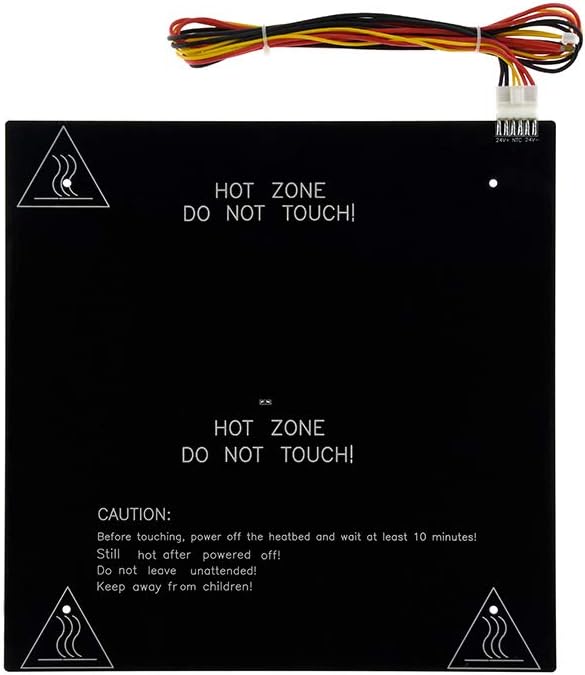


This official replacement heated bed ranks highest for reliability and performance. With a strong 4.5 rating it delivers consistent heat distribution essential for quality prints. The build quality matches original equipment standards ensuring long term durability.
We may earn a commission when you buy through this link, at no additional cost to you.
The 220W 24V power output provides fast and uniform heating. It works seamlessly with Ender 3 Pro V2 Neo and other variants. The included cable reduces installation complexity significantly making upgrades straightforward for most users.
While the cost is slightly higher than generic options the quality control justifies it. Users appreciate the precise dimensions and secure connection points. This minimizes risk of compatibility issues during replacement.
Choose this bed if you prioritize authenticity and guaranteed fit. It is ideal for owners of Ender series printers seeking factory specifications. The investment ensures your machine performs as intended without compromise.
The included cable and precise dimensions allow users to replace the old bed quickly without needing extra tools or modifications.
At 220W this bed reaches target temperatures rapidly maintaining stability throughout long print jobs to reduce layer separation issues.
We may earn a commission when you buy through this link, at no additional cost to you.
HICTOP offers a reliable budget alternative to official parts without sacrificing core performance. Its 4.5 rating reflects strong user satisfaction across various use cases. The design mirrors OEM specifications ensuring smooth integration.
We may earn a commission when you buy through this link, at no additional cost to you.
It supports multiple Ender models and even the Voxelab Aquila X2. The 220W power ensures adequate heating speed for standard filaments. Installation is straightforward with the included cabling kit reducing setup time.
The aluminum construction maintains even heat distribution which is critical for adhesion. While it reaches 110C this covers most common printing materials. Users find it a cost effective upgrade for aging machines.
This bed is perfect for cost conscious makers needing a dependable replacement. It balances price and performance well for typical desktop printing tasks. If you want value without extensive compromises this is a top pick.
The broad compatibility list means owners of different Ender variants or similar printers can use this bed with minimal adjustments.
With 220W at 24V the bed heats efficiently enough for PLA and ABS without requiring electrical upgrades to your setup.
We may earn a commission when you buy through this link, at no additional cost to you.
The FYSETC Silicone Heating Plate earns a perfect 5.0 rating for advanced users seeking maximum performance. It covers 95 percent of the bed area providing superior heat uniformity. This design reduces cold spots effectively improving print consistency.
We may earn a commission when you buy through this link, at no additional cost to you.
Rated at 750W AC 110V it heats much faster than standard DC beds. The integrated safety fuse protects against overheating adding peace of mind. A thermistor sensor ensures accurate temperature feedback to your firmware.
Installation requires checking your power system since it uses AC input. However for Voron or high speed printers this extra complexity is worth it. The mat fits precisely without holes simplifying assembly further.
Choose this if you need elite heating for high throughput builds. It is tailored for enthusiasts optimizing reliability and speed. With proper setup this plate delivers top tier results for demanding projects.
The bimetal thermal fuse disconnects power if temperatures exceed safe limits protecting your hardware from potential damage during long runs.
Covering over 95% of the bed surface ensures edges warm up quickly preventing warping that often affects large prints.
We may earn a commission when you buy through this link, at no additional cost to you.
This aluminum heatbed targets CR-10 owners with a direct replacement solution. While its 3.8 rating is lower it offers the right dimensions for that model. The kit includes power wires to simplify setup.
We may earn a commission when you buy through this link, at no additional cost to you.
The 220W 24V power supports typical printing needs adequately. Its 3mm thickness provides structural stability and even heating. Users must remove protective film before use to ensure performance.
Some reviews note quality variance typical of budget third-party parts. However for users needing a specific size this remains a viable option. It restores functionality without custom fabrication requirements.
Opt for this bed if you own a CR-10 and need a basic upgrade. It is straightforward and fits the printer's mounting points. For critical projects consider higher rated alternatives though.
Designed specifically with correct hole spacing and dimensions to fit CR-10 frames without modification.
The power wire kit saves users from needing to source or connect extra electrical components separately.
We may earn a commission when you buy through this link, at no additional cost to you.
This oversized heated bed supports prints up to 500x500mm. Its integrated heating and substrate reduce warping significantly. The aluminum alloy offers impact resistance for long term use.
We may earn a commission when you buy through this link, at no additional cost to you.
At 350W it heats efficiently for such a large area. Countersunk holes avoid nozzle collisions during print moves. However customer feedback suggests some reliability concerns on average.
The flat surface improves precision and avoids print failures from unevenness. It suits large format printing enthusiasts willing to manage higher power needs. Ensure your electrical system handles 350W safely.
Choose this if large scale prints are your priority. It provides the physical capacity and design features for ambitious projects. Verify installation requirements before committing to this high capacity option.
By integrating the heater directly with the aluminum substrate this bed reduces the risk of model warping during large prints.
Countersunk mounting holes keep the surface ultra-flat maximizing usable area and minimizing nozzle collision risks.
We may earn a commission when you buy through this link, at no additional cost to you.
This bed fits Anet A8 and A6 printers perfectly. It operates at 12V which many users find safer than higher voltages. The 120W output is sufficient for standard materials at this scale.
We may earn a commission when you buy through this link, at no additional cost to you.
Installation is straightforward with the included wire and cable line. Users report good adhesion and consistent heating results. The black finish matches common printer aesthetics for a clean look.
Lower wattage means slightly longer warmup times than 24V options. However for entry level setups this tradeoff is acceptable. It restores functionality to older machines cost effectively.
Select this if you maintain an older Anet printer. It provides a reliable upgrade that matches original specs. For 12V systems this remains a safe and effective replacement.
Operating at 12V reduces electrical risks making it a safer choice for beginner setups or less secure power supplies.
The package includes all necessary wires and cables allowing immediate installation without searching for extra parts.
We may earn a commission when you buy through this link, at no additional cost to you.
This mid-size bed bridges the gap between standard and large format. At 400x400mm it allows for bigger prints without excessive power. The 280W rating ensures decent heating speed for this area.
We may earn a commission when you buy through this link, at no additional cost to you.
Countersunk holes help maintain flatness and prevent nozzle strikes. The aluminum alloy ensures uniform heat spread and structural strength. Compatible with Ender 3 Pro and CR-10 for flexibility.
Limited reviews make performance claims less certain. Still the specs suggest solid utility for expanding workspace needs. The flat design supports improved print accuracy and reliability.
Opt for this if you need more space than standard beds offer. It is a versatile choice for growing print tasks. Ensure compatibility with your specific model before purchasing.
With 280W power this bed heats large areas quickly minimizing wait time before starting a new print.
A flat aluminum surface improves layer adhesion and reduces curling common with uneven heating elements.
We may earn a commission when you buy through this link, at no additional cost to you.
This large bed promises rapid heating reaching 100C in 90 seconds. Its 350W output handles big prints with stability. The integrated design ensures consistent power distribution across the surface.
We may earn a commission when you buy through this link, at no additional cost to you.
The aluminum alloy substrate reduces warping risk significantly. It fits larger projects well making it ideal for bulk production. Countersunk holes maintain flatness for better nozzle control.
With limited user feedback actual long term performance is uncertain. Still the specs indicate strong capability for high throughput setups. Ensure your power system can support high draw safely.
Choose this for fast large format printing workflows. It minimizes downtime with quick warmups and robust construction. Verify electrical compatibility before installation for best results.
Reaching target temperature in 90 seconds means you can start prints immediately reducing overall production time.
The integrated heating system maintains steady power output which prevents temperature drops during long print sessions.
We may earn a commission when you buy through this link, at no additional cost to you.
This silicone heating pad targets Voron and Trident users specifically. Its perforated design allows for efficient heat dissipation. With 750W to 1000W power it heats large beds quickly.
We may earn a commission when you buy through this link, at no additional cost to you.
The 300 or 350mm sizes match common build volumes. Operating at 220V it reduces preheating time significantly. It supports smooth flat prints by maintaining stable temperatures.
High voltage operation demands proper electrical setup and safety checks. Ensure your printer supports 220V AC for reliable function. It is a specialized choice for advanced builds.
Select this if you work on Voron Trident projects. The design minimizes warping and balances cooling effectively. Verify voltage compatibility and safety measures before installation.
Holes in the pad improve heat dissipation allowing for stable printing without excessive heat buildup on the surface.
Running at 220V means lower current draw for same power improving efficiency for high capacity heating systems.
We may earn a commission when you buy through this link, at no additional cost to you.
This silicone heated bed delivers a perfect 5.0 user rating. It heats quickly thanks to 200W 24V power. The pad is high temp resistant ensuring safety during operation.
We may earn a commission when you buy through this link, at no additional cost to you.
Users note fast heating and uniform heat transfer. Its dimensions suit Ender 3 and CRX models well. The silicone material allows for easy installation and better contact.
The max temperature is limited around 200 degrees Celsius which is adequate for common plastics. Some users may need minor adjustments for perfect fit. Overall performance remains highly praised.
Pick this if you need a quick affordable silicone upgrade. It works well for standard materials with good results. Ensure your printer supports 24V input before buying.
The silicone construction allows for a snug fit over different bed shapes improving thermal contact and adhesion.
Silicone spreads heat evenly across the pad reducing hot spots that can cause warping or inconsistent print quality.
We may earn a commission when you buy through this link, at no additional cost to you.
Choosing the right heated bed involves considering size voltage power and material. This guide covers the key factors to help you select a product that matches your printer and printing needs effectively.
Ensure the heated bed matches your printer model dimensions and mounting points. Products designed for specific models like Ender 3 or CR-10 reduce installation errors and connection problems.
Always check the product title and description to confirm support for your exact printer variant before purchasing.
Most heated beds operate at 12V or 24V. Using the wrong voltage can damage your power supply or bed. Verify your printer's power system matches the bed's rated voltage.
If upgrading to a higher voltage bed ensure your mainboard and power supply support the change safely.
Power measured in watts affects heating speed. Higher wattage like 220W or 350W warms beds faster reducing wait times. Ensure your power supply can handle the total load.
Match wattage to your print size; larger beds need higher power to heat evenly and quickly.
Aluminum beds are durable and conduct heat well. Silicone pads offer flexibility and even surface contact. Choose material based on your printing style and bed shape needs.
High quality aluminum ensures stability while silicone pads can improve adhesion on irregular surfaces.
Select a bed size that fits your frame and desired print volume. Standard sizes are 220x220mm or 235x235mm. Larger options enable bigger prints but need more power and space.
Confirm the bed size matches your printer's frame to avoid mounting issues or nozzle collisions.
Some beds come with cables and connectors simplifying installation. Others may require you to source wires separately. Look for kits that include all necessary hardware.
Pre-installed cables save time and reduce risk of incorrect electrical connections during setup.
High power beds like those over 300W may include fuses or sensors for protection. Check if your model has thermal fuse or overheat protection features.
Safety components prevent damage from overheating and ensure safe long term operation.
Read customer feedback to gauge real world reliability. High rated products often indicate better quality and support. Look for comments on heating speed and durability.
Products with many reviews usually have proven track records for compatibility and performance.
Install the bed carefully following wiring instructions. Ensure all connections are secure and voltage matches before powering on. Test heating function with low settings first to confirm operation.
Keep the bed surface clean from dust and residue. Use gentle cleaners to avoid scratching the surface. Replace protective films if they peel to maintain adhesion.
Monitor temperatures and avoid exceeding rated limits. Regularly check cables for wear. Maintain consistent bed leveling to prevent uneven heating and ensure better print quality.
Check your printer's power supply and mainboard specifications. Most modern printers use 24V for faster heating. Using a mismatched voltage can damage components or fail to heat properly.
Disconnect power before removing the old bed. Secure the new bed with screws matching original holes. Connect wires to correct terminals and verify polarity. Test briefly without prints first.
Uneven heating may stem from poor contact or damaged elements. Ensure the bed sits flat with no debris. Check for loose connections or worn wires causing power issues.
Only if your frame supports it and mounting points align. Larger beds may require more power than your supply can provide. Confirm clearance for the nozzle and axis movement.
Most standard beds safely operate up to 110C for common filaments. Exceeding this risks damaging the bed or insulation. Always refer to the product's max temp rating.
Yes if the new bed requires more power than your current supply. Calculate total wattage of all components. Upgrade your supply if needed to avoid voltage drops or failures.
Read the product description for listed models and dimensions. Compare your printer's bed size and mounting hole layout. Contact seller support if unsure about fit before buying.
Keep the surface clean and free of debris. Inspect wiring regularly for wear. Maintain bed leveling to avoid uneven heating. Avoid exceeding rated temperatures during operation.
We reviewed ten heated beds ranging from official replacements to high power upgrades. Each offers unique benefits depending on your printer and project needs. Prioritize compatibility and safety for best results.
Focus on voltage power and material quality when comparing options. A reliable heated bed improves adhesion reduces warping and supports diverse materials. Choose based on your specific requirements and budget.
Prices and availability change regularly so verify current details before purchasing. Always test new beds carefully before starting important projects. With the right upgrade your prints will be more consistent and professional.