
Cudy R700
4.4Editor score
OpenWRT-Ready Control
5X GbE Ports
Complete VPN Gateway
This guide compares the top ten Dual Wan Router models for 2026, evaluating security features, port configurations, and performance to help you choose the
Finding the right network hardware is critical for modern businesses and power users who demand reliability. A Dual Wan Router allows you to connect multiple internet sources, ensuring that if one connection fails, the other takes over seamlessly. This redundancy is essential for maintaining uptime during video calls, cloud syncing, and critical data transfers without interruption.
We evaluated ten top-rated models based on port variety, security protocols, VPN support, and ease of management. Our analysis focuses on devices that offer genuine failover capabilities, load balancing options, and robust firewalls to protect your data. Each product was selected for its ability to handle diverse network needs, from small offices to enterprise branches.
Each pick below highlights specific strengths like Gigabit speeds, OpenWRT compatibility, or cloud management tools. You will find detailed insights into how these devices perform under stress and what trade-offs they might present. Please note that availability and specific pricing details can change, so verify current listings before making a final purchase decision for your setup.
4.4Editor score

4.4Editor score

4.2Editor score
This table provides a side-by-side comparison of all ten selected routers, highlighting key specifications and unique capabilities to help you quickly identify the device that best fits your network requirements.



The TP-Link ER605 stands out as the top choice for reliable connectivity. It holds a strong 4.4-star rating for consistent performance in office settings.
We may earn a commission when you buy through this link, at no additional cost to you.
Its five Gigabit ports offer excellent bandwidth, while the USB port supports 4G backups. The advanced firewall and DoS defense keep your network secure without complex configuration.
This router lacks built-in wireless capabilities, requiring separate access points. The web interface is functional but less modern than high-end competitors with cloud dashboards.
It is ideal for small offices needing wired reliability. Choose this if you want secure, affordable failover without paying for extra wireless features.
With one WAN plus two WAN/LAN ports, you can balance traffic across multiple ISPs effectively.
Connecting a 4G modem to the USB port ensures you stay online during fiber outages.
We may earn a commission when you buy through this link, at no additional cost to you.
The Peplink B-One is designed for business branches needing stable high-speed internet. Its 4.4-star rating reflects solid enterprise performance and connectivity.
We may earn a commission when you buy through this link, at no additional cost to you.
It delivers 1Gbps throughput with SpeedFusion technology that keeps video calls smooth even if one line drops. Starlink connectivity simplifies satellite backup integration.
The price is significantly higher than basic models, which may not suit small setups. Advanced features like automatic updates are great for admins but overkill for simple homes.
Use this for offices where uptime is critical. It is the best choice if you need to combine Starlink or multiple ISPs for maximum resilience.
Seamlessly connect Starlinks or use them to backup cable/fiber with load balancing.
SpeedFusion ensures your network stays robust and online despite ISP fluctuations.
We may earn a commission when you buy through this link, at no additional cost to you.
The NETGEAR PR60X offers top-tier hardware with 10G and 2.5G ports for modern networks. It has a 4.2-star rating for professional-grade performance and reliability.
We may earn a commission when you buy through this link, at no additional cost to you.
It includes a 10G SFP+ port for long-distance backhaul and supports up to 32 VLANs. WireGuard and IPSec VPNs ensure secure remote access for your devices.
The cost is high, and the Insight subscription is required for remote management. This is overkill for a standard home but perfect for growing small and medium enterprises.
Select this if you need multi-gigabit speed and centralized control. It is the premier choice for businesses integrating with NETGEAR Pro WiFi systems.
Multiple multi-gigabit ports allow for maximum throughput and network scaling.
Secure remote access via IPSec or WireGuard keeps your team connected safely.
We may earn a commission when you buy through this link, at no additional cost to you.
The Cudy R700 brings enterprise-level features to a budget-friendly price point. Its 4.4-star rating indicates strong satisfaction among home and small business users.
We may earn a commission when you buy through this link, at no additional cost to you.
It supports OpenWRT, allowing deep customization, and includes WireGuard and OpenVPN built-in. You can connect up to five ISPs for automatic failover and load balancing.
The interface is functional but lacks the polish of premium brands. Documentation for OpenWRT packages can be scarce, requiring technical know-how to customize fully.
This is the best value for tech-savvy users. Choose it if you need multiple WAN ports and VPN features without spending a fortune on hardware.
Unlock full VLAN segmentation and custom QoS policies with OpenWRT support.
Instant traffic rerouting ensures your business stays online during ISP outages.
We may earn a commission when you buy through this link, at no additional cost to you.
The Omada ER707-M2 delivers high bandwidth with 2.5G ports and cloud management. It holds a 4.4-star rating for reliable performance in professional environments.
We may earn a commission when you buy through this link, at no additional cost to you.
It supports 500,000 sessions and 1,000+ clients. The Omada app allows centralized control, and its VPN suite includes 100+ IPsec tunnels for remote access.
You may need an Omada controller for full features, adding complexity. The 5-year warranty is excellent, but the upfront cost is higher than standard consumer routers.
Ideal for managed networks needing scalability. This router suits businesses wanting centralized cloud control and robust session handling capabilities.
With 500,000 concurrent sessions, it handles large client loads easily.
The Omada app provides a single interface to manage networks from anywhere.
We may earn a commission when you buy through this link, at no additional cost to you.
The ASUS RT-BE88U is a powerhouse offering 7.2 Gbps speeds with WiFi 7. It has a 4.3-star rating for delivering next-gen performance to demanding users.
We may earn a commission when you buy through this link, at no additional cost to you.
Its two 10G ports support massive wired capacity. AI WAN detection helps maintain always-on internet, while commercial-grade AiProtection Pro shields your network from threats.
This router is expensive and works best with WiFi 7 devices for full speed. Standard devices will not see the full benefit unless you invest in new adapters.
Pick this for ultra-fast home networks. It is the ideal choice if you need maximum speed and comprehensive security protection for your home.
Multi-Link Operation and 4096-QAM boost throughput significantly over WiFi 6.
Versatile configuration options ensure your internet stays active even during issues.
We may earn a commission when you buy through this link, at no additional cost to you.
The ASUS ExpertWiFi EBG15 focuses on security with intrusion prevention and Layer 7 filtering. It has a 3.8-star rating reflecting mixed feedback on usability.
We may earn a commission when you buy through this link, at no additional cost to you.
It supports three WAN ports for load balancing and includes a free ASUS AiProtection Pro subscription. Bluetooth setup simplifies initial configuration for admins.
Some users find the security interface complex compared to standard routers. The free IPS features are great, but the interface is less intuitive for non-experts.
This suits businesses prioritizing security. Choose it if you need commercial-grade protection and Layer 7 firewalling without buying a separate firewall box.
IPS and Layer 7 firewalling block malicious traffic effectively.
Bluetooth setup makes connecting to the router easier than traditional methods.
We may earn a commission when you buy through this link, at no additional cost to you.
The D-Link DSR-250V2 follows NDAA/TAA standards for government and secure environments. It holds a 2.9-star rating due to dated performance metrics.
We may earn a commission when you buy through this link, at no additional cost to you.
It provides enterprise-grade encryption and dual WAN failover to keep your office online. You get up to 75 VPN tunnels to connect remote workers securely.
Users report slower speeds compared to modern Gigabit models. While compliant and secure, the performance is lower than current market standards for general use.
Use this if compliance is mandatory. It fits organizations requiring specific government standards but may not satisfy speed-focused users.
Made in Taiwan, it meets strict government industry security standards.
IPSec and AES encryption reduce risks for remote and hybrid work teams.
We may earn a commission when you buy through this link, at no additional cost to you.
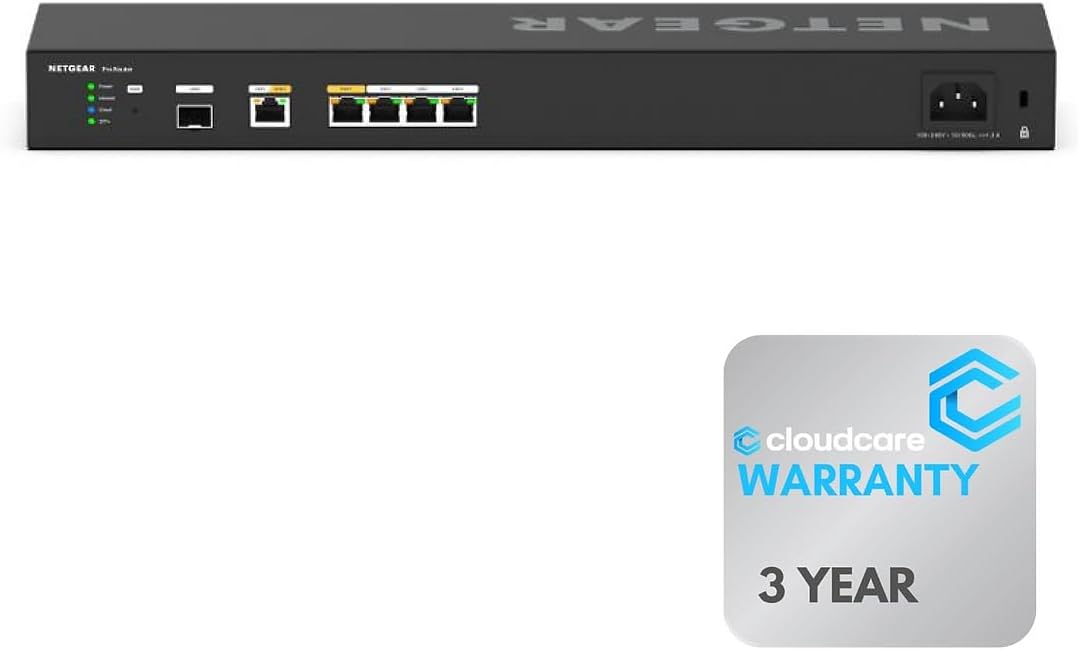
The Cloud Care PR60X offers six 10G ports for maximum wired speed in racks. It has a 4.6-star rating for professional and enterprise environment performance.
We may earn a commission when you buy through this link, at no additional cost to you.
It supports load balancing and failover across two WAN ports. The Cloud Care warranty support simplifies claims for your products purchased through specific listings.
This router is expensive and requires rack space or wall mounting for best use. It is overkill for a living room but perfect for IT server closets.
Ideal for professional network setups. Choose this if you need high port density and rack-mounting convenience for enterprise environments.
Efficient equipment organization with desktop or wall-mount capabilities.
Manage your network remotely with easy setup and maintenance tools.
We may earn a commission when you buy through this link, at no additional cost to you.
The Linksys LRT224 offers reliable business networking with strong VPN support. It holds a 4.0-star rating for meeting general business network requirements.
We may earn a commission when you buy through this link, at no additional cost to you.
It supports 50 IPsec tunnels and provides up to 900 Mbps firewall throughput. Load balancing ensures you get the best performance from multiple internet connections.
The device is older, so management tools are basic compared to cloud solutions. You must refer to the manual for troubleshooting since updates are less frequent.
Use this for small businesses needing steady connectivity. It is a solid choice if you want straightforward VPN tunnels without complex cloud management.
Supports up to 50 IPsec tunnels for secure site-to-site connectivity.
WAN failover ensures highly reliable internet for critical business operations.
We may earn a commission when you buy through this link, at no additional cost to you.
Selecting the right Dual Wan Router requires understanding your network size, security needs, and future growth plans. This guide breaks down the essential factors to consider.
Consider how many WAN and LAN ports you need. Most routers offer two or more WAN ports for redundancy, plus LAN ports for wired devices. Ensure the number of Gigabit ports matches your device count.
Look for routers with at least two WAN ports and four LAN ports for balanced setups.
A robust firewall is essential to protect your network from external threats. Look for DoS defense, intrusion prevention, and SSL inspection. Some models offer commercial-grade protection for added safety.
Choose routers with built-in firewalls and advanced security protocols.
If you need secure remote access, check the number of VPN tunnels supported. Models vary from 20 to 100+ tunnels. Ensure compatibility with OpenVPN or WireGuard if required.
Verify the tunnel count and protocol support for your remote access needs.
Automatic failover is crucial to prevent downtime. The router should switch to a backup connection instantly if the primary one fails. Some include 4G/3G support via USB.
Prioritize routers with instant traffic rerouting features.
Consider whether you prefer cloud management or local interfaces. Cloud tools allow remote control, while local access offers more direct configuration. Choose based on your technical comfort level.
Select a management style that fits your workflow needs.
Consider if you need 10G or 2.5G ports for faster throughput. Basic routers may offer only 1Gbps. Multi-gigabit support prepares you for speed upgrades.
Check port speeds to ensure they meet future bandwidth demands.
Connect your primary ISP to the main WAN port and your backup connection to the secondary WAN or USB port. Use the setup wizard to configure failover rules and ensure both lines are recognized.
Regularly update the firmware to keep your network secure. Check for updates in the admin panel. This process protects against vulnerabilities and improves performance over time.
Monitor your connection health through the dashboard. Check the logs for failed attempts or drops. Reboot the router occasionally to clear temporary data and maintain stability.
A Dual Wan Router is a networking device that allows you to connect two or more internet connections. It balances traffic across these connections and ensures continuous internet access if one fails.
Some models like the TP-Link ER605 lack built-in Wi-Fi and need access points. Others include Wi-Fi but may be limited in coverage compared to dedicated mesh systems.
Yes, many models support 4G/3G modems via USB ports. This provides an instant backup if your primary wired connection goes down. Check the compatibility list before purchasing.
Standard Ethernet cables work for most ports. If you choose 10G models, ensure your cables are Cat6a or better to support higher speeds. Most LAN ports use standard cabling.
Cloud management is optional. It offers remote access to settings, which is useful for admins. However, basic web interfaces are sufficient if you manage the router locally.
Load balancing distributes your traffic across multiple internet lines. This increases total bandwidth and prevents a single connection from becoming overloaded during heavy use.
Yes, many support site-to-site VPNs and secure client access. Features like IPSec tunnels allow remote teams to connect safely to your internal network.
Most offer wizards to guide configuration. However, enterprise models may require technical knowledge for VLANs or security rules. Basic business options are generally straightforward.
We explored ten models ranging from budget-friendly options to high-end enterprise solutions. The TP-Link ER605 leads in overall value, while the NETGEAR PR60X offers premium multi-gigabit performance.
Prioritize your needs: consider how many ports, security levels, and VPN tunnels you require. Cloud management is great for remote admins, but local control works well for dedicated on-site IT.
Remember that hardware evolves quickly, so check current listings before buying. Verify compatibility with your ISPs and any specific compliance standards required for your organization.