
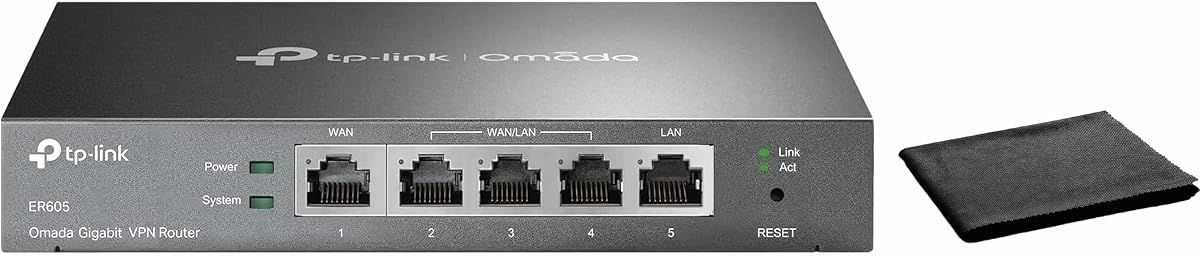
TP-Link ER605, Wired Gigabit VPN Router
4.4Editor score
Three WAN port configuration
USB WAN backup support
Comprehensive firewall protection
This guide compares the top ten load balancing router models for reliability speed and security to help you choose the right networking hardware for your
Modern businesses need reliable internet connections to stay productive and competitive in today digital marketplace. A load balancing router helps distribute network traffic across multiple internet service providers to ensure maximum uptime and efficiency.
We analyzed ten top rated models based on their port configurations security features and management capabilities. Our team reviewed technical specifications and user feedback to identify the most effective solutions for various network sizes and requirements.
Each selection highlights specific strengths and ideal use cases for different environments. Keep in mind that availability and pricing may change over time so verify current details before making your final purchasing decision.
4.4Editor score

4.4Editor score

4.7Editor score
The following table presents a side-by-side comparison of all ten models to help you evaluate their key specifications and capabilities at a glance.



The Cudy R700 stands out as a top choice for network professionals seeking flexibility. It rates highly among users for its robust feature set and straightforward setup process.
We may earn a commission when you buy through this link, at no additional cost to you.
Its multi-WAN capabilities allow connections to up to five ISPs with automatic failover ensuring business continuity. The OpenWRT support gives you deep control over firewall rules and VLAN segmentation.
While it requires some technical knowledge to unlock all features the community support is extensive. Most users find the trade-off acceptable given the enterprise-grade functionality at this price point.
Businesses needing reliable internet with minimal downtime should consider this model. Its balance of performance and flexibility makes it a strong recommendation for office environments.
OpenWRT support enables custom QoS policies and community packages for professional management.
Built-in VPN suite and SPI firewall protect sensitive data across multiple connections.
We may earn a commission when you buy through this link, at no additional cost to you.
The TP-Link ER605 offers excellent value for small offices on a tight budget. Users appreciate its simple setup and consistent performance over long periods.
We may earn a commission when you buy through this link, at no additional cost to you.
It supports up to three WAN connections including mobile broadband via USB for backup. The firewall and DoS defense features provide solid protection against common network threats.
Some advanced users might find the VPN options basic compared to enterprise models. However for typical office use the performance and cost balance is hard to beat.
This router is ideal for startups or small businesses needing reliable load balancing. Its affordability and ease of use make it a practical choice for essential connectivity.
USB WAN port supports 4G 3G modems for instant internet redundancy.
IP MAC URL filtering and DoS defense keep your network perimeter secure.
We may earn a commission when you buy through this link, at no additional cost to you.
The Omada Fusion 2.5G brings enterprise features to growing businesses with ease. Its high ratings reflect user satisfaction with speed and management capabilities.
We may earn a commission when you buy through this link, at no additional cost to you.
Five 2.5G ports enable fast load balancing across multiple connections while the touchscreen provides instant local insights. The integrated controller eliminates the need for extra hardware.
The premium price may be steep for smaller setups but the performance justifies the cost. Users who value convenience and speed find this investment worthwhile.
Organizations upgrading to multi-gigabit internet will benefit most from this router. It combines modern hardware with intuitive management for seamless network expansion.
2.51 inch screen shows speed tests and traffic stats without a laptop.
High-speed CPU ensures low latency during heavy traffic loads.
We may earn a commission when you buy through this link, at no additional cost to you.
The TP-Link ER7206 is designed for professional environments needing high client capacity. Users praise its flexibility and robust connection options.
We may earn a commission when you buy through this link, at no additional cost to you.
It offers four WAN ports including one SFP for fiber internet. The Omada SDN integration allows centralized management across multiple sites effectively.
Some users note the need for SDN controllers to unlock all features. However for managed networks the centralized control benefits are significant.
Businesses with many devices or multiple locations will find this router ideal. Its scalability and professional features make it a strong choice for growth.
Supports up to 150000 devices and 700 active clients easily.
Seamlessly integrates into Omada Software Defined Networking ecosystem.
We may earn a commission when you buy through this link, at no additional cost to you.
The Alta Labs Route10 targets users needing raw throughput for demanding applications. It rates well for hardware performance and professional routing features.
We may earn a commission when you buy through this link, at no additional cost to you.
It handles 10Gbps wired routing with hardware acceleration ensuring no bottlenecks. The integrated PoE Plus helps power access points without extra injectors.
Users should note this router does not include wireless capabilities. It is purely for wired networks so separate access points are required.
Network engineers and data centers benefit most from this performance level. It is perfect for environments where speed and wired reliability are top priorities.
Qualcomm quad-core processor handles traffic without slowing down.
Power network devices directly through Ethernet cables for simplicity.
We may earn a commission when you buy through this link, at no additional cost to you.
The Omada ER7412-M2 balances multi-gigabit speed with professional security tools. Users appreciate its versatility and robust feature set.
We may earn a commission when you buy through this link, at no additional cost to you.
It offers up to eleven WAN ports for maximum utilization. Deep packet inspection helps manage traffic flow efficiently across connections.
The price point reflects its enterprise capabilities but may be high for homes. Most users agree the performance justifies the investment.
Organizations needing security and speed should consider this model. It is designed for environments where traffic control is essential.
Advanced traffic analysis helps optimize bandwidth for critical apps.
Supports many VPN protocols for secure remote access.
We may earn a commission when you buy through this link, at no additional cost to you.
The TP-Link TL-R470T+ is a cost-effective solution for small offices. Users like its simple interface and reliable performance for basic needs.
We may earn a commission when you buy through this link, at no additional cost to you.
It supports four WAN ports and PPPoE server functions for client management. The lightning protection helps prevent damage from surges.
While it lacks gigabit speeds it handles small office traffic well. Many users find it sufficient for basic internet sharing tasks.
Small businesses needing affordable load balancing will find this useful. It offers practical features without unnecessary complexity.
Supports PPPoE server for extensive client network management.
Built-in protection helps safeguard against electrical surges.
We may earn a commission when you buy through this link, at no additional cost to you.
The TP-Link TL-R480T+ provides basic load balancing for small networks. Users appreciate its straightforward design and ease of use.
We may earn a commission when you buy through this link, at no additional cost to you.
It allows three configurable WAN/LAN ports for flexible setup. This helps businesses connect multiple internet sources without complexity.
The device is best suited for simple traffic management needs. Users seeking advanced features may find it lacking.
Startups needing simple redundancy will find this model useful. It offers essential functionality at an accessible price point.
Three ports allow mixed WAN and LAN connections.
Small size fits easily on desktop or shelf.
We may earn a commission when you buy through this link, at no additional cost to you.
The TP-Link ER-605 is designed for easy cloud management and setup. Users appreciate its streamlined interface and responsive monitoring tools.
We may earn a commission when you buy through this link, at no additional cost to you.
It features dual WAN ports for load balancing and bandwidth optimization. The web interface simplifies configuration for remote management.
Some users may find the port count limiting for larger setups. However for small offices the convenience is a strong plus.
Businesses prioritizing ease of use should consider this model. It balances performance with practical management tools.
Centralized cloud monitoring offers real-time network status and alerts.
QoS settings ensure critical applications get priority.
We may earn a commission when you buy through this link, at no additional cost to you.
The Ubiquiti EdgeRouter 4 is a favorite among network professionals. Its high rating reflects reliability and robust engineering.
We may earn a commission when you buy through this link, at no additional cost to you.
It includes an SFP port for fiber connections and runs fanless for quiet operation. The console port helps with advanced troubleshooting.
New users might find the interface less intuitive than consumer brands. However for skilled users it provides significant control.
Network engineers needing reliability will appreciate this model. It is designed for critical infrastructure where uptime is key.
Internal PSU and fanless cooling allow silent operation.
Supports fiber optics for direct WAN connections.
We may earn a commission when you buy through this link, at no additional cost to you.
Selecting the right load balancing router depends on your network size and performance needs. This guide outlines key factors to help you evaluate models effectively.
The number and type of ports determine how many connections you can balance. Look for devices with enough WAN ports to support your internet service providers. Some models also offer SFP or USB options for additional flexibility.
Ensure the router supports your required WAN port count and connection types.
Different routers offer various load balancing algorithms like round-robin or weighted distribution. Higher-end models provide more control over traffic flow per application. This helps prioritize critical business tools over general browsing.
Choose a model that supports the traffic management methods your business needs.
Automatic failover is crucial for maintaining uptime when one connection drops. Some devices detect outages faster than others ensuring minimal disruption. This is vital for businesses that cannot afford downtime.
Verify the device supports rapid automatic failover for business continuity.
A strong firewall and VPN support are essential for protecting sensitive data. Look for features like SPI firewall DoS defense and multiple VPN protocols. These help secure remote access and internal communications.
Ensure the router includes robust security features to protect your data.
Ease of use depends on the interface and management options. Cloud-based portals or mobile apps simplify remote configuration. Touchscreen models offer quick local troubleshooting without a laptop.
Look for management tools that match your team skill level.
Throughput capacity should match your internet speeds to avoid bottlenecks. Multi-gigabit routers offer better performance for fast connections. Processing power affects how quickly the device handles heavy traffic.
Select a model with throughput matching your internet speeds.
Consider how well the router integrates with your existing network gear. SDN integration allows easier scaling and centralized control. Ensure compatibility with access points and switches you plan to use.
Choose a device compatible with your network ecosystem.
Higher-end routers cost more but provide better long-term value. Check warranty terms and community support availability. Professional models often come with reliable documentation and forums.
Balance initial cost with long-term support and value.
Connect your internet cables to the designated WAN ports to enable load balancing. Ensure all connections are secure and cables are undamaged to maintain signal quality.
Log into the web interface using the default credentials provided in the manual. Customize WAN settings like failover rules and traffic distribution to match your needs.
Regularly update firmware to access new features and security patches. Place the router in a cool ventilated area to prevent overheating during high usage.
A load balancing router distributes network traffic across multiple internet connections. This maximizes bandwidth use and provides redundancy if one connection fails. It helps ensure continuous service for businesses and heavy users.
You need multiple internet connections from providers to utilize load balancing. Some providers may have terms about connecting multiple lines so check your policies. Standard business plans often support these configurations.
Load balancing uses all connections simultaneously to speed up traffic. Failover waits until a connection drops before switching to the backup. Many routers combine both features for best performance.
Yes most load balancing routers include Ethernet ports for access points. These connect to LAN ports to provide wireless coverage. Ensure your points support the router standards for best results.
Basic setup is usually simple with a web interface. Advanced features like VLANs may require network knowledge. Many models offer guides or community support for help.
Weighted load balancing lets you prioritize faster connections for traffic. You can assign more bandwidth to better lines for balance. This prevents slow lines from dragging down total performance.
The models reviewed offer solutions ranging from basic office needs to enterprise-grade performance. Selecting depends on your connection count budget and technical expertise.
Prioritize reliability and speed based on your business requirements. Cloud tools and monitoring features can save time in the long run.
Always verify current availability and features before purchasing. Network needs evolve so choose a model that grows with your business.