
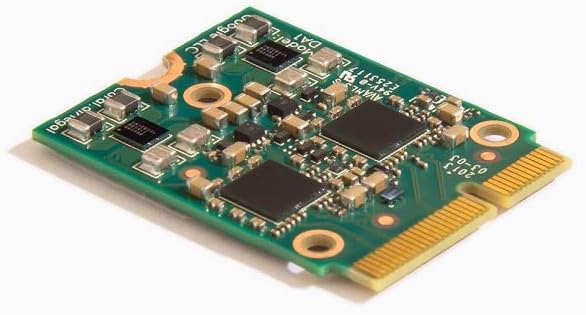
Coral M.2 Accelerator B+M Key
5.0Editor score
4 TOPS peak performance
Debian Linux integration
TensorFlow Lite support
This comprehensive guide compares the top ten M2 Accelerator Cards available in October 2026 to help you select the ideal hardware for your machine learning
M2 Accelerator Cards have revolutionized how developers deploy machine learning models on edge devices. These compact modules bring powerful inference capabilities directly into your existing hardware infrastructure. Choosing the right card ensures your applications run efficiently without compromising on speed or power consumption.
We have carefully evaluated ten top-rated products based on performance metrics, compatibility, and ease of integration. Our analysis focuses on real-world use cases ranging from computer vision to natural language processing. Each selection represents a distinct approach to accelerating AI workloads in constrained environments.
Every pick in this guide highlights specific strengths and potential trade-offs for different user needs. Prices and availability may fluctuate so always verify current listings before purchasing. We aim to provide clear insights that empower you to make an informed decision for your specific workload requirements.
5.0Editor score

4.3Editor score

4.6Editor score
The following table provides a side-by-side comparison of all ten selected M2 Accelerator Cards highlighting their core specifications and key capabilities for easy reference.


The MX3 M.2 AI Accelerator stands out as a top choice for developers needing high performance AI computing in a compact form factor. With a rating of 4.3 it delivers exceptional results for computer vision workloads while maintaining energy efficiency. This card is designed to integrate seamlessly into existing systems using the standard M.2 M-key interface.
We may earn a commission when you buy through this link, at no additional cost to you.
Its standout quality lies in the comprehensive Software Development Kit which simplifies the deployment process significantly. The hardware compatibility extends to Raspberry Pi 5 with a HAT adapter making it versatile for various projects. Developers can access detailed documentation through the MemryX website ensuring support is readily available.
While the card excels in performance it does require a Linux operating system which might limit some Windows-only environments. The documentation availability can sometimes be sparse requiring users to rely heavily on community forums or the developer website for specific use cases. These trade-offs are generally acceptable given the performance benefits.
If you need a powerful and efficient AI accelerator for edge computing the MX3 is a highly recommended choice. It balances performance with power consumption effectively making it ideal for battery powered or thermally constrained devices. Ensure your system supports Linux before purchasing to maximize its capabilities.
The MX3 handles demanding computer vision tasks with high efficiency ensuring smooth real-time performance.
A robust SDK streamlines model deployment reducing the time from development to production.
We may earn a commission when you buy through this link, at no additional cost to you.
This M.2 Accelerator featuring dual Edge TPU chips offers an affordable entry point into efficient machine learning inference. With a rating of 4.1 it provides 8 TOPS of total peak performance which is impressive for its price point. The card uses a standard M.2 2230 E-key form factor ensuring compatibility with many modern single board computers.
We may earn a commission when you buy through this link, at no additional cost to you.
The dual TPU design allows for parallel processing of multiple models which enhances throughput for complex applications. Each TPU delivers 2 TOPS per watt making this card exceptionally energy efficient. This efficiency is crucial for deployments where power supply is limited or thermal management is a concern.
Users must ensure their system supports the E-key slot as this card is not compatible with M-key only slots. The PCIe Gen2 interface limits data transfer speeds compared to newer Gen3 or Gen4 options which might bottleneck high bandwidth applications. These constraints are manageable for most edge computing scenarios.
For developers seeking a budget friendly yet powerful AI accelerator this dual TPU card is an excellent option. It strikes a great balance between cost performance and power efficiency. Verify your motherboard slot type before buying to ensure a smooth installation process.
Two Edge TPUs enable simultaneous inference tasks doubling the potential throughput of single TPU devices.
With 2 TOPS per watt this card minimizes energy costs and heat generation.
We may earn a commission when you buy through this link, at no additional cost to you.
The G650 Coral M.2 Accelerator has earned a perfect 5.0 rating reflecting its reliability and performance excellence. It features an onboard Edge TPU coprocessor capable of 4 trillion operations per second while consuming minimal power. This card is designed for high-speed machine learning inference tasks making it a favorite among professionals.
We may earn a commission when you buy through this link, at no additional cost to you.
Its integration with Debian-based Linux systems is seamless and it supports TensorFlow Lite models out of the box. This means developers do not need to build models from scratch saving significant time and effort. AutoML Vision Edge support allows for rapid deployment of custom image classification models directly on the device.
While it requires a Debian based system the flexibility of compiling models for Edge TPU mitigates some OS limitations. The B+M key interface is standard but users should verify their slot compatibility before purchase. These minor constraints are outweighed by the robust performance and community support.
For those prioritizing performance and reliability this Coral accelerator is a top tier choice. Its ability to execute state-of-the-art models like MobileNet v2 at high frame rates is unmatched in this category. Invest in this card if you need dependable AI acceleration for critical applications.
4 TOPS peak performance ensures rapid processing of complex neural network models.
Support for TensorFlow Lite and AutoML simplifies model integration and customization.
We may earn a commission when you buy through this link, at no additional cost to you.
The QNAP QM2-2P10G1TB is primarily an expansion card that enhances storage and networking capabilities in server environments. With a rating of 4.4 it offers two M.2 NVMe SSD slots and a 10GbE Ethernet port. This combination makes it ideal for NAS systems needing fast caching and high-speed connectivity.
We may earn a commission when you buy through this link, at no additional cost to you.
Its Marvell AQtion Ethernet controller ensures reliable high-speed networking connecting seamlessly to modern infrastructure. The card supports Windows and Linux alongside QNAP QTS providing flexibility across different operating systems. Pre-installed low-profile brackets make installation easy in compact server chassis.
While not an AI accelerator in the traditional sense it can support storage-intensive AI pipelines by providing rapid data access. Users must have an available PCIe slot in their system which limits use to desktops or servers. The focus on storage means it is not a direct substitute for dedicated AI accelerators.
For IT professionals managing data centers or NAS devices this card is invaluable for performance enhancement. It ensures data moves quickly between storage and processing units which is critical for large dataset workflows. Choose this if your priority is storage speed and network connectivity.
Two M.2 slots allow for RAID configurations or separate caching and storage tiers.
High-speed Ethernet ports reduce latency in data transfer heavy environments.
We may earn a commission when you buy through this link, at no additional cost to you.
The Rocket 1604L PCIe Gen5 card is designed for users requiring massive bandwidth for multiple high-speed NVMe drives. It supports four M.2 NVMe devices each with dedicated lanes ensuring optimal performance for data-intensive tasks. This card targets advanced users with modern hardware capable of supporting PCIe 5.0 speeds.
We may earn a commission when you buy through this link, at no additional cost to you.
Its compatibility with mainstream operating systems and platforms like x86 Intel and AMD makes it versatile for various setups. The support for ARM platforms adds to its flexibility for specialized computing environments. Natively supported drivers ensure a smooth installation process without extra configuration.
Since this product is relatively new there is no official rating yet but its specs suggest high potential. Users need a motherboard with PCIe 5.0 x16 slots to fully utilize its capabilities. Without a compatible system performance may be limited to PCIe 4.0 speeds.
For enthusiasts and professionals building high-performance workstations this card offers future-proof connectivity. It ensures that your storage subsystem keeps pace with fast processing units and AI accelerators. Invest in this if you anticipate growing data requirements and need maximum throughput.
Latest PCIe 5.0 technology provides unmatched data transfer speeds for large datasets.
Four dedicated ports allow for complex storage configurations and expanded capacity.
We may earn a commission when you buy through this link, at no additional cost to you.
This PCIe adapter transforms a standard system into a dual-TPU machine learning workstation by housing two Coral M.2 cards. Although it lacks an official rating its design focuses on delivering enhanced AI performance for tasks like object detection and real-time video analytics. It is a perfect solution for developers needing more power than a single TPU can offer.
We may earn a commission when you buy through this link, at no additional cost to you.
The space-efficient design saves multiple PCIe slots allowing for more compact system builds. It splits PCIe Gen3 x4 lanes into four Gen2 x1 lanes ensuring both TPU cards receive adequate bandwidth. This setup maximizes existing hardware investments without requiring a full system upgrade.
Users must purchase two separate Coral M.2 Accelerator Cards to use this adapter which adds to the overall cost. Without testing data it is hard to predict exact performance gains under heavy load. These factors are acceptable for projects where scalability is a priority.
For scaling edge AI deployments efficiently this adapter offers a pragmatic path to higher throughput. It simplifies the hardware setup for multi-TU configurations reducing the complexity of integration. Choose this if you need to balance performance with system footprint constraints.
Combine two TPUs for increased parallel processing capacity on complex model inference.
Dual TPU performance in a single PCIe slot footprint saves valuable motherboard space.
We may earn a commission when you buy through this link, at no additional cost to you.
The ASUS Hyper M.2 x16 Gen5 card supports up to four NVMe M.2 drives delivering up to 512 Gbps bandwidth. With a rating of 4.2 it ensures smooth data transfers with its server-grade PCB designed for high reliability. The card includes a large heatsink and active fan to prevent thermal throttling during intensive operations.
We may earn a commission when you buy through this link, at no additional cost to you.
It supports RAID functions across different platforms enabling users to create bootable arrays with up to four drives. The two-phase power solution up to 14-watt output ensures stable power delivery to high-demand NVMe SSDs. Fan control from the motherboard header provides flexible thermal management options.
Installation requires a dedicated 6-pin PCIe power connector which might need a compatible PSU cable. Managing the extra fan cable can add to internal complexity in smaller cases. These requirements are typical for high-performance multi-drive cards and do not diminish its overall value.
For workstations needing massive storage throughput this card is an ideal choice for data-intensive workflows. Its ability to handle multiple drives without throttling ensures consistent performance during large file transfers. Select this if you need robust multi-drive support with advanced thermal solutions.
512 Gbps total bandwidth eliminates bottlenecks in data transfer heavy tasks.
Active fan and large heatsink maintain optimal temperatures for sustained performance.
We may earn a commission when you buy through this link, at no additional cost to you.
The waveshare Hailo-8 M.2 AI Accelerator Module delivers an impressive 26 TOPS of performance making it one of the most powerful options in this list. With a rating of 4.6 it is compatible with Raspberry Pi 5 and supports both Linux and Windows systems. Its low power consumption of just 2.5W ensures efficient operation in various environments.
We may earn a commission when you buy through this link, at no additional cost to you.
The scalable design allows simultaneous processing of multiple streams and models which is crucial for complex applications. It supports popular frameworks like TensorFlow PyTorch and ONNX offering developers flexibility in model deployment. The operating temperature range of -40°C to 85°C makes it suitable for harsh industrial conditions.
As a module only product users might need to source a compatible carrier or HAT board separately. While documentation is provided through official WiKi resources users may need to dig for specific integration steps. These minor hurdles are outweighed by the high performance and wide compatibility.
For demanding AI tasks on edge devices this module offers top-tier capabilities with minimal power draw. Its support for diverse frameworks and multi-stream processing makes it highly versatile for professional use. Choose this if you need high performance in a compact and efficient package.
26 TOPS enables rapid processing of complex AI models and real-time video.
Compatibility with major AI frameworks simplifies integration for any project.
We may earn a commission when you buy through this link, at no additional cost to you.
This Coral M.2 Accelerator features an A+E key interface making it ideal for integration into existing systems with compatible slots. Rated 4.2 it delivers 4 TOPS peak performance while consuming minimal power at 2 TOPS per watt. Its industrial-grade reliability ensures stable operation in environments with varying temperatures and conditions.
We may earn a commission when you buy through this link, at no additional cost to you.
It supports Linux systems including Debian and Ubuntu as well as Windows 10 providing broad compatibility. The Edge TPU integration streamlines machine learning inference tasks allowing for quick deployment of optimized models. Wide OS support means fewer barriers to entry for developers across different ecosystems.
Users must ensure their hardware supports the A+E key interface as this card will not fit M-key slots. The operating temperature range is excellent but users should verify their specific environmental needs before purchase. These compatibility checks are standard for specialized hardware and do not hinder its value.
For industrial applications and embedded systems this card offers robust performance with energy efficiency. Its reliability and broad OS support make it a dependable choice for commercial deployments. Select this if you need a durable accelerator for demanding real-world scenarios.
Industrial-grade construction ensures consistent operation in harsh environments.
Compatibility with major Linux and Windows versions eases adoption.
We may earn a commission when you buy through this link, at no additional cost to you.
This adapter is designed exclusively for Coral M.2 Accelerator with Dual Edge TPU modules to maximize inference performance. With a perfect 5.0 rating it ensures stable connectivity through bidirectional Gen2 bandwidth and robust mounting features. It fits standard M.2 2280 B-key or M-key slots providing flexibility for various system configurations.
We may earn a commission when you buy through this link, at no additional cost to you.
The adapter supports upstream and downstream PCIe lanes ensuring efficient data transfer between the card and the host. A stainless steel mounting screw is included to secure the PCB against vibrations which is crucial for mobile or industrial use. Its design prevents errors by explicitly excluding SATA M.2 compatibility.
Since it is designed for Coral Dual Edge TPU modules users must ensure they have these specific cards available. The adapter is not compatible with Raspberry Pi CM4 USB enclosures which limits certain edge use cases. These limitations are well documented making selection straightforward for aware buyers.
For maximizing TPU performance in a single PCIe slot this adapter is a highly reliable choice. Its attention to detail in mounting and bandwidth ensures stable operation under load. Choose this if you need to run two Coral TPUs efficiently on a single slot.
Bidirectional Gen2 bandwidth ensures efficient data flow for dual TPU workloads.
Stainless steel screws provide vibration resistance for durable installations.
We may earn a commission when you buy through this link, at no additional cost to you.
Selecting the right M2 Accelerator Card depends on your specific hardware needs performance requirements and budget. This guide outlines key factors to consider before making a purchase.
Look for cards that offer sufficient TOPS (Tera Operations Per Second) for your model complexity. Higher TOPS means faster inference times and ability to handle more complex tasks. Ensure peak performance aligns with your application demands.
Prioritize cards with high TOPS ratings for demanding AI workloads.
M2 Accelerator Cards often run on embedded systems where power is limited. Check the power consumption per TOPS to evaluate efficiency. Lower wattage per operation ensures longer battery life and less heat.
Choose energy efficient models to optimize system power budgets.
Verify the M.2 key type (M-key E-key or B+M) matches your motherboard slot. Also confirm operating system support such as Linux or Windows compatibility. Ensuring hardware and OS compatibility prevents installation issues.
Always match the key type and OS support with your existing setup.
M.2 cards come in various sizes like 2230 2260 or 2280. Select a size that fits your available space and mechanical constraints. Compact sizes are useful for portable devices while larger sizes allow better cooling.
Choose a form factor that fits your device chassis dimensions.
Check if the card supports your preferred ML frameworks like TensorFlow Lite or PyTorch. A good SDK simplifies deployment and debugging. Strong community support can save you valuable development time.
Prioritize products with robust SDKs and framework compatibility.
High-performance cards generate heat which can affect stability. Look for features like passive cooling or active fans. Good thermal design ensures consistent performance without throttling.
Ensure the card has adequate cooling for your environment.
Industrial grade cards often come with wider operating temperature ranges. This durability is crucial for deployments in harsh conditions. Check warranty terms and build quality for long term use.
Opt for durable hardware if deploying in challenging environments.
Prices vary significantly across different capabilities and brands. Determine your maximum budget and compare features within that range. Balance cost with performance needs to avoid overspending.
Select the best value within your financial limits.
Begin by ensuring your system has a compatible M.2 slot and power supply. Insert the card carefully to avoid bending pins and secure it with provided screws. Boot your system and verify recognition in device manager.
Install the latest drivers and SDK from the manufacturer website. Configure your environment to use the accelerator by selecting the correct backend in your ML code. Test with sample models to confirm proper functionality.
Regularly monitor temperatures and update firmware to maintain optimal performance. Keep the card clean from dust and ensure airflow around it. Following these steps will extend the lifespan of your accelerator.
An M2 Accelerator Card provides hardware support for machine learning tasks directly on edge devices. It speeds up tasks like image recognition and natural language processing without relying on cloud servers. This makes applications faster and more privacy compliant.
Yes most M2 Accelerator Cards require specific drivers and software libraries to function properly. Manufacturers provide these through developer websites or package repositories. Proper installation ensures the OS communicates efficiently with the hardware.
Some M2 Accelerator Cards are designed specifically for Raspberry Pi 5 using HAT adapters. Others may need USB bridges or PCIe carriers which might limit functionality. Check product descriptions for explicit Pi compatibility before buying.
M-key slots support PCIe lanes and are common for storage and performance accelerators. E-key slots are often found on smaller boards and support Wi-Fi or AI modules. Using the wrong key type will prevent the card from fitting.
You can check your motherboard manual or use system tools like lspci on Linux. PCIe Gen3 is necessary for some high speed cards to run at full capacity. Without it performance may be limited to lower generation speeds.
Many M2 Accelerator Cards support Windows 10 and 11 though Linux is often preferred. Ensure driver availability for your specific version before purchasing. Some frameworks might have better support on Linux systems.
Overheating can cause performance throttling or instability in your applications. Proper ventilation and cooling solutions are essential for sustained operation. Check for thermal issues if you notice sudden performance drops.
Most reputable manufacturers include a limited warranty ranging from one to three years. Check the seller description for specific warranty terms and coverage details. Having a warranty protects against manufacturing defects and early failures.
We have reviewed ten top M2 Accelerator Cards ranging from budget friendly options to premium performance solutions. Each card offers unique strengths tailored to different computing environments and project goals. Selecting the right one depends on balancing performance power and compatibility.
Prioritize performance metrics and software support to ensure your applications run smoothly. Always verify hardware compatibility before purchasing to avoid integration issues. Investing in the right accelerator can significantly improve your AI workload efficiency.
Prices and availability change frequently so check current listings for the latest deals. We hope this guide helps you make a confident choice for your edge computing needs. Happy developing with your new hardware acceleration.