
M.2 Heatsink Cooler 2280 SSD
4.6Editor score
Aluminum alloy material
Double-sided clip design
Thermal silicone pads
This guide compares the top M2 2280 SSD Heatsink models for PS5 and PC to help you choose the best cooling solution for your storage drive.
Modern storage drives generate significant heat during heavy usage. Proper cooling ensures longevity and consistent performance for your critical data storage needs.
We evaluated ten leading heatsink models based on thermal efficiency and build quality. Our analysis covers compatibility with various systems and ease of installation.
Each pick highlights specific strengths for different user scenarios. Note that product availability and pricing may vary over time due to market conditions.
4.6Editor score

4.7Editor score

4.7Editor score
The following table presents a side-by-side comparison of all ten selected products. Review the specifications to find the model that best fits your specific hardware requirements.


This affordable heatsink offers solid performance for budget builds and console upgrades. With a strong rating of 4.6, it is a favorite for cost-conscious users.
We may earn a commission when you buy through this link, at no additional cost to you.
The aluminum alloy construction provides effective passive cooling. Its double-sided clips secure the drive firmly, ensuring the thermal pads maintain contact with the controller and memory.
While it lacks advanced features like heatpipes, the cooling performance is sufficient for standard usage. The silver plating helps reduce static electricity which protects sensitive electronics.
Choose this model if you need reliable cooling without breaking the bank. It is an excellent entry-level solution for anyone looking to prevent thermal throttling.
This unit is explicitly designed to fit PS5 expansion slots without obstruction ensuring seamless integration with console storage upgrades.
The anodic oxidation surface treatment increases durability while the thermal pads bridge air gaps for efficient heat transfer away from the SSD.
We may earn a commission when you buy through this link, at no additional cost to you.
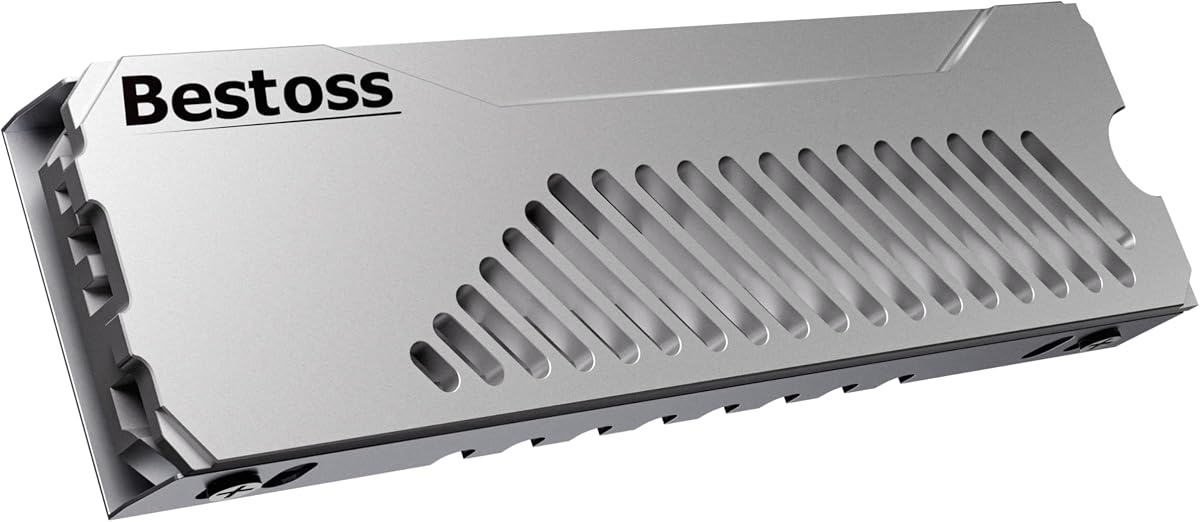
The Bestoss heatsink focuses on airflow and material efficiency. Its hollowed-out design allows air to pass through while the aluminum alloy dissipates heat effectively.
We may earn a commission when you buy through this link, at no additional cost to you.
Thermal performance is enhanced by the high conductivity silicone pad. This ensures that heat moves quickly from the SSD controller to the heatsink body.
Installation is straightforward and it fits most 2280 form factor drives. The minimalist design blends well with modern PC cases that prioritize clean aesthetics.
This model suits users who prefer lightweight components without compromising thermal protection. It balances cost and performance for standard desktop environments.
The three-sided hollowed-out design increases surface area and allows for better air circulation around the drive during operation.
With thermal conductivity up to 3 W/mK the silicone pad fills microscopic gaps to create a low-resistance path for heat transfer.
We may earn a commission when you buy through this link, at no additional cost to you.
Sabrent provides a robust heatsink solution combining copper and aluminum for maximum thermal performance. This blend offers excellent conductivity and durability for heavy workloads.
We may earn a commission when you buy through this link, at no additional cost to you.
The package includes everything needed for installation such as screws and a screwdriver. This convenience makes setup easy for users new to hardware upgrades.
While slightly more expensive the build quality justifies the investment. It is specifically designed for desktop environments where space is less constrained than in consoles.
Select this if you prioritize brand reputation and material quality. It delivers reliable cooling for high-performance NVMe drives in desktop PCs.
Copper provides superior heat transfer while aluminum adds lightness creating an optimal balance for thermal management in compact spaces.
The inclusion of thermal tape screws and tools removes the need for additional purchases ensuring a complete solution out of the box.
We may earn a commission when you buy through this link, at no additional cost to you.
This model earns our Editor's Choice due to its advanced heatpipe technology. It effectively moves heat away from the drive to maintain consistent read and write speeds.
We may earn a commission when you buy through this link, at no additional cost to you.
The aluminum heatsink ensures long-term durability while the mounting system is designed for hassle-free setup. Users appreciate the secure fit that keeps the drive protected.
Thermal throttling is a significant risk for high-speed drives but this cooler mitigates that threat. The sleek matte black finish complements modern black-themed PC builds.
Choose this heatsink for reliability and performance. It is ideal for users who demand top-tier cooling for their gaming or creative workstations.
The built-in heatpipe transports heat rapidly to the fins allowing the heatsink to handle high temperatures without passive airflow.
Simple mounting ensures a quick setup process allowing users to install the cooler without complicated tools or extensive technical knowledge.
We may earn a commission when you buy through this link, at no additional cost to you.
This value pack offers five aluminum fin-type heatsinks at an affordable price. It is perfect for builders with multiple drives or those who prefer having spares on hand.
We may earn a commission when you buy through this link, at no additional cost to you.
The elastic bands allow for tool-free installation which simplifies the process significantly. The thermal conductivity of the pads ensures effective heat transfer for general use.
While not as refined as premium models it serves the core purpose well. Users can outfit multiple workstations without worrying about running out of cooling solutions.
Pick this for bulk upgrades or budget builds. It provides essential thermal protection for multiple SSDs without increasing the overall project cost.
Two silicone elastic bands secure the heatsink in place eliminating the need for screws and allowing for quick removal if needed.
The set includes five heatsinks plus accessories making it a cost-effective choice for users managing multiple storage devices in one system.
We may earn a commission when you buy through this link, at no additional cost to you.
ARCTIC is known for thermal expertise and this heatsink reflects that heritage. It meets Sony specifications for PS5 installations making it a safe choice for console upgrades.
We may earn a commission when you buy through this link, at no additional cost to you.
The click mechanism secures the drive without requiring screws or rubber bands. This design reduces vibration and ensures a stable connection between the drive and cooler.
Extra thermal mass helps dissipate heat into the environment effectively. The included TP-3 pads adapt to height differences ensuring full contact with all components.
Ideal for PS5 owners and desktop users alike. This model offers a balance of simplicity and reliability for those prioritizing console compatibility.
This heatsink meets specific requirements for PS5 installation ensuring it fits within the console's storage expansion slot without interference.
Additional mass allows the heatsink to absorb and release heat efficiently which helps maintain stable temperatures during intense gaming sessions.
We may earn a commission when you buy through this link, at no additional cost to you.
Thermalright brings twenty years of development experience to this heatsink. The anodized surface treatment protects against corrosion while increasing heat dissipation area.
We may earn a commission when you buy through this link, at no additional cost to you.
Double-sided clips provide a tight fit supported by screws for added stability. This ensures the thermal film stays in place under various usage conditions.
The cooling effect can reach up to thirty degrees depending on the environment. This high potential makes it suitable for demanding workloads that generate excess heat.
Select this for desktop builds requiring robust protection. The detailed installation guides help users avoid common mistakes during setup.
The anodized sandblasting process creates a durable finish that resists scratches while maximizing surface area for improved heat dissipation.
Comprehensive instructions and video tutorials are provided to assist users in achieving a secure and effective installation quickly.
We may earn a commission when you buy through this link, at no additional cost to you.
This model features an 8mm pure copper heat pipe that significantly boosts thermal conductivity. The solid construction ensures durability during transport and installation.
We may earn a commission when you buy through this link, at no additional cost to you.
Fine workmanship is evident in the anode sandblasting process and precise dimensions. The double-layer silicone sheet ensures maximum contact with both sides of the drive.
Performance is tested strictly before shipping to guarantee consistency. Users can rely on this heatsink for stable operation during demanding computing tasks.
Choose this for efficient cooling with copper technology. It fits standard 2280 slots well and may support smaller drives partially for flexible use.
The 8mm pure copper heat pipe conducts heat away from the controller faster than standard aluminum designs to reduce hot spots effectively.
Double layer silicone sheets provide enhanced thermal contact ensuring heat is transferred efficiently from the drive to the cooler.
We may earn a commission when you buy through this link, at no additional cost to you.
This premium model boasts a massive heat dissipation area of 4500mm2. The 10HP generation 3 reverse gravity heat pipe ensures heat moves even if installed vertically.
We may earn a commission when you buy through this link, at no additional cost to you.
Nano thermal pads offer superior ductility allowing for perfect contact with uneven surfaces. This prevents air gaps that can compromise cooling efficiency.
The stainless steel fixed bottom surface adds strength. With 32 fins the airflow capacity is optimized for maximum cooling potential in any case.
Ideal for enthusiasts seeking top-tier cooling. This heatsink represents the peak of passive cooling technology for high-performance storage drives.
The 10HP generation 3 reverse gravity heat pipe functions effectively even in vertical orientations making it suitable for various PC cases.
Made from nano silicon grease material the pad is soft enough to fill uneven gaps without damaging the warranty label on the drive.
We may earn a commission when you buy through this link, at no additional cost to you.
This model features an active fan solution for maximum cooling power. The 20mm micro blower fan spins at 8000 RPM to force air over the heatsink.
We may earn a commission when you buy through this link, at no additional cost to you.
Integrated aluminum heatsink and copper heat pipe work together to draw heat away. The stainless steel backplate reinforces the structure against potential damage.
While more complex than passive options it delivers higher performance. Users must consider the noise and power requirements when choosing this active cooling method.
Best for systems needing extreme cooling regardless of noise. It provides an aggressive solution for environments where passive cooling is insufficient.
The powerful silent high speed 20mm micro fan generates significant airflow to reduce temperatures faster than passive heatsinks.
The stainless steel reinforced backplate protects the PCB of the drive ensuring structural integrity during active operation.
We may earn a commission when you buy through this link, at no additional cost to you.
Selecting the right heatsink depends on your specific needs and hardware constraints. This guide explains the factors you should consider before purchasing.
Aluminum and copper are the primary materials used in heatsinks. Aluminum is lightweight and affordable while copper conducts heat more efficiently. Many premium models combine both to balance cost and performance.
Look for anodized or plated surfaces to ensure durability and static protection against sensitive electronics.
Thermal pads fill the gap between the SSD and the heatsink. High conductivity pads improve heat transfer. Some premium models use specialized nano or liquid metal pads for better contact.
Ensure the pads are included in the package to avoid additional costs and installation headaches.
Check if the heatsink fits your motherboard slot and case clearance. Some models are specifically designed for PS5 expansion slots. Others may be too tall for compact desktop enclosures.
Verify that the heatsink supports both single and double-sided drives if your specific model has components on both sides.
Some heatsinks use clips or bands for tool-free installation while others require screws. Tool-free methods are faster but may be less secure in high-vibration environments.
Choose a method that matches your comfort level and the stability requirements of your system.
Heatpipes use phase change physics to move heat away quickly. Models with copper heatpipes offer superior cooling compared to solid aluminum blocks. However they add weight and cost.
If you run heavy workloads like 3D rendering heatpipes provide a noticeable performance edge over passive blocks.
Standard 2280 drives are the most common but some drives use 2242 or 2260 formats. Ensure the heatsink is adjustable or explicitly stated to support these smaller lengths.
A mismatched form factor can lead to poor contact and ineffective cooling.
Solid aluminum heatsinks are durable and withstand drops better than lightweight alternatives. High-quality finishes resist scratches and corrosion over time.
Inspect the product details for reinforced designs that protect the SSD from physical damage during transport.
Budget options provide basic cooling while premium models offer advanced features. Determine if the performance gain justifies the cost difference for your specific use case.
Often a mid-range option offers the best balance of cost and cooling for average users.
Before installation turn off your computer and disconnect the power cable to prevent electrical shorts. Ground yourself to avoid static discharge which can damage electronic components.
Place the SSD on a stable surface and apply the thermal pad to the controller area. Ensure the pad covers the entire surface evenly without air bubbles or tears.
Secure the heatsink using the provided clips or screws. Verify that the drive is firmly held in place before reconnecting power. Regularly clean the heatsink fins with a soft brush to prevent dust buildup.
Not all drives require external cooling especially lower-end models with slower speeds. However high-performance NVMe drives often throttle without a heatsink. Using one ensures the drive maintains peak performance consistently over time.
Yes many PS5 compatible heatsinks fit standard PC slots. Check the dimensions to ensure clearance inside your case. If it fits within the available space it will work perfectly for desktop use.
Copper offers the best thermal conductivity but is heavy and expensive. Aluminum is lighter and more affordable. A combination of both typically provides the best balance for consumer applications.
Compare the length width and height of the heatsink with your motherboard specifications. Ensure there is enough clearance from graphics cards and other components. Reading user reviews helps identify fit issues for specific boards.
Generally thermal pads last as long as the drive. They may dry out over years of high heat. If you notice performance drops after years you might consider replacing the pads if you have a spare set.
Poor contact or insufficient airflow can cause overheating. Check that the thermal pad is applied correctly. If your case lacks fans adding more airflow may help cool the area around the drive.
Tool-free mounts are convenient and often reliable for stationary desktops. However for laptops or high-vibration setups screws provide a safer hold. Consider your environment when choosing between these methods.
Most passive heatsinks reduce temperatures by ten to twenty degrees. Active cooling solutions can lower them further. The actual reduction depends on ambient temperature and system airflow conditions.
We have reviewed ten excellent options ranging from budget-friendly to premium models. The be quiet! MC1 Pro and Thermalright HR09 stand out for their advanced cooling technologies.
Prioritize material quality and compatibility before making your decision. Investing in a reliable heatsink protects your data and ensures your system runs smoothly under load.
Prices and availability change frequently so check current listings before buying. Select the model that best fits your needs and budget to enjoy optimal performance.