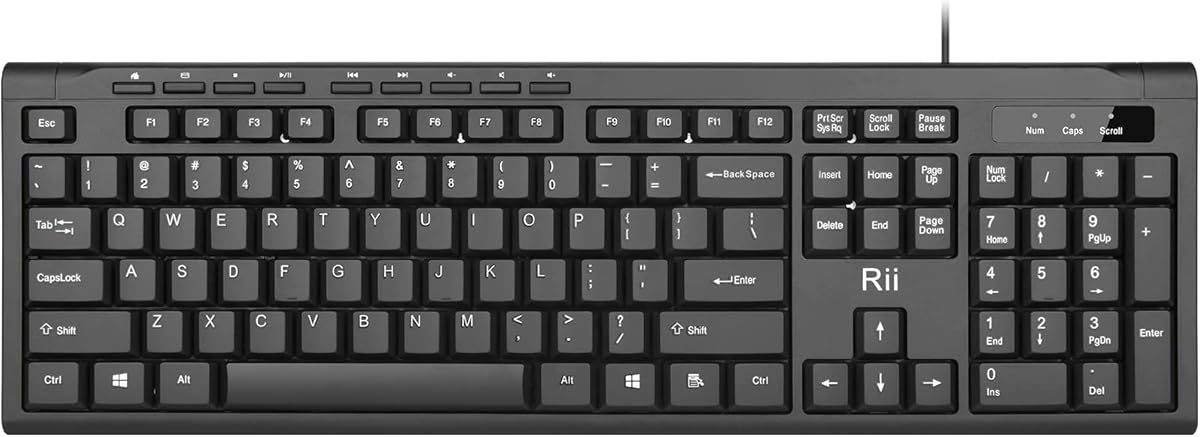
Rii RK907 Ultra-Slim
4.5Editor score
Plug-and-play USB connection
Low-profile quiet keys
Splash resistant design
This guide compares the top ten lightweight keyboards for portability and performance across gaming, office, and travel scenarios to help you find the right
Finding a lightweight keyboard that balances portability with performance is essential for modern professionals and gamers on the go. These devices reduce desk clutter and fit easily into bags without sacrificing typing comfort or connectivity options.
We evaluated ten top-rated models based on build quality, battery life, connection stability, and overall typing experience. Each product was analyzed for its weight, dimensions, and specific use cases to ensure reliable recommendations for diverse needs.
Every pick in this list highlights key features like wireless connectivity, compact layouts, and durable materials. Prices and availability may change over time, so check current listings before making your final purchasing decision for your setup.
4.5Editor score

4.4Editor score

4.3Editor score
The following table provides a side-by-side look at the most important specifications for each lightweight keyboard model included in this review. Compare their dimensions, connectivity types, and key features to determine which one aligns best with your specific workflow requirements.



The GEODMAER 65% Gaming Keyboard offers an affordable entry point for users seeking a compact wired setup. With a 4.3 star rating, it delivers reliable performance for both gaming and office tasks without breaking the bank.
We may earn a commission when you buy through this link, at no additional cost to you.
Its 65% layout saves significant desk space while retaining essential arrow keys. The detachable Type-C cable ensures a stable connection, and the LED backlighting provides clear visibility in dim environments through multiple adjustable modes.
While it uses membrane switches rather than mechanical ones, the imitation mechanical technology provides a satisfying tactile feel. The UV-coated keycaps resist fading over time, ensuring the keyboard looks new even after extended daily use.
This keyboard is ideal for gamers or professionals who need a compact, budget-friendly solution for desktop setups. Its quiet operation and sturdy construction make it a solid choice for shared spaces or long work sessions.
The 65% form factor removes the numpad to free up valuable desk space, making it perfect for smaller workstations or travel setups where portability matters.
Users can toggle between always bright and breathing modes, plus adjust brightness and frequency easily using function keys for a personalized lighting experience.
We may earn a commission when you buy through this link, at no additional cost to you.
The Logitech Pebble Keys 2 K380s is designed for users who prioritize seamless multi-device switching and slim design. Rated 4.3 stars, it delivers a comfortable laptop-like typing experience with a stylish, modern aesthetic.
We may earn a commission when you buy through this link, at no additional cost to you.
Its Bluetooth connection allows switching between Windows, Mac, and Chrome devices with a single click. The keyboard uses recycled plastic for a durable build, and its low profile keys ensure quiet operation during meetings or quiet workspaces.
Battery life is a standout feature, lasting up to three years on a single set of batteries. The auto-sleep mode conserves power effectively, ensuring the keyboard is ready for use whenever you need it without frequent battery changes.
This model suits mobile professionals and students who need a reliable, portable typing solution. Its simplicity and ease of use make it a favorite for those who value efficiency and environmental considerations in their tech choices.
Switch between devices effortlessly without re-pairing, saving time and streamlining your workflow across phones, tablets, and computers instantly.
Manufactured with at least 49% recycled plastic, this keyboard reduces environmental impact while maintaining the durability expected from Logitech products.
We may earn a commission when you buy through this link, at no additional cost to you.
The Arteck 2.4G USB Wireless Keyboard delivers a premium feel with its stainless steel body and ultra-thin profile. Rated 4.4 stars, it offers a full-size layout including a numeric keypad, making it versatile for office and data entry tasks.
We may earn a commission when you buy through this link, at no additional cost to you.
Its rechargeable battery lasts up to six months on a single charge, significantly reducing waste from disposable batteries. The low-profile keys provide a quiet and comfortable typing experience, perfect for shared environments or late-night work sessions.
The nano USB receiver ensures a stable connection up to standard wireless ranges, though it requires a USB-A port. Despite its slim design, it does not compromise on key functionality or durability, proving robust for daily heavy use.
This keyboard is recommended for users who need a full-size layout in a lightweight package. The combination of style, battery life, and reliability makes it a top contender for desktop or laptop setups requiring a numeric keypad.
The low-profile key layout reduces wrist strain during extended typing sessions, promoting better posture and long-term comfort for daily users.
Built-in lithium battery provides industry-high capacity ensuring months of use on a single charge without the hassle of constant replacements.
We may earn a commission when you buy through this link, at no additional cost to you.
The ProtoArc XK01 stands out by offering a full-size typing experience in a travel-friendly foldable format. With a 4.3 rating, it bridges the gap between portability and desktop-like functionality for remote workers and frequent travelers.
We may earn a commission when you buy through this link, at no additional cost to you.
Its tri-fold design allows it to compactly fit into bags, yet it unfolds to provide all keys including a numpad. Bluetooth 5.1 connectivity ensures stable connections with up to three devices, allowing seamless switching between laptops and tablets.
The scissor-switch keys are quiet and provide good feedback, ideal for public spaces like coffee shops. The keyboard recharges via USB-C and features an auto-sleep mode that preserves battery life for up to 150 days of standby.
This keyboard is perfect for professionals who refuse to compromise on key layout while traveling. It delivers a reliable, durable solution that maintains productivity whether you are working from a hotel or a remote office.
Internal aluminum hinges are tested for over 10,000 folds, ensuring the keyboard survives frequent packing and unpacking during business trips.
One-button switching between devices keeps your workflow uninterrupted, allowing quick transitions from phone calls to detailed document editing.
We may earn a commission when you buy through this link, at no additional cost to you.
The TECKNET 2.4G Wireless Keyboard is a mini compact solution designed for users with limited desk space. Rated 4.4 stars, it features a sleek design with chocolate keycaps that offer smooth and quiet typing for daily use.
We may earn a commission when you buy through this link, at no additional cost to you.
It connects via a slim wireless receiver for stable connectivity up to 32.8 feet. The included media hotkeys allow quick access to volume and playback controls, enhancing multimedia experiences without needing a mouse or extra devices.
Battery life is rated at 12 months, powered by standard AAA batteries, ensuring minimal maintenance. While the Enter key layout differs from standard models, it is easy to adapt to and provides a comfortable typing experience overall.
This keyboard is ideal for home users or travelers who need a small, efficient typing tool. Its affordability and simplicity make it a practical choice for secondary workstations or casual computing needs.
Dedicated hotkeys simplify multimedia management, letting you adjust volume or pause videos directly from the keyboard without interrupting your workflow.
Measuring just 11.5 by 4.9 inches, this keyboard fits easily on crowded desks, leaving ample room for a mouse or documents.
We may earn a commission when you buy through this link, at no additional cost to you.
The Rii RK907 Ultra-Slim is an excellent budget-friendly option for basic typing tasks. With a 4.5 star rating, it offers a reliable, quiet, and comfortable experience suitable for office environments or casual home use.
We may earn a commission when you buy through this link, at no additional cost to you.
Its simple wired USB connection ensures consistent performance without battery concerns. The low-profile keys contribute to a quiet typing environment, and the splash-resistant design protects against accidental spills during coffee breaks or busy workdays.
While it lacks advanced features like wireless connectivity, its durability and simplicity make it a great choice for fixed desktop setups. The compact form factor also saves space, making it suitable for smaller desks or shared work areas.
This keyboard is perfect for users who prioritize cost and reliability over advanced features. It provides a functional, durable tool that gets the job done without unnecessary complexity or expense.
Wired connectivity eliminates interference and latency issues, ensuring your inputs are registered instantly during critical tasks or data entry.
The shallow key travel reduces finger fatigue and noise, making it ideal for quiet libraries or open-office settings where discretion is key.
We may earn a commission when you buy through this link, at no additional cost to you.
The Logitech MX Keys Mini combines minimalist design with premium features like smart backlighting and precision typing. Rated 4.4 stars, it is engineered for professionals who demand quality and efficiency in a portable form factor.
We may earn a commission when you buy through this link, at no additional cost to you.
Its smart illumination lights up automatically when you approach and adjusts to ambient light, saving battery while providing clear visibility. The spherical keycaps are shaped for your fingertips, offering a comfortable and accurate typing experience.
Connectivity is seamless via Bluetooth Low Energy, allowing pairing with up to three devices. The rechargeable battery lasts up to 10 days with backlighting on, making it convenient for daily travel without worrying about disposable batteries.
This keyboard is a top choice for power users seeking a high-end portable keyboard. Its durability, typing comfort, and advanced features justify the investment for those who value quality in their daily workflow.
Auto-adjusting backlight ensures visibility in any lighting condition, turning off when not in use to maximize battery life.
Switch between Mac and PC devices effortlessly, maintaining a consistent workflow regardless of the operating system you are using.
We may earn a commission when you buy through this link, at no additional cost to you.
The ProtoArc XK04 is designed specifically for phones and tablets, offering a compact typing experience on the go. Rated 4.4 stars, it features a two-fold design that fits easily into pockets or small bags, making it ideal for travelers.
We may earn a commission when you buy through this link, at no additional cost to you.
Its PU leather cover protects the keys during transport, adding a premium feel to the device. Bluetooth 5.1 ensures stable connectivity with up to three devices, allowing you to switch between tablets and phones without interruption.
The layout is optimized for mobile devices, providing physical typing capability where touch screens may be cumbersome. It charges via USB-C and offers a long standby time, ensuring it is ready whenever you need to send messages or notes.
This keyboard is perfect for digital nomads who rely heavily on mobile devices. Its balance of protection, portability, and performance makes it a reliable tool for staying productive while traveling or commuting.
The compact layout is tailored for smaller screens, ensuring efficient typing without sacrificing essential keys for daily use.
The integrated PU leather cover shields the keyboard from scratches and damage, providing durability without the need for an extra case.
We may earn a commission when you buy through this link, at no additional cost to you.
The Arteck 2.4G Wireless Keyboard features a stainless steel body that combines durability with a sleek aesthetic. Rated 4.4 stars, it offers a quiet and comfortable typing experience for office users who value style and function.
We may earn a commission when you buy through this link, at no additional cost to you.
Its ultra-thin profile makes it easy to store in bags or drawers, saving valuable desk space. The rechargeable battery lasts up to six months on a single charge, reducing environmental waste and maintenance costs over time.
Setup is straightforward with the included nano USB receiver, allowing instant use on compatible devices. The low-profile keys provide a laptop-like feel, making it ideal for long typing sessions or data entry tasks.
This keyboard is recommended for professionals who need a stylish, portable solution for their workspace. Its premium look and reliable performance make it a great choice for modern, minimalist office setups.
The stainless steel construction adds a touch of elegance and durability, resisting wear and tear better than plastic alternatives.
Built-in battery eliminates the need for frequent battery replacements, ensuring continuous usage with minimal interruption to your workflow.
We may earn a commission when you buy through this link, at no additional cost to you.
The Logitech K400 Plus is designed specifically for controlling PCs connected to TVs, combining a keyboard and touchpad in one unit. Rated 4.4 stars, it eliminates the clutter of separate devices, making it ideal for media centers or living rooms.
We may earn a commission when you buy through this link, at no additional cost to you.
Its wireless range reaches up to 33 feet, allowing comfortable control from a distance. The large touchpad provides intuitive navigation for streaming services and web browsing, while the spill-resistant design protects against accidental liquid spills.
Battery life is rated up to 18 months, powered by standard batteries, ensuring long-term use without frequent replacements. The layout prioritizes media control over heavy typing, making it perfect for entertainment-focused environments.
This keyboard is the best choice for users wanting to simplify their TV setup. Its combination of typing and navigation capabilities streamlines the experience of using a PC as a media source in a living room setting.
Eliminates the need for a separate mouse, allowing easy navigation of menus and apps directly from the keyboard surface.
Optimized keys provide quick access to volume, play, and navigation, enhancing the entertainment experience without switching devices.
We may earn a commission when you buy through this link, at no additional cost to you.
Selecting the right lightweight keyboard requires evaluating several factors to ensure it meets your specific needs for portability, connectivity, and typing comfort.
When choosing a lightweight keyboard, size is a primary concern. Look for models with slim profiles and compact layouts like 60%, 65%, or foldable designs. These configurations reduce bulk, making them easier to slide into laptop bags or backpacks without adding significant weight.
Prioritize keyboards under 1.5 pounds if you travel frequently. Consider foldable options if you need maximum compactness, ensuring that the unfolded size still fits comfortably on smaller desks or airplane trays.
Connectivity determines how well the keyboard integrates with your devices. Bluetooth models are generally lighter than wired ones since they lack cables, but ensure they support the Bluetooth version compatible with your devices. Dual-mode keyboards offer both Bluetooth and USB connections for flexibility.
For desktop use, a wired connection may provide better stability. For mobile use, Bluetooth is essential. Check battery requirements for wireless models to ensure they align with your maintenance preferences.
Wireless keyboards rely on battery power, so longevity is crucial. Rechargeable models with USB-C ports are becoming the standard, offering convenience and reducing waste. Look for models that provide at least several months of use on a single charge or battery set.
Auto-sleep modes help conserve power when the keyboard is not in use. Ensure the battery life matches your typical usage patterns, especially if you plan to use the keyboard in remote locations without easy access to chargers.
The layout affects your typing efficiency and comfort. Full-size layouts include a numeric keypad, which is necessary for data entry but adds bulk. Compact layouts like 75% or 60% save space but may require function layers to access certain keys.
Consider whether you need specific keys like arrow keys or dedicated media controls. Ensure the layout supports your operating system, especially if you switch between Mac and Windows environments regularly.
Switch type determines the tactile feedback and noise level. Mechanical switches offer distinct tactile bumps but are often heavier. Membrane or scissor switches are quieter and lighter, making them suitable for travel or shared workspaces.
Evaluate the key travel distance; shorter travel usually means less finger fatigue. If you prioritize speed and noise reduction, low-profile scissor switches are often the best choice for lightweight keyboards.
Lightweight keyboards should not compromise on durability. Look for high-quality materials like aluminum or reinforced plastic that resist wear and tear. Splash resistance is a valuable feature that protects the internal components from accidental spills.
Foldable models require sturdy hinges to survive frequent use. Check for warranties and customer reviews regarding long-term reliability to ensure the device will withstand daily handling and transport.
Many modern lightweight keyboards allow you to connect multiple devices simultaneously. Look for models with Easy-Switch buttons that let you toggle between laptops, tablets, and phones without re-pairing.
Ensure the keyboard supports your specific operating system, whether it is Windows, macOS, Chrome OS, or Android. Multi-platform support is essential for professionals who work across different ecosystems.
Price varies widely based on features like backlighting, wireless capability, and build quality. Determine your budget early and look for models that offer the best balance of features. Often, mid-range keyboards provide the best value without unnecessary premium costs.
Consider the cost of accessories like replacement batteries or carrying cases. Investing slightly more in a durable model can save money in the long run by reducing the frequency of replacements.
To maximize the life of your lightweight keyboard, store it in a padded case or sleeve when transporting. This protects against physical damage, scratches, and moisture exposure, which are common risks during travel or commuting.
Keep the keyboard clean by regularly wiping the keycaps with a soft, slightly damp cloth. Avoid harsh chemicals that may damage the coatings or plastic. Use a can of compressed air to remove debris from between the keys and prevent sticking.
If your keyboard is wireless, ensure you turn it off when not in use to preserve battery life. For rechargeable models, do not let the battery drain completely before charging. Charge the device every few months even if unused to maintain battery health.
The lightest wireless keyboards are typically compact Bluetooth models designed for mobile devices. Some foldable options weigh under 10 ounces, while slim-profile keyboards like the Arteck 2.4G also offer minimal weight. Always check specifications for the exact weight before purchasing to ensure portability meets your needs.
Yes, many lightweight keyboards are built with durable materials like stainless steel or high-quality reinforced plastic. Models with spill-resistant designs and sturdy hinges can withstand frequent use. Choosing a reputable brand with a good warranty ensures long-term reliability even for travel or daily office work.
Most modern lightweight keyboards are compatible with Mac devices via Bluetooth or USB. Ensure the keyboard supports macOS, which often involves having correct function keys for brightness and volume. Models like the Logitech MX Keys Mini offer specific layouts tailored for Mac users.
Most rechargeable lightweight keyboards use a USB-C or micro-USB cable to charge. Plug the included cable into the keyboard port and a power source. Some models offer auto-sleep features to extend battery life, so check the specific charging requirements and indicators in the user manual.
Yes, several lightweight keyboards are designed specifically for gaming, offering anti-ghosting and responsive keys. Compact 60% or 65% layouts are popular among gamers for saving space and allowing more mouse movement. Look for low-latency wired options if responsiveness is your top priority.
Wireless lightweight keyboards typically offer battery life ranging from several months to over a year depending on usage. Rechargeable models usually last around 10 days to a few weeks with backlighting, while battery-operated models can last 6 to 12 months. Check specific product specs for accurate estimates.
Yes, many lightweight keyboards feature low-profile scissor switches or membrane keys designed to minimize noise. Quiet models are ideal for open offices or shared workspaces where typing sounds can be distracting. Look for descriptions mentioning quiet operation or low-profile keys when selecting an office-friendly option.
Many lightweight keyboards support connecting to multiple devices simultaneously via Bluetooth. You can usually switch between them using dedicated buttons without re-pairing. This feature is essential for users who work across laptops, tablets, and phones, streamlining your workflow across different screens.
We have reviewed ten top-rated lightweight keyboards that cater to a wide range of needs from budget gamers to premium professionals. Each model offers a unique balance of portability, connectivity, and build quality to suit different workflows and environments.
When making your decision, prioritize factors that matter most to your daily use. If you travel often, focus on foldable designs and multi-device switching. For office work, consider battery life and typing comfort to ensure long-term satisfaction.
Prices and availability can change quickly in the market, so always check current listings before finalizing your purchase. Selecting the right keyboard will enhance your productivity and comfort whether you are at a desk or on the move.