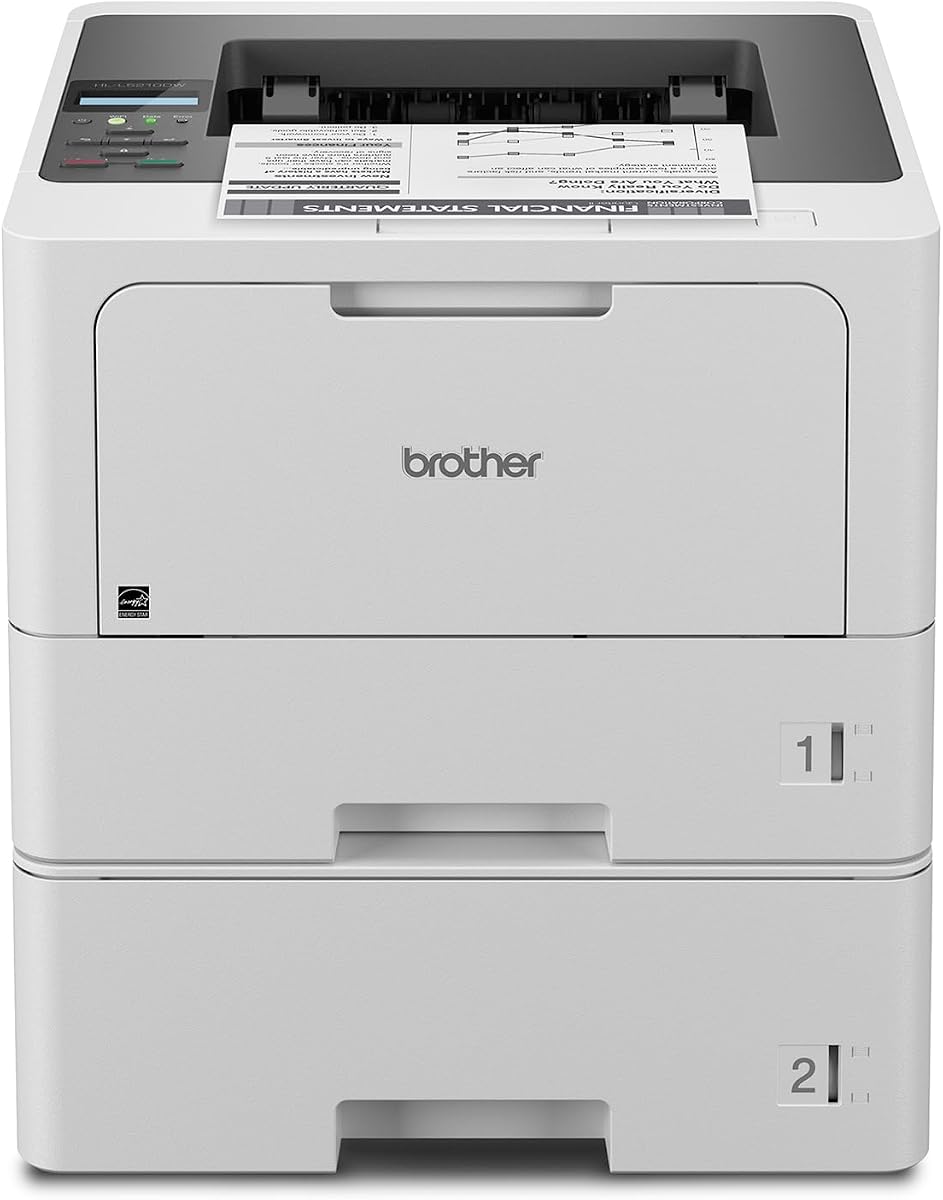
Brother HL-L5210DWT
4.3Editor score
Up to 48ppm print speed
Dual paper trays for capacity
Gigabit Ethernet connectivity
This guide compares the top laser printers for large workgroups evaluating speed capacity security and cost efficiency to help you choose the right model for
Choosing the right laser printer for large workgroups is essential for maintaining productivity and efficiency in a busy office environment. You need devices that can handle high volumes without compromising on quality or speed. A reliable printer ensures your team stays focused on critical tasks rather than dealing with frequent jams or slow output.
We have carefully selected and analyzed ten top-rated models that excel in performance and reliability for medium to large teams. Our comparison focuses on print speeds, paper capacity, advanced security features, and overall cost efficiency. Each product was evaluated based on real-world business needs and technical specifications to ensure accurate recommendations.
Each pick in this guide highlights specific strengths such as duplex printing, wireless connectivity, and robust security protocols. We also note that pricing and availability may fluctuate over time so checking current listings is advisable. This comprehensive overview helps you make an informed decision tailored to your specific workgroup demands.
4.3Editor score

4.4Editor score

4.5Editor score
The following table provides a side-by-side comparison of the ten selected laser printers highlighting their key specifications and capabilities to help you quickly identify which model best fits your large workgroup requirements.


The Brother MFC-L8930CDW stands out as a top-tier color laser all-in-one printer designed for demanding workgroups. With a rating of 4.4 stars it delivers professional results through sharp color and black printing capabilities. Its standout qualities include fast print speeds and advanced security protocols that protect sensitive documents in transit.
We may earn a commission when you buy through this link, at no additional cost to you.
Productivity is greatly enhanced by the high-speed two-sided scanning which reaches up to 104 pages per minute. The 7-inch color touchscreen provides intuitive navigation and supports customized shortcuts for frequently used tasks. Flexible connectivity options like dual-band wireless and Gigabit Ethernet ensure seamless integration into existing office networks.
While the initial investment is higher than monochrome options the included toner cartridges help lower printing costs over time. The compact design is 25% smaller than previous models making it suitable for spaces with limited footprint. These trade-offs are acceptable given the superior versatility and output quality provided by this device.
This printer is ideal for marketing teams or departments requiring high-quality color prints regularly. Its advanced features make it a strong candidate for medium to large workgroups prioritizing efficiency and security. We recommend it for businesses needing reliable multifunction capabilities with minimal downtime.
Flexible connectivity and touchscreen navigation streamline daily tasks and reduce manual overhead for busy teams.
Advanced security features keep devices secure and protect data during transit and printing operations.
We may earn a commission when you buy through this link, at no additional cost to you.
The Brother HL-L5210DWT offers exceptional value for workgroups focused on high-volume monochrome printing. It boasts a print speed of up to 48 pages per minute ensuring fast professional quality documents. Its standout qualities include dual paper trays and flexible connectivity that support seamless network sharing.
We may earn a commission when you buy through this link, at no additional cost to you.
Efficiency is boosted by the dual 250-sheet paper trays which reduce refilling time significantly. The optional tray expandability allows for a total capacity of up to 1390 sheets catering to large offices. Cost efficiency is maintained through the use of super high-yield replacement toner cartridges.
Although it lacks scanning capabilities its focus on printing speed and reliability makes it a robust choice. The security features safeguard networks and protect documents in transit to and from print devices. These limitations are acceptable for departments requiring dedicated printing power without multifunction needs.
This model is perfect for administrative departments or sales teams needing rapid document production. It balances performance and cost effectively for businesses prioritizing speed. We highly recommend it for teams seeking reliable monochrome output with minimal intervention.
Using high-yield toner cartridges helps reduce operating costs and lower the total cost of ownership.
Built-in Gigabit Ethernet and dual-band wireless allow seamless setup and sharing on your network.
We may earn a commission when you buy through this link, at no additional cost to you.
The HP LaserJet Enterprise M406dn is an entry-level enterprise printer designed for speed and security. With a rating of 4.4 stars it offers print speeds up to 42 ppm to empower work teams. Its standout qualities include HP Wolf Enterprise Security which detects and self-heals from malware threats.
We may earn a commission when you buy through this link, at no additional cost to you.
Business efficiency is built into this device through HP FutureSmart firmware that can be updated for years to come. The ability to print directly from the 2.7-inch color display adds convenience for immediate tasks. Automatic two-sided printing helps save paper and speeds up task completion.
While it lacks wireless connectivity the built-in Ethernet ensures stable performance in wired environments. The security layers are critical for businesses handling sensitive data that require robust protection. These trade-offs are acceptable for organizations prioritizing network stability and data safety.
This printer suits offices needing reliable monochrome printing with minimal management overhead. Its security features make it ideal for regulated industries. We recommend it for teams focusing on straightforward and secure document production.
Third-party solutions and card reader support give workgroups what they need to succeed efficiently.
HP FutureSmart firmware ensures your investment is optimized for years through regular updates.
We may earn a commission when you buy through this link, at no additional cost to you.
The Brother MFC-L6810DW is an enterprise monochrome all-in-one printer built for mid to large-sized workgroups. It delivers high-quality output and speeds up to 52ppm to ensure fast professional documents. Its standout qualities include a large expandable paper capacity and integrated NFC card reader for authentication.
We may earn a commission when you buy through this link, at no additional cost to you.
Fast high-volume scanning is supported by the 80-page auto document feeder which offers single-pass two-sided scanning. The 7-inch touchscreen display allows scanning to popular destinations including cloud services directly. Lifetime value is offered through included toner cartridges and options for ultra high-yield replacements.
The higher cost reflects the robust features and capacity required for demanding enterprise environments. The large footprint may require dedicated space but ensures uninterrupted printing for busy teams. These trade-offs are acceptable for organizations needing maximum throughput and security.
This printer is best for central offices or departments with heavy document processing needs. Its security and speed make it a reliable asset for productivity. We recommend it for workgroups prioritizing high-volume efficiency and network safety.
Triple Layer Security helps safeguard your network and protect documents in transit effectively.
Optional trays allow capacity expansion up to 1660 sheets reducing refilling interruptions.
We may earn a commission when you buy through this link, at no additional cost to you.
The Brother HL-L6210DW delivers impressive performance for high-volume monochrome printing tasks. With a rating of 4.1 stars it ensures jobs are completed with exceptional efficiency and precision. Its standout qualities include built-in Gigabit Ethernet and dual-band wireless networking for mobile device printing.
We may earn a commission when you buy through this link, at no additional cost to you.
Superior capacity is provided by the robust 520-sheet main tray and 100-sheet multipurpose tray. Optional trays expand the total capacity up to 1660 sheets for uninterrupted professional-grade performance. Cost-efficient printing is achieved through ultra high-yield replacement toner cartridges.
While it lacks scanning features the focus on speed and connectivity makes it ideal for shared office use. Security excellence is maintained through Triple Layer Security features protecting network and devices. These trade-offs are acceptable for teams prioritizing fast output and flexible access.
This model is excellent for departments needing reliable wireless printing without multifunction overhead. It supports seamless integration across business networks effectively. We recommend it for users seeking efficient and secure high-volume printing.
Gigabit Ethernet and dual-band wireless enable efficient sharing across business networks.
Impressive 50 ppm output speed ensures high-volume jobs are completed efficiently.
We may earn a commission when you buy through this link, at no additional cost to you.
The Brother MFC-L5915DW offers high-quality output and print speeds up to 50ppm for busy offices. It maintains a strong rating of 4.3 stars and ensures fast professional documents. Its standout qualities include low-cost output options and flexible connectivity for seamless network sharing.
We may earn a commission when you buy through this link, at no additional cost to you.
Help reduce operating costs by using the ultra high-yield 18000-page replacement toner cartridge. The 70-page auto document feeder offers single-pass two-sided scanning up to 56ipm for efficiency. Built-in Gigabit Ethernet and dual-band wireless allow easy setup and sharing on your network.
While it lacks an NFC card reader the scanning capabilities are robust enough for most business needs. The cost-efficiency is a major draw for departments managing tight budgets without sacrificing speed. These trade-offs are acceptable for teams needing reliable multifunction capabilities.
This printer is ideal for general office use requiring consistent high-volume printing and scanning. It balances features and cost effectively for various business sizes. We recommend it for workgroups needing efficient document handling and cost control.
Help reduce operating costs by using ultra high-yield replacement toner cartridges effectively.
Gigabit Ethernet and dual-band wireless ensure seamless set up and sharing on network.
We may earn a commission when you buy through this link, at no additional cost to you.
The HP LaserJet Enterprise M507n is designed to keep up with the demands of a growing business. With a rating of 4.0 stars it consistently prints high-quality documents reliably. Its standout qualities include over 200 embedded security features and centralized printing control capabilities.
We may earn a commission when you buy through this link, at no additional cost to you.
The world's most secure printing ensures protection of printer information and continual detection of attacks. Help build business efficiency with HP Web JetAdmin by easily adding new devices and updating features. Trusted HP 89A/89X toner cartridges avoid reprints and wasted supplies.
While it lacks wireless connectivity the built-in Ethernet provides stable performance for office networks. The security features make it suitable for businesses requiring rigorous data protection. These trade-offs are acceptable for environments prioritizing network stability and security management.
This printer is best for enterprises needing reliable monochrome printing with centralized management. Its robust security makes it a strong candidate for regulated industries. We recommend it for businesses seeking growth-ready printing solutions.
Over 200 embedded security features protect printer information and stop attacks continually.
HP Web JetAdmin helps build business efficiency and applying corporate policies.
We may earn a commission when you buy through this link, at no additional cost to you.
The HP LaserJet Enterprise MFP M634z combines performance energy efficiency and security in one package. With a high rating it delivers professional-quality documents with JetIntelligence technology. Its standout qualities include industry-leading security and high-speed performance that keeps business moving.
We may earn a commission when you buy through this link, at no additional cost to you.
Protect your network from attacks with the deepest security embedded features protecting sensitive data. High-speed performance includes print speeds up to 55 ppm and fast first page out time. Accelerate workflow with a 150-page auto document feeder and 9-inch color touchscreen.
The higher price reflects the premium features and robust capabilities for large environments. The large footprint and high paper volume ensure uninterrupted operation for teams. These trade-offs are acceptable for enterprises prioritizing maximum throughput and security.
This printer is ideal for large enterprises requiring extensive document processing and finishing options. It supports heavy workloads and secure operations effectively. We recommend it for organizations needing comprehensive printing solutions.
JetIntelligence combines performance energy efficiency and security for professional-quality documents.
2300-sheet input capacity and stapler stacker ensure ready operation for teams.
We may earn a commission when you buy through this link, at no additional cost to you.
The Brother HL-L8430CDWT is built for dependable performance and professional results in busy offices. With a rating of 4.6 stars it supports work teams with sharp black and color output. Its standout qualities include low-cost printing options and flexible connectivity with a color touchscreen.
We may earn a commission when you buy through this link, at no additional cost to you.
Optimize business productivity with print speeds up to 33ppm and vibrant color output quality. Dual paper trays offer flexibility for mixed media and higher capacity for fewer refills. Sustainability features include EPEAT Gold rating and ENERGY STAR certification for energy efficiency.
While it lacks scanning capabilities the focus on color printing speed and cost efficiency is strong. The low-cost printing options help manage budgets for teams needing regular color prints. These trade-offs are acceptable for departments prioritizing quality and reliability.
This printer is best for teams needing consistent color printing without multifunction complexity. It balances performance and sustainability effectively. We recommend it for offices requiring reliable color output and secure printing.
Print speeds up to 33ppm and sharp output ensure dependable performance and teams.
Super high yield replacement toner cartridges lower costs for color printing needs.
We may earn a commission when you buy through this link, at no additional cost to you.
The Brother HL-L6310DW delivers high-quality output and speeds up to 52ppm for large workgroups. With a rating of 4.2 stars it ensures fast professional documents efficiently. Its standout qualities include enterprise-level security features and large expandable paper capacity for uninterrupted work.
We may earn a commission when you buy through this link, at no additional cost to you.
Help boost productivity and ensure fast professional quality documents for mid to large-sized workgroups. Lifetime value is provided through built-in value with included genuine toner cartridges. Large expandable paper capacity allows total capacity expansion up to 1660 sheets with optional trays.
While it lacks scanning features the robust security and capacity make it suitable for enterprise needs. Easy to use and deploy with device management solutions for mass distribution of configurations. These trade-offs are acceptable for teams prioritizing output speed and control.
This printer is ideal for large offices requiring high-volume monochrome printing with minimal management. Its security features protect networks and devices effectively. We recommend it for enterprises needing reliable and scalable printing solutions.
Print speeds up to 52ppm ensure professional documents for large workgroups.
User friendly design allows for easy replacement of paper and toner.
We may earn a commission when you buy through this link, at no additional cost to you.
Selecting the right laser printer for large workgroups requires careful evaluation of key factors that impact performance and operational efficiency in your office environment.
Print speed measured in pages per minute is crucial for maintaining workflow in busy offices. Look for models that offer high speeds such as 40 ppm or more to ensure that waiting times are minimized during peak usage periods. This ensures your team can access documents quickly without bottlenecks.
Prioritize high print speeds for large groups to maintain productivity.
Large workgroups require substantial paper capacity to reduce the frequency of refills. Seek printers with multiple trays or the ability to expand capacity to support thousands of sheets. This ensures continuous operation and minimizes interruptions during high-volume printing tasks.
Choose models with expandable trays to support continuous printing needs.
Security is a critical consideration when handling sensitive business documents on shared devices. Look for printers equipped with advanced features like intrusion detection and authentication to protect data. These layers safeguard your network and prevent unauthorized access to print jobs.
Prioritize devices with advanced security protocols to protect sensitive information.
Versatile connectivity ensures that users can print from various devices and locations. Opt for printers that offer both wired Ethernet and wireless options to accommodate diverse workflows. This flexibility supports mobile printing and seamless integration with existing network infrastructure.
Ensure the printer supports both wired and wireless connections for flexibility.
Operating costs can add up significantly over time for large teams. Evaluate toner yield and replacement costs to determine long-term value. Models that offer high-yield cartridges or built-in cost-saving features can reduce overall expenses.
Consider total cost of ownership when choosing toner and replacement options.
All-in-one printers combine printing scanning copying and faxing to save space and money. If your workgroup requires document processing beyond printing look for multifunction models. This consolidation simplifies workflow and reduces the need for multiple separate devices.
Invest in multifunction devices to consolidate tasks and save office space.
An intuitive user interface helps reduce training time and improve efficiency. Touchscreens with clear menus and customizable shortcuts allow users to complete tasks quickly. A user-friendly design ensures that even complex features are easy to access and use.
Look for models with responsive touchscreens and intuitive menu navigation.
Environmental impact is increasingly important for modern businesses. Select printers that are ENERGY STAR certified and use recycled materials. Features like duplex printing help reduce paper usage and support green initiatives within the workplace.
Choose printers with ENERGY STAR certification and eco-friendly features.
Regularly update your printer firmware to ensure optimal performance and security. These updates often include patches for vulnerabilities and improvements to network stability. Keeping your device updated protects your network from potential cyber threats effectively.
Keep the paper trays clean and free of dust to prevent jams and ensure smooth operation. Use high-quality paper designed for laser printing to reduce wear on internal components. Proper maintenance extends the lifespan of your printer and maintains high output quality.
Utilize the administrative tools provided with enterprise models to monitor usage and manage settings. This allows you to track costs and enforce printing policies across the workgroup. Regular management helps maintain efficiency and reduces unnecessary operational expenses.
A laser printer suitable for large workgroups typically offers high print speeds large paper capacity and advanced security features. These factors ensure that the device can handle high volumes of documents without frequent interruptions or compromising data safety.
Yes multifunction printers combine printing scanning copying and faxing which can save space and money. They streamline workflows by reducing the need for separate devices and simplify document management for teams.
Security is crucial for office printing as sensitive data is often processed on these devices. Advanced features like authentication and intrusion detection help prevent unauthorized access and protect information in transit.
High paper capacity reduces the frequency of refills allowing teams to focus on core tasks. For large workgroups this means fewer interruptions and more continuous operation during busy periods.
Choosing between color and monochrome depends on your document needs. If your workgroup frequently prints marketing materials or graphs a color printer is necessary. Otherwise monochrome models often offer lower operating costs.
You can reduce costs by using high-yield toner cartridges enabling duplex printing and monitoring usage through admin tools. Additionally enforcing print policies and recycling cartridges helps manage expenses effectively.
Wireless printers are secure enough provided they use strong encryption and authentication methods. Look for models that support secure protocols and network protection features to safeguard data during transmission.
The average lifespan of a laser printer is typically around five to seven years with proper maintenance. Regular cleaning and using genuine toner help extend its life and maintain performance standards.
In summary the top picks for large workgroups include the Brother MFC-L8930CDW for color versatility and the Brother HL-L5210DWT for value. These models excel in speed capacity and security making them strong choices for various business needs.
When choosing a printer prioritize features that align with your specific workflow such as speed and security. Consider the total cost of ownership and ensure the device supports your long-term growth and efficiency goals.
Remember to check current availability and prices as market conditions can change. Selecting the right laser printer ensures your team stays productive and your data remains secure in any business environment.