
Blue Marble Learn to Draw Projector
4.4Editor score
Adjustable and collapsible design
Includes markers and image discs
Simple setup for kids
This guide compares the best kids drawing projector options available in October 2026 to help parents choose the perfect artistic tool for their child's
Finding the right drawing projector for your child can transform how they learn to draw and express themselves creatively. These devices project images onto paper so kids can trace and learn fundamental artistic skills without feeling overwhelmed by blank pages.
We evaluated ten top-rated drawing projectors based on ease of use, image clarity, included content, and educational value. Our comparison looks at features like app connectivity, built-in tutorials, and durability to ensure you find a tool that grows with your child.
Each pick below highlights specific strengths such as budget friendliness or advanced AI features that generate custom drawings. Remember that prices and availability can change frequently, so check current listings before making your final purchase decision today.
4.4Editor score

4.5Editor score

4.6Editor score
The following table provides a side-by-side comparison of all ten drawing projectors reviewed in this guide. Each entry includes key specifications and direct links to product details on Amazon for your convenience.



The Flycatcher smART Sketcher 2.0 stands out as the top choice for families seeking a comprehensive drawing tool. With a 4.5 star rating it delivers a robust learning experience that combines projection technology with interactive app features.
We may earn a commission when you buy through this link, at no additional cost to you.
This projector shines by connecting to smartphones via Bluetooth allowing children to access a vast library of tutorials and images. Kids can trace over 60 preloaded images or upload their own photos to create custom drawings with ease.
While the app dependency adds complexity the freedom it offers is unmatched. The initial cost is higher than basic projectors but the expandable content and educational depth justify the investment for serious young artists.
Families wanting a tool that grows with their child should choose this model. It fosters independence and problem-solving skills while providing endless hours of creative fun through structured and open-ended drawing activities.
The companion app unlocks personalized drawings and interactive tutorials that keep kids engaged long after the box is opened.
Beyond art this tool promotes hand-eye coordination and cognitive development through structured tracing and creative projects.
We may earn a commission when you buy through this link, at no additional cost to you.
The Caydo T3 AI is the premium choice offering high definition projection and artificial intelligence capabilities. Rated 4.6 stars it transforms any room into a creative studio and entertainment center for older children.
We may earn a commission when you buy through this link, at no additional cost to you.
Its standout feature is the AI app that turns text ideas like dragons eating pizza into traceable outlines instantly. The projector also functions as a native 720P media player for streaming cartoons after drawing time.
The price reflects these advanced features but the versatility ensures it won't be outgrown quickly. Eye safety is prioritized with RG0 certification and a timer that reminds kids to take breaks during long sessions.
Choose this projector if you want a versatile device that serves as both an art tool and media player. It is perfect for tech savvy kids who want to bring their wildest imaginative ideas to life.
Type any idea into the app and watch it transform into a clean outline ready for tracing in seconds.
Built-in WiFi and Bluetooth allow the device to stream content making it a dual purpose entertainment hub.
We may earn a commission when you buy through this link, at no additional cost to you.
The Blue Marble projector offers an excellent entry point for families on a budget. With a 4.4 star rating it provides all the essentials for tracing and drawing without requiring additional purchases.
We may earn a commission when you buy through this link, at no additional cost to you.
This all-inclusive kit comes with markers and image discs making it ready to use right out of the box. The collapsible design allows for easy storage and the step-by-step tutorial disc helps beginners learn the basics.
While it lacks app connectivity the simplicity is a benefit for younger kids who might get distracted by tech. The award winning design ensures quality construction and reliable performance for early artistic exploration.
Parents looking for a reliable and affordable starter kit will love this option. It provides a low risk way to introduce drawing concepts and build confidence before moving to more complex tools.
Everything needed for a complete art experience is included in the box from markers to tutorial discs.
Winner of the Toy of the Year Award this projector is proven to foster education and creativity effectively.
We may earn a commission when you buy through this link, at no additional cost to you.
The Caydo T3 Joy AI is designed specifically for younger children with a focus on simplicity and fun. Its impressive 4.8 star rating reflects how well it balances creativity with ease of use for ages four and up.
We may earn a commission when you buy through this link, at no additional cost to you.
With 120 built-in patterns across fun themes like space and animals kids can start drawing immediately without complex setup. The projector features a timer to encourage healthy breaks and protects eyes with downward lighting design.
While it is less complex than the standard T3 model it is perfectly suited for preschoolers. The adorable sloth design and sticker decorations make it feel like a friendly companion rather than just a tool.
This is the ideal choice for parents of toddlers and preschoolers. It builds early artistic confidence through simple steps and ensures screen free play with thoughtful safety features designed for little eyes.
Ready to create in minutes the device breaks patterns into manageable steps so kids never feel lost.
Designed with RG0 blue light safety it shines images downward ensuring comfortable screen free creative play.
We may earn a commission when you buy through this link, at no additional cost to you.
The Thin Air Brands projector is built to withstand rough handling by young children. With a 4.6 star rating it offers a rugged design that ensures longevity even in active play environments.
We may earn a commission when you buy through this link, at no additional cost to you.
This kit includes 32 animal drawings on four sturdy discs plus crayons and paper making it a complete set. The operation is simple with a knob to turn on and slide the disc in for immediate tracing fun.
Durability is the main selling point here as the ABS plastic resists cracks and drops effectively. While it lacks app features the simplicity allows children to focus entirely on the drawing process without tech distractions.
Families with energetic preschoolers will appreciate the tough build quality. It is also an excellent travel option since it uses standard batteries and stores neatly in a colorful box that protects the contents.
Made of rugged ABS plastic this projector resists impact ensuring it lasts through rough play sessions.
No complicated setup is required so toddlers can insert discs and start drawing on their own.
We may earn a commission when you buy through this link, at no additional cost to you.
This AI drawing projector brings imagination to life by allowing kids to type ideas and see them instantly. Rated 4.4 stars it is a great gift for children aged five to twelve who want to create custom art.
We may earn a commission when you buy through this link, at no additional cost to you.
Simply type a description like a dancing dragon and the projector creates a picture to trace. The included speaker adds educational value by reading words and numbers when specific learning packs are selected.
The main drawback is that it requires a constant power connection during use. This limits portability but ensures the device has enough energy to process AI images and project them clearly on paper.
It is perfect for families wanting a tech focused toy that still encourages drawing. The combination of AI generation and learning audio makes it a unique tool that supports both art and literacy skills.
Type any idea like a castle in space and turn it into a custom picture to project and trace.
The built-in speaker says numbers and words as matching pictures appear to support learning through play.
We may earn a commission when you buy through this link, at no additional cost to you.
The Gohero projector is designed as a complete travel kit that keeps kids entertained anywhere. With a 4.3 star rating it includes 64 images and a storage box that holds all accessories together.
We may earn a commission when you buy through this link, at no additional cost to you.
The unit features a 360 degree rotation and a focus button so kids can adjust clarity easily. All pens and discs fit into the box which makes cleanup simple and prevents loss of pieces during outings.
While the rating is slightly lower the convenience factor is high for families on the go. The focus button helps ensure images are sharp enough for tracing even if the surface is slightly uneven.
This is an excellent choice for parents who need entertainment for car rides and flights. The storage box design solves the common problem of lost art supplies and keeps the play area organized.
Everything fits into a sturdy storage box making it ideal for keeping kids entertained in cars and airplanes.
Adjust the sharpness with the focus button to ensure images are clear for accurate drawing.
We may earn a commission when you buy through this link, at no additional cost to you.
The KETIEE projector offers a unique multi-function approach combining projection with other creative tools. Rated 4.5 stars it allows kids to project copy draw and listen to music all in one device.
We may earn a commission when you buy through this link, at no additional cost to you.
It comes with an erasable board and twelve drawing pens providing a variety of mediums for expression. The smooth edges and soft light ensure it is safe for children to use without risk of injury.
This model is great for kids who like to switch between different types of art activities. The multifunction nature makes it a versatile toy that can grow with a child's changing interests.
Choose this projector if you want a device that offers more than just tracing. The inclusion of a reusable board and music capability makes it a dynamic creative station for younger artists.
Can project copy draw and listen to music making it a powerful and interesting creative toy.
The smooth edges and soft light will not hurt a child's hands or eyes during use.
We may earn a commission when you buy through this link, at no additional cost to you.
The Crayola Light Up Tracing Pad is a classic light box that makes tracing simple and precise. With a 4.6 star rating it uses an LED surface to illuminate images placed underneath for accurate tracing.
We may earn a commission when you buy through this link, at no additional cost to you.
This set includes 12 colored pencils and 10 tracing sheets to start creating immediately. The lightweight build and non-slip frame make it easy to move around the house or take to class.
While it does not project images like others it offers great precision for older kids who need control. The trusted Crayola brand ensures quality materials and reliable performance for all art projects.
Choose this pad if you prefer a hands on approach to tracing. It is perfect for kids who want to work on detailed drawings and value a brand known for art supplies and quality.
The LED surface makes it simple for kids to trace and transfer favorite designs with precision.
Includes pencils tracing sheets and blank paper so kids can start drawing right away.
We may earn a commission when you buy through this link, at no additional cost to you.
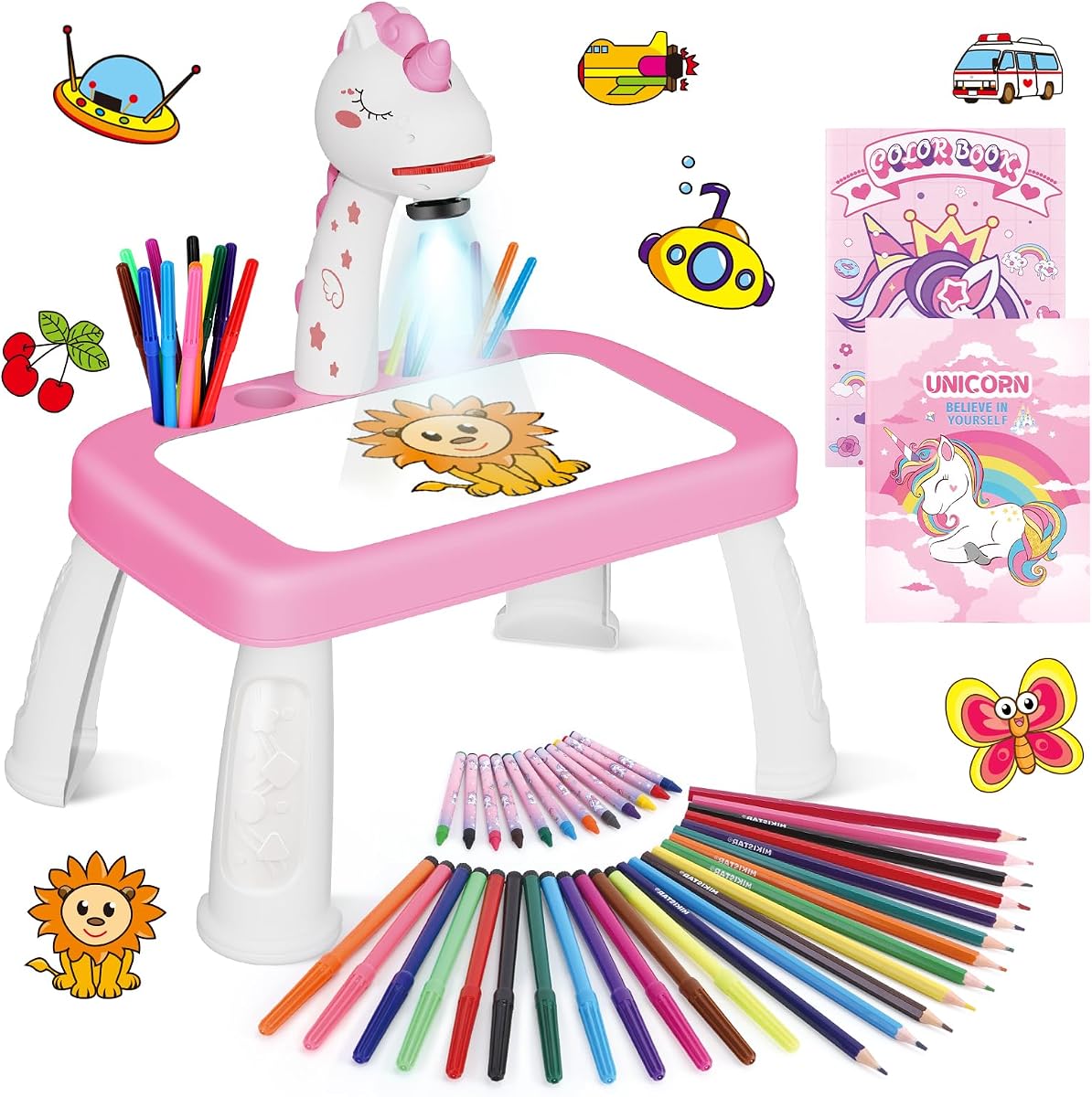
This Unicorn themed drawing projector kit is a delightful gift for children who love magical creatures. With a 4.4 star rating it combines a projector with a wide variety of art supplies in one package.
We may earn a commission when you buy through this link, at no additional cost to you.
The set includes color pens pencils crayons and a sticker book making it a comprehensive craft station. The durable unicorn shaped design is drop resistant ensuring it survives daily use by young children.
While the theme is specific it offers great value due to the number of supplies included. It is designed for kids as young as three and makes a wonderful birthday or Christmas present.
Choose this kit if you want a gift that looks special and offers multiple art options. The unicorn theme adds a personal touch that makes the art experience more engaging and fun for fans.
Designed in an adorable unicorn shape this kit is a delightful gift for children who love magical creatures.
Includes color pens pencils crayons and a sticker book making it a comprehensive craft station.
We may earn a commission when you buy through this link, at no additional cost to you.
Choosing the right drawing projector involves considering age appropriateness content variety durability and additional features like app connectivity or audio.
Different projectors are designed for different age groups ranging from preschoolers to preteens. Younger kids need simpler controls and sturdy materials while older kids may benefit from app connectivity and custom image features.
Always check the recommended age range to ensure the device matches your child's developmental stage and ability to operate the projector independently.
The number of included images and options to add new content are crucial for long-term use. Look for models with discs or built-in libraries that offer enough variety to keep interest high over months of use.
Prefer models with expandable libraries or app support if you want your child to access a wider range of images without buying extra discs separately.
Some projectors connect to smartphones or tablets via Bluetooth allowing kids to trace their own photos. This feature adds a personal touch and expands creativity beyond preloaded images significantly.
If your child enjoys custom drawings consider a model with app connectivity but ensure you have a compatible device to use the extra features effectively.
Eye safety is critical when selecting a projector for children. Look for devices with RG0 certification or downward light design to prevent direct exposure to bright lights during use.
Certified eye protection ensures that your child can enjoy long drawing sessions without eye strain or potential long-term vision issues from bright light.
Children can be rough with toys so sturdy construction is essential. Models made with ABS plastic and rounded edges are less likely to break when dropped or handled roughly.
Choose a model with rugged construction to ensure longevity and reduce the need for replacements after a few months of heavy use.
Projectors typically run on batteries or direct power cords. Battery powered models offer portability but require replacements while corded models ensure consistent performance without battery interruptions.
Decide based on your typical use case whether you need the freedom of battery operation or the reliability of a constant power connection.
Some advanced models include built-in speakers that read words or numbers as images are projected. This adds an educational layer beyond art helping with literacy and math skills simultaneously.
If you want a device that supports multiple learning areas check for models with audio capabilities or language learning packs included.
A projector that stores its accessories is easier to keep organized and ready for use. Look for models with built-in compartments or a dedicated storage box for discs and pens.
Good storage design prevents lost pieces and keeps the art area tidy which encourages children to use the projector regularly without frustration.
To get started place the projector on a flat surface and insert a disc or slide. Turn on the device using the knob or power button and adjust the focus until the image appears sharp on the paper.
Place a sheet of paper under the projection arms and have your child trace the outline with the provided markers. Remind them to use light strokes and check the projector timer for healthy breaks.
After use store the discs and pens in the built-in compartments to prevent loss. Wipe the lens with a soft cloth if it gets dirty to ensure clear projections for future creative sessions.
Most modern projectors are designed with eye safety in mind featuring downward lighting that projects onto paper rather than at the child. Look for models with RG0 blue light certification for added protection during long drawing sessions.
Yes most drawing projectors are designed to work with standard copy paper or sketchbooks. Some kits even include a pad of drawing paper specifically sized to fit under the projection arms perfectly.
Many models offer app connectivity that allows you to upload photos or browse additional content. Basic models may sell extra disc packs or slides that provide fresh designs for continued creativity.
Setup is typically very simple involving inserting a disc or slide into the slot and turning a power knob. Adjust the focus button and height to get a clear image on the paper before starting to draw.
While possible most kits recommend using paper for best results and to avoid damage. The included markers work best on paper so using a provided drawing pad ensures the best quality and easiest cleanup.
It depends on the model as some use standard AA batteries while others plug into a wall outlet. Check the product details for power requirements and ensure you have the right power source ready to go.
Yes most models are designed with child-friendly controls like simple knobs and buttons. Once the disc is inserted children can turn it on and start tracing independently which fosters creativity and confidence.
Some advanced models include timers that remind children to take breaks every 30 to 60 minutes. Even without a timer it is wise to limit continuous use to avoid eye strain and encourage breaks.
Whether you choose the Flycatcher smART Sketcher 2.0 for its app features or the Blue Marble projector for its value there is an option for every family's needs and budget.
Prioritize eye safety features and durability to ensure the projector lasts and protects your child during play. Look for models that grow with your child to provide long-term creative value.
Remember to check current pricing and availability before buying as deals may change frequently. Use the comparison table above to find the perfect balance of features and cost for your young artist.