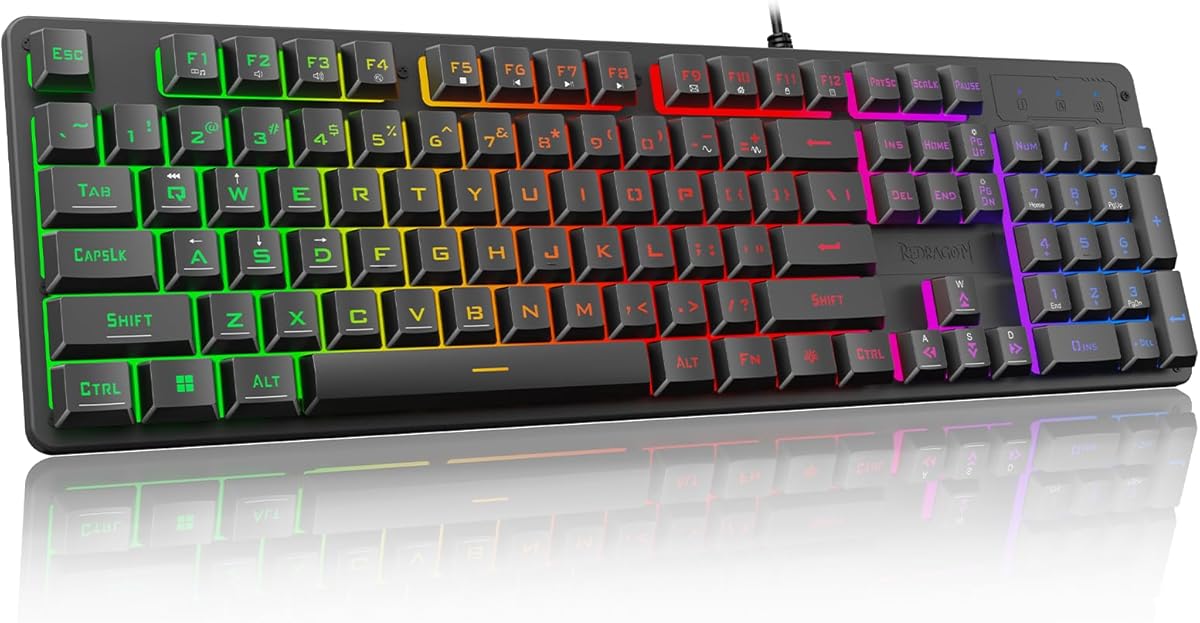
Redragon K521 Upgrade Rainbow LED Gaming Keyboard
4.4Editor score
19 Keys Anti-Ghosting
Mechanical Feeling Keys
One-Touch Backlit
Discover the best keyboard for Rainbow Six Siege to enhance your gameplay with responsive controls and durable builds designed for tactical shooters.
Finding the right keyboard for Rainbow Six Siege can significantly impact your tactical performance and reaction times during intense competitive matches.
We compared top-rated gaming keyboards based on switch speed, durability, layout efficiency, and customization options to help you choose the perfect tool.
Each pick highlights specific strengths for Siege players, from macro keys to rapid trigger modes, while noting that availability and stock levels may vary over time.
4.4Editor score

4.6Editor score

4.6Editor score
This side-by-side comparison evaluates every model on key attributes relevant to Siege operators, including actuation speed, layout compactness, and build quality.



The Redragon K521 offers a highly accessible entry point into gaming keyboards, achieving a 4.4 rating from users who appreciate its value and visual appeal.
We may earn a commission when you buy through this link, at no additional cost to you.
Its mechanical feeling keys provide faster response times than standard keyboards, while the anti-ghosting feature ensures that complex ability combinations register correctly during fast-paced Siege matches.
Although it lacks advanced software for macro programming, the dedicated multimedia keys and simple lighting controls make it easy to manage volume and brightness without pausing your operation.
This keyboard is ideal for players on a strict budget who still need reliable performance and visual flair, making it a solid starting point for tactical shooter enthusiasts.
The competitive pricing makes professional gaming features accessible to everyone without compromising on core functionality like anti-ghosting.
The adjustable breathing mode and brightness settings allow players to match their keyboard lighting to their ambient room setup for immersion.
We may earn a commission when you buy through this link, at no additional cost to you.
With a 4.6 rating, the AULA F75 Pro stands out for its versatility and build quality, offering a tri-mode connection that keeps you connected to your console or PC seamlessly.
We may earn a commission when you buy through this link, at no additional cost to you.
The hot-swappable design allows you to customize the switch feel to match your preference for rapid trigger actuation or smooth linear typing, which is critical for precise movement in Siege.
While the lack of deep macro software might limit advanced scripting, the multi-function knob provides quick control over volume and brightness, keeping your focus on the tactical map.
This keyboard is a perfect choice for players who want the freedom of wireless play without sacrificing the tactile benefits of a mechanical setup.
Hot-swapping allows you to experiment with different switch types to find the ideal actuation speed for your specific playstyle.
The 2.4GHz mode ensures low latency comparable to wired connections, eliminating cables cluttering your desk during intense rounds.
We may earn a commission when you buy through this link, at no additional cost to you.
The ASUS ROG Strix Scope II 96 achieves a 4.6 rating by balancing full functionality with a compact footprint, making it a top-tier choice for serious operators.
We may earn a commission when you buy through this link, at no additional cost to you.
Its integrated sound-dampening foam ensures that your keystrokes remain quiet, which is beneficial for maintaining stealth during communication with your team via Discord or Squad chat.
The tri-mode connectivity offers reliable switching between devices, ensuring you never lose your connection during critical moments, while the PBT keycaps resist wear and shine over time.
For those willing to invest in premium quality, this keyboard delivers the comfort and performance necessary for long ranked sessions without compromising on features.
The internal foam and dampening pads reduce key noise significantly, preventing fatigue during extended practice or competitive play.
The 96% layout keeps the numpad and arrow keys accessible while saving desk space, optimizing your setup for better ergonomics.
We may earn a commission when you buy through this link, at no additional cost to you.
With a 4.4 rating, the Corsair K55 RGB PRO provides a reliable entry-level option for players who prefer the tactile softness of membrane switches without sacrificing utility.
We may earn a commission when you buy through this link, at no additional cost to you.
The six dedicated macro keys are particularly useful for Siege operators who need to execute complex gadget interactions or weapon swaps with a single stroke.
Its IP42-rated design protects against accidental spills, ensuring your hardware survives the intensity of competitive gaming environments where drinks may be nearby.
This keyboard is best suited for casual players or those transitioning from office keyboards who value comfort and durability over high-speed mechanical actuation.
Programmable macros allow you to map essential skills to dedicated keys, reducing reaction time during high-stress tactical engagements.
The robust design ensures that your setup remains functional even if a drink spills, keeping you ready for the next round without delay.
We may earn a commission when you buy through this link, at no additional cost to you.
The SteelSeries Apex 3 earns a 4.6 rating for its exceptionally quiet switches, making it a top choice for players who value minimal noise during ranked matches.
We may earn a commission when you buy through this link, at no additional cost to you.
The magnetic wrist rest provides full palm support that helps reduce strain during long sessions, while the dedicated multimedia controls let you manage audio levels without alt-tabbing.
Although it lacks advanced macro programming capabilities, the durable water-resistant design ensures that your keyboard can withstand minor accidents and daily wear and tear.
This keyboard is ideal for late-night gaming where sound discipline is necessary, offering a comfortable and reliable experience without breaking the bank.
The low friction switches are designed for nearly silent use, which helps maintain focus and prevents distractions during team communication.
The full-size magnetic wrist rest aligns perfectly with the keyboard to provide ergonomic support that reduces wrist fatigue over time.
We may earn a commission when you buy through this link, at no additional cost to you.
The Razer Ornata V3 achieves a 4.5 rating with its unique low-profile design that offers a natural hand position ideal for long gaming sessions.
We may earn a commission when you buy through this link, at no additional cost to you.
Its mecha-membrane switches combine the snappy feedback of mechanical keys with the familiar feel of conventional keyboards, providing precision without the height of traditional switches.
The UV-coated keycaps ensure that legends remain vibrant and clear even after extensive use, maintaining a professional aesthetic that suits any setup.
This keyboard is best suited for players who prefer a lower profile and a comfortable typing experience over the high actuation force of standard mechanical switches.
The slim keycaps reduce the distance your fingers travel, helping to minimize strain and improve endurance during extended ranked play.
The UV coating protects the legends from fading, ensuring the keyboard looks new and professional even after thousands of hours of gameplay.
We may earn a commission when you buy through this link, at no additional cost to you.
With a 4.6 rating, the Logitech G413 TKL SE delivers robust performance and durability in a compact tenkeyless format that leaves ample room for mouse movements.
We may earn a commission when you buy through this link, at no additional cost to you.
The tactile mechanical switches offer clear feedback for every press, while the PBT keycaps provide a superior texture that resists wear and shine over time.
Its 6-key rollover anti-ghosting ensures that your inputs are registered accurately even when pressing multiple keys simultaneously during complex maneuvers.
This keyboard is an excellent choice for players who prioritize durability and a streamlined layout without needing extensive software customization features.
The tenkeyless layout removes the number pad to free up space for wide mouse sweeps, essential for precise aiming in tactical shooters.
The brushed aluminum top case and magnesium alloy body provide a sturdy foundation that withstands the physical demands of competitive gaming.
We may earn a commission when you buy through this link, at no additional cost to you.
The ASUS ROG Strix Scope II X earns a 4.5 rating by combining a full-size layout with premium mechanical features, ensuring all essential keys are within reach.
We may earn a commission when you buy through this link, at no additional cost to you.
Its hot-swappable design allows for customization of switch types, while the integrated sound-dampening foam reduces noise and echoes for a more focused gaming environment.
The ROG NX V2 switches provide a smooth linear experience that is highly responsive for rapid-fire inputs, and the PBT keycaps add durability and a superior touch.
This keyboard is ideal for players who want the convenience of a numpad alongside high-end mechanical features and do not require wireless connectivity.
The inclusion of a numpad is perfect for players who need to manage inventory or input codes without switching to a secondary device.
Hot-swapping enables you to replace switches easily to tailor the actuation feel to your specific preferences for movement and shooting.
We may earn a commission when you buy through this link, at no additional cost to you.
With a 4.5 rating, the Razer BlackWidow V4 X delivers instant rapid-fire inputs thanks to its yellow mechanical linear switches that minimize distance between actuation and reset.
We may earn a commission when you buy through this link, at no additional cost to you.
The built-in sound dampeners ensure that your keypresses remain quiet, while the six dedicated macro keys expand your arsenal of commands for complex skill executions.
The multi-function roller allows you to adjust volume and brightness effortlessly, giving you intuitive control over your environment without interrupting your gameplay flow.
This keyboard is perfect for players who prioritize speed and smooth linear feedback, offering a highly responsive experience for competitive tactical play.
The zero distance between reset and actuation allows for incredibly fast double-tapping, giving you an edge in rapid combat situations.
Special foam under the circuit board minimizes noise, ensuring a quieter and more immersive experience during focused gaming sessions.
We may earn a commission when you buy through this link, at no additional cost to you.
The Aula WIN60 HE achieves a 4.5 rating by offering advanced rapid trigger technology that allows for faster peeking and quick-stop shooting, essential for competitive FPS play.
We may earn a commission when you buy through this link, at no additional cost to you.
Its magnetic switches ensure precise and consistent actuation without physical contact, while the 8000 Hz polling rate delivers ultra-fast response times that keep you ahead in high-stakes matches.
The compact 60% design saves significant desk space, providing more room for your mouse to move freely, which is beneficial for low-sensitivity aiming setups.
This keyboard is an ideal choice for competitive gamers seeking the absolute latest in performance technology, provided they are comfortable with a layout that requires muscle memory adaptation.
Rapid trigger mode enables you to release and reset keys almost instantly, allowing for rapid-fire shooting and precise movement control.
The powerful yet simple web-based driver lets you remap keys and customize RGB without needing to download bulky software, streamlining your setup.
We may earn a commission when you buy through this link, at no additional cost to you.
Selecting the right keyboard involves understanding how different features impact your reaction times and comfort during extended gaming sessions.
The type of switch you choose directly affects how quickly your inputs are registered. Linear switches offer smooth actuation without a bump, which is ideal for rapid-fire inputs and quick key presses required in Siege. Tactile switches provide a physical bump that signals actuation, giving you confidence that a command has been sent. For competitive play, consider rapid trigger technology found in newer magnetic switches, which resets the key as soon as you lift your finger rather than waiting for a specific travel distance. This reduces the time between key presses and allows for more fluid movement during peeking and repositioning.
For best performance in Siege, prioritize linear or rapid trigger switches to minimize input delay.
The layout of your keyboard determines how much desk space you have for your mouse. Full-size keyboards include a numpad, which is useful if you need to manage inventory or input commands frequently. Tenkeyless layouts remove the numpad to provide more room for low-sensitivity aiming, which is popular among competitive FPS players. Compact 60% or 75% keyboards save even more space but require you to use function layers to access arrow keys and navigation keys, which may disrupt gameplay flow until you build muscle memory. Consider how much space you have and whether you rely on the numpad for utility.
Choose a TKL or 75% layout to maximize mouse movement area for better aiming precision.
Polling rate refers to how often the keyboard reports its status to your computer. Higher polling rates like 8000 Hz reduce input lag significantly compared to standard 1000 Hz rates. This means that when you press a key to shoot or move, the action is registered almost instantly, which is crucial for fast-paced tactical shooters where milliseconds matter. While standard keyboards are sufficient for casual play, competitive players benefit from the added responsiveness of high polling rates to ensure their commands are processed without delay.
Look for keyboards with at least 1000 Hz polling, but 8000 Hz is ideal for competitive advantage.
Gaming keyboards must withstand frequent and forceful inputs over long periods. PBT keycaps are generally more durable and resistant to shine than ABS keycaps, ensuring your keys feel consistent over time. Look for robust materials like aluminum top cases or reinforced bodies that minimize flex during intense sessions. Additionally, features like water resistance protect against accidental spills, ensuring your hardware remains operational after accidents. Durability is essential for a device you will use daily for competitive gaming.
Prioritize PBT keycaps and metal reinforced construction to ensure long-term durability.
Comfort is critical for long ranked sessions or tournaments. A detachable palm rest or built-in wrist support helps maintain a neutral wrist position, reducing the risk of strain or injury. Adjustable tilt options allow you to find the most comfortable angle for your hands. Low-profile keys can also reduce finger travel distance, making it easier to type and press keys for extended periods without fatigue. Ergonomic design ensures you can focus on your gameplay rather than physical discomfort.
Ensure the keyboard includes wrist support and adjustable tilt to maintain ergonomic health.
Wired connections typically offer the most reliable performance with zero latency. Wireless options like 2.4GHz provide flexibility and reduce desk clutter but require you to manage battery life. Bluetooth is useful for switching between multiple devices but often comes with higher latency. Consider whether you prioritize reliability or convenience. Most competitive players still prefer wired options to avoid any potential connection drops during critical matches.
Wired connections are safest for competitive play, but modern 2.4GHz wireless is reliable enough for most.
Software support allows you to remap keys and create complex macro scripts. Macros can automate gadget interactions or weapon switches, giving you a tactical advantage. Look for keyboards with intuitive drivers that let you edit profiles easily. However, ensure the software is lightweight and does not consume excessive system resources. Some keyboards offer hardware-based macros that work without needing software running, which is a plus for tournament play.
Choose a keyboard with robust software support to optimize your key bindings and macros.
RGB lighting is not just for looks; it can help you identify keys in low-light environments. Per-key RGB allows for distinct color schemes that can highlight essential keys like WASD or tactical abilities. While aesthetics are subjective, a lighting system that can be dimmed or turned off helps reduce eye strain during night sessions. Choose a keyboard where lighting customization is integrated into the main software for easy management.
Per-key RGB helps you locate keys quickly in the dark without compromising visual focus.
To maximize the performance of your keyboard, start by customizing your key bindings in the game settings to match your preferred hand layout. Ensure that the most frequently used abilities are mapped to keys you can reach easily without stretching.
Clean your keyboard regularly using compressed air to remove dust and debris from under the keycaps. For mechanical switches, occasional lubrication of the stabilizers can keep the sound consistent and prevent rattle over time.
If your keyboard has software for macros and lighting, keep it updated to ensure compatibility with the latest operating system patches. This prevents unexpected behavior during critical matches when you need precise execution.
Yes, mechanical keyboards generally offer faster actuation and better durability than membrane models. The precise feedback and shorter reset distance allow for quicker movement and more accurate key presses during tactical gameplay. However, the improvement depends largely on your personal preference and familiarity with the switch type.
60% keyboards save significant desk space for mouse movement, which is beneficial for low-sensitivity aiming. However, they lack dedicated arrow keys and navigation keys, requiring you to use function layers. This can be a hurdle until you build muscle memory, so ensure you can adapt before committing to this compact form factor.
While 1000 Hz is standard and sufficient for most players, higher polling rates like 8000 Hz reduce input lag further. This ultra-fast response time ensures that your commands are registered instantly, giving you a competitive edge in fast-paced scenarios. If your system supports it, opting for higher polling rates is recommended for competitive play.
Tenkeyless (TKL) keyboards are generally preferred for tactical shooters because they provide more room for your mouse to move freely. Full-size keyboards include a numpad that might be useful for inventory management but can restrict mouse movement. Assess your desk space and whether you need the numpad for utility features in the game.
Ensure your keyboard has a detachable wrist rest or built-in support to maintain a neutral wrist position. Adjust your chair height so your elbows are at a 90-degree angle while typing. Taking short breaks to stretch your hands and wrists can also help prevent strain and repetitive motion injuries over time.
Modern 2.4GHz wireless keyboards offer reliability comparable to wired connections with minimal latency. However, some competitive players still prefer wired options to eliminate any risk of interference or battery issues. If you choose wireless, ensure it supports a high polling rate and has a reliable battery life for long sessions.
Most keyboards require specific software to program complex macros and lighting effects. Some models offer hardware-based macro storage that allows you to save profiles directly to the keyboard, so they work even on computers without the software installed. Check the specific model details to see if it supports hardware storage.
We have reviewed ten top-rated keyboards that offer a range of features from budget-friendly options to premium wireless models. Each pick was evaluated on performance, durability, and suitability for tactical gameplay to ensure you find the best tool for your needs.
When making your decision, prioritize features like switch speed and ergonomic comfort that directly impact your reaction times and long-term health. Consider whether you need a full-size layout or prefer the extra desk space provided by compact designs.
While prices and availability may fluctuate, investing in a quality keyboard will significantly enhance your gaming experience. Always check current stock levels and reviews before purchasing to ensure you get the latest version with the best support.