
2 in 2 Out USB 3.0 Switch
4.6Editor score
2 Port USB 3.0 Switch
One Button Switching Mode
Durable Aluminum Alloy Shell
This guide compares the top ten keyboard and mouse switch for 2 computers to help you find the perfect USB sharing solution for your dual PC setup today.
Finding a reliable keyboard and mouse switch for 2 computers can transform your workflow. These devices let you share peripherals between systems without constant cable swapping. A good switch offers fast data transfer and stable connections for daily tasks.
We evaluated ten top-rated USB switchers based on compatibility and build quality. Our analysis covers models supporting USB 3.0 and mixed port types like A and C. Each entry includes real-world performance notes and key feature breakdowns.
Every pick highlights specific strengths for different user needs and budgets. Prices listed reflect current market rates but may fluctuate over time. Always verify compatibility with your specific devices before finalizing your purchase decision.
4.6Editor score

4.0Editor score

4.3Editor score
This side-by-side comparison breaks down the key specifications of each USB switcher reviewed in this guide. We focus on port counts, data speeds, and included accessories to help you make an informed decision quickly.


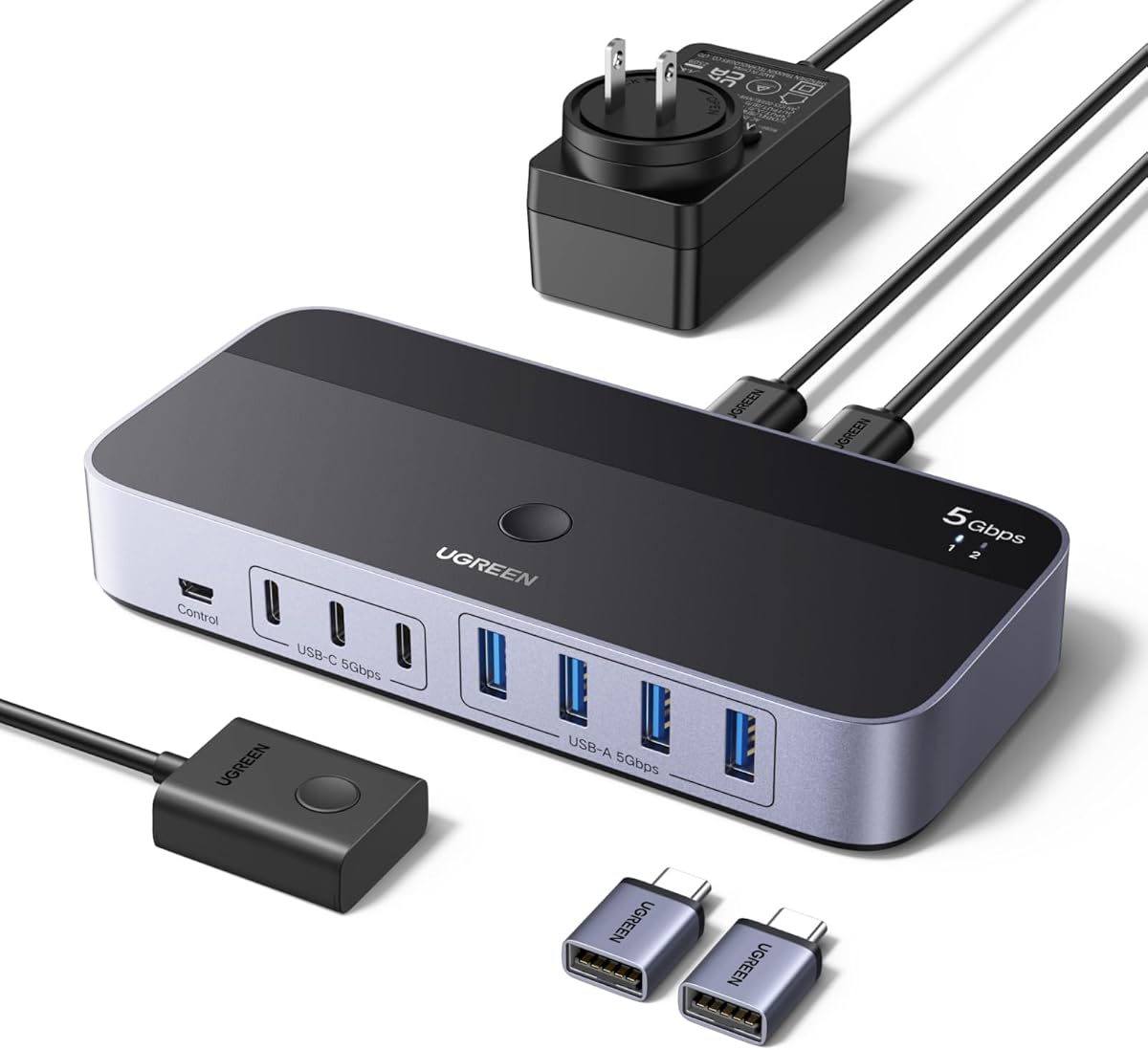

The UGREEN USB 3.0 switch stands out as a top choice for sharing peripherals between two computers. It offers a robust mix of USB A and C ports which is essential for modern setups. With a rating of 4.0 stars it shows solid reliability for daily office tasks.
We may earn a commission when you buy through this link, at no additional cost to you.
Its ability to handle 4 devices simultaneously makes it versatile for shared printers and cameras. The included controller adds convenience when the switch needs to be hidden. Power delivery options ensure stable performance even with power hungry accessories.
Trade-offs include the lack of video support which limits it to data only. Users must ensure their devices match the port types provided. The USB C port is for data not video output so plan accordingly.
This switch is ideal for users needing flexible connectivity without breaking the bank. It balances port variety with performance well. For dual PC users it streamlines workflow efficiently.
Supports both USB A and C devices for modern legacy compatibility.
Optional USB C power supply keeps high draw devices running smoothly.
We may earn a commission when you buy through this link, at no additional cost to you.
The BENFEI USB 3.0 switch is a reliable option for sharing keyboards and mice. It features 4 ports allowing multiple peripherals to connect at once. Its 4.1 rating reflects consistent performance across various operating systems.
We may earn a commission when you buy through this link, at no additional cost to you.
The LED indicator helps you know which computer is active instantly. This visual cue prevents confusion when switching quickly during work. The 18 month warranty provides extra peace of mind for buyers.
It does not support video so it is purely for data peripherals. You need specific USB A to A cables for connections. Make sure your devices match this requirement.
Buyers seeking a simple switch with good support should consider this model. It works well for home office setups. Just ensure cable compatibility before ordering.
LED light shows active computer for effortless switching.
18 month warranty ensures long term satisfaction and support.
We may earn a commission when you buy through this link, at no additional cost to you.
This 2 port USB 3.0 switch offers high quality at a low price. With a 4.6 rating it is a favorite for budget conscious buyers. It handles essential peripherals like keyboards and mice with ease.
We may earn a commission when you buy through this link, at no additional cost to you.
The aluminum alloy shell provides better heat dissipation and durability. This build quality ensures longevity even with frequent switching. It includes cables so you can start using it right away.
Limitations include only having 2 ports for devices. If you need more peripherals it may not be enough. But for simple setups it is highly efficient.
Perfect for users who want simplicity and affordability. It saves money while delivering solid performance. Just check your device count before buying.
Durable aluminum alloy shell ensures long lasting use.
Affordable price point without sacrificing core functionality.
We may earn a commission when you buy through this link, at no additional cost to you.
UGREEN offers a reliable 2 port switch for basic needs. Its one button operation makes switching between computers incredibly easy. The 4.1 rating confirms consistent performance for general users.
We may earn a commission when you buy through this link, at no additional cost to you.
Data transfer speeds reach 5Gbps enabling quick file movement. This is faster than older USB 2.0 switches. The driver free design means instant setup on any PC.
It lacks video support so monitor sharing is not possible. Also only 2 devices can be connected at once. Ensure this matches your specific workflow.
Ideal for light users needing a straightforward solution. It is compact and efficient. Just verify you do not need more ports.
Driver free installation allows immediate use out of the box.
USB 3.0 speeds make file sharing seamless and quick.
We may earn a commission when you buy through this link, at no additional cost to you.
This device combines USB and HDMI for full monitor sharing. It is a true KVM switch for those needing video control. A 4.0 rating shows it handles high resolution outputs well.
We may earn a commission when you buy through this link, at no additional cost to you.
The 4K 60Hz support makes it great for media tasks. A wired remote keeps the desk tidy when switching. Four USB ports allow ample peripheral connections.
Setup is more involved than USB only switches. The cost is higher but justified for video needs. Ensure your monitors match HDMI specs.
Best for users wanting to share a single monitor too. It centralizes control effectively. Consider budget before purchasing.
Switch monitor display and USB peripherals simultaneously.
Delivers sharp 4K visuals at 60Hz refresh rate.
We may earn a commission when you buy through this link, at no additional cost to you.
This USB 2.0 switch is ideal for legacy devices. Its 4.4 rating is impressive for older tech standards. It allows 4 devices to share without hassle.
We may earn a commission when you buy through this link, at no additional cost to you.
The micro USB port allows external power for stability. This prevents disconnections with larger peripherals. LED lights confirm which computer is currently active.
Data speeds are limited compared to USB 3.0 models. For simple keyboards and mice this is fine. But file transfers will be slower.
Great for office environments with older hardware. It provides stability and ease of use. Check speed requirements before choosing.
Works flawlessly with older USB 2.0 peripherals.
Micro USB port ensures consistent power to peripherals.
We may earn a commission when you buy through this link, at no additional cost to you.
This 4 port USB 3.0 switch delivers strong performance. A 4.3 rating reflects satisfaction among users. It supports up to 4 peripherals comfortably.
We may earn a commission when you buy through this link, at no additional cost to you.
The USB C power port helps stabilize power hungry devices. This is useful for external drives or cameras. One button switching makes transitions smooth.
It does not support video so separate monitor setup needed. USB 3.0 cables included are standard length. Check if extra cables are needed for your desk.
A solid choice for standard desktop setups. It balances price and features well. Just note its data only limitations.
USB C power port supports high power consumption devices.
Four ports allow multiple peripherals to connect easily.
We may earn a commission when you buy through this link, at no additional cost to you.
This switch offers exceptional port variety with 7 total. It bridges USB A and C for modern laptops. A 4.3 rating shows reliability across various devices.
We may earn a commission when you buy through this link, at no additional cost to you.
The included power adapter ensures stable operation. This eliminates common power issues. An external controller keeps the desk organized when the main unit is hidden.
It is larger than typical switches so desk space matters. The cost is higher due to extra ports. But it replaces multiple hubs.
Perfect for power users with many peripherals. It consolidates all connections into one. Check desk space before buying.
Supports both legacy USB A and modern USB C.
Remote controller keeps switching accessible and desk tidy.
We may earn a commission when you buy through this link, at no additional cost to you.
This compact switch handles basic 2 port needs well. Its 4.2 rating indicates dependable performance. It allows easy swapping between work and home PCs.
We may earn a commission when you buy through this link, at no additional cost to you.
LED indicators clearly show active status for convenience. The package includes USB cables for immediate use. It is powered directly by the computer.
It lacks advanced power support for heavy devices. Only 2 ports are available limiting expansion. Check your device count carefully.
A good entry level option for dual PCs. It saves money without sacrificing core utility. Just ensure port limits fit your needs.
Small form factor fits easily on any desk.
Includes necessary cables to start using immediately.
We may earn a commission when you buy through this link, at no additional cost to you.
This switch features 10Gbps speeds for maximum performance. With a 4.3 rating it suits power users needing speed. It supports 7 ports with mixed USB types.
We may earn a commission when you buy through this link, at no additional cost to you.
USB 3.2 Gen 2 allows quick file transfers. The included power adapter keeps everything stable. This is ideal for heavy storage and peripheral loads.
Cost is significantly higher than other options. Not everyone needs 10Gbps speeds. But for data intensive tasks it is unmatched.
Best for professionals needing top tier speed. It future proofs your setup effectively. Just consider your specific speed needs.
10Gbps USB 3.2 Gen 2 ensures ultra fast file movement.
Seven ports allow massive peripheral connectivity options.
We may earn a commission when you buy through this link, at no additional cost to you.
Selecting the right USB switch requires understanding your specific connection needs. This guide breaks down critical factors to ensure you buy a compatible model.
Check how many peripherals you need to connect at once. USB 3.0 models offer faster speeds but USB 2.0 is cheaper. Ensure you have enough USB A or C ports for your devices.
Match port types to your devices to avoid needing extra adapters.
USB 3.0 switches provide 5Gbps while USB 3.2 offers 10Gbps. For basic keyboards and mice speed matters less. But for file transfers or cameras higher speed helps.
Choose higher speeds if you move large files frequently.
Most USB switches do not support video or monitor sharing. Only KVM switches allow video routing. Confirm if you need to switch screens or just peripherals.
Buy a KVM switch if you need full monitor control.
Some devices like external drives need extra power. Look for switches with dedicated power ports or adapters. This prevents random disconnections during use.
Power supported models work better with hard drives.
Ensure the switch works with your OS like Windows or macOS. Most modern switches are plug and play across systems. Check product specs for driver requirements.
Driver free units save time on setup.
Aluminum or sturdy plastic housings last longer. Good heat dissipation prevents overheating. Solid materials also protect ports from wear.
Invest in metal cases for frequent daily use.
Options include button, controller, or hotkeys. Controllers let you place switches out of sight. Buttons are simple but visible on your desk.
Choose a controller for cleaner desk layouts.
Prices vary based on features and port counts. Look for warranties of 12 months or more. Customer service access matters for troubleshooting.
Longer warranties reduce long term risks.
Connect each computer to one of the input ports on the switch using USB cables. Then plug your peripherals into the output ports. Make sure cables are secure.
Use the button or controller to switch between active systems. LED lights show which computer is currently controlling your peripherals.
Store the device away from dust and heat sources. Regularly check cables for wear to ensure stable performance over time.
No standard USB switches only share data devices like keyboards. To share a monitor you need a KVM switch with HDMI or DisplayPort.
Most modern switches are plug and play and do not need drivers. They work instantly on Windows, macOS, and Linux.
Disconnects often happen due to insufficient power. Use an external power adapter if you have high drain devices.
Yes USB 3.0 switches work with USB 2.0 and 1.1 devices. Speed will adjust to the slower standard automatically.
Press the physical button on the unit or use the remote controller. The LED indicator will show which PC is active.
Switches are meant for data not charging. Power may be insufficient for charging. Use direct ports for charging.
Yes but you may need USB C adapters for older Macs. Check if the switch has USB C ports or buy adapters.
This list is for 2 computers setups. For more systems look for 4 computer switch models or specialized docking solutions.
We reviewed ten top models ranging from budget USB switches to premium high speed options. The UGREEN USB 3.0 series stood out for versatility and port count.
Consider your device needs and whether you require video support when deciding. Higher port counts and faster speeds justify the premium prices.
Always verify current prices and stock before purchasing. Links and specs are accurate as of November 2026.