
Guermok Video Capture Card
4.4Editor score
USB 3.0 connectivity
Ultra low latency
Portable design
Finding the right HDMI recorder can transform how you capture important moments from gaming sessions to professional conferences. These devices allow you to save high-definition video directly without relying heavily on a computer system. Whether you need standalone functionality or seamless streaming integration, the market offers diverse solutions tailored to specific user needs and technical requirements.
We evaluated ten leading models based on their capture resolution, latency performance, and ease of use. Our analysis covers standalone recorders that work without PCs alongside portable capture cards designed for live streaming. Each product was assessed for compatibility with common devices like consoles, camcorders, and set-top boxes to ensure broad utility across different scenarios.
Every pick in this list highlights unique strengths such as 4K support, analog input options, or built-in screens for previewing content. We also note important limitations like HDCP restrictions to help you avoid compatibility issues. Please keep in mind that product availability and pricing can change frequently so always verify details before making a final purchase decision.
4.4Editor score
4.0Editor score

4.1Editor score
As an Amazon Associate we earn from qualifying purchases.
The following comparison table provides a side-by-side overview of the ten selected HDMI recorders highlighting their key specifications and primary use cases to help you quickly identify the best fit for your specific recording needs.





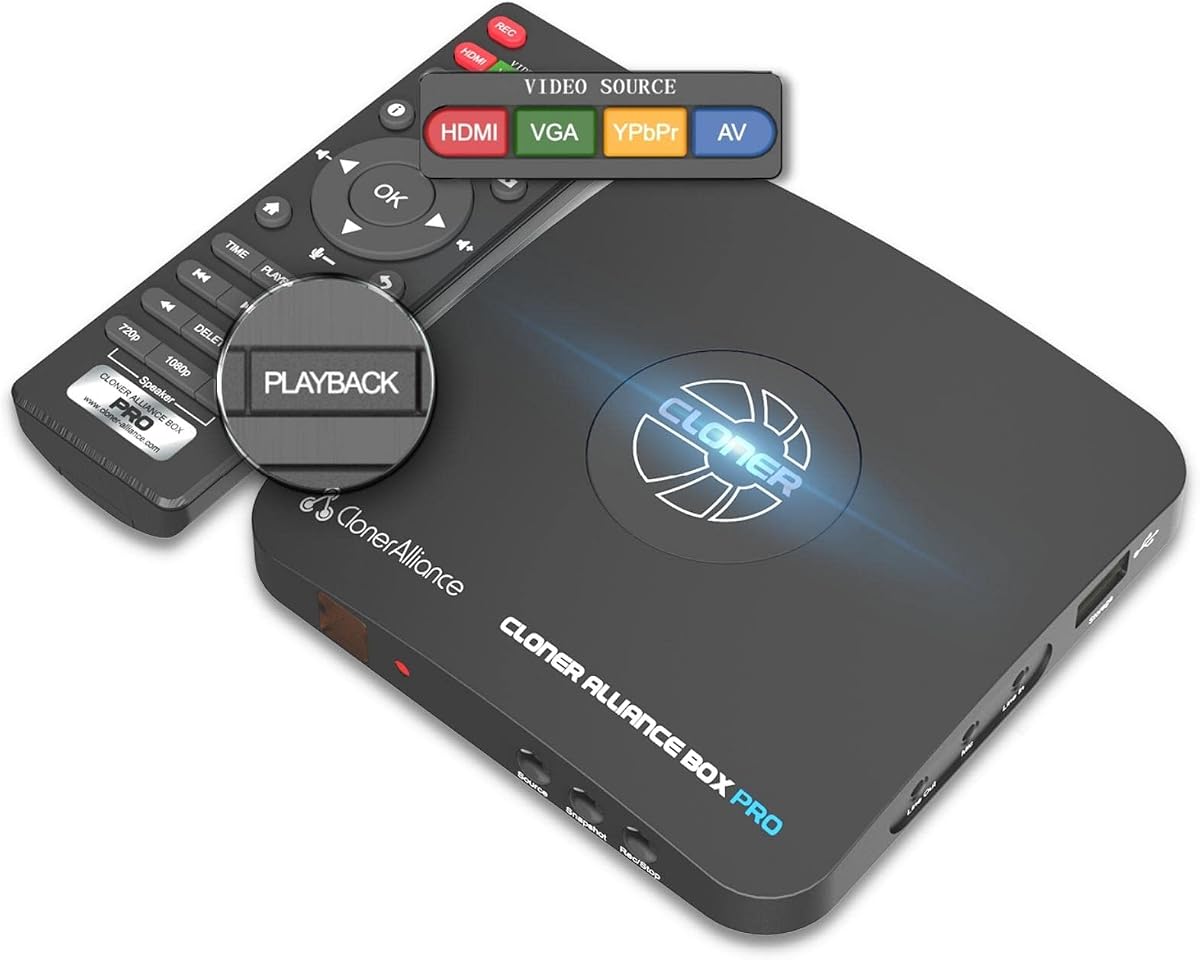
The ClonerAlliance Box Pro stands out as a versatile standalone device for capturing video from various sources without needing a computer. It features a rating of 4.0 stars and supports both HDMI and analog inputs making it ideal for archiving old tapes or capturing modern gameplay. The device records directly to USB storage and allows playback on TV with included remote control.
We may earn a commission when you buy through this link, at no additional cost to you.
Its key strength lies in its ability to handle multiple input types including RCA VGA and component signals alongside standard HDMI. This makes it a bridge between old analog devices and modern digital storage systems. Ultra-low latency under 90ms ensures smooth recording without noticeable lag which is critical for gaming and live capture scenarios. The included software allows basic editing on Windows systems.
Trade-offs include the lack of HDCP support which means it cannot record from protected content sources like streaming boxes or certain game consoles. Additionally the included video editing software is limited to Windows users leaving Mac users without official support for conversion tasks. Despite these limitations the device offers robust standalone functionality for non-protected sources.
This device is perfect for users who want to archive VHS tapes or capture gameplay without setting up a complex PC streaming rig. The schedule recording feature adds convenience for capturing TV shows or conferences automatically. We recommend it for anyone seeking a reliable standalone recorder that balances analog and digital input needs effectively without requiring a computer.
Convert old VHS tapes and camcorder footage into modern MP4 files using multiple analog input options including RCA and VGA.
Record and playback video directly to a TV using USB storage without needing to connect to a computer at all.
We may earn a commission when you buy through this link, at no additional cost to you.
The Guermok Video Capture Card is an excellent budget-friendly option for users needing simple high-quality video capture without spending much. With a strong rating of 4.4 stars it offers 1080p recording at 60fps and supports up to 4K input resolution via USB 3.0. It works seamlessly with popular streaming software like OBS and Potplayer making it versatile for gamers and content creators.
We may earn a commission when you buy through this link, at no additional cost to you.
Its standout feature is the ultra-low latency performance enabled by quality aluminum alloy construction for heat dissipation. This prevents lag during live gaming or streaming sessions ensuring a smooth viewing experience. The plug and play design means no drivers are needed and it works across Windows Mac and Linux systems easily. The compact size allows you to carry it in a bag for mobile streaming.
However this device requires external capture software to function and does not support direct screen casting to a monitor without a PC. It also only supports one-way transmission from HDMI to USB which limits flexibility for bidirectional setups. Users should also ensure they use USB 3.0 ports to avoid bandwidth issues that could drop resolution or frame rates.
Ideal for budget-conscious streamers or students needing to record video meetings and gameplay this card delivers solid performance for its price. The wide compatibility with consoles and cameras makes it a flexible tool for various capture needs. We suggest it for anyone looking for an entry-level capture card that prioritizes portability and low latency over standalone features.
Built-in aluminum heat sink ensures the device stays cool during long recording sessions preventing overheating and performance throttling.
Works smoothly with Windows Mac and Linux systems allowing users to choose their preferred operating environment for capture.
We may earn a commission when you buy through this link, at no additional cost to you.
The ClonerAlliance UHD Pro is a premium standalone recorder designed for users who need true 4K capture capabilities without relying on a PC. Rated at 4.1 stars it features advanced H.265 codec support and records up to 4K at 30fps with cinematic 24fps options. It also provides 4K passthrough so you can watch high-quality video while recording simultaneously.
We may earn a commission when you buy through this link, at no additional cost to you.
Its key advantages include support for high bitrates up to 50Mbps which ensures detailed video quality during complex scenes. The pause and resume functionality allows users to split recording sessions without needing multiple files which simplifies post-production. Like other ClonerAlliance models it works directly with USB storage and supports various file systems for broad compatibility.
Trade-offs involve the need to disable Dolby audio and HDR on the source device during recording to avoid errors. It also does not support HDCP protected content which may limit use with certain streaming devices. Despite these caveats the device offers professional-grade features for archiving high-resolution content from consoles or cameras.
This device is best suited for professionals or enthusiasts who need to capture 4K video from medical equipment or gaming consoles efficiently. The ability to select specific codecs and resolutions provides flexibility for storage management and quality preferences. We recommend it for those seeking a powerful standalone 4K recorder that balances performance and ease of use.
Efficient H.265 compression reduces file sizes while maintaining high visual quality for long recording sessions.
4K passthrough ensures viewers see pristine video quality even while the device is capturing footage simultaneously.
We may earn a commission when you buy through this link, at no additional cost to you.
This Capture Card 4K HDMI offers a reliable solution for gamers who want to record or stream gameplay across multiple console systems easily. With a 4.3 rating it supports 1080p at 60fps capture and features a dedicated microphone input for adding commentary during sessions. The HDMI loop-out ensures zero delay for gameplay so you can play normally while capturing video.
We may earn a commission when you buy through this link, at no additional cost to you.
The device works as a plug and play USB 3.0 peripheral that is automatically detected as a webcam by your operating system. This eliminates the need for driver installation and allows instant setup for streaming to platforms like Twitch or YouTube. It supports a wide range of systems including Windows and Mac making it accessible for most users.
However the microphone input is limited to standard 3.5mm TRS headsets which may not be suitable for all professional audio setups. Since it requires a PC to capture it lacks standalone functionality for users who want to record without a computer. Also it does not support 4K120Hz input which might limit high refresh rate use cases.
Ideal for streamers and console gamers this card provides a straightforward way to capture high-quality video with audio commentary. The loop-out feature is crucial for competitive gaming where latency must be minimized. We suggest it for users who already have a PC setup and need a cost-effective capture card for general gaming and streaming needs.
HDMI loop-out allows you to play games directly on your monitor without any perceptible lag during recording.
Built-in mic input lets you add your own voice tracks directly into the capture stream without extra adapters.
We may earn a commission when you buy through this link, at no additional cost to you.
The Audio Express AXHDCAP is a compact and affordable capture card ideal for video conferencing and basic recording needs. With a 4.4 rating it supports HDMI input up to 4K and outputs at 1080p30fps via USB 2.0. It provides crystal-clear video and stereo sound making it suitable for professional broadcasts and educational recording sessions.
We may earn a commission when you buy through this link, at no additional cost to you.
Its ultra-low latency technology ensures real-time preview without lag which is vital for live streams and meetings. The plug and play design works across Windows Mac and Linux without requiring additional drivers. The device is lightweight and portable allowing you to easily carry it for outdoor broadcasts or travel conferences.
A significant limitation is that it uses USB 2.0 which caps output at 1080p30fps and may not support higher resolutions or frame rates effectively. It also does not work for adding HDMI output to laptops that lack HDMI out ports. Users looking for high frame rate recording might find this insufficient for gaming needs.
This card is perfect for professionals needing a simple reliable tool for capturing meetings or classroom lectures. The affordable price point makes it accessible for educators and small businesses with limited budgets. We recommend it for users who prioritize ease of use and cost over high-end performance specifications.
Ideal for recording video calls and lectures with consistent quality and zero setup complexity.
Built with thermal dissipation features to ensure reliable performance during extended use sessions.
We may earn a commission when you buy through this link, at no additional cost to you.
This capture card offers a lightweight solution for content creators needing to stream gameplay or presentations easily. With a strong 4.4 rating it delivers 1080p at 60fps via USB 3.0 and works seamlessly with popular streaming software like OBS. The compact design allows you to carry it anywhere which is great for mobile streaming setups.
We may earn a commission when you buy through this link, at no additional cost to you.
Its universal compatibility covers major consoles and cameras ensuring you can capture from virtually any HDMI-enabled source. Low latency performance is emphasized for smooth streaming without delays between action and broadcast. Setup is instant as it functions as a plug and play device without external drivers or power requirements.
While effective the device relies on third-party software for operation and does not include proprietary applications. Some users may find the build quality basic compared to more expensive models. Additionally it does not support high-end features like 4K recording output which limits its use for higher fidelity needs.
Perfect for casual streamers and educators this card provides essential capture capabilities at a competitive price. The portability factor makes it a great choice for those who need to set up quickly at different locations. We suggest it for users prioritizing flexibility and ease of use over advanced video features.
Plug into your laptop and begin capturing immediately without any driver installations or configuration steps.
Lightweight and small enough to fit in any laptop bag for on-the-go content creation.
We may earn a commission when you buy through this link, at no additional cost to you.
The 4K60 Video Capture Box stands out with its dual HDMI inputs and built-in 7-inch screen for previewing content without a computer. Rated at 3.8 stars it supports Picture-in-Picture and Picture-Out features for managing multiple video sources simultaneously. It records to USB or SD storage and supports battery power for mobile use.
We may earn a commission when you buy through this link, at no additional cost to you.
Its unique strength is the ability to manage two input sources simultaneously allowing you to record two games or camera feeds at once. The built-in screen lets you control settings and monitor playback on the go. Battery support adds flexibility for outdoor events or locations without easy power access.
However it does not support copyrighted or content-protected HDMI sources which limits use with certain streaming devices. The rating is lower than some competitors suggesting potential quality issues or limited long-term reliability. Users should be prepared for potential compatibility limitations with newer protected content formats.
Best for users needing dual-input recording like event coverage or multi-camera setups this box provides practical features for professional needs. The screen and battery options make it a standalone alternative to PC-dependent solutions. We recommend it for specific scenarios where multi-screen management is required despite its lower ratings.
Dual HDMI inputs allow simultaneous recording from two devices with easy switching or PIP features.
Built-in screen and battery support enable recording in locations without access to power or computers.
We may earn a commission when you buy through this link, at no additional cost to you.
The ZowieREC 4K HDMI is a premium standalone recorder with a sleek aluminum design and robust recording features. Although rated at 3.3 stars it supports up to 4K recording at 30fps and allows pausing and resuming within the same file. Schedule recording ensures you never miss planned content by automatically starting at set times.
We may earn a commission when you buy through this link, at no additional cost to you.
Its key benefits include a high-quality build and flexible storage options supporting both USB and TF cards. The ability to pause and resume recording gives you more control over file management without needing to edit later. HDMI passthrough allows you to watch TV while recording ensuring zero disruption to your viewing experience.
The lower rating suggests some users may experience connectivity or compatibility issues. It does not support HDCP protected content which restricts use with streaming sources. While the design is premium users should verify compatibility with their specific devices before purchase to avoid disappointment.
Suitable for professionals who need a durable standalone recorder for conferences or gameplay this unit offers advanced scheduling and control features. The schedule recording feature is particularly useful for capturing programs without constant supervision. We suggest it for users prioritizing build quality and automation features over high compatibility ratings.
Set specific times for automatic recording to capture scheduled events without needing to be present.
Capture up to 4K resolution to ensure detailed footage for professional archival purposes.
We may earn a commission when you buy through this link, at no additional cost to you.
The ClonerAlliance ViewPro is a portable recorder featuring a large 7-inch LCD screen for instant preview and playback anywhere. With a 4.3 rating it supports 1080p at 60fps recording and includes AV VGA and YPbPr inputs for analog devices. An included IR remote allows easy navigation without needing a keyboard or mouse.
We may earn a commission when you buy through this link, at no additional cost to you.
Its standout feature is the ability to convert analog video sources like VHS tapes into digital MP4 files easily. The built-in speaker allows you to monitor audio during recording and the screen provides visual feedback without connecting to a TV. Schedule recording ensures you capture important content automatically at specified times.
The main drawback is the higher price point compared to similar models which might not justify the cost for everyone. Also like other ClonerAlliance devices it does not support HDCP protected content. Users should ensure their source devices are not protected by digital rights management before purchasing.
Ideal for archiving old family tapes or recording analog feeds this device combines portability with essential recording features. The remote control and screen make it highly user-friendly for older adults or non-tech savvy users. We recommend it for those needing reliable analog capture without sacrificing modern digital storage capabilities.
Review your recordings immediately on the large screen without needing to connect to an external display.
Included IR remote simplifies navigation and playback for easier use from a distance.
We may earn a commission when you buy through this link, at no additional cost to you.
The Blackmagic Design UltraStudio Express is a professional SDI video capture device designed for studio environments. While rated as N/A it offers robust hardware features including multiple SDI speeds and program outputs for high-fidelity workflows. It supports loop output allowing signal pass-through while recording essential for production setups.
We may earn a commission when you buy through this link, at no additional cost to you.
Its primary strength lies in its professional grade components which ensure stable and high-quality video capture for broadcast and post-production. The device is compatible with various high-speed SDI standards including 3G and 12G for flexible workflow integration. It is ideal for users needing reliable hardware beyond consumer-grade capabilities.
However it uses SDI inputs rather than HDMI which limits compatibility with standard consumer devices without adapters. The lack of consumer-friendly software bundling requires professional editing suites for full utilization. Users should ensure they have the necessary infrastructure before investing in this specialized hardware.
Best for broadcast engineers and professionals this recorder provides unmatched reliability for critical recording tasks. The multi-speed SDI support ensures adaptability across different production standards and setups. We recommend it for studio professionals who require broadcast-quality input and loop-out functionality.
Designed for professional broadcast environments with stable hardware ensuring consistent performance.
Supports multiple SDI standards to integrate seamlessly with various professional video workflows.
We may earn a commission when you buy through this link, at no additional cost to you.
Selecting the right HDMI recorder depends on your specific needs such as resolution requirements, standalone functionality, and connectivity options. This guide covers key factors to consider to ensure you choose a device that matches your use case effectively.
Resolution determines the clarity of your recorded video while frame rate affects how smooth motion appears. If you plan to record gameplay or fast-moving video look for 1080p at 60fps as a minimum standard. For high-fidelity archives 4K support may be essential depending on your storage capacity and playback needs.
Always verify the maximum input and output resolution supported by the device to avoid bottlenecks during capture. Higher frame rates ensure smoother playback for action content.
Standalone recorders work independently using USB storage and often include screens or remote controls for setup. These are ideal if you want to capture without running a computer or software continuously. PC-dependent capture cards require a host computer and software like OBS to function which offers more flexibility for streaming.
Choose standalone for simplicity and offline use while opting for PC-dependent units if you need live streaming integration.
Different recorders support various input types such as HDMI, USB VGA and analog signals. Ensure the device supports the outputs from your source equipment whether it is a game console or old camcorder. Mismatched inputs can render the recorder useless for your intended purpose.
Check for analog input options if you need to digitize legacy media like VHS tapes for long-term preservation.
HDCP (High-bandwidth Digital Content Protection) limits recording from protected content like streaming services. Most consumer recorders do not support HDCP and will output black screens for such sources. Verify this limitation if you plan to capture content from streaming boxes or protected media.
If you need to record protected content consider alternative solutions or devices specifically designed to bypass these restrictions legally.
Latency refers to the delay between the input signal and the output or recorded video. Low latency is crucial for live streaming or gaming where responsiveness matters. Devices with ultra-low latency specs under 90ms ensure minimal lag for better user experience.
Review technical specs for latency numbers to avoid devices that introduce noticeable delays during real-time capture.
Recorders may support USB drives, SD cards, or internal storage. Ensure the device accepts standard formats like FAT32 or NTFS for compatibility with modern drives. Consider storage capacity needs based on your typical recording length and resolution.
USB and SD storage offer flexibility for transferring files to computers for editing or sharing later.
Audio capture is as important as video for many use cases. Check if the device allows audio input via mic jacks or passthrough. Some devices separate audio and video streams which might require additional mixing software.
Ensure audio compatibility with your software to avoid sync issues during playback and editing.
Plug and play devices reduce setup time by requiring no drivers. However some devices need specific software for features like scheduling. Compatibility with Windows and Mac is essential if you switch operating systems frequently.
Choose devices with broad software support to ensure flexibility across different computing environments.
Connect the HDMI source to the recorder and link the recorder to a display or PC. If using a standalone device connect a USB or SD card for storage and power on the unit. Configure settings like resolution and frame rate via the menu or software.
For optimal performance ensure all cables are secure and properly seated to avoid signal loss. Regularly update any bundled software to benefit from improved compatibility and features. Test recordings before long sessions to ensure everything works as expected.
Keep the device in a cool dry place to prevent overheating especially during long captures. Avoid exposing it to dust and humidity which can damage internal components over time. Clean ports gently with a dry cloth and handle with care to maintain durability.
Most HDMI recorders do not support HDCP protected content which includes many streaming devices. You may get a black screen or error message when trying to capture from these sources. For legal content capture use standard gaming consoles or unprotected video inputs.
High-speed USB 3.0 drives or SD cards are recommended for 4K or high-frame-rate recording. Ensure the device supports your file system like NTFS or exFAT to avoid compatibility issues. Check manufacturer recommendations for minimum write speeds to prevent dropped frames.
Standalone recorders are designed to work without a PC using internal menus and remote controls. However you still need a PC to transfer and edit files once recorded. Some models offer live streaming capabilities only when connected to a computer.
Lag can be caused by insufficient storage write speeds or high latency capture cards. Ensure your USB device supports the required data transfer rates. Also check your capture software settings for proper buffering and frame rate configuration.
Some recorders like ClonerAlliance models include AV VGA or component inputs specifically for analog sources. Others only support HDMI so check the input ports before buying. Analog inputs require compatible adapters to work properly with digital recording.
Most recorders use USB drives or SD cards that you can remove and plug into a computer. Some models also support direct USB transfer to a PC without removing the card. Always use safe removal procedures to avoid data corruption during file access.
Many manufacturers offer one to two-year warranty coverage for these devices. Check the product page for specific terms regarding replacement and return policies. Some brands like ClonerAlliance provide detailed support services for repair and replacements.
The ClonerAlliance Box Pro offers a versatile solution for most users needing standalone recording without a PC. For budget conscious shoppers the Guermok Video Capture Card delivers solid 1080p capture with great portability. If you need 4K quality the ClonerAlliance UHD Pro provides premium features worth the investment.
Prioritize features like analog inputs and latency based on your specific use case whether it is gaming or archiving. Ensure the device supports your storage needs and file formats to avoid data management headaches during workflows.
Always check current prices and availability before making a purchase as these factors change frequently. Read recent user reviews to ensure the model matches your expectations for reliability and support. With the right choice you can capture important moments with clarity and ease.