
HDMI Cable Tester Portable
4.4Editor score
Tests HDMI and RJ45 cables
Powered by AAA battery or USB
Compact portable design
This guide compares the best HDMI cable and port testers for continuity checks, signal analysis, and troubleshooting across consumer and professional setups.
Finding a reliable HDMI cable and port tester is essential for anyone working with AV systems. These tools help identify wiring faults quickly, ensuring your video and audio signals remain crisp and uninterrupted during critical presentations or home theater setups.
We compared ten top-rated testers based on their testing accuracy, port compatibility, and ease of use. Our list includes options for quick continuity checks as well as advanced signal analysis for professionals who need deeper diagnostics for complex installations.
Each pick highlights key features like LED indicators, detachable units, and supported HDMI versions. Note that prices fluctuate frequently, so check current listings before purchasing to ensure you get the best value for your specific testing needs.
4.4Editor score

4.8Editor score

4.5Editor score
The following table offers a side-by-side comparison of the top ten HDMI and port testers available today. Each entry summarizes key specifications to help you quickly identify the right tool for your specific connectivity testing requirements.


This tester is a favorite among technicians for its accuracy and portability. With a rating of 4.8, it consistently identifies faults in HDMI and Mini HDMI cables efficiently.
We may earn a commission when you buy through this link, at no additional cost to you.
It scans 19 wires rapidly to pinpoint shorts, opens, or mis-sequence errors. The double-mode test allows you to choose between scanning or full display for better visibility.
The battery voltage warning ensures you never get stranded in the field. However, it does not explicitly support the very latest HDMI 2.1 standards found in newest gaming consoles.
Ideal for AV installers and home users needing reliable troubleshooting without complex gear. The automatic power-off feature helps conserve battery life during daily use.
The rapid analysis feature quickly identifies conduction state issues to save valuable time during urgent repairs.
Weighing only 175 grams, this device allows a single person to complete field tests without needing heavy assistance.
We may earn a commission when you buy through this link, at no additional cost to you.
For those on a tight budget, this tester offers incredible value. It covers essential testing needs for HDMI and Network cables without costing a fortune.
We may earn a commission when you buy through this link, at no additional cost to you.
The main and remote unit design allows for easy testing of installed cables. The LED lights flash in rotation to confirm proper connectivity quickly.
While it lacks advanced signal analysis, it is perfect for basic continuity checks. You can power it with a standard AAA battery or a USB charger for flexibility.
This is the ideal choice for homeowners or small IT shops needing a backup tool. Its multi-function capability saves space by replacing two separate testers.
This device combines HDMI and LAN testing into one unit to simplify your toolkit and reduce overall costs.
You can use either a battery or USB power supply to ensure the device works wherever you need it.
We may earn a commission when you buy through this link, at no additional cost to you.
This premium unit takes testing to the next level with a built-in HD LCD display. You do not need a TV to verify signal quality in the field.
We may earn a commission when you buy through this link, at no additional cost to you.
It performs full color audio and video checks to ensure set-top boxes are installed correctly. The screen resists dust, water, and scratches for durability.
Three HDMI ports allow for pass-through testing and signal verification simultaneously. While heavier, the ruggedized housing protects it against drops and bumps.
Professional installers will appreciate the self-contained nature of this device. It provides immediate visual feedback that simpler testers cannot offer.
The HD LCD display provides both audio and video feedback so you can verify signal integrity instantly.
Tempered glass and a dual-layer rubber housing make this device resistant to harsh environments and accidental drops.
We may earn a commission when you buy through this link, at no additional cost to you.
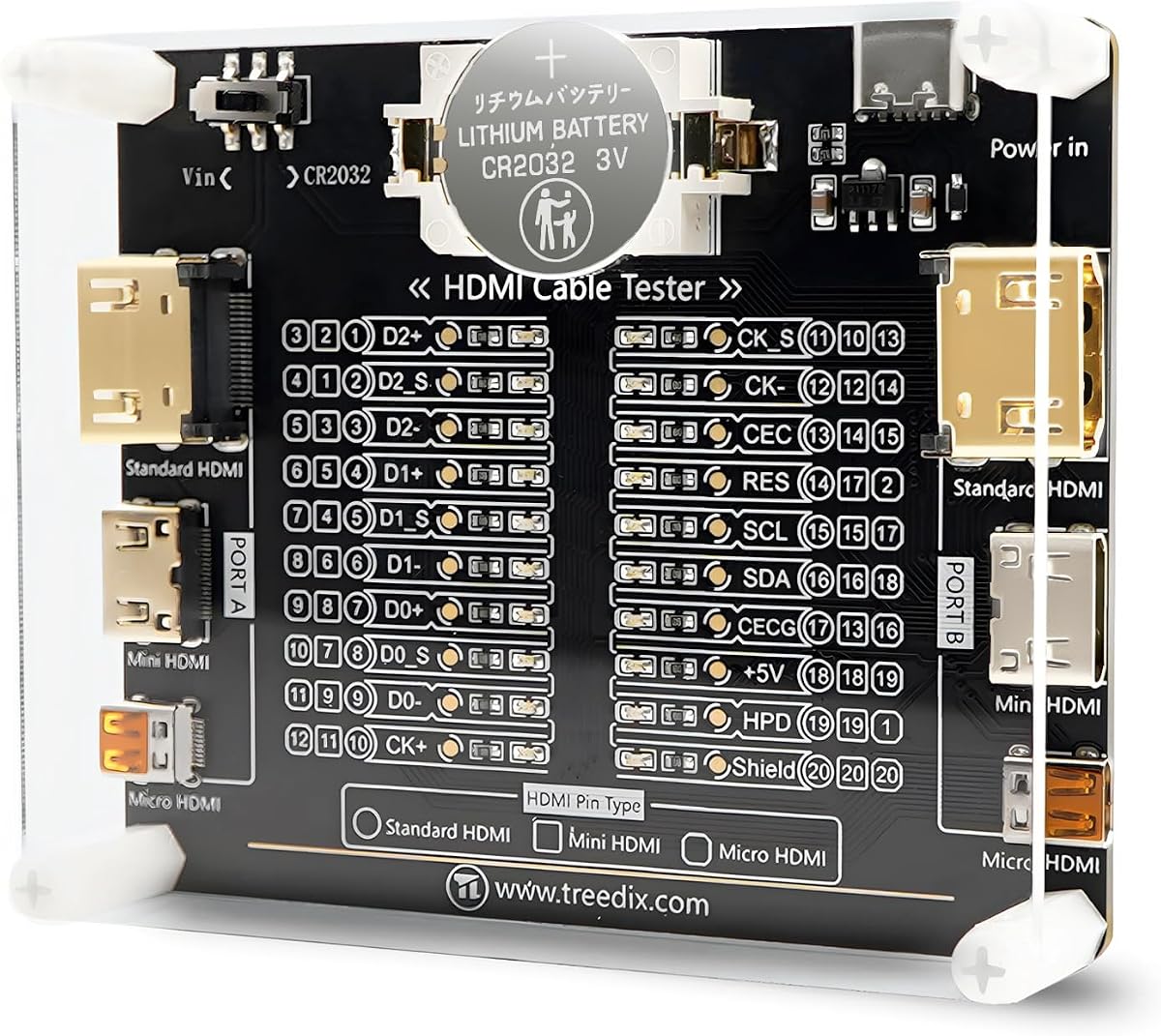
This board is designed for detailed continuity checks with 20 individual LED indicators. Each pin corresponds to a specific light for precise fault location.
We may earn a commission when you buy through this link, at no additional cost to you.
It supports a wide range of HDMI versions including the newer 2.1 standard. The reverse connection protection prevents damage if power is connected incorrectly.
You can power it with a battery or an external supply between 3 and 12 volts. The acrylic housing keeps the internal components safe from physical damage.
Engineers and hobbyists will find this useful for diagnosing specific pin failures. It is less portable than a handheld unit but offers more granular data.
With 20 LED lights, you can see exactly which pin is failing to isolate issues faster.
The board accepts a wide voltage range and protects against reverse connections for safer operation.
We may earn a commission when you buy through this link, at no additional cost to you.
Jonard Tools delivers a professional-grade tester capable of handling cables up to 500 meters. The remote unit detaches easily to test installed lines from either end.
We may earn a commission when you buy through this link, at no additional cost to you.
It evaluates cables for shorts, open circuits, or incorrect wire pairings for each pair. This precision is vital for long runs where signal degradation is common.
Scan mode lets you see each connection tested individually while full display mode shows all at once. You will need a 9V battery to power the main unit.
This is a solid choice for contractors working on large venue setups. The robust design ensures it survives the rigors of daily job site use.
The ability to test cables up to 500 meters makes this ideal for large venue or industrial installations.
Individual wire pair evaluation ensures you catch subtle faults that might be missed by basic testers.
We may earn a commission when you buy through this link, at no additional cost to you.
This device functions as both a signal generator and a display analyzer for advanced testing. It helps verify that your HDMI cable supports high bandwidth signals.
We may earn a commission when you buy through this link, at no additional cost to you.
You can set video resolutions and HDCP content using a 4-pin DIP switch. It supports 4K at 60Hz with various chroma subsampling options.
Using HDCP controls, you can test for content protection issues that often cause display failures. It is more of a signal source than a cable continuity checker.
AV professionals will find this useful for testing display compatibility and signal integrity. It ensures your cable can handle the demands of high-resolution content.
By generating specific test patterns you can verify if a display or cable can handle high-resolution signals.
Adjusting HDCP settings helps diagnose content protection errors that prevent video playback on modern displays.
We may earn a commission when you buy through this link, at no additional cost to you.
This portable checker offers two distinct modes for scanning or full display testing. It is compatible with both HDMI and standard RJ45 network cables.
We may earn a commission when you buy through this link, at no additional cost to you.
The auto shut-down function saves battery life after ten minutes of inactivity. It scans up to 19 wires to detect shorts or wrong orders quickly.
While the rating is slightly lower than others, it remains a functional option for basic needs. It supports a wide range of HDMI versions from 1.1 to 2.0.
Users looking for a simple tool for both video and network cables should consider this. The two test modes provide flexibility depending on how detailed you need the check to be.
Choose between a fast scan or a full display mode to balance speed and detail during your tests.
Automatic power off after ten minutes helps preserve battery life when you forget to turn the device off manually.
We may earn a commission when you buy through this link, at no additional cost to you.
This tester is built for professionals who need to check audio video and network cables. It features XLR, HDMI, USB, and other interface connections in one device.
We may earn a commission when you buy through this link, at no additional cost to you.
The detachable design allows split testing of cables in different locations easily. A 10-way switch helps you select the correct mode for each connection type.
Clear LED indicators provide instant visual feedback on connectivity status. The metal housing ensures the device can withstand heavy use on job sites.
If you work in a mixed AV environment, this versatility is invaluable. It reduces the need to carry multiple testers for different types of cables.
With ports for XLR, HDMI, USB, and BNC this device handles nearly every common audio and video cable type.
The detachable remote unit allows you to test long cables from both ends without needing assistance.
We may earn a commission when you buy through this link, at no additional cost to you.
This simple tester is great for diagnosing common issues like color shift or missing pictures. It features both DVI and HDMI connectors for broader compatibility.
We may earn a commission when you buy through this link, at no additional cost to you.
You can locate it at the source or display end of the system to isolate where the signal is breaking. It displays the status of each HDMI signal component clearly.
The compact design makes it easy to carry in a toolkit for quick fixes. It is straightforward to use without complex configuration requirements.
Ideal for home theater enthusiasts or repair shops dealing with signal loss. Its specific focus on color shift helps identify cabling issues visually.
Specifically designed to help identify the causes of color shift or missing pictures in your signal path.
Test cables at either the source or display end to accurately pinpoint where the connection issue originates.
We may earn a commission when you buy through this link, at no additional cost to you.
This tester stands out with a perfect rating and strong support for Ethernet cables alongside HDMI. It covers HDMI 1.2 to 2.1 and various network standards.
We may earn a commission when you buy through this link, at no additional cost to you.
The main and remote unit design allows convenient storage and easy testing of long runs. LED lights flash in rotation to confirm proper network cable connectivity.
You can power it with a battery or a phone USB charger for flexibility on the go. It helps you verify both video and data lines with one tool.
IT professionals and home users with mixed cabling needs will find this useful. Its high rating reflects consistent performance and reliability for daily tasks.
One tool handles both HDMI video cables and RJ45 network cables simplifying your toolkit and reducing costs.
Support for HDMI 2.1 and Cat6a ensures you can test the latest high-speed cables and displays effectively.
We may earn a commission when you buy through this link, at no additional cost to you.
Selecting the right tester depends on the types of cables you work with and the level of detail you need. This guide breaks down the critical factors to consider before purchasing a new unit.
Ensure the tester supports the HDMI versions you frequently encounter. Basic units may only cover 1.4 or 2.0, while newer models support 2.1 for high bandwidth signals. If you work with modern gaming consoles or 8K displays, this factor is vital to avoid buying outdated equipment.
Check product specifications for supported versions to ensure your tool works with current and future devices.
Many testers also check RJ45 Ethernet cables which is useful for IT and mixed installations. If you handle both video and network cabling, a dual-function unit saves space and cost. Look for models that explicitly list Cat5e or Cat6a support in their specs.
Choose a dual-purpose tester if you want one tool to handle both video and data cable verification efficiently.
Consider the number and type of input output ports available on the device. Some units offer detachable remote units which makes testing installed cables much easier. Others provide pass-through ports to verify signal quality without disconnecting the main cable.
A remote unit or extra ports add significant convenience for testing cables in walls or long runs.
Power flexibility ensures you can use the tester anywhere without needing a nearby outlet. Some models work on AAA batteries while others accept USB charging or external voltage supplies. Check if batteries are included or if you need to purchase them separately.
Opt for a tester with multiple power sources to keep it operational in remote or emergency situations.
LED indicators should be bright and clearly labeled to help you interpret results quickly. More advanced units provide pin-specific lights so you know exactly which wire is faulty. Poorly labeled indicators can lead to misdiagnosis and wasted time.
Prioritize models with clear, distinct LED displays for efficient and accurate fault identification.
Field tools should have a rugged housing to withstand drops and environmental dust. Metal cases or reinforced plastics offer better protection than flimsy shells. Shock-resistant designs are essential for technicians who carry equipment daily.
Invest in a durable model to extend the lifespan of your tester and avoid frequent replacements.
A user-friendly interface allows you to start testing immediately without complex setup. Look for plug and play designs that do not require manual switch configurations. Clear buttons and logical layouts reduce errors during critical troubleshooting moments.
Choose a simple setup with intuitive controls to speed up your workflow and reduce learning time.
Price should reflect the features you actually need rather than just the lowest cost. Basic testers are cheap but might lack advanced features needed for high-end systems. Balance the initial cost with the long-term value and versatility of the device.
Determine your specific requirements before buying to ensure you get the best value for your specific use case.
Start by ensuring the tester is properly powered with the correct battery or USB connection. Insert the HDMI cable into the main unit and connect the remote unit to the other end to begin testing. Wait for the LED indicators to stabilize before interpreting the results.
Regularly clean the ports and connectors with a soft dry cloth to prevent dust buildup. Avoid bending the cables excessively during testing to maintain their integrity over time. Store the unit in its protective case when not in use to prevent physical damage.
If you notice dim LEDs or slow response, check the battery level or replace it immediately. Keep the firmware or settings updated if the model allows for software adjustments. Proper care ensures consistent performance and extends the useful life of your testing equipment.
An HDMI cable tester verifies the integrity of connections to ensure video and audio signals are transmitted correctly. It helps identify shorts, opens, or miswired pins that cause display issues. Using one saves time by quickly isolating cable faults rather than guessing.
Not all testers support HDMI 2.1. You must check the product specifications to confirm compatibility with the specific version you are using. Some advanced models do support 2.1, while basic ones may stop at 2.0.
Most portable testers require batteries like AAA or 9V to function. However, many modern units also offer USB charging options for flexibility. Always check the power requirements before purchasing to ensure you have the right supply.
Basic testers check continuity to see if wires are connected properly. Advanced models may include signal generators to verify bandwidth and resolution support. Choose based on whether you need simple wiring checks or full signal analysis.
Most testers are designed to be safe on live equipment but always follow the manufacturer instructions. Avoid connecting them to damaged ports or equipment with visible electrical issues. Safety is paramount when working with any electronic diagnostic tool.
Each LED typically corresponds to a specific pin or wire in the cable. If a light fails to flash or flashes incorrectly, it indicates a fault at that position. Refer to the manual for specific codes to understand the error accurately.
Our top picks offer a range of solutions from basic continuity checks to advanced signal verification. The UT681 stands out for reliability while the STEREN provides premium visual feedback for professionals.
Prioritize features like HDMI 2.1 support or dual network testing if they match your workflow. A well-chosen tester simplifies troubleshooting and prevents costly downtime during installations.
Always check the latest prices and availability before making a purchase since deals change often. Investing in a quality tool ensures your AV systems perform reliably for years to come.