
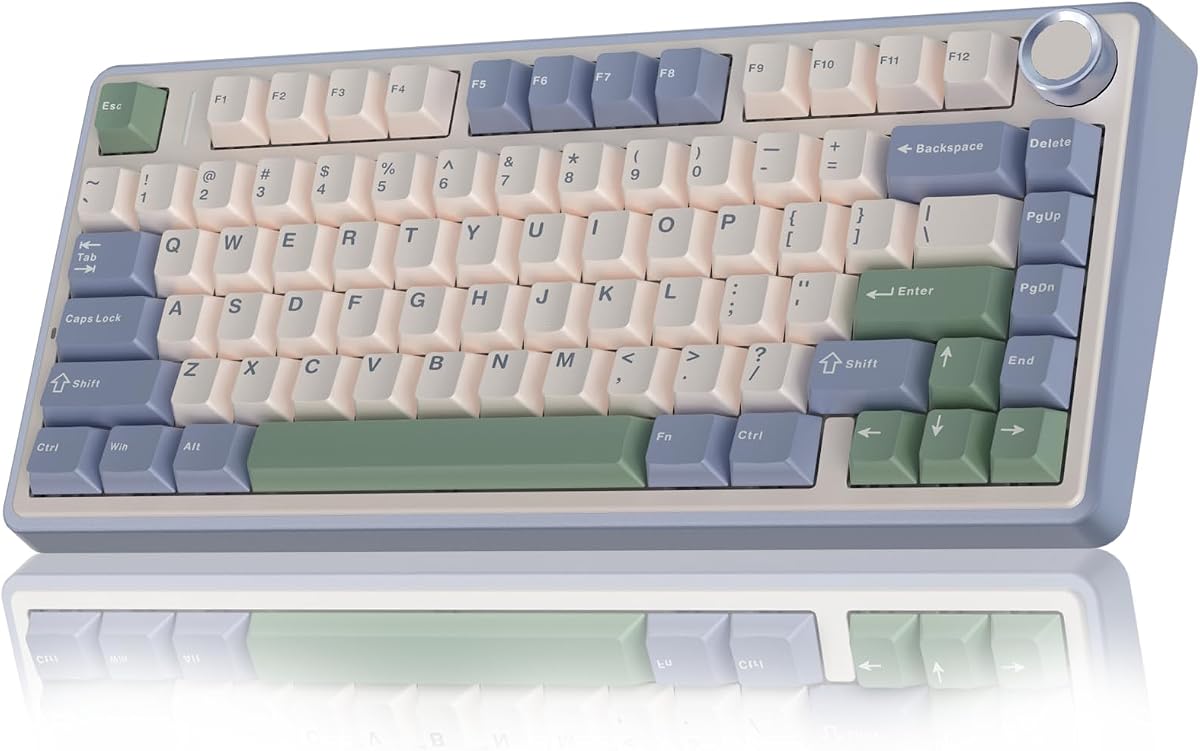
Womier DK75 75% Wireless Gaming Keyboard
4.5Editor score
Quiet membrane switches
PBT keycaps
Long battery life
This guide compares the top green backlit gaming keyboards for 2026, evaluating connectivity, typing feel, and RGB features to help you choose the perfect
Finding the right green backlit gaming keyboard can transform your setup into a visually stunning and highly functional workspace. These keyboards offer unique aesthetics combined with performance features like wireless connectivity and customizable lighting effects that cater to both gamers and professionals seeking style and efficiency.
We have carefully compared ten distinct models ranging from budget-friendly membrane options to premium mechanical switches. Our analysis focuses on build quality, connectivity modes, battery life, and the specific green lighting aesthetics that define this niche category in the current market landscape.
Each pick in this list highlights specific strengths such as hot-swappable switches, multimedia knobs, or compact layouts designed to save desk space. Please note that prices and availability can change frequently so always verify current details before making your final purchase decision online.
4.5Editor score
4.6Editor score
4.8Editor score
The following table provides a quick side-by-side comparison of the top ten green backlit gaming keyboards available this month focusing on their layout, switch type, and key connectivity features.


The AULA F75 stands out as a top contender in the green backlit gaming keyboard market with its impressive mechanical build and versatile connectivity options. With a rating of 4.6 stars users praise its smooth typing experience and the rich RGB lighting that complements the green aesthetic perfectly.
We may earn a commission when you buy through this link, at no additional cost to you.
Key strengths include its hot-swappable base which allows you to change switches easily and its advanced gasket structure that provides a solid stable feel. The keyboard supports up to five devices via Bluetooth 5.0 2.4GHz wireless or USB wired connection making it incredibly flexible for multi-device setups.
Honest trade-offs involve the driver software which is only available for Windows systems and the specific green theme might not appeal to everyone seeking pure customization. However these minor issues are outweighed by the performance and build quality that define this model.
This keyboard is ideal for gamers and professionals who want a premium mechanical feel without breaking the bank. If you value smooth keystrokes and robust wireless performance the F75 is a highly recommended choice for your desk setup.
The pre-lubricated stabilizers and LEOBOG reaper switches deliver a signature creamy sound that enthusiasts love during long sessions.
Connect to five devices simultaneously and switch effortlessly between work and play with the side button or shortcut keys.
We may earn a commission when you buy through this link, at no additional cost to you.
The Womier DK75 offers an affordable entry point for those seeking a green backlit gaming keyboard with a mechanical-inspired design and wireless freedom. Rated 4.5 stars it delivers a quiet and comfortable typing experience that suits shared spaces like offices or libraries.
We may earn a commission when you buy through this link, at no additional cost to you.
Its key strengths include durable PBT keycaps that resist oil and wear and a large 4000mAh battery that ensures long-lasting use on a single charge. The keyboard also features 15 dynamic RGB effects and a rotary knob for easy volume and lighting adjustments.
While it uses membrane switches instead of true mechanical ones which might limit tactile feedback for hardcore gamers the value it provides is undeniable. The compact 75% layout saves space without sacrificing essential arrow keys needed for gameplay.
This keyboard is perfect for budget-conscious users or students who need a reliable quiet device for both gaming and productivity. If you prioritize cost and comfort over high-end mechanical switches the DK75 is a smart choice.
Crafted from high-quality PBT material these keycaps maintain their texture and appearance even after long-term daily use.
High-quality membrane switch structure offers smooth cushioned keystrokes with minimal sound perfect for shared spaces.
We may earn a commission when you buy through this link, at no additional cost to you.
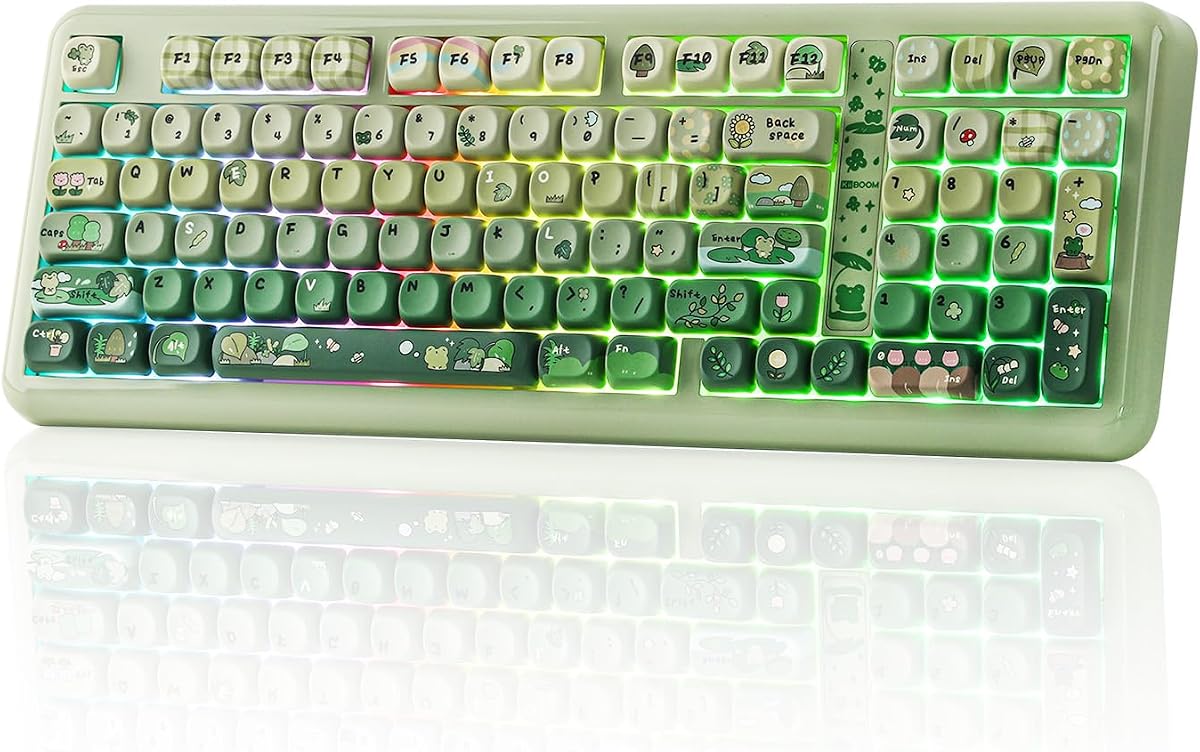
The KiiBoom Phantom98 Lite represents the premium end of the green backlit gaming keyboard spectrum with exceptional build quality and advanced customization options. With a rating of 4.8 stars it appeals to enthusiasts who want a highly refined typing experience and deep personalization.
We may earn a commission when you buy through this link, at no additional cost to you.
Key strengths include its VIA compatibility which allows unlimited key mapping and macro creation and its gasket-mounted structure that ensures a creamy sound and solid feel. The keyboard supports tri-mode connectivity and features a massive 8000mAh battery for extended wireless sessions.
The higher price point and the learning curve associated with VIA software might be barriers for casual users but they are justified by the performance and longevity this device offers. The compact 96% layout balances space efficiency with full functionality.
This keyboard is ideal for professionals and avid gamers who demand the best in performance and customization. If you are willing to invest in a top-tier device that will serve you for years the Phantom98 Lite is a standout choice.
VIA compatibility enables users to customize every key macro and RGB lighting effect to match their specific workflow needs.
A gasket-mounted structure with various damping materials ensures rigidity and flexibility providing a creamy typing foundation.
We may earn a commission when you buy through this link, at no additional cost to you.
The Womier SK80 brings a unique visual element to the green backlit gaming keyboard category with its vibrant color multimedia display screen. Rated 4.6 stars it stands out for its ability to show custom GIFs connection status and system settings directly on the keyboard.
We may earn a commission when you buy through this link, at no additional cost to you.
Its key strengths include a hot-swappable PCB that allows switch replacement without soldering and a gasket mount design that enhances stability while reducing typing noise. The software allows for deep customization of RGB and macros though it currently lacks full Mac support.
Trade-offs include the limitation of the advanced software features to Windows systems and a design that might be too flashy for minimalists. However the unique screen feature offers a level of personalization that few competitors can match.
This keyboard is perfect for streamers or users who want a dynamic setup that reflects their personality. If you value visual flair and mechanical performance the SK80 is a compelling option to consider.
The DIY multimedia display allows you to visualize custom gif images connection mode and system settings easily.
The gasket mount design enhances stability and reduces typing noise for an immersive gaming experience.
We may earn a commission when you buy through this link, at no additional cost to you.
The Keymatic Gaming Keyboard offers a charming alternative in the green backlit gaming keyboard market with its compact layout and integrated screen. Rated 4.4 stars it combines a number pad with modern wireless features making it a practical choice for mixed-use desks.
We may earn a commission when you buy through this link, at no additional cost to you.
Key strengths include its space-saving 98-key layout that retains full functionality and the inclusion of a multifunctional control knob for media control. The silver paste membrane technology provides responsive quiet keystrokes that mimic a mechanical feeling without the cost.
While it lacks true mechanical switches which might disappoint purists the overall value and design appeal are strong. The RGB backlighting and status screen add a layer of interactivity that enhances the user experience during sessions.
This keyboard is suitable for users who want a balance of style and function without investing heavily in mechanical switches. If you appreciate compact designs and need a number pad the Keymatic is a solid practical pick.
The 98-key layout integrates a full number pad ensuring efficient data entry while saving desktop space.
Advanced silver paste membrane technology provides responsive and quiet keystrokes with satisfying tactile feedback.
We may earn a commission when you buy through this link, at no additional cost to you.
The Owpkeenthy Full Size keyboard is a dedicated choice for those who need a traditional layout within the green backlit gaming keyboard category. Rated 4.5 stars it offers N-key rollover and ergonomic comfort designed for productivity and gaming alike.
We may earn a commission when you buy through this link, at no additional cost to you.
Its strengths include linear red switches that provide a smooth quiet typing experience and a full-size layout with number pad essential for data entry. The XDA profile keycaps are uniform across rows providing a comfortable touch area that reduces fatigue over long sessions.
Trade-offs include the wired-only connectivity which limits flexibility compared to wireless models and the large footprint that may not fit smaller desks. However the reliable connection and ergonomic design are major benefits for heavy typists.
This keyboard is perfect for office users or gamers who prefer a traditional full-size layout and wired stability. If you value comfort and full functionality over wireless convenience the Owpkeenthy is a reliable choice.
N-key rollover technology allows all keys to work simultaneously with high speed for a reliable connection.
XDA profile keycaps are uniform across the row resulting in a great look and better comfort for long-term use.
We may earn a commission when you buy through this link, at no additional cost to you.
The Aula Nova75 is a feature-rich mechanical keyboard that combines a multimedia display with solid wireless performance in the green backlit gaming keyboard niche. Rated 4.7 stars it appeals to users who want visual indicators and customizable controls on their desk.
We may earn a commission when you buy through this link, at no additional cost to you.
Key strengths include its TFT smart display that shows GIFs and connection status and its gasket-mounted hot-swappable PCB that supports various switches. The 8000mAh battery ensures long-lasting endurance while the dual-color injection-molded PBT keycaps add aesthetic charm.
While it requires software for custom GIF settings which is only available for Windows the hardware quality and battery life are top-notch. The compact layout saves space without losing essential keys making it versatile for different setups.
This keyboard is ideal for users who want a mix of technology and mechanical quality. If you enjoy multimedia customization and need reliable wireless performance the Nova75 is a strong contender.
The DIY multimedia display design allows you to intuitively display custom GIF images and system settings.
The gasket-mounted keyboard features pre-lubricated linear switches paired with south-facing transparent light diffusers.
We may earn a commission when you buy through this link, at no additional cost to you.
The Aula F75 Green variant offers a versatile mechanical experience with robust connectivity and tactile feedback in the green backlit gaming keyboard market. Rated 4.8 stars it is praised for its gasket structure that delivers a creamy sound loved by enthusiasts.
We may earn a commission when you buy through this link, at no additional cost to you.
Key strengths include the ability to connect up to five devices simultaneously and its hot-swappable base that makes switching switches easy. The full-key macro programmability via driver enhances efficiency for work and gaming when using wired mode on Windows.
Trade-offs include reliance on software for macros which limits full usage on Mac or wireless modes but the hardware performance is undeniable. The smart power management with auto-sleep ensures battery life is optimized without sacrificing responsiveness.
This keyboard is perfect for multi-device users who want a high-quality mechanical feel. If you value connectivity and sound quality the F75 Green is an excellent choice for your setup.
You can connect up to 5 devices at the same time to meet your specific needs across PC laptop and mobile.
The gasket structure with 5 sound and shock-absorbing layers effectively counteracts cavity noise.
We may earn a commission when you buy through this link, at no additional cost to you.
The Redragon K742 offers a compact and programmable option in the green backlit gaming keyboard category with open-source support for advanced users. Rated 4.6 stars it features a gasket structure that ensures a silent and satisfying typing feel for extended use.
We may earn a commission when you buy through this link, at no additional cost to you.
Its key strengths include QMK/VIA programmability that allows deep key mapping and macro automation and a tri-mode connectivity that supports seamless switching between devices. The 98% compact layout saves desk space while retaining functionality.
While the need to contact support for the JSON file for VIA setup adds a step to the process the flexibility it provides is worth it. The RPC linear switches deliver creamy sound keystrokes that enhance comfort during long sessions.
This keyboard is ideal for tech enthusiasts and professionals who want maximum control over their input device. If you value open-source customization and compact design the K742 is a powerful choice.
The VIA Software offers endless possibilities in remapping keys editing automating repetitive macros and customizing layers.
The 98% compact layout with multimedia volume knob saves 10% desk space without sacrificing functionality.
We may earn a commission when you buy through this link, at no additional cost to you.
The AULA S99 brings a retro aesthetic and full programmability to the green backlit gaming keyboard market making it a unique option for efficiency. Rated 4.2 stars it is designed to support different scenes with flexible connectivity modes and dual-mode control.
We may earn a commission when you buy through this link, at no additional cost to you.
Key strengths include full-key macro programming that lets you record complex actions into a single click and a dual-mode rotary knob for volume and lighting. The 96% layout keeps the numeric keypad while freeing up desktop space for better ergonomics.
While it uses membrane switches which may not satisfy mechanical enthusiasts the versatility and macro features provide significant workflow improvements. The foldable two-stage stand helps reduce wrist pressure for a more comfortable typing experience.
This keyboard is suitable for office users and casual gamers who need efficiency over tactile precision. If you value programmability and a retro look the AULA S99 is a solid everyday tool.
All keys support macro customization which allows you to record and edit macros to program complex actions.
This keyboard combines vintage aesthetics with modern craftsmanship and an integrated numeric keypad.
We may earn a commission when you buy through this link, at no additional cost to you.
Choosing the right green backlit gaming keyboard involves considering factors like connectivity, switch type, and layout to match your specific needs.
The type of switch determines how your keyboard feels and sounds. Mechanical switches offer tactile feedback and durability while membrane switches are quieter and more budget-friendly. For a creamy sound many models now use pre-lubricated linear switches that provide smooth keystrokes.
Look for hot-swappable options if you want to customize your switches later without soldering. This flexibility allows you to experiment with different tactile or linear profiles to find your perfect match.
Modern gaming keyboards often support tri-mode connectivity including Bluetooth 5.0 2.4GHz wireless and USB-C wired. This versatility allows you to switch between multiple devices like PCs laptops and consoles seamlessly.
Check battery life ratings to ensure the wireless mode lasts long enough for your sessions. Models with large capacities like 8000mAh offer extended use before needing a recharge.
Layout options range from full-size with numpads to compact 75% or 60% configurations. Consider your desk space and whether you need the number pad for productivity or prefer extra mouse room for gaming.
Compact layouts like 75% or 96% often retain arrow keys which are crucial for navigation and gaming. Ensure the layout supports the essential keys you use daily to avoid workflow disruption.
Green backlighting is a specific aesthetic choice often paired with customizable RGB zones. Look for keyboards that allow you to adjust brightness and speed or display custom images on multimedia screens for extra flair.
Software support is key for deep customization. Ensure the keyboard offers drivers that allow you to remap keys set macros and create lighting profiles to suit your style.
Materials matter for long-term use. Keycaps made from PBT are more resistant to wear and shine compared to ABS. A gasket-mounted structure can enhance typing comfort by adding flex and reducing vibration.
Check for features like N-key rollover and anti-ghosting to ensure every keystroke registers accurately during intense gaming sessions. Durability ratings like millions of keystrokes can also guide your expectation of lifespan.
Prices vary widely from budget membrane models to premium mechanical options. Determine what features are non-negotiable such as wireless connectivity or hot-swap capabilities to find the best value within your price range.
Higher-priced models often include better build materials and advanced features like VIA compatibility. However budget options may still offer excellent performance if you prioritize essential features over extras.
Many modern keyboards include rotary knobs for quick volume and lighting adjustments. Some models also integrate multimedia screens that display system info or custom GIFs for a personalized desktop.
Ensure the media controls are easy to reach and intuitive to use. Additional shortcut keys can also enhance workflow by providing quick access to common functions or modes.
Check operating system compatibility to ensure full functionality. Some software features may only be available for Windows so Mac users should verify support before purchasing.
Ease of software setup is another factor. Look for intuitive drivers that allow you to save profiles locally or sync across devices for consistent use.
Start by connecting the keyboard to your preferred device using the desired mode such as Bluetooth or USB-C. If it is a mechanical model with hot-swappable switches you may install your preferred switches before first use for a custom feel.
Download the manufacturer software if needed to customize RGB lighting macros and key mapping. Explore the multimedia knob functions to adjust volume or lighting effects on the fly for better control during sessions.
Keep your keyboard clean by regularly wiping down the keycaps with a microfiber cloth. Avoid exposing the device to liquids and store it in a dry place to ensure long-term performance and aesthetic appeal.
Many green backlit keyboards offer RGB customization allowing you to change colors and lighting effects. Some models support software controls to save custom profiles or adjust brightness and speed for personalized setups.
Hot-swappable switches allow you to change the mechanical switches without soldering. This gives you the flexibility to try different switches for feel or sound and extend the keyboard's lifespan if a switch fails.
Most models work with Mac for basic typing but software features like macros may be limited to Windows. Always check product descriptions for specific OS compatibility before purchasing to ensure full functionality.
Battery life varies by model and usage but typical wireless gaming keyboards offer between 20 to 100 hours on a single charge. Features like auto-sleep help conserve power when the keyboard is idle.
Gasket mount refers to a design where the PCB is mounted on rubber gaskets rather than directly to the case. This adds flex and sound dampening resulting in a softer and quieter typing experience.
Yes many models support macro programming through their dedicated software. You can assign complex sequences to single keys to improve efficiency in games or productivity tasks.
A 75% layout saves desk space while retaining essential keys like arrows and function keys. It is ideal for users who want a compact setup without sacrificing key functionality needed for gaming.
Use a soft brush or compressed air to remove dust between keys and wipe the surface with a slightly damp cloth. Avoid using harsh chemicals that may damage the keycap texture or print.
We have explored ten top green backlit gaming keyboards ranging from budget-friendly membrane options to premium mechanical builds. Each model offers unique features like tri-mode connectivity, hot-swappable switches, and vibrant lighting to suit different preferences.
When making your decision prioritize factors like layout, switch type, and connectivity to ensure the keyboard fits your specific workflow. Whether you value sound quality, macro support, or aesthetic design there is a model in this list that meets your needs.
Remember that availability and pricing can fluctuate so always check current product details before buying. We hope this guide helps you find the perfect green backlit gaming keyboard to elevate your setup experience.