
SSK Portable SSD 1TB
4.5Editor score
1050MB/s read speeds
Lightweight 36.6g design
Includes USB-C and USB-A cables
This guide compares the top 10 external SSDs for Mac Mini M4 users, analyzing speed, durability, and compatibility to help you find the perfect storage
Expanding storage on your Mac Mini M4 requires a reliable external SSD that matches its high-performance capabilities. Choosing the right drive ensures seamless workflow integration without bottlenecks.
We evaluated ten top-rated portable and desktop drives based on real-world transfer speeds, macOS compatibility, and build quality. Our analysis focuses on devices that thrive with Apple silicon architectures.
Each pick highlights specific strengths like thermal management or Thunderbolt support. Prices fluctuate frequently, so verify current offers before purchasing to secure the best value for your needs.
4.5Editor score

4.7Editor score

3.9Editor score
This side-by-side comparison outlines key specifications for every drive listed in our guide. It helps you quickly identify performance tiers and interface types to match your specific Mac Mini M4 setup requirements.
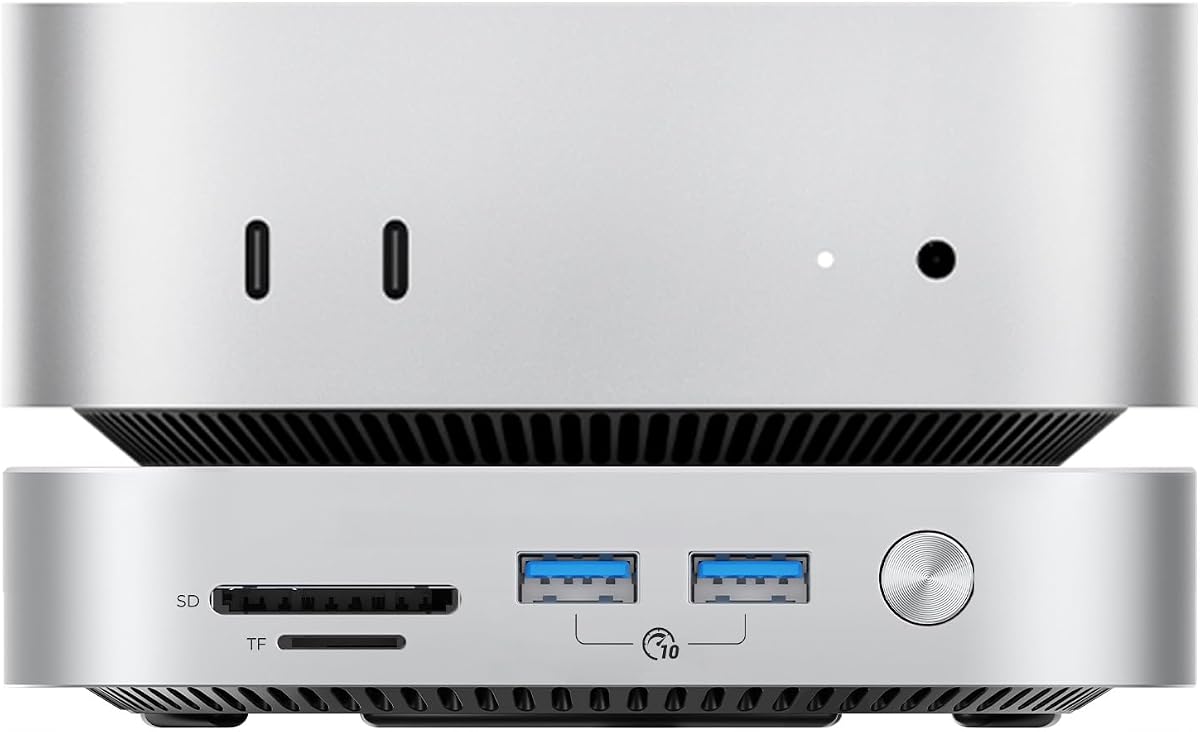




The ORICO 2TB External SSD stands out as a robust expansion solution specifically designed for Mac Mini systems. It offers seamless integration with M-series chips and provides a significant storage boost without compromising performance.
We may earn a commission when you buy through this link, at no additional cost to you.
Its dual-SSD architecture allows users to attach two NVMe drives simultaneously, effectively doubling storage while maintaining desktop elegance. The aerospace-grade aluminum body ensures peak speeds are sustained through intelligent cooling channels.
While it is larger than standard portable drives, its feature set including multiple USB ports and an SD reader makes it a powerful hub. This trade-off is acceptable for users needing a dedicated expansion base.
Creative professionals and developers should consider this drive for its Time Machine compatibility and 3-year warranty. It delivers reliability and high throughput for 4K and 8K workflows out of the box.
This drive supports two NVMe SSDs for massive storage needs without cluttering your desk with multiple cables.
Smart cooling ensures consistent high speeds during long transfers without overheating or throttling performance.
We may earn a commission when you buy through this link, at no additional cost to you.
The Samsung T7 Portable SSD is a top choice for budget-conscious buyers seeking reliable performance with Mac Mini M4. Its compact design fits easily in pockets while delivering consistent speeds for daily file transfers.
We may earn a commission when you buy through this link, at no additional cost to you.
With PCIe NVMe technology, it achieves read and write speeds up to 1050MB/s, making it nearly twice as fast as older models. The solid aluminum unibody construction provides excellent protection against drops and impacts.
While it lacks Thunderbolt connectivity, its USB 3.2 Gen 2 interface is sufficient for most creative workflows. The durable build ensures longevity even with frequent travel or handling during on-site projects.
Students and casual creatives should prioritize this drive for its balance of price and performance. It backs up files quickly and securely without breaking the bank or compromising on essential quality.
Quick transfer times reduce waiting periods when moving large video files between Mac Mini M4 and external storage.
Shock resistance up to six feet protects your data during travel or accidental drops in the office.
We may earn a commission when you buy through this link, at no additional cost to you.
The SanDisk Professional 4TB PRO-G40 SSD represents the pinnacle of external storage performance for high-end Mac Mini M4 setups. It delivers blazing fast speeds suitable for professional video editing and large database management.
We may earn a commission when you buy through this link, at no additional cost to you.
Its dual-mode compatibility supports both Thunderbolt 3 and USB-C, ensuring flexibility across different connection types. The ultra-rugged design with IP68 resistance offers protection against water and dust in demanding environments.
While the premium price may be steep for some, the 3000MB/s speeds justify the investment for power users. The large capacity means fewer transfers are needed over time, streamlining the workflow significantly.
Professionals requiring extreme durability and top-tier speed should consider this drive. It maintains transfer consistency even under heavy loads thanks to its cooling core and robust construction quality.
The Thunderbolt 3 interface unlocks maximum performance from the Mac Mini M4 for rapid project file transfers.
IP68 dust and water resistance ensures the drive functions reliably even in harsh outdoor or industrial conditions.
We may earn a commission when you buy through this link, at no additional cost to you.
The Lexar 2TB ES3 External SSD offers an attractive mix of capacity and speed for Mac Mini M4 users. It provides quick transfers and instant storage expansion without the bulk of traditional hard drives.
We may earn a commission when you buy through this link, at no additional cost to you.
Graphite sheets inside the drive quickly conduct heat to keep temperatures low during blazing fast transfers. This thermal management is crucial for sustained performance when working with large media files.
While the body is sleek, users should handle it with care due to its plastic composition. The drop resistance up to 2 meters offers decent protection for daily office or home use.
Anyone needing 2TB of space at a reasonable price should look to this drive. It balances performance and affordability well for general storage expansion needs.
Internal graphite sheets enhance heat dissipation to prevent throttling during continuous file writes.
Two terabytes of space allow users to store vast libraries of photos and videos externally.
We may earn a commission when you buy through this link, at no additional cost to you.
The Sandisk 1TB Extreme Portable SSD delivers near-instant file transfers with speeds up to 2000MB/s for Mac Mini M4 users. It allows users to move massive photo sets in seconds without lag.
We may earn a commission when you buy through this link, at no additional cost to you.
Security is a key feature with 256-bit AES encryption helping to keep private files secure with password protection. The IP65 rating ensures protection against spills and accidental drops during travel.
Although the price is higher than standard portable drives, the speed and security features justify the cost. Users can carry high-res clips and edits securely without worrying about data loss or corruption.
Traveling photographers and videographers should prioritize this drive for its speed and ruggedness. It ensures that your AI content and high-res photos move quickly between your camera and Mac Mini.
Password protection and encryption keep your sensitive client data safe from unauthorized access on the go.
IP65 rating provides peace of mind against accidental spills or rain exposure during outdoor shoots.
We may earn a commission when you buy through this link, at no additional cost to you.
The Lexar ES3 1TB Portable SSD Silver is designed for those who value portability above all else. It weighs only 42g and is thin enough to fit easily into a jacket pocket or slim bag.
We may earn a commission when you buy through this link, at no additional cost to you.
Despite its slim profile, it supports USB 3.2 Gen 2 for fast data transfer rates of up to 1050MB/s. This ensures that you do not sacrifice speed when choosing a lighter drive option.
Data safety is addressed with included encryption software to protect files during transit. However, users should note that the thin design may feel less robust compared to heavier aluminum alternatives.
Frequent travelers and mobile workers will appreciate this drive for its minimal footprint. It allows you to carry essential files without adding noticeable weight to your daily carry setup.
The slim and light form factor makes it perfect for attaching to laptops or slipping into pockets.
USB 3.2 Gen 2 ensures quick access to files even when working with large media assets.
We may earn a commission when you buy through this link, at no additional cost to you.
The SSK Portable SSD 1TB is a compelling choice for users who prioritize extreme portability and iPhone compatibility. It supports 4K60Hz ProRes HDR video capture making it a versatile tool for mobile creators.
We may earn a commission when you buy through this link, at no additional cost to you.
Its lightweight design weighs just 36.6g and operates on low power consumption to ensure seamless usability on the go. SLC caching ensures steady speeds during transfers within the cache capacity.
While it is very small and may be easy to misplace, it includes both USB-C and USB-A cables for convenience. The LED light helps track activity which is useful when the drive is in a bag.
Mobile editors and iPhone users should consider this drive for its specialized performance. It bridges the gap between mobile capture and desktop processing on your Mac Mini M4 efficiently.
Designed to work well with mobile devices for capturing high quality video directly to storage.
Low power usage ensures compatibility with devices that have limited power output capabilities.
We may earn a commission when you buy through this link, at no additional cost to you.
The Crucial X10 2TB Portable SSD is built for creators and students who need reliable storage for games and files. It offers ultra-fast speeds and broad compatibility across Windows and Mac systems.
We may earn a commission when you buy through this link, at no additional cost to you.
Designed to last, it features IP65 dust and water resistance along with drop resistance up to 9.8 feet. This durability makes it suitable for travel and all types of weather conditions.
Users also receive bonus software like Acronis True Image which enhances data security and backup options. This added value strengthens the drive appeal for comprehensive storage management needs.
Students and gamers should prioritize this drive for its balanced performance and ruggedness. It provides a secure place for large files while remaining portable enough for daily transport.
IP65 rating and drop resistance ensure data remains safe during travel or accidental drops on hard surfaces.
Included Acronis software helps with backups and drive health monitoring for better data management.
We may earn a commission when you buy through this link, at no additional cost to you.
The Samsung T9 Portable SSD is designed for creators who need fast read and write speeds during longer processes. Its advanced thermal solution controls heat to maintain ideal temperatures during heavy use.
We may earn a commission when you buy through this link, at no additional cost to you.
With speeds up to 2000MB/s, it allows you to race through projects without waiting on data transfers. The Dynamic Thermal Guard ensures performance does not drop due to overheating issues.
While it is an upgrade from the T7, the higher price is justified for sustained performance. Users should ensure their Mac Mini has Gen 2×2 support to utilize the full speed potential of this drive.
Power users needing consistent performance should choose this drive over standard options. It is a true team player when it comes to heavy-duty application usage and efficient file-saving tasks.
Dynamic Thermal Guard technology keeps the drive cool during long video editing sessions.
USB 3.2 Gen 2×2 support doubles the bandwidth for faster data transmission rates.
We may earn a commission when you buy through this link, at no additional cost to you.
The SABRENT Rocket Nano XTRM 2TB offers top-tier Thunderbolt 3 speeds for uninterrupted 4K editing. It fits 2TB of storage in a compact aluminum body that fits easily into a shirt pocket.
We may earn a commission when you buy through this link, at no additional cost to you.
It falls back seamlessly to USB 3.2 Gen 2 for compatibility with standard ports. Both Thunderbolt and USB-C cables are included so no extra purchases are needed to start using the drive.
Bus-powered operation means no external power adapter is needed for travel. The aluminum chassis improves heat dissipation during sustained transfers to protect your data integrity.
Professionals who need max speed should consider this drive. The included cables and compact design make it ideal for field work where every ounce matters.
Thunderbolt 3 interface delivers 2700 MB/s speeds for high bandwidth video editing tasks.
Both cables included ensures immediate compatibility with various ports without extra costs.
We may earn a commission when you buy through this link, at no additional cost to you.
Selecting the right storage solution involves balancing speed, capacity, and durability. This section outlines critical factors to consider before purchasing an external drive for your Mac setup.
The interface determines how fast data moves between your Mac and the drive. USB 3.2 Gen 2 offers up to 10Gbps while Thunderbolt 3 reaches 40Gbps for significantly faster workflows.
Consider how much data you regularly handle. Options range from 1TB for basic files to 4TB for large media projects. Choose a capacity that avoids constant file management.
Ruggedness matters if you travel with your drive. Look for IP ratings for water resistance and drop ratings to ensure physical protection against accidental impacts and spills.
High-performance drives generate heat. Aluminum bodies and internal cooling sheets help dissipate heat to maintain consistent speeds without throttling during long transfers.
Encryption software is vital for sensitive data. Ensure the drive supports password protection and AES encryption to keep your files secure from unauthorized access.
Drivers and management tools like backup software add value. Some drives include Acronis images Magician tools which simplify drive maintenance and data protection.
Check if cables are included. A drive that comes with both USB-C and USB-A cables offers more flexibility for connecting to various devices without extra purchases.
Ensure the drive is Mac ready or supports APFS formatting. Compatibility with macOS ensures plug-and-play functionality without needing additional drivers.
Always eject the drive safely via Finder before unplugging it to prevent data corruption. Store the drive in a cool dry place to extend its lifespan and protect internal components.
Yes the Mac Mini M4 is compatible with almost all external SSDs via USB-C or Thunderbolt ports. However for you should check if the drive supports macOS file systems like APFS for optimal performance.
Most modern drives include the necessary USB-C or Thunderbolt cable in the box. If not you will need a USB-C to USB-C cable rated for the speed you intend to use.
Absolutely. An external SSD is an excellent choice for Time Machine backups due to its speed and reliability. Just ensure it is formatted correctly for macOS to work seamlessly.
Slow speeds can be caused by using an older USB port or a slow cable. Ensure you are connected to a USB 3.2 Gen 2 or Thunderbolt port for maximum performance.
Look for product descriptions that mention Mac compatibility or APFS support. Most reputable brands like Samsung and SanDisk list this clearly in their technical specifications.
An SSD is highly recommended for the Mac Mini M4 due to its speed and durability. HDDs are slower and more prone to physical damage which can hinder high-performance workflows.
Yes high-performance SSDs allow direct video editing without needing to transfer files to internal storage. This saves space on your Mac Mini while maintaining smooth playback.
SSDs typically last for several years depending on usage. With proper care and avoiding physical damage they can easily exceed five years of reliable daily use.
Remember that prices change frequently so check current offers before purchasing. Verify compatibility with your specific model to avoid connection issues upon arrival.