
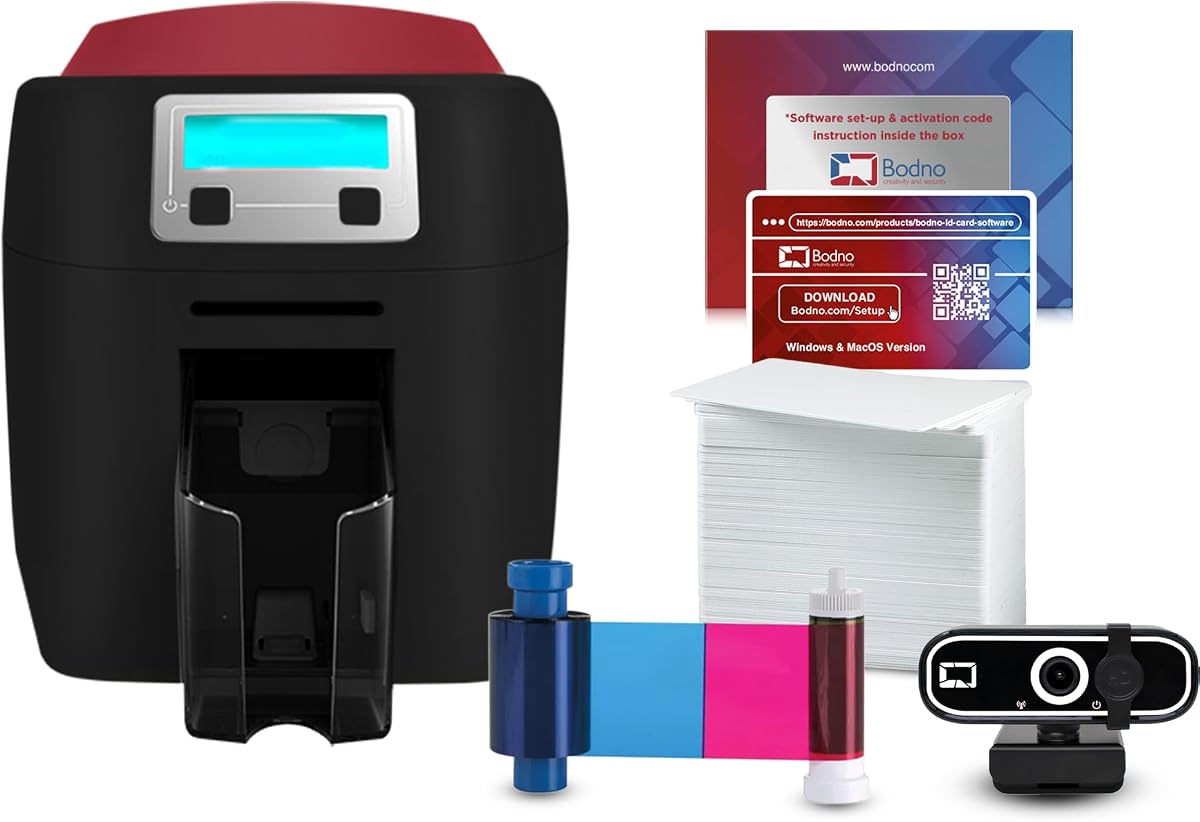
Bodno Seaory S28 Dual Sided ID Card Printer & Complete Supplies Package ID Software and Camera – Bronze Edition
4.6Editor score
One pass dual printing
High resolution output
Linux compatibility included
This guide compares the top dual sided card printers for professional ID badge creation, evaluating features speed and reliability for business and organization
Finding the right dual sided card printer is essential for organizations needing professional identification badges quickly. These devices allow you to print vibrant full color graphics on both sides of PVC cards efficiently. Whether for employee badges or event passes the right machine ensures durability and quality.
We evaluated ten leading models based on print speed ease of use and included supplies. Each printer was analyzed for software compatibility ribbon longevity and overall build quality. Our comparisons highlight the best options for various budgets and operational needs without bias.
Each pick shows specific strengths like warranty coverage or included design tools to help you decide. Prices and availability change frequently so always check the current listing before purchasing. We hope this guide simplifies your search for the perfect card printing solution.
4.6Editor score
4.6Editor score

4.3Editor score
The following table provides a side by side comparison of all ten selected printers. It highlights key specifications and included items to help you identify the right model for your specific workflow needs.


The Bodno Magicard 400X stands out as a comprehensive solution for businesses needing reliable ID card printing. With a rating of 4.6 stars this model offers an all inclusive package that simplifies setup significantly. It includes everything required to start producing high quality cards immediately upon unboxing.
We may earn a commission when you buy through this link, at no additional cost to you.
This printer supports dual sided printing which allows for detailed designs on both sides of the card. The included Bronze Edition software features pre made templates and intuitive drag and drop capabilities making design accessible for non technical users. Compatibility with both Windows and Mac ensures flexibility for any office environment.
While the price is higher than basic models the inclusion of a 300 print ribbon and extensive warranty offsets the initial cost. The 4 year warranty and lifetime software support provide long term peace of mind. Some users may find the activation code process slightly tedious initially.
This model is ideal for organizations that prioritize ease of use and complete supply readiness. If you need a printer that handles dual sided work with minimal setup time this is a strong recommendation. It balances professional quality with user friendly features effectively.
The package includes ribbons and software so you can start printing right away without extra purchases.
Pre made templates and drag and drop tools simplify the card design process for all users.
We may earn a commission when you buy through this link, at no additional cost to you.
The Bodno Seaory S28 offers exceptional value for budget conscious buyers seeking dual sided capabilities. Its 4.6 rating reflects strong user satisfaction with its performance and ease of use. The single pass dual printing feature saves time compared to two pass alternatives in its class.
We may earn a commission when you buy through this link, at no additional cost to you.
Resolution capabilities up to 300 x 1200 dpi ensure sharp text and vibrant graphics on your cards. Compatibility extends to Linux Windows and Mac making it versatile for diverse tech environments. The included software provides pre made templates to streamline the design workflow efficiently.
While the hardware warranty is two years instead of three it remains competitive for this price range. The inclusion of a color ribbon and cards reduces immediate additional costs. Some users might prefer a longer warranty period for heavy industrial use cases.
This printer is perfect for small businesses or schools needing affordable reliable dual sided printing. It delivers professional results without the high price tag of premium enterprise models. Choose this if cost efficiency and single pass speed are your top priorities.
Printing both sides in one pass increases productivity and reduces total print time significantly.
Support for Linux Windows and Mac allows deployment in virtually any existing office setup.
We may earn a commission when you buy through this link, at no additional cost to you.
The Evolis Primacy 2 is designed for high volume environments needing speed and reliability. Replacing the Primacy 1 it offers a 25 percent speed increase allowing 280 full color cards per hour. This makes it suitable for large campuses or corporate offices with high issuance needs.
We may earn a commission when you buy through this link, at no additional cost to you.
It uses direct to card dye sublimation technology for durable professional quality prints. The printer includes color ribbon and blank cards so you can begin production immediately. Optional LCD touch screen with QR code display adds convenience for operational assistance and troubleshooting.
While it is priced higher than entry level models the speed and build quality justify the investment for businesses. The 3 year warranty and optional 200 card feeder upgrade offer flexibility for growing needs. However the basic LCD panel might lack the interface of the touch option.
Invest in this printer if you need high throughput and advanced connectivity features like Ethernet. It balances performance with ease of use making it a top choice for professional settings. The included bundle ensures you are ready to print right out of the box.
With 280 cards per hour it handles large batches efficiently without compromising quality.
Optional feeders and touch screens allow customization based on your specific operational demands.
We may earn a commission when you buy through this link, at no additional cost to you.
The Magicard 300 provides a straightforward reliable solution for basic dual sided card printing needs. With a 4.2 rating it is praised for its robust build and consistent performance. The bundle includes essential supplies like ribbons and cards to get started quickly.
We may earn a commission when you buy through this link, at no additional cost to you.
Its LED panel offers easy to understand messages ensuring users can resolve issues without calling support. Free technical support helps with setup which is valuable for first time users. The 300 dpi resolution supports high detail designs including micro-text and logos effectively.
One limitation is the lack of Ethernet connectivity limiting network printing options to USB only. The design is functional but may feel dated compared to newer models with touchscreens. Despite this it remains a solid choice for departments needing simplicity over advanced features.
This printer is best for small offices or schools where network printing is not a priority. The free support and clear LED messages make maintenance easy for non technical staff. Choose this if you value simplicity and reliability in a dual sided printer.
The LED panel provides simple messages that help users navigate setup and troubleshooting easily.
Experts assist with printer setup ensuring you can start printing with minimal hassle.
We may earn a commission when you buy through this link, at no additional cost to you.
The Fargo DTC4500e is a feature rich printer designed for versatile and durable card production. It includes a 500 image ribbon which reduces frequent replacement needs in busy environments. The smart LCD screen provides access to simple and complex print commands easily.
We may earn a commission when you buy through this link, at no additional cost to you.
A dual hopper option allows holding two different card types which streamlines workflows for mixed batches. Optional laminator compatibility adds durability to cards which is vital for ID badges used frequently. This flexibility makes it suitable for diverse organizational requirements beyond basic printing.
The unit is heavier than desktop models so ensure you have a stable surface for setup. The price is higher but the extended ribbon life and optional features offer long term savings. Some users might find the interface learning curve slightly steeper than simpler devices.
Invest in this model if you need card type flexibility and laminating capabilities for longevity. The large ribbon capacity reduces downtime during peak printing periods significantly. It is a robust choice for security focused environments needing reliable card production.
Holding two card types at once improves efficiency for mixed badge or ID production batches.
Adding a laminator extends card lifespan which is essential for heavy use identification cards.
We may earn a commission when you buy through this link, at no additional cost to you.
The Fargo DTC4250e boasts a perfect 5.0 rating indicating high user satisfaction and reliability. It features direct to card printing with built-in erase and rewrite capabilities for added flexibility. This feature allows you to reuse cards or update information without wasting physical stock.
We may earn a commission when you buy through this link, at no additional cost to you.
The smart LCD screen simplifies command access making operation intuitive for all staff members. Included supplies like PVC cards and ribbons ensure you can start producing cards immediately. The printer is well suited for offices needing efficient updates and quick card changes.
Ribbon capacity is 250 prints which may require more frequent changes for high volume users. Connectivity is primarily USB limiting network sharing options compared to more advanced models. However the erase rewrite feature is a significant benefit for cost sensitive organizations.
Choose this printer if you value user feedback and the ability to rewrite card data. It is efficient for environments where card details change frequently like event badges. The high rating suggests consistent performance and ease of use for daily tasks.
Built-in erase and rewrite lets you update card data quickly without wasting physical media.
A perfect 5.0 rating reflects strong reliability and ease of use across various environments.
We may earn a commission when you buy through this link, at no additional cost to you.
The Bodno Magicard 300 delivers a balanced mix of features and value for dual sided printing. It includes a 300 print YMCKO ribbon and supplies to ensure immediate usability out of the box. The Bronze Edition software offers drag and drop design tools for quick customization.
We may earn a commission when you buy through this link, at no additional cost to you.
Dual sided printing support allows for comprehensive designs that utilize the full card surface. Compatibility with Windows and Mac ensures this fits seamlessly into most IT environments. The 3 year warranty and lifetime support provide a safety net for technical issues or queries.
While it lacks advanced encoding features it covers most basic ID card needs efficiently. The Bronze software may have fewer template options than higher editions but remains functional. Users appreciate the straightforward setup and reliable printing performance for day to day tasks.
This model is ideal for organizations needing a reliable workhorse without excessive advanced features. It offers strong support and warranty coverage that minimizes risk for new buyers. Consider it for general ID badge printing needs with dual sided requirements.
Lifetime software support ensures you can get help whenever you face design or software issues.
Supplies and ribbons included mean you can start printing without extra procurement steps.
We may earn a commission when you buy through this link, at no additional cost to you.
The Zebra ZC300 provides flexibility with both color and monochrome printing options for varied needs. It features a highly graphical LED LCD interface with icons that simplify navigation for all users. Government-grade AES data encryption protects sensitive information during the printing process effectively.
We may earn a commission when you buy through this link, at no additional cost to you.
Multiple encoding options allow for magnetic stripe or contactless cards with easy third party integration. The saloon-style output doors make card access straightforward without needing to open complex doors. This design improves user convenience and workflow efficiency in busy printing stations.
Some users report a lower rating likely due to initial setup complexity or software integration. The SDKs support many encoders but may require technical knowledge to configure correctly. However the security features and interface design make it strong for data sensitive environments.
Choose this if security and interface clarity are critical for your organization. The flexibility in encoding and color options suits varied identification tasks. Ensure your team has technical support for optimal setup and integration with existing systems.
AES data encryption protects sensitive data during printing preventing unauthorized access.
Design makes card loading and unloading faster and simpler for daily use.
We may earn a commission when you buy through this link, at no additional cost to you.
The Bodno Matica MC320 offers cost-effective dual sided printing with straightforward operation. It comes ready to use with necessary supplies and compatibility for both Windows and Mac platforms. The YMCKO ribbon supports up to 100 dual-sided prints for immediate use.
We may earn a commission when you buy through this link, at no additional cost to you.
Bronze Edition software includes drag-and-drop features and pre-made templates to streamline design tasks. The activation code allows convenient hassle-free use without complex installation steps. This makes it accessible for small businesses or departments needing reliable printing solutions quickly.
Print yield is lower than some models which may increase per-card costs over high volume. However the affordable price point offsets this for many users with moderate needs. The 3-year warranty ensures reliability and support for the duration of initial usage.
This printer suits organizations seeking a balance between cost and functionality. It is ideal for small batches or occasional printing needs without compromising on quality. Consider it if budget and ease of use are primary decision factors for your team.
Affordable dual sided printing makes this accessible for small businesses or low volume needs.
Secure activation code ensures quick access to software features without complex setup steps.
We may earn a commission when you buy through this link, at no additional cost to you.
The Zebra ZC350 delivers incredible printing speeds surpassing others in its class for high-volume needs. Its visual interface allows touch-based printing and pre-print preview eliminating the need for test runs. This saves time and money ensuring your output matches expectations before full production.
We may earn a commission when you buy through this link, at no additional cost to you.
A redesigned hopper with saloon-style doors makes loading and unloading cards significantly easier. The snug-fit ribbon design prevents installation errors reducing maintenance issues and printer downtime. It is ready to print immediately upon setup making it efficient for urgent card production.
The price is higher than average but the speed and interface justify the cost for busy offices. Customizable encoding offers flexibility for various card types and secure identification needs. Some users might find the ribbon fit design slightly rigid during installation.
Choose this model if you need fast reliable card production with minimal downtime. The visual interface helps streamline operations and reduce errors in daily workflows. It is a top choice for environments where speed and ease of use are critical.
The screen allows quick card look before printing saving time and reducing wasted cards.
Design ensures ribbons are installed correctly every time reducing maintenance errors.
We may earn a commission when you buy through this link, at no additional cost to you.
Selecting the right printer involves evaluating speed compatibility and supply costs. Below are key factors to consider for your specific organizational needs.
Print speed determines how quickly you can produce batches of cards. Faster models reduce wait times for large groups such as student enrollments or employee onboarding.
Choose a model that matches your expected monthly volume to avoid bottlenecks.
Ribbons and PVC cards are recurring costs that impact your long term budget. Models with higher ribbon yields may cost more initially but reduce per card expenses.
Evaluate the total cost of ownership rather than just the upfront hardware price.
Ensure the printer driver and software work with your office OS. Some models support Linux alongside Windows and Mac offering flexibility for diverse IT environments.
Check manufacturer documentation for specific system requirements before purchasing.
User interfaces vary from simple LED panels to touch screens. A graphical interface helps non technical staff operate the device with minimal training.
Prioritize models with intuitive screens if multiple users will manage the printer.
Warranty length indicates manufacturer confidence and protects your investment. Look for models offering at least three years of hardware coverage and responsive support.
Lifetime software support can save money on future updates and troubleshooting.
Design software determines how easy it is to create professional ID cards. Features like templates and drag and drop simplify the workflow for all users.
Check if the software requires a one-time license or subscription before buying.
For secure IDs consider printers with built-in encryption or magnetic stripe encoding. These features protect sensitive data stored on the cards.
Verify if third party encoders are supported if you have specific card standards.
Some models include ribbons blank cards and software in the initial purchase. These bundles reduce initial setup costs and allow immediate usage.
Always check what is included to avoid unexpected costs upon receipt.
Install the printer on a stable surface and connect it to your computer using the provided USB or Ethernet cable. Ensure you have downloaded the latest drivers and software from the manufacturer's website to avoid compatibility issues.
Load your ribbons and PVC cards according to the user guide. Use the alignment guides provided in the tray to ensure cards feed correctly during printing to prevent jams.
Regularly clean the printer rollers and printhead using the recommended cleaning kits. This maintains print quality and prevents residue buildup that could damage your cards or the machine.
Many modern printers offer drivers for both Windows and Mac systems. Always check the product specifications to confirm compatibility with your specific operating system version before purchasing.
A standard YMCKO ribbon typically produces 200 to 500 prints depending on the coverage. Check the ribbon specs to estimate how many cards you can print before needing a replacement.
Some models come with built-in encoding options while others require external modules. Verify the specific model capabilities to ensure it meets your security requirements.
Most reputable brands include at least a one to three year hardware warranty. Extended warranties are often available for purchase to cover longer periods of use.
Most dye sublimation printers are designed for PVC cards. Using other materials may damage the printhead or result in poor quality prints.
It is recommended to clean the printhead and rollers after every few ribbons. Regular maintenance ensures consistent print quality and extends the life of the machine.
Most printers include basic design software with templates. Advanced features may require separate licenses or third-party software depending on your needs.
Many models support Ethernet or USB sharing through network servers. Check if the printer supports direct network printing for easier access across an office.
We have reviewed ten top options ranging from budget friendly bundles to high speed enterprise models. The Bodno Magicard 400X and Seaory S28 offer excellent value for those needing comprehensive packages.
Prioritize speed and connectivity if you handle large batches regularly. For smaller teams ease of use and included supplies may be more important factors in your decision.
Prices and inventory change frequently so verify current details before buying. We hope this guide helps you find the perfect dual sided card printer for your needs.