
Cooling Station PS5 Slim Pro
4.5Editor score
Automatic fan speed adjustment
Nine RGB honeycomb light modes
Compatible with all PS5 models
This guide compares the top ten cooling stands for PS5 consoles including vertical and horizontal models with fan speed control and controller charging
Finding the right cooling stand for your PlayStation 5 is essential for maintaining performance during long gaming sessions. Overheating can lead to throttling and reduced lifespan, so a dedicated accessory helps dissipate heat efficiently while keeping your setup organized and visually appealing.
We evaluated ten top-rated cooling stations based on fan performance, charging capabilities, build quality, and compatibility with all PS5 models. Our comparison focuses on real-world usability, noise levels, and additional features like USB hubs and RGB lighting to help you make an informed decision.
Each pick highlights unique strengths such as auto fan control, fast charging speeds, or compact designs. Prices and availability change frequently, so verify current details before purchasing. These recommendations cover a range of budgets and preferences for every PS5 owner.
4.5Editor score

4.5Editor score

4.5Editor score
The following table provides a side by side comparison of all ten cooling stands evaluated in this guide. Each entry highlights key specifications including fan types, charging speeds, and unique features to help you quickly identify the best match for your setup.
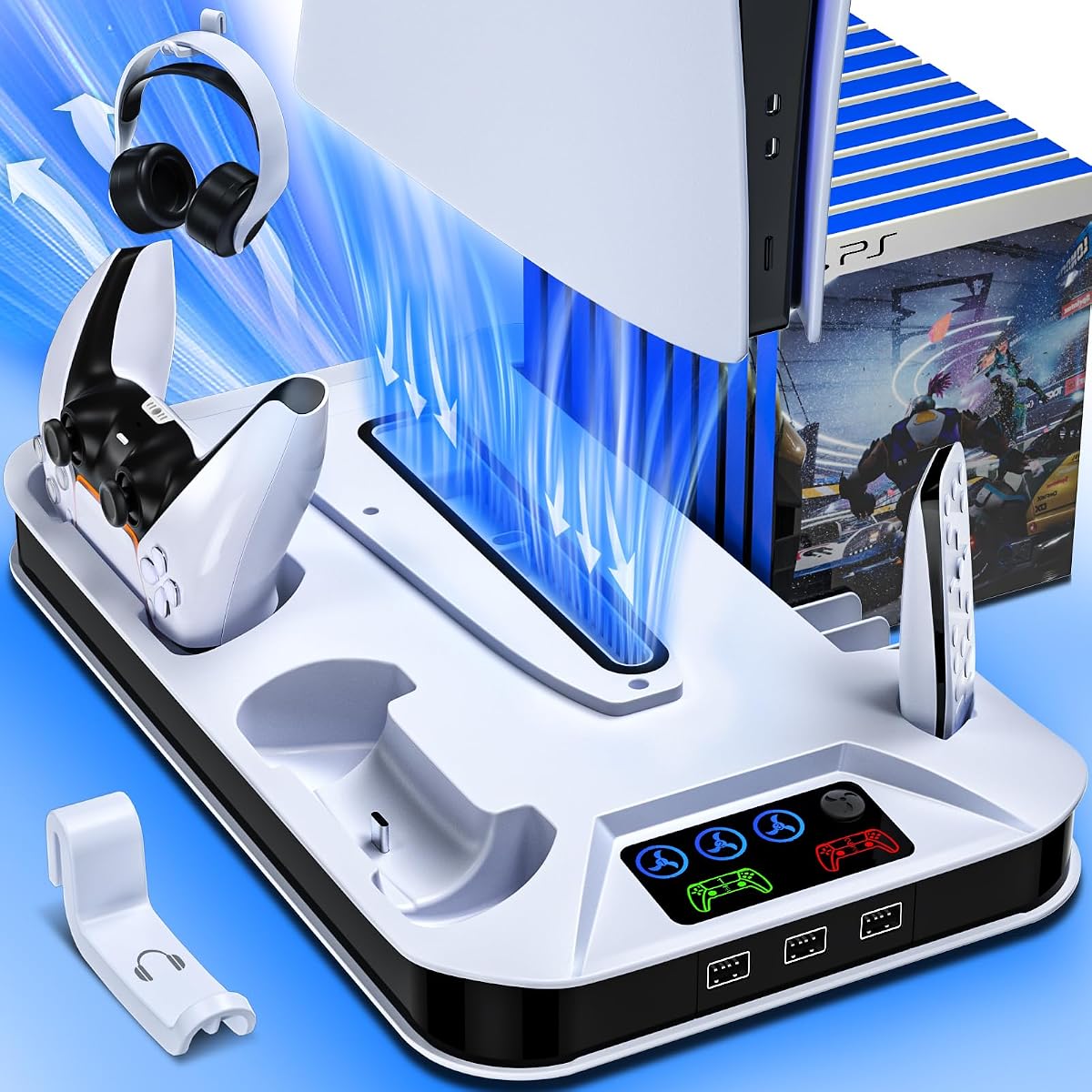


This cooling station offers a comprehensive solution for PS5 owners seeking reliable thermal management and accessory organization. With a 4.4 star rating, it delivers efficient cooling and fast charging capabilities for multiple devices simultaneously.
We may earn a commission when you buy through this link, at no additional cost to you.
The three-speed turbo fan effectively dissipates heat from the bottom of the console ensuring stable performance during intense gaming sessions. Additionally, the dual controller charger completes a full charge in just three hours while USB hubs allow charging headsets and other peripherals without extra cables.
While the design fits standard Slim and Pro models well users with Edge controllers should note compatibility limitations. The panel adapter removal step for Slim versions is straightforward but adds a minor setup detail worth considering before installation.
Ideal for gamers who value organization and consistent cooling this stand keeps your console secure and accessories within easy reach. Its balance of functionality and aesthetic integration makes it a top recommendation for most PS5 setups.
The turbo fan adjusts between high medium and low speeds to match thermal demands without excessive noise.
USB ports and dedicated docks ensure controllers headsets and remotes stay powered without cluttering your desk.
We may earn a commission when you buy through this link, at no additional cost to you.
This horizontal stand prioritizes versatility and ease of use for PS5 users who prefer a sideways console orientation. Its scalable design adapts to standard Slim and Pro editions ensuring a secure fit regardless of your console version.
We may earn a commission when you buy through this link, at no additional cost to you.
The three-speed adjustable cooling fans allow precise temperature control while the dual charging dock supports both original and Edge controllers efficiently. Setup is straightforward with no tools required making it accessible even for first-time users seeking quick installation.
While the wider footprint may require more shelf space the consolidation of charging and cooling into one unit offsets this trade-off. Users should be aware that high fan speeds can introduce audible noise during quiet gaming moments.
Recommended for those seeking a streamlined setup this stand combines functionality with flexible placement options. Its ability to handle Edge controllers sets it apart in the horizontal category for broader compatibility.
The scalable design ensures a perfect fit for all PS5 generations including the latest Slim and Pro editions.
Unlike many models this stand supports Edge controllers ensuring premium users get full charging functionality.
We may earn a commission when you buy through this link, at no additional cost to you.
Tokluck offers a smart cooling station featuring automatic fan adjustments based on real-time console temperature readings. This intelligence ensures optimal cooling efficiency without manual intervention while maintaining low noise during lighter gaming loads.
We may earn a commission when you buy through this link, at no additional cost to you.
The unit includes vibrant RGB lighting effects and a memory function that recalls your preferred fan and lighting settings after restart. Dual controllers charge in just two and a half hours with clear LED indicators showing status at a glance.
Installation requires securing the console and managing cables from the bottom which can be slightly fiddly. Additionally the added lighting features consume extra power which might matter for energy-conscious users prioritizing simplicity.
Perfect for gamers who enjoy customization this station blends performance with visual flair. The auto fan mode and rapid charging make it a practical choice for maintaining console health and gameplay continuity.
Built-in temperature probes adjust fan speeds automatically ensuring efficient thermal management without user input.
Nine RGB lighting modes enhance your gaming atmosphere with adjustable brightness and breathing effects.
We may earn a commission when you buy through this link, at no additional cost to you.
This white cooling station delivers exceptional value with a full suite of features at a budget-friendly price point. A 4.5 star rating reflects its reliability in cooling and charging across various PS5 models and accessories.
We may earn a commission when you buy through this link, at no additional cost to you.
The three-speed turbo fan ensures effective heat dissipation while the included headset holder and USB hubs maximize organization. Dual controllers charge fully in two and a half hours with smart circuit protection preventing overcharging and extending battery life.
Compatibility is limited to standard Slim and Pro models excluding Edge controllers which may be a drawback for some users. The design is functional but lacks advanced lighting or premium finishes found in higher-priced alternatives.
An ideal pick for cost-conscious gamers this stand covers essential needs without unnecessary extras. Its balance of performance and affordability makes it a strong contender for everyday use.
Despite the low price it includes USB hubs a headset holder and reliable charging protection for peace of mind.
Smart chips monitor charging to prevent overheating and overcurrent ensuring safe overnight charging for controllers.
We may earn a commission when you buy through this link, at no additional cost to you.
Rysker delivers a reliable vertical stand with a standout memory function that recalls your last fan setting after power cycles. This convenience ensures consistent cooling performance without needing to reconfigure settings each time you resume play.
We may earn a commission when you buy through this link, at no additional cost to you.
The unit supports Edge controllers unlike many competitors offering broader compatibility for premium users. A built-in smart chip stops charging at 80 percent to extend battery life while three USB ports provide flexible peripheral power options.
While it lacks extensive RGB customization the focus on functional features appeals to users prioritizing performance over aesthetics. The moderate build weight provides stability but may feel slightly bulky in minimal setups.
A practical choice for long-term users this stand combines thoughtful design with durable construction. Its memory feature and Edge compatibility make it a standout for those who value consistency and convenience.
The fan remembers your preferred speed setting after restart eliminating the need to adjust it manually every session.
Support for Edge controllers expands utility for owners of Sony's premium controller without needing adapters.
We may earn a commission when you buy through this link, at no additional cost to you.
This station combines advanced thermal management with eye-catching RGB honeycomb lighting for a visually immersive gaming setup. Automatic fan control adjusts speeds based on console temperature ensuring efficient cooling without manual adjustments during gameplay.
We may earn a commission when you buy through this link, at no additional cost to you.
The charging system supports both original and Edge controllers with a two and a half hour full charge time. Nine lighting modes include single color and breathing effects allowing extensive customization to match your room aesthetic.
While the lighting features enhance ambiance they add a layer of complexity and cost compared to simpler models. Some users may prefer minimal setups where RGB lighting is unnecessary for their personal preference.
Recommended for gamers seeking a premium aesthetic this stand delivers on style and performance. The auto fan and fast charging ensure functionality keeps pace with its impressive visual appeal.
Nine RGB honeycomb modes create dynamic lighting effects that sync with your gaming environment for added immersion.
Temperature probes automatically scale fan speeds ensuring optimal cooling while minimizing noise during lighter tasks.
We may earn a commission when you buy through this link, at no additional cost to you.
This horizontal stand features a scalable design ensuring compatibility across all PS5 generations including the latest 2024 Pro edition. Its consolidated layout merges cooling and charging into a single unit reducing desk clutter effectively.
We may earn a commission when you buy through this link, at no additional cost to you.
Setup requires no tools with EVA foam and screws included for a secure fit. The three-speed fan allows customization for different gaming intensities while the dual dock supports Edge controllers for broader versatility.
The wider footprint may limit placement options on smaller desks or shelves which is a key consideration for tight setups. Additionally the fan noise on high settings might distract during quiet gaming sessions.
Ideal for users prioritizing compatibility and ease of installation this stand offers a robust solution for organizing PS5 accessories. Its adaptability makes it a strong choice for evolving console collections.
The scalable structure adapts to new PS5 models ensuring long-term usability as hardware evolves over time.
No complex tools are needed for setup allowing quick installation with included foam and screw components.
We may earn a commission when you buy through this link, at no additional cost to you.
This stand offers advanced auto fan control driven by built-in sensors that adjust speed based on real-time console temperature readings. It also features smart charging protection stopping charges at 70 percent to extend controller battery life significantly.
We may earn a commission when you buy through this link, at no additional cost to you.
The unit provides extensive storage including slots for hard drives game cards headsets and media remotes keeping your desk tidy. A Type-C cable included supports flexible power options for charging even when the console is in rest mode.
Cable management can be tricky given the many ports and power options which may require additional effort to maintain a clean look. The heavier build adds stability but makes relocation more cumbersome compared to lighter stands.
A top choice for long-term durability this stand combines smart thermal and charging features with robust storage. Its safety-focused charging makes it ideal for users who leave controllers on the dock overnight regularly.
Smart chips prevent overcharging by stopping charges at 70 percent ensuring longer controller lifespan and safety.
Slots for drives cards and remotes consolidate accessories saving space and maintaining a clutter-free setup.
We may earn a commission when you buy through this link, at no additional cost to you.
heclynis presents a cooling stand with vibrant RGB lighting offering eight color options across four modes to enhance your gaming ambiance. It includes a turbo fan with three silent speeds ensuring effective cooling without excessive noise during play.
We may earn a commission when you buy through this link, at no additional cost to you.
Dual controllers charge in about three hours with clear LED indicators showing status. The unit also supports USB A ports for additional peripherals while keeping the console fixed securely with an included safety screw.
The lighting adds visual appeal but requires extra steps to configure which may not suit minimalist setups. USB port availability is limited compared to models offering more hubs for extensive accessory charging.
Great for style-focused gamers this stand balances performance with decorative lighting. Its quiet fan and solid build make it a reliable option for maintaining console temperature while enhancing room aesthetics.
Eight RGB colors and multiple modes allow extensive customization to match your personal gaming style preferences.
Three silent fan speeds provide efficient cooling while keeping noise levels low during critical gaming moments.
We may earn a commission when you buy through this link, at no additional cost to you.
This station offers broad compatibility with all PS5 models and supports charging for iPhones laptops and other USB devices thanks to multiple USB and Type-C ports. A two-year warranty and responsive support add peace of mind for buyers.
We may earn a commission when you buy through this link, at no additional cost to you.
The three-stage adjustable fan ensures efficient heat dissipation from the console bottom while LED indicators show charging status clearly. Dual controllers charge fully in three hours with smart chip protection against overcharging and voltage issues.
Setup instructions could be clearer for first-time users which might lead to minor initial confusion during assembly. The moderate price reflects its robust feature set but may not fit tight budgets compared to basic models.
A solid all-in-one choice this stand combines versatile charging with reliable cooling and strong after-sales support. Its device flexibility makes it valuable for households using multiple gadgets alongside their PS5 console.
A twenty-four month warranty with responsive service ensures reliable support for any technical issues after purchase.
Multiple USB and Type-C ports allow charging of various devices from phones to laptops without extra adapters.
We may earn a commission when you buy through this link, at no additional cost to you.
Choosing the right cooling stand requires evaluating several factors including fan performance compatibility and additional features. This section outlines key aspects to consider ensuring your purchase matches your specific needs and setup.
Effective cooling is critical to prevent overheating which can lead to performance throttling and hardware damage. Look for stands with adjustable turbo fans that offer multiple speed settings to balance noise and thermal dissipation efficiently during different gaming loads.
Prioritize models with proven temperature management capabilities ensuring your console stays within safe operating limits even during marathon sessions.
Ensure the stand supports your exact PS5 version including Standard Slim and Pro models both Disc and Digital editions. Some stands exclude Edge controllers or require panel removal for Slim versions which can impact usability and setup convenience.
Always check compatibility details in the product description to avoid purchasing a stand that does not fit your specific console or accessories.
Dual controller chargers are standard but charge times and smart protection vary between models. Faster charge times reduce downtime between sessions and smart chips that stop charging at specific percentages help extend controller battery lifespan over time.
Consider stands with additional USB ports for headsets and remotes to centralize charging and reduce cable clutter on your desk.
Sturdy materials and secure locking mechanisms ensure your console remains stable and protected from accidental knocks. Lightweight stands may shift easily whereas those with safety screws and non-slip pads offer better stability during intense gameplay.
Invest in stands with durable construction to withstand daily use without wobbling or scratching your console surfaces.
Features like RGB lighting USB hubs and accessory holders enhance convenience and personalization but add complexity and power draw. Decide which extras matter most to your setup whether visual flair or practical storage and avoid paying for unnecessary functions.
Select stands that balance useful features with simplicity to keep your gaming area organized without extra bloat or costs.
Noise control is important especially during quiet gaming moments when background sounds can be distracting. Look for stands with low noise ratings or silent modes that maintain cooling without introducing excessive fan hum.
Test fan settings if possible or read reviews focusing on noise to ensure the stand suits your environment's acoustic preferences.
Prices range widely based on features and build quality so determine your budget before comparing models. Higher-priced stands may offer advanced controls or better warranties but budget options can still deliver reliable cooling and essential charging.
Compare feature sets carefully to identify the best value that meets your needs without overspending on unneeded extras.
Some stands require tools or complex assembly steps that can be frustrating for first-time users. Tool-free designs with clear instructions and included screws reduce setup time and make installation more accessible.
Choose stands with straightforward setup processes to minimize hassle and start using the cooling benefits immediately.
Begin by removing the panel adapter if you own a Slim or Pro model before securing your console to the stand. Use the included safety screw and non-slip pads to fasten the console tightly ensuring it remains stable during gameplay.
Connect the stand to your console using the provided cable and adjust the fan speed based on your gaming intensity. For automatic models the fan will adjust itself but manual modes let you select low medium or high speeds as needed.
Regularly clean the fan vents and surface of the stand with a soft dry cloth to prevent dust buildup that can reduce airflow and increase noise. Avoid using water or chemical cleaners that might damage the plastic and electronic components.
Most modern cooling stands are designed to support the PS5 Pro alongside Slim and Standard models. However some older or budget models may lack specific features needed for the Pro. Always check the product description for explicit compatibility confirmation before purchasing to ensure a perfect fit.
Yes you can use the stand without the console connected for charging accessories via USB hubs. The cooling fan typically requires console power so it may not operate if the console is off unless the stand has an independent power source.
Use a soft dry cloth to gently wipe the fan vents and exterior surfaces of the stand. Avoid using water or chemical cleaners that can damage internal components. For deeper cleaning a can of compressed air can help remove dust buildup without disassembly.
Not all stands support Edge controllers since they have unique charging pins and shapes. Models with adjustable charging docks or specific Edge support ensure compatibility. Check the product details carefully if you own an Edge controller to avoid compatibility issues.
Many cooling stands include limited warranties typically ranging from six months to two years depending on the manufacturer. Review warranty terms before purchasing to ensure coverage for defects or failures. Keep your receipt and order details for potential claims.
A quality cooling stand can reduce internal console fan noise by improving airflow and lowering operating temperatures. External fan noise may vary so choose models with adjustable speeds or silent modes to keep the gaming environment quieter during use.
Many stands feature USB hubs that allow charging of headsets remotes and other compatible devices. Some support smartphones and tablets via Type-C or standard USB ports. Check the included ports and supported device types to maximize versatility.
Most stands are designed for easy setup without tools requiring only a few minutes. Screws and foam are included for securing the console. Follow the included instructions step by step to ensure a safe and stable installation.
Selecting the right cooling stand depends on your specific needs whether that is automatic fan control RGB lighting or extensive accessory organization. Our top picks highlight models balancing performance value and unique features for different gamers.
Consider factors like console compatibility charging speed and build quality to find a stand that fits your setup and usage habits. Prioritize models that enhance your experience without introducing unnecessary complexity or noise.
Prices and availability change frequently so always verify the latest details before making a final purchase decision. This guide provides a solid foundation for choosing a cooling stand that will protect your console and elevate your gaming setup.