
Computer Fan Stand
4.4Editor score
Fits 120mm 140mm fans
Heavy duty metal construction
360 degree rotation
Keeping your devices cool is essential for performance and longevity. A quality computer fan stand helps dissipate heat efficiently while improving ergonomics. Whether you work from home or game intensely, the right stand prevents overheating and boosts comfort during extended use.
We evaluated ten top-rated cooling stands based on fan quality, adjustability, build materials, and compatibility. Our comparison covers laptop-specific pads and universal PC fan mounts. Each option was analyzed for noise levels, airflow efficiency, and durability to ensure reliable daily performance.
Each pick highlights key features, pros, and cons to help you decide. You will find budget-friendly options alongside premium models with advanced cooling. Prices and availability can change, so verify details on the product page before purchasing to ensure you get the best value today.
4.4Editor score
4.6Editor score

4.0Editor score
As an Amazon Associate we earn from qualifying purchases.
This table provides a side-by-side overview of all ten products. It highlights key specifications and features so you can quickly compare options and find the model that fits your specific cooling and ergonomic needs.


This laptop cooling pad stands out with five quiet fans and an ergonomic design. It earned a strong rating for its ability to maintain safe temperatures without noise. The dual USB hub adds convenience for peripherals while you work.
We may earn a commission when you buy through this link, at no additional cost to you.
The cooling system allows you to control fan usage with switches. You can run one fan or all five depending on need. This flexibility saves power and reduces heat when full cooling is not required.
While the USB cable is standard USB to USB, Type C devices need an adapter. Also the LED lights cannot be turned off separately from fans. These minor limitations do not outweigh the cooling and comfort benefits provided.
Buy this if you need reliable cooling for a 12 to 17 inch laptop. It is perfect for students and professionals who value quiet operation and ergonomic support during long sessions at their desk.
Switches let you choose fan speed and count to match your cooling needs without noise.
Six height settings help you find a viewing angle that reduces strain on your neck and back.
We may earn a commission when you buy through this link, at no additional cost to you.
This cooling stand combines premium aluminum construction with stylish RGB lighting. It is designed for users who want both performance and aesthetics on their desk. The foldable design makes it easy to transport between home and office.
We may earn a commission when you buy through this link, at no additional cost to you.
Two ultra quiet fans provide efficient airflow with three speed settings. The aluminum body helps dissipate heat while adding durability. You can adjust the height to fit your posture needs comfortably.
It only supports laptops up to 16 inches so larger models may not fit. The fans are built in and cannot be replaced or upgraded. Still the build quality and style make it a strong choice for many users.
Choose this if you value a sleek look and portable design. It works well for gaming and office work on smaller laptops where airflow and portability are top priorities.
The foldable aluminum frame is lightweight yet sturdy enough for daily use and travel.
RGB lighting adds a modern touch that enhances your setup without distracting from work.
We may earn a commission when you buy through this link, at no additional cost to you.
This stand offers active cooling and a foldable design at a great value. It fits many laptop sizes and includes a phone mount for added utility. The open frame helps prevent overheating during long use.
We may earn a commission when you buy through this link, at no additional cost to you.
You can adjust the load capacity with a screw tool to support heavier devices. The non slip base keeps the stand steady on your desk. Portability is high since it folds to just over one inch thick.
The fan is not speed adjustable so you rely on its fixed performance. The phone mount might add height for very small desks. Overall the versatility and cooling make it a smart buy for most users.
Buy this if you need a simple reliable stand with cooling. It suits anyone who wants extra space under the laptop and support for their phone.
The open design allows air to flow freely around your laptop to reduce heat buildup.
Adjust screws to change load range up to five kilograms for heavier laptops or accessories.
We may earn a commission when you buy through this link, at no additional cost to you.
This cooling pad is designed for family use with three silent fans and easy controls. It includes a phone holder and extra USB ports to keep devices connected. The metal mesh ensures good heat dissipation.
We may earn a commission when you buy through this link, at no additional cost to you.
You can set the height to five levels to suit any user posture. The wheel switch makes fan speed adjustment simple and intuitive. Front pads keep laptops secure even in active households.
At maximum speed the noise might reach forty decibels which could distract some. The ABS body may feel warm over time though the steel mesh stays cool. Still it offers great value for multi user homes.
Pick this for a shared family setup where convenience is key. It works well for homework gaming and work across different ages and laptop sizes.
Extra USB ports let you connect multiple devices without using laptop ports.
Lift and lock height settings make it simple to change ergonomics quickly.
We may earn a commission when you buy through this link, at no additional cost to you.
This heavy duty stand is built to mount standard PC cooling fans on your desk. It allows precise airflow control with a rotating design. The metal construction ensures stability even with high speed fans.
We may earn a commission when you buy through this link, at no additional cost to you.
You can adjust the fan direction in 360 degrees for targeted cooling. Thumb screws make installation and repositioning tool free. It is ideal for cooling electronics that lack built in fans.
The fan itself is not included so you must source one separately. Metal edges require care during installation to avoid cuts. Despite this the build quality makes it a reliable choice for DIY cooling.
Buy this if you need flexible cooling for your PC or router. It works well for gamers and tech enthusiasts who want directed airflow without case modifications.
Rotate the fan to direct air exactly where your hardware needs it most.
A weighted metal base prevents movement even during high fan speeds.
We may earn a commission when you buy through this link, at no additional cost to you.
This aluminum stand offers durability and corrosion resistance for desktop cooling. It fits 120mm fans and allows full rotation for airflow direction. The lightweight design makes it easy to move as needed.
We may earn a commission when you buy through this link, at no additional cost to you.
The upgraded metal construction ensures stability even at high fan speeds. You can adjust the angle without tools thanks to thumb screws. It is a simple reliable solution for cooling electronics.
It only supports 120mm fans so 140mm models will not fit. Vertical locking is not explicit so angles rely on friction. Still the aluminum build and ease of use are strong advantages.
Choose this for a clean and durable 120mm fan mount. It suits users who prefer metal over plastic and need lightweight portability.
Full aluminum construction prevents rust and ensures long term durability.
Thumb screws allow quick assembly and adjustment without extra tools.
We may earn a commission when you buy through this link, at no additional cost to you.
This black mount supports both 120mm and 140mm fans with a sturdy metal build. It offers 360 degree rotation for flexible airflow direction. The design is straightforward and easy to install on any desk.
We may earn a commission when you buy through this link, at no additional cost to you.
Heavy duty metal ensures stability during high speed fan operation. Thumb screws make adjustments fast and tool free. It is a cost effective way to add external cooling to your workspace.
The design is basic without height adjustment features. If you need vertical height changes you may need additional solutions. Still the compatibility and durability make it a practical choice.
Pick this if you want a simple reliable mount for standard fans. It works well for budget conscious users who need robust cooling support.
Supports both 120mm and 140mm fans for wider use cases.
Heavy duty metal prevents wobbling even with large high speed fans.
We may earn a commission when you buy through this link, at no additional cost to you.
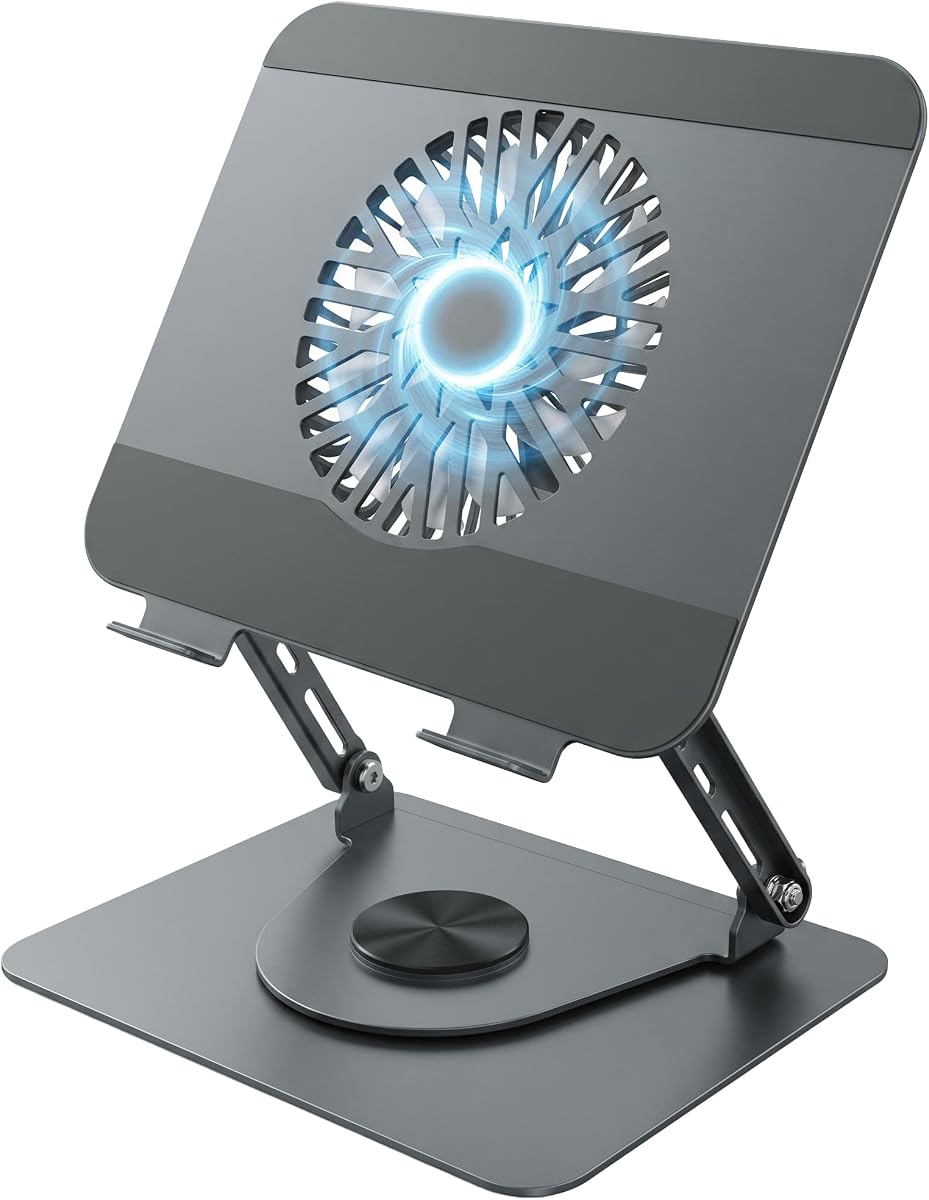
This stand combines ergonomic support with an integrated fan to manage heat. The 360 degree rotating base helps you share screens easily. Adjustable height and angle settings reduce posture strain.
We may earn a commission when you buy through this link, at no additional cost to you.
Silicone pads protect your laptop and keep it secure during use. The elevated design creates space underneath for storage. It is ideal for users who need both cooling and workspace organization.
The fan power is fixed so you cannot adjust speed. There is no USB hub for extra device connectivity. Still the rotation and ergonomic benefits make it a top choice for office use.
Buy this if you need a versatile stand with cooling. It suits professionals who value posture and flexible screen angles in their setup.
Rotate the screen to face colleagues or clients without moving the desk.
Space under the stand allows storage of keyboard and accessories.
We may earn a commission when you buy through this link, at no additional cost to you.
This stand features precision CNC machined aluminum with a refined finish. It supports fans from 120mm to 180mm for maximum versatility. The damped hinges allow smooth and secure angle adjustments.
We may earn a commission when you buy through this link, at no additional cost to you.
Multiple pivot hinges give you both horizontal and vertical movement. The wide base with anti slip pads ensures stability during operation. Thumb screws allow tool free adjustments for different fan sizes.
The price is higher than basic models and fans are sold separately. The setup is straightforward but requires care to align hinges correctly. Still the build quality justifies the premium for enthusiasts.
Choose this if you want a high end mount for custom setups. It works best for users who need precise airflow control and durable construction.
Precision hinges hold your fan securely at any angle without slipping.
Compatible with 120mm to 180mm fans for flexible cooling options.
We may earn a commission when you buy through this link, at no additional cost to you.
This stand boasts a perfect five star rating for stability and build. It fits standard 120mm and 140mm fans with precision holes. The solid metal frame reduces vibration during high speed operation.
We may earn a commission when you buy through this link, at no additional cost to you.
You can tilt and swivel the fan freely for unlimited airflow directions. Large textured knobs make assembly fast and secure. It is ideal for cooling routers and electronics too.
The look is basic and fans must be sourced separately. If you want a sleek aesthetic this may feel utilitarian. Still the stability and versatility make it a top choice for cooling tasks.
Buy this if you need a rock solid mount for your fan. It works well for tech users who prioritize vibration free cooling and durability.
Thick metal frame ensures the stand stays steady even at high speeds.
Use for laptops routers and 3D printers to solve overheating anywhere.
We may earn a commission when you buy through this link, at no additional cost to you.
Choosing the right computer fan stand depends on your device type and cooling needs. This guide outlines key factors to consider so you can make an informed purchase.
Check whether the stand supports your device size. Laptop pads vary from 10 to 18 inches while PC mounts target 120mm or 140mm fans. Ensure your hardware fits securely to prevent slipping.
Match the stand specs to your device dimensions for a safe fit.
Materials like aluminum and steel offer better durability than plastic. Aluminum resists corrosion and helps dissipate heat while steel provides stability. A sturdy base prevents wobbling during fan use.
Choose metal construction for long term reliability and cooling efficiency.
Look for stands with adjustable height or angle settings. Ergonomic designs help reduce strain on your neck and back. Some models allow full rotation for flexible viewing angles.
Prioritize adjustability to maintain a healthy posture during extended use.
Fans should operate quietly to avoid distractions. Check decibel ratings or reviews about noise. More fans or larger sizes often mean better cooling but potential noise tradeoffs.
Select a stand that balances silent operation with sufficient airflow for your device.
Extras like USB hubs phone holders and RGB lighting add value. These can reduce cable clutter or enhance aesthetics. Decide if you need these or prefer a minimal design.
Consider only features you will actively use to keep cost low.
Foldable or lightweight stands are ideal if you travel. Compact designs store easily in bags or small desks. Some mounts allow quick disassembly for transport.
Opt for a portable model if you move between locations regularly.
Tool free installation saves time and effort. Thumb screws and pre assembled parts simplify setup. Clear instructions help avoid mistakes during initial use.
Choose a stand that requires minimal tools for quick setup.
Set a budget that fits your needs. Basic models are affordable while premium ones offer better materials. Weigh features against cost to get the best value for money.
Focus on long term durability to justify higher initial costs.
Place the stand on a flat stable surface to prevent tipping. Ensure there is enough clearance around fans for airflow. Avoid using on soft surfaces like beds that block air intake.
Dust fans and vents regularly with a soft cloth or brush. Clean every few weeks to maintain cooling efficiency. For metal stands wipe down to prevent buildup that reduces aesthetics.
Adjust angles before placing heavy laptops on the stand. Lock any height mechanisms securely to avoid accidental changes. Do not exceed weight limits specified by the manufacturer.
Most stands support common brands like MacBook Dell HP and ASUS. Check the inch range and weight limits before buying. Universal mounts may require adapters for non standard sizes.
Some laptop pads have integrated fans that are not replaceable. PC mounts allow you to swap out the fan itself. Check product specs for replaceability before purchasing.
Noise varies by fan speed and model. Most modern fans operate around 40 dB or less. Look for quiet ratings and reviews to ensure a distraction free experience.
Yes PC fan mounts work well for routers and modems. Ensure the fan size matches and the mount is stable. This helps improve airflow for electronics with limited ventilation.
Laptop pads draw power from USB ports. PC mounts usually require a separate power source for the fan. Check cables and adapter needs in product descriptions.
Turn off and unplug the stand before cleaning. Use compressed air or a soft brush to remove dust from blades. Avoid liquids near electronics to prevent damage.
Laptop stands typically support up to 17 inches and vary in weight. PC mounts handle standard fan weights. Always check load capacity to avoid structural issues.
Many models support gaming laptops up to 17 inches. Look for strong cooling and sturdy bases for high heat devices. Ensure anti slip pads are present to secure heavy units.
The top picks include the Laptop Stand with Cooling Fan for ergonomics and the Computer Fan Stand for budget PC cooling. Each offers unique benefits depending on your device type and cooling goals.
Prioritize compatibility and build quality when making your decision. Adjustable stands add long term value by supporting posture and flexible use cases.
Verify current availability and prices on the product pages. Offers and stock can change so check details before buying to ensure you get the best deal available today.