
Dell 24 Monitor SE2426H
4.7Editor score
144Hz refresh rate
IPS technology panel
TÜV eye comfort
Finding a monitor that stays visible in direct sunlight is crucial for outdoor professionals. High brightness and anti-glare coatings ensure clarity even under harsh conditions.
We evaluated ten leading models based on brightness, color accuracy, and portability. Our analysis covers both desktop units and portable screens designed for field use.
Each pick highlights specific strengths like resolution and connectivity. Prices and availability change frequently so check current listings before purchasing your new display.
4.7Editor score
4.8Editor score

4.2Editor score
As an Amazon Associate we earn from qualifying purchases.
This side-by-side comparison highlights key specifications across all ten selected monitors. Review brightness levels and connectivity options to find the perfect match for your setup.





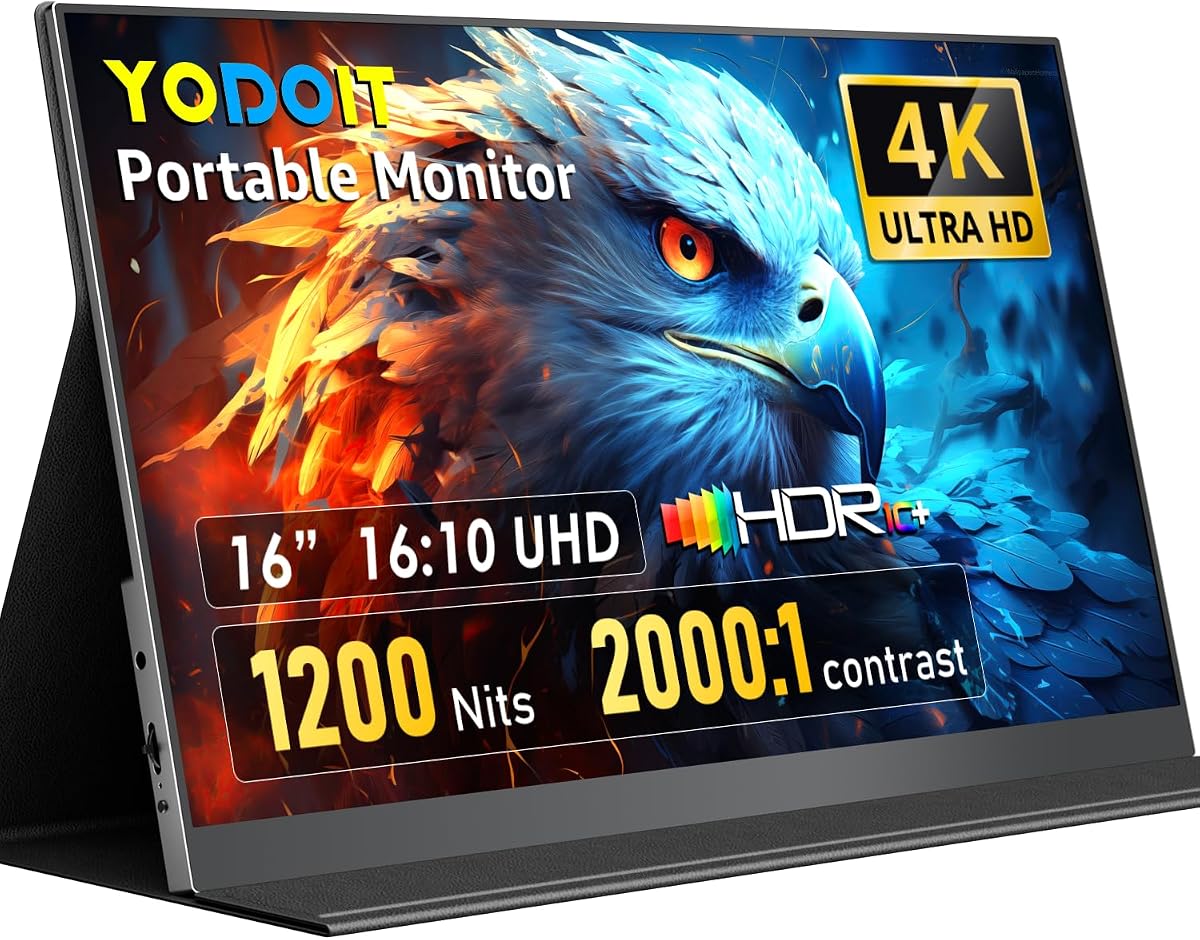
This portable monitor stands out with its 1200 nit brightness and 145% sRGB coverage. It is ideal for photographers working outdoors under harsh light conditions.
We may earn a commission when you buy through this link, at no additional cost to you.
The 4K resolution offers sharp details while the IPS panel ensures consistent colors from any viewing angle. Dual speakers add value for media playback tasks.
While it needs a separate power adapter for peak performance the trade-off is worth the visibility it provides. The matte finish helps maintain clarity without reflections.
Buyers seeking a reliable outdoor display for editing should consider this model first. It delivers professional results where other screens might fail in daylight.
The high brightness ensures content remains readable even in direct sunlight without causing eye strain or squinting.
Covering 145% of the sRGB spectrum ensures that edits look true to life on screen and in final prints.
We may earn a commission when you buy through this link, at no additional cost to you.
This model offers solid performance for general use at a competitive cost. The IPS panel ensures good color consistency across the screen surface.
We may earn a commission when you buy through this link, at no additional cost to you.
A 144Hz refresh rate provides smooth visuals which helps reduce motion blur during fast tasks. TÜV certification adds value by reducing blue light exposure.
While it does not reach extreme brightness levels it handles indoor ambient light well. The thin bezels make it suitable for multi-monitor setups.
Budget conscious users looking for reliability and eye comfort will find this a strong option. It balances price and features effectively for office work.
The high refresh rate makes scrolling and moving windows feel fluid which reduces eye fatigue over time.
Certified to reduce harmful blue light this monitor helps maintain comfort during long viewing sessions.
We may earn a commission when you buy through this link, at no additional cost to you.
This portable unit is engineered for high visibility with 1200 nits of brightness. The aluminum shell adds durability and a premium feel compared to plastic rivals.
We may earn a commission when you buy through this link, at no additional cost to you.
It supports 4K resolution which delivers sharp detail for text and images. The matte screen minimizes glare making it suitable for various lighting environments.
Users need to ensure adequate power delivery to reach maximum brightness levels. The contrast ratio enhances depth making dark and light areas distinct.
For professionals requiring top tier visibility on the go this monitor is a worthy investment. It stands out for build and performance in challenging conditions.
With 1200nits this screen cuts through ambient glare to ensure content remains clear and legible everywhere.
The aluminum alloy chassis provides better heat dissipation and a sturdy feel than typical plastic portable monitors.
We may earn a commission when you buy through this link, at no additional cost to you.
This 27 inch model brings high resolution to desktop users seeking detailed visuals. The IPS panel provides accurate colors and consistent brightness across the display.
We may earn a commission when you buy through this link, at no additional cost to you.
Refresh rates up to 120Hz ensure fluid motion which benefits both work and entertainment. ComfortView Plus reduces blue light for longer viewing comfort.
The build quality is solid with a sleek white finish. It is best suited for permanent setups where space allows for a larger screen.
Buyers needing detailed graphics work should appreciate the high pixel count. It delivers professional quality visuals for demanding tasks on a desk.
The 4K resolution renders fine text and graphics with exceptional sharpness for professional workflows.
ComfortView Plus maintains accurate colors while cutting harmful emissions to support eye health during use.
We may earn a commission when you buy through this link, at no additional cost to you.
This unit prioritizes ergonomic flexibility with full stand adjustments for height and pivot. It suits users who need to adjust their screen for comfort.
We may earn a commission when you buy through this link, at no additional cost to you.
Audio is included via dual speakers which simplifies desk setups. Eye comfort certifications help reduce strain during extended daily use.
The stand allows for portrait mode which is useful for coding or documents. However the resolution is standard Full HD not ultra high definition.
Office users needing flexibility and audio without extra speakers will like this. It is a practical choice for general productivity tasks.
Height and tilt adjustments help you maintain a healthy posture throughout the workday.
Built in speakers provide clear sound for calls and media without cluttering your workspace.
We may earn a commission when you buy through this link, at no additional cost to you.
This LG monitor focuses on smooth motion with a fast refresh rate and blur reduction features. It helps maintain clarity during fast moving content.
We may earn a commission when you buy through this link, at no additional cost to you.
The slim base saves desk space while the panel offers good color coverage. Reader mode adjusts brightness for reading tasks to reduce fatigue.
While it supports HDR the brightness level is standard for indoor use. It performs well for tasks where motion fluidity matters most.
Users working with dynamic content will appreciate the motion handling capabilities. It is a solid choice for general daily computing tasks.
A fast refresh rate and motion reduction tech ensure smooth transitions in fast moving visuals.
The slim base design frees up desk space for documents and accessories around the screen.
We may earn a commission when you buy through this link, at no additional cost to you.
This model offers a large screen size at an affordable price point. The zero frame design maximizes the viewing area for a modern look.
We may earn a commission when you buy through this link, at no additional cost to you.
IPS technology ensures consistent colors across the large surface area. Adaptive sync helps maintain a smooth viewing experience during video playback.
While it lacks ultra high resolution it provides ample space for multitasking. It is an excellent option for office environments needing bigger displays.
Buyers needing screen real estate on a budget should consider this option. It balances size and performance well for everyday work.
A 27 inch panel provides ample space for multiple open windows without clutter.
Minimal bezels offer an immersive viewing experience and a clean visual look.
We may earn a commission when you buy through this link, at no additional cost to you.
This 32 inch display delivers vibrant colors with 99% sRGB coverage. It is well suited for creative tasks requiring accurate color reproduction.
We may earn a commission when you buy through this link, at no additional cost to you.
A single USB-C cable simplifies connections and reduces cable clutter on the desk. The large screen provides room for detailed design work.
While it does not have extensive height adjustments the tilt feature offers some flexibility. It performs well for media consumption and creative tasks.
Users needing a larger canvas for creative work will find this appealing. It balances resolution and color accuracy effectively for designers.
Wide color coverage ensures that images and designs appear vibrant and true to life.
A single USB-C cable carries video and power reducing cable clutter on your desk.
We may earn a commission when you buy through this link, at no additional cost to you.
This model combines high resolution with full ergonomic adjustments for desktop comfort. The stand supports pivot and height changes for versatile positioning.
We may earn a commission when you buy through this link, at no additional cost to you.
Dual speakers offer audio convenience without extra hardware. The ash white finish adds a distinctive look to modern office setups.
While the refresh rate is fast the panel prioritizes color depth. It balances professional needs with visual quality for demanding tasks.
Buyers wanting a QHD display with flexibility should consider this. It offers a complete package for professional workflows.
Multiple adjustments allow you to set the screen to any comfortable angle.
Enhanced contrast helps distinguish subtle details in images and documents.
We may earn a commission when you buy through this link, at no additional cost to you.
This compact model fits well in smaller workspaces. The zero frame design keeps attention focused on the screen content.
We may earn a commission when you buy through this link, at no additional cost to you.
IPS technology ensures stable colors across the surface. It handles general office tasks smoothly with a fast refresh rate.
While it lacks advanced stand features it offers reliable daily performance. It is a cost effective choice for office setups.
Buyers needing a simple reliable screen will find this suitable. It balances essential features for general productivity.
Smaller size allows placement in tight spaces without losing clarity.
Minimal bezels maximize screen real estate for content.
We may earn a commission when you buy through this link, at no additional cost to you.
Selecting a monitor for bright environments requires attention to specific technical factors. Consider these elements to ensure visibility and comfort.
Brightness measured in nits determines how visible your screen is under light. For direct sunlight choose models that reach at least 1000 nits to avoid glare.
Aim for higher nit counts to maintain clarity outdoors.
Matte finishes reduce reflections significantly better than glossy surfaces. This feature is essential for working near windows or in bright offices.
Select a matte screen to minimize unwanted reflections.
IPS panels offer better color consistency and viewing angles than TN panels. Look for IPS technology to ensure accurate colors from any position.
Prioritize IPS panels for color accuracy and viewing comfort.
Portable units weigh less and fit in bags for travel. Verify power requirements as high brightness often needs external power sources.
Check portability features if you move locations frequently.
High sRGB coverage ensures colors match standard output formats. Aim for 99% sRGB for reliable design work.
Check color gamut percentages for design tasks.
Ensure the monitor supports your laptops ports like USB-C or HDMI. Dual ports allow flexible setup options for different devices.
Confirm port compatibility before purchasing.
Higher refresh rates provide smoother motion and reduce blur. This helps reduce eye strain during long work sessions.
Look for refresh rates above 60Hz for fluid motion.
Certifications like TÜV indicate reduced blue light emissions. This feature helps maintain comfort during extended daily use.
Choose monitors with eye comfort certifications.
Start by placing the monitor away from direct light sources to minimize glare. Adjust the brightness setting to balance visibility with comfort.
Connect the appropriate cables to ensure stable performance. For portable monitors use the included power adapter when available.
Clean the screen regularly with a soft microfiber cloth. Avoid harsh chemicals to preserve the anti-glare coating.
For clear visibility in direct sunlight aim for monitors with at least 1000 nits. Lower brightness may be washed out in strong daylight.
Yes if they have high brightness and matte finishes. Ensure you have enough power to run them away from an outlet.
Use a monitor with a matte coating and position it so that light sources do not reflect on the screen surface.
It depends on your device. Some high brightness models require an external power adapter for stable operation.
Matte coatings may slightly diffuse light but modern displays maintain sharpness. The reduction in glare usually outweighs this minor trade-off.
Higher refresh rates like 120Hz help reduce eye strain by providing smoother motion. Aim for rates above 75Hz for daily work.
Yes especially models with high sRGB coverage. Check color accuracy specs to ensure reliable results for editing.
Use a dry or slightly damp microfiber cloth to wipe the screen gently. Avoid using paper towels or abrasive cleaners.
The Yodoit 4K Portable stands out for its brightness and color accuracy. It remains the top pick for field professionals.
Prioritize nits and matte coatings when selecting your next monitor. These features ensure your screen remains usable in challenging conditions.
Always check current listings as prices and stock fluctuate frequently. Find the model that fits your specific workflow requirements.