
Creality Ender 3 V3 SE
3.8Editor score
CR Touch auto leveling
Sprite direct extruder
Dual Z axis stability
This guide compares the best auto bed leveling 3D printer for beginners including top models with one-click leveling fast printing and easy setup for new users.
Starting your 3D printing journey requires a machine that handles the technical setup for you. Auto bed leveling technology ensures the first layer adheres perfectly every time. This feature removes the guesswork and frustration often associated with manual calibration.
We evaluated ten top models based on ease of use print quality and leveling systems. Our analysis focused on features that matter most to newcomers such as quick setup and reliable performance. We compared specifications and user feedback to build this trusted list.
Each pick highlights specific strengths like speed or multi-material support for different needs. Note that prices and availability change frequently so check current listings before buying. This guide helps you choose the right printer for your budget and goals.
3.8Editor score

4.3Editor score

4.3Editor score
This table provides a side-by-side overview of the top models to help you compare key specs at a glance.


The FLASHFORGE Adventurer 5M is a high-speed 3D printer designed for ease of use. It holds a strong rating among users for its reliable one-click auto leveling system. This model removes the need for manual bed calibration, making it perfect for beginners.
We may earn a commission when you buy through this link, at no additional cost to you.
Its Core XY motion system enables speeds up to 600mm/s with rapid acceleration. The direct extruder ensures consistent filament flow even for flexible materials. Vibration compensation reduces ghosting, resulting in smoother surfaces on your prints.
While it lacks a fully enclosed chamber, the open design aids ventilation during printing. The removable PEI plate makes print removal simple. Power loss recovery ensures you do not lose progress if the power goes out.
This printer is ideal for those who want speed and simplicity without complex setup. It balances performance and user-friendly features well. We recommend it for hobbyists looking to start printing immediately.
The one-click auto leveling calibrates the bed automatically to ensure perfect adhesion every time.
With 600mm/s speed and acceleration compensation, you get quick prints with smooth details.
We may earn a commission when you buy through this link, at no additional cost to you.
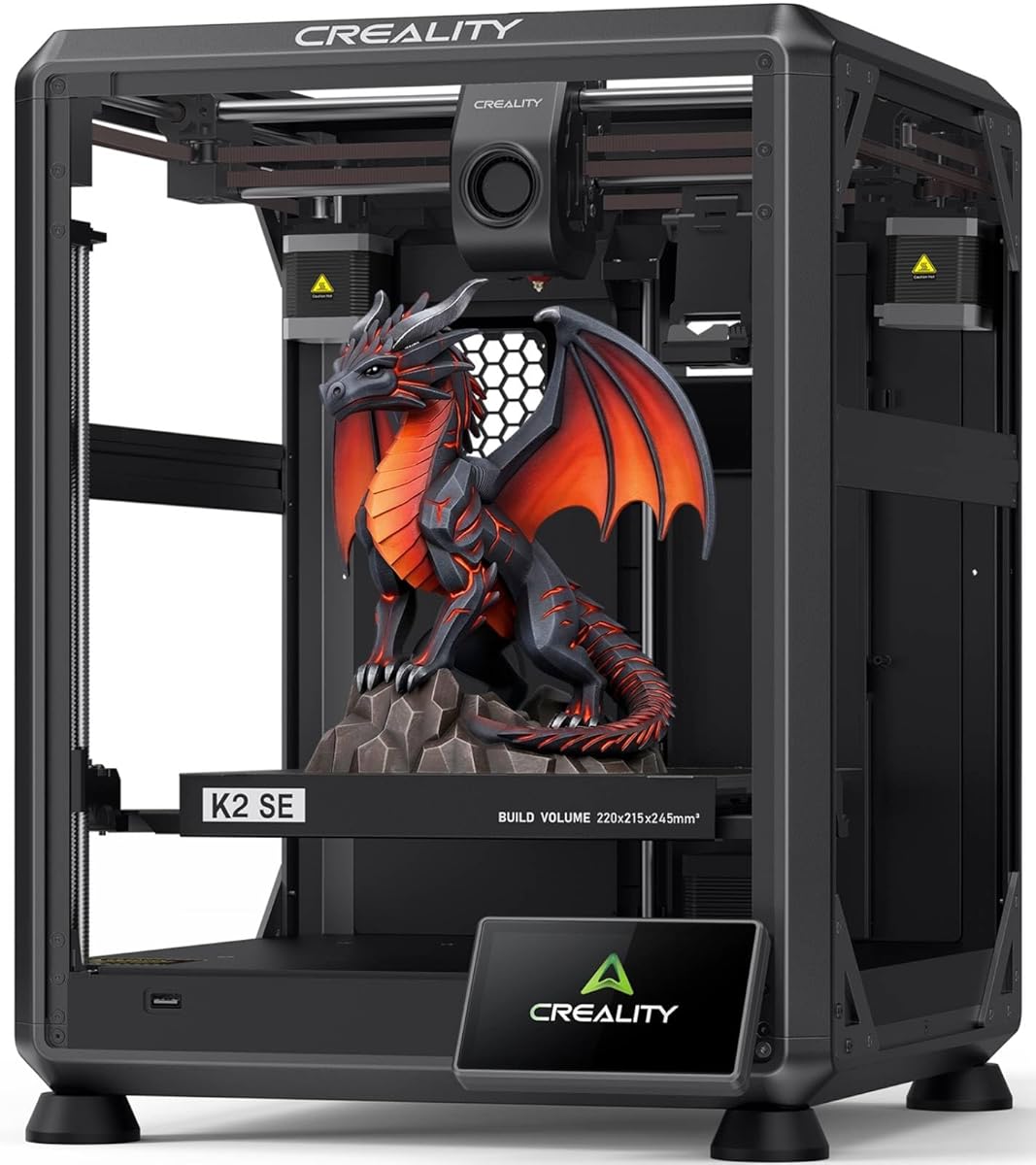
The Creality K2 SE offers a robust metal build for stability during high-speed prints. It supports auto leveling to simplify setup for new users. This model also prepares you for multicolor printing with the CFS system.
We may earn a commission when you buy through this link, at no additional cost to you.
Its CoreXY motion system delivers speeds up to 500mm/s. The direct drive extruder handles various filaments reliably. Vibration sensors help reduce ringing for cleaner prints on models.
While the CFS system adds cost, it enables advanced color projects. The touchscreen guide makes initial setup easier. You may need to adjust settings for best performance.
This printer suits users ready to grow into multi-material workflows. It offers good value with upgrade paths. Consider it if you plan to explore color printing later.
A die-cast aluminum frame ensures rigidity and precision during fast movements.
Compatibility with the CFS multicolor system lets you upgrade as your skills grow.
We may earn a commission when you buy through this link, at no additional cost to you.
The E-Leveler 2 is an electronic tool to assist with manual bed leveling on 3D printers. It provides LED feedback to show when the bed is level. This makes calibration easier for users with older printers.
We may earn a commission when you buy through this link, at no additional cost to you.
Its design includes a strong battery holder and visual arrows for adjustments. It works with most manually adjustable beds except resin or Delta printers. The tool helps achieve consistent first layers without trial and error.
While not an automatic system, it simplifies the manual process significantly. It is a cost-effective way to improve print quality. You still need to turn knobs but get precise guidance.
This tool is great for beginners on a budget or with existing printers. It bridges the gap between manual and auto leveling. Consider it if your printer lacks built-in auto leveling.
LED lights guide adjustments so you know exactly when the bed is level.
Works with most manually adjustable 3D printers for flexible use.
We may earn a commission when you buy through this link, at no additional cost to you.
The FLASHFORGE AD5M features full auto calibration to set nozzle offsets accurately. This eliminates manual Z-axis adjustments and ensures flawless first layers. It is designed for both beginners and experts needing reliable performance.
We may earn a commission when you buy through this link, at no additional cost to you.
Its all-metal CoreXY structure supports stable high-speed printing up to 600mm/s. The quick-release nozzle system allows tool-free swaps in seconds. Remote monitoring via app lets you track prints from anywhere.
Power loss recovery saves ongoing prints during outages. The PEI plate simplifies removal and supports various materials. While open, it ventilates well for common filaments.
This printer excels in speed and automation for stress-free printing. It is ideal for users wanting minimal setup. We recommend it for fast prototyping or hobby use.
Automatically measures nozzle-to-plate distance for precise offsets every time.
Swapping nozzles takes seconds without tools to save downtime.
We may earn a commission when you buy through this link, at no additional cost to you.
The QIDI Q2 redefines beginner printers with professional features like a 65C heated chamber. Its nozzle acts as a leveling sensor for unmatched accuracy. This design ensures strong layer adhesion and minimal warping.
We may earn a commission when you buy through this link, at no additional cost to you.
It reaches 370C nozzle temperature enabling advanced materials like PPS-CF. The dual filtration system reduces odors for safe indoor use. AI camera monitoring and power recovery add reliability.
Multi-color support via QIDI BOX allows up to 16 colors. The build plate simplifies part removal. While pricier, it covers entry to expert projects.
This printer is best for those wanting professional quality out of the box. It minimizes warping and simplifies setup. We recommend it for serious hobbyists and engineers.
High temp nozzle and chamber unlock composites and engineering filaments easily.
Uses the nozzle itself as a leveling sensor for true plug-and-play accuracy.
We may earn a commission when you buy through this link, at no additional cost to you.
The FLASHFORGE 5M Pro focuses on quiet printing with dual filtration for air quality. Its one-click auto leveling ensures flawless first layers consistently. It supports multiple materials with a range of nozzles.
We may earn a commission when you buy through this link, at no additional cost to you.
Enclosed design allows safe home use with HEPA and carbon filters. Remote monitoring via app helps track status. The direct drive extruder handles flexible filaments well.
Silent mode reduces noise during study or work. The nozzle bundle provides flexibility for fine or fast prints. While pricier, it offers peace of mind.
This model suits users needing a quiet clean environment. It combines speed with health safety. Consider it for classrooms or shared spaces.
Filters and silent modes make it safe for home or classroom printing.
Bundle includes multiple nozzles for various print quality needs.
We may earn a commission when you buy through this link, at no additional cost to you.
The Creality Ender 3 V3 SE is a budget-friendly upgrade with CR Touch auto leveling. It simplifies setup with preassembly and a Sprite direct extruder. This model is popular for its ease of use.
We may earn a commission when you buy through this link, at no additional cost to you.
Dual Z-axis screws reduce wobble for better stability. Auto filament loading and unloading save time. The silent mainboard reduces noise during operation.
While speeds are lower than premium models, it is reliable for daily prints. Assembly takes minutes. It supports common filaments well.
This printer is perfect for beginners wanting auto leveling without high cost. It balances features and price. We recommend it for entry-level users.
Offers auto leveling and direct extruder at an accessible price point.
Preassembled design means you can start printing in minutes.
We may earn a commission when you buy through this link, at no additional cost to you.
The Creality CR Touch kit adds auto leveling to compatible Ender and CR printers. It uses multi-point detection to compensate for bed tilt. This is ideal for users upgrading existing machines.
We may earn a commission when you buy through this link, at no additional cost to you.
It requires firmware flashing to function correctly. The kit includes mounting brackets and instructions. It works with various bed surfaces like PEI or glass.
While not a full printer, it modernizes older models affordably. It reduces manual Z-offset adjustments. Check motherboard version before buying.
This kit suits DIY users wanting auto leveling on old printers. It extends the life of existing hardware. Consider it if you already own a supported model.
Converts existing printers with auto leveling without buying a new machine.
Records height at multiple points for precise compensation.
We may earn a commission when you buy through this link, at no additional cost to you.
The FLASHFORGE AD5X enables four-color printing with the Intelligent Filament System. Fully auto leveling ensures accurate starts for complex projects. It runs at 600mm/s for rapid turnaround.
We may earn a commission when you buy through this link, at no additional cost to you.
The IFS manages filament automatically to reduce interruptions. CoreXY structure minimizes vibrations for smooth prints. It supports flexible TPU and large models.
While limited to four colors, it offers vibrant designs easily. The system detects and refills filament. Setup may require tuning for best results.
This printer is for creatives wanting color without manual switching. It speeds up workflow with automation. Recommend it for designers and artists.
Create vibrant designs with up to four colors using the IFS system.
High speed printing maintains accuracy for quick project completion.
We may earn a commission when you buy through this link, at no additional cost to you.
The Creality Ender 3 V3 SE prioritizes beginner ease with CR Touch auto leveling. Setup takes minutes with guided steps. Its silent mainboard ensures quiet operation for home use.
We may earn a commission when you buy through this link, at no additional cost to you.
Sprite extruder provides smooth feeding for PLA and TPU. Dual Z-axis screws support stability. The PC spring steel plate allows easy model removal.
While simple, it covers essential needs well. It is reliable for everyday projects. Great for learning without frustration.
This printer is ideal for first-time users needing simplicity. It removes calibration stress. We recommend it for quick start.
Preassembly and auto leveling reduce setup stress for new users.
Quiet board and flexible plate make printing comfortable.
We may earn a commission when you buy through this link, at no additional cost to you.
Choosing the right auto leveling printer involves considering several key factors that impact your printing success.
Auto leveling can be direct sensor-based or touch-based. Direct sensors measure the bed physically while CR Touch uses a probe. Both work well but sensor types vary by printer model.
Ensure the printer you choose matches your comfort with setup. Full auto systems reduce manual steps.
Build volume determines the largest object you can print. Common beginner sizes range from 200mm to 250mm. Larger volumes allow more complex parts but cost more.
Select a size fitting your typical projects to avoid waste or limitations.
Higher speeds like 600mm/s save time but require stable frames. Check acceleration values for smooth high-speed movement. Vibration compensation helps maintain quality at speed.
Balance speed needs with printer stability to avoid artifacts.
Direct extruders handle flexible filaments better than Bowden types. Look for direct drive if printing TPU. Sprite extruders are popular for reliability.
Direct systems improve feeding control for diverse materials.
Enclosed printers contain heat for materials like ABS and reduce dust. Filtration keeps air clean for safe home use. Open frames are cheaper but less contained.
Choose enclosed with filtration for health and material flexibility.
App control and cloud features let you monitor prints remotely. Wi-Fi enables wireless file transfer. Check if the printer supports common slicers.
Smart features improve convenience and tracking of print jobs.
Most beginners start with PLA but PETG and TPU are common. Ensure the nozzle reaches temps needed for your materials. Some printers support high-temp composites.
Verify max temp and nozzle size match your material needs.
Official support ensures you can get help when issues arise. Look for 12-month warranties and active communities. Good documentation speeds up troubleshooting.
Strong support networks improve long-term user experience.
Start by placing the printer on a stable flat surface away from vibration. Connect power and load filament according to the manual. Use the auto leveling menu to calibrate the bed before first print.
Regularly clean the nozzle and check for filament jams. Replace nozzles when worn to maintain print quality. Keep the build plate clean and dry to ensure good adhesion.
Monitor prints via camera or app for issues like stringing or warping. Store filament in dry containers to prevent moisture damage. Update firmware periodically for performance improvements.
Auto bed leveling is a feature that measures the print bed surface automatically. It adjusts the nozzle height to ensure consistent first layer adhesion. This removes the need for manual calibration and improves print success.
No, auto leveling handles the calibration process for you. The printer uses sensors to detect bed height variations. You just need to ensure the bed is roughly flat before starting.
Full auto one-click systems are easiest for beginners. They require no manual input or tools. These systems simplify setup and reduce the risk of user error.
Run auto leveling before each print session or when moving the printer. Temperature changes can affect bed shape over time. Frequent leveling ensures consistent print quality.
Yes, kits like CR Touch allow upgrading existing printers. You need to install the sensor and flash firmware. This is a cost-effective way to add auto leveling.
Auto leveling works with all standard FDM filaments like PLA and TPU. It ensures the bed is level for any material. Just confirm the nozzle temp suits your filament.
We reviewed ten top models ranging from budget to premium options. Each offers unique strengths in leveling speed and features. The Adventurer 5M leads for speed while Ender V3 SE offers value.
Prioritize ease of setup and reliability for your skill level. If you want color or enclosure, consider models with IFS or sealed chambers. Match features to your typical printing projects.
Always check current prices and stock before buying as they change often. Read user reviews for real-world performance. This guide helps you start printing with confidence and success.