
ASUS Prime AP201 Micro-ATX PC Case
4.7Editor score
Quasi Filter Mesh Panels
Optimized for Cooling
Industry-Leading Spatial Efficiency
This guide compares the top ASUS PC Case models for airflow, build quality, and aesthetics to help you find the perfect chassis for your next custom build.
Choosing the right chassis is fundamental to a successful computer build. An ASUS PC Case offers robust construction, excellent airflow, and distinct styling that complements high performance hardware. Whether you need a compact design or a full tower, ASUS provides reliable options for every enthusiast.
We have evaluated the latest models based on airflow efficiency, cable management, build quality, and user features. This list covers the full range from budget friendly options to premium full towers. Each selection is chosen for its ability to support modern components and cooling solutions effectively.
Each pick highlights specific strengths like tool free assembly, panoramic glass, or superior cooling zones. Prices and availability can change so verify details before purchasing. Use this guide to match your system requirements with the right ASUS PC Case for long term satisfaction.
4.7Editor score

4.8Editor score

4.6Editor score
The following table provides a side-by-side look at the key specifications and features across all ten models. This comparison helps you quickly identify which case best fits your motherboard size, cooling needs, and aesthetic preferences.


The ASUS TUF Gaming GT501 stands out as the top choice for builders seeking a balance of style and function. Its 4.8 rating reflects strong user satisfaction. The custom TUF gaming spatter pattern and 4mm-thick smoked tempered-glass side panel create a unique aesthetic that showcases your components effectively.
We may earn a commission when you buy through this link, at no additional cost to you.
This model excels in cooling. It supports three 120mm aura Sync rgb-illuminated fans and one 140mm rear PWM fan. Custom Liquid Cooling ready support allows for top or front mounted 360mm radiators. The ergonomic woven-cotton carry handles make transporting this heavy case safer for your hardware.
There are trade-offs to consider. The case is heavy and robust which might be challenging for small setups. However the independent cooling zones and vertical GPU slot offer significant benefits for high-performance builds. The tool-free side panels simplify upgrades and maintenance.
Buy this case if you prioritize durability, airflow, and a distinct industrial look. It is ideal for those planning custom water loops or high-end air cooling. The GT501 delivers on reliability and style making it the leading pick for most users in this category.
The semi-open structure and multiple fan mounting points ensure optimal airflow to keep components cool under load.
Side panels remove easily with a clip mechanism allowing quick access for upgrades without losing screws.
We may earn a commission when you buy through this link, at no additional cost to you.
The ASUS Prime AP201 is the ideal budget pick for builders wanting high performance without overspending. With a 4.7 rating it delivers exceptional value. The quasi-filter mesh panels with over 57,000 precision-machined holes ensure maximum airflow for your hardware.
We may earn a commission when you buy through this link, at no additional cost to you.
Despite its 33L footprint it supports ATX PSUs up to 180 mm long and GPUs up to 338 mm. The optimized cooling allows for 280 and 360mm radiators. The tool-free side panels and sizeable cable management cutouts make assembly straightforward and clean.
It may lack some premium features like extensive RGB integration. However the focus on airflow and efficiency makes it perfect for compact high-performance builds. The simple clip mechanism prevents accidental dislodging ensuring your side panels stay secure.
Choose this case if you need a reliable compact chassis for a custom budget build. It balances cost and performance better than many rivals. The AP201 proves that great airflow does not require a large price tag.
This case maximizes every inch of space to fit large components without sacrificing airflow.
The dense mesh ensures air flows directly over components keeping thermal temperatures low.
We may earn a commission when you buy through this link, at no additional cost to you.
The ROG Hyperion GR701 is the flagship of ASUS PC cases offering top-tier features and build quality. Its 4.6 rating reflects users appreciation for its premium design. The semi-open structure improves airflow allowing support for up to 2 x 420mm radiators.
We may earn a commission when you buy through this link, at no additional cost to you.
The diecast aluminum-alloy frame is incredibly sturdy with top bars serving as carry handles capable of supporting up to 80KG. The built-in storage drawer and integrated graphics card holder offer a premium building experience. Two front panel Type-C ports support 60W fast charge.
While expensive and heavy the case is engineered for massive builds. The hinged tool-free side panel simplifies access significantly. This is an investment for those who want the absolute best in cooling capacity and structural integrity.
Buy the GR701 if you are building a high-end workstation or gaming rig with extensive cooling needs. The unique features justify the cost for serious enthusiasts. It stands as the pinnacle of current ASUS case design.
Supporting 420mm radiators allows for extreme cooling configurations that few other cases can match.
The aluminum-alloy frame ensures durability and protects your valuable components during transport.
We may earn a commission when you buy through this link, at no additional cost to you.
The GT502 Horizon offers a unique panoramic view with tempered tinted glass panels at the front and side. This model rates 4.5 stars for its innovative design. The dual-chamber chassis establishes independent cooling zones for the CPU and graphics cards which improves thermal performance.
We may earn a commission when you buy through this link, at no additional cost to you.
Its fully modular design allows most panels and mounting components to be detached to streamline hardware installation. The front panel includes a USB 10 Gbps Type-C port for high-speed data transfer. Tool-free side panels can be easily removed by pressing a button on the rear.
While the modular design requires some patience during build the benefits are significant. The independent cooling zones help prevent hot air from mixing. This case is ideal for builders wanting a distinct look and superior thermal separation.
Select this case if you value aesthetics and specific cooling strategies. The panoramic design showcases your build beautifully. The GT502 Horizon stands out for its functional modular approach to PC housing.
Separate chambers for CPU and GPU prevent heat overlap and maintain optimal temperatures.
Glass panels at front and side provide a clear 180-degree view of your internals.
We may earn a commission when you buy through this link, at no additional cost to you.
The A31 PLUS is designed for modern motherboards with hidden connectors. This approach optimizes cable management for a clutter-free setup which is highly valued by builders. It supports up to 360mm radiators and 380mm graphics cards comfortably.
We may earn a commission when you buy through this link, at no additional cost to you.
Four pre-installed ARGB fans ensure effective cooling while delivering a mesmerizing display of vibrant lighting. The 8° angled base enhances airflow efficiency and widens the viewing angle. Dual tempered glass panels offer unobstructed views of the main chamber.
It works best with specific ASUS hidden connector motherboards. However the focus on clean visuals and airflow is strong. The base design helps performance and aesthetics making it a solid choice for modern setups.
Choose this case if you want a clean build without complex cable routing. It is a great option for those who prioritize cable management. The ARGB lighting adds a nice touch to your system.
Designed for hidden connectors to keep cables out of sight for a sleek look.
The angled base improves airflow and widens the viewing angle for better immersion.
We may earn a commission when you buy through this link, at no additional cost to you.
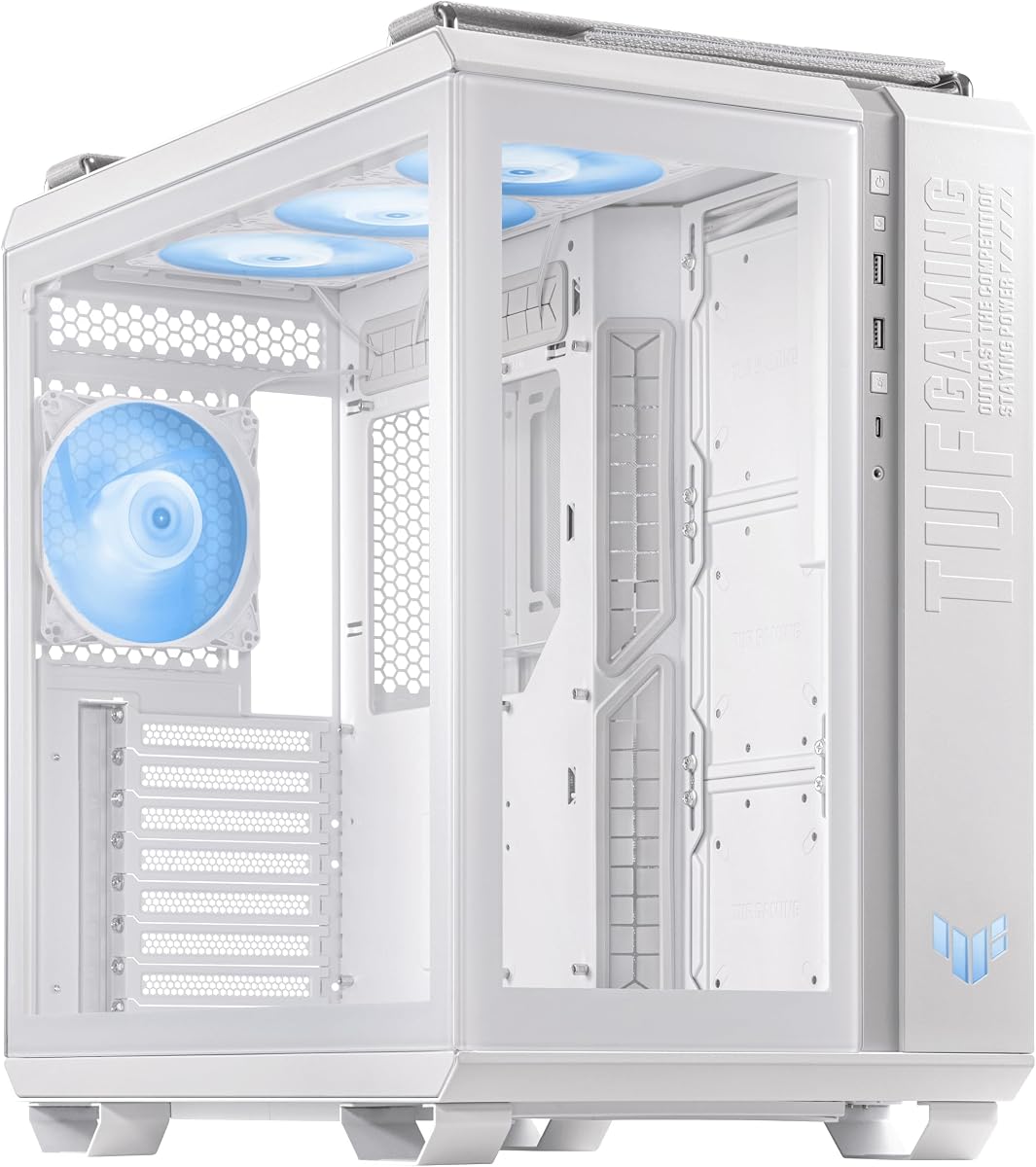
The TUF GT501 White Edition brings the same robust performance as the black version in a striking white design. Its 4.7 rating matches the original. The custom TUF Gaming spatter pattern and smoked tempered-glass side panel showcase your build's internals beautifully.
We may earn a commission when you buy through this link, at no additional cost to you.
Efficient cooling is maintained with three 120mm Aura Sync RGB-illuminated fans and one 140mm rear PWM fan. Ergonomic woven-cotton carry handles enable safe transport. Space is reserved for front and top-mounted 360mm water-cooling radiators.
While white cases can show dust more, this model uses textured metal panels to hide minor marks. The airflow and build quality remain top-tier. It is perfect for users who want a clean white build without sacrificing performance.
Buy this if you want to match white components. The TUF GT501 White is a reliable choice for cooling and aesthetics. It delivers the same durability as the standard model with a unique color.
The metal chassis and patterned panels ensure durability while maintaining a unique look.
Multiple fan points and radiator support keep hardware cool even under high loads.
We may earn a commission when you buy through this link, at no additional cost to you.
The GT301 is designed for compact builds that still need high performance. It features a perforated honeycomb front panel to aid airflow. Its 4.6 rating indicates strong satisfaction among users looking for a smaller footprint.
We may earn a commission when you buy through this link, at no additional cost to you.
Equipped with three 120mm Aura Sync addressable RGB-illuminated fans and one 120mm rear fan it ensures targeted airflow. The integrated 6 ports Aura Sync addressable-RGB controller hub lets you create stunning lighting effects easily. Space is reserved for 280/360mm water-cooling radiators.
It is smaller than full towers but still supports ATX motherboards. The dedicated front panel control button and headphone hanger add convenience. While cable management is tighter the build quality remains excellent.
Choose this case if desk space is limited. It offers great airflow and lighting in a compact package. The GT301 is perfect for gamers who need performance without a large footprint.
Built-in RGB controller hub allows for easy setup of synchronized lighting effects.
Optimized for smaller desks while still supporting high-end components and cooling.
We may earn a commission when you buy through this link, at no additional cost to you.
The TUF GT502 Horizon ARGB offers a stunning white look with panoramic glass. Its 4.7 rating reflects strong user satisfaction. The interior is divided into two chambers that form independent cooling zones for CPU and graphics card.
We may earn a commission when you buy through this link, at no additional cost to you.
Limitless panoramic design with tempered tinted glass provides a completely unobstructed view. Pre-installed ARGB fans ensure balanced cooling performance and vivid lighting. Most panels and mounting hardware are removable to simplify hardware installation.
The USB 20Gbps Type-C port on the front panel ensures high-speed storage access. While assembly can be complex due to modularity it is a trade-off for customization. The build quality is robust and clean.
Buy this case if you want a modern white build with top cooling. The independent zones help thermal performance. It is a strong option for those who value both form and function.
Front and side glass create a seamless view of your entire build.
Separate compartments prevent heat overlap for better component longevity.
We may earn a commission when you buy through this link, at no additional cost to you.
The A31 Plus TG ARGB is a top choice for clean cable management. Its 4.9 rating is among the highest in this list. Built for motherboards with concealed connectors it optimizes setup for a clutter-free look.
We may earn a commission when you buy through this link, at no additional cost to you.
Panoramic Design offers tempered glass panels on the front and sides for an unobstructed view. The 8° angled base improves airflow efficiency and increases the viewing angle for a more intense experience. It supports GPUs up to 380mm.
While it depends on specific motherboard features the result is a sleek professional look. The angled base is a unique design touch that boosts airflow and aesthetics. It stands out for its user-friendly installation.
Choose this case if you value a clean cable-free setup. It is great for those wanting a neat interior without complex routing. The high rating proves its effectiveness and design.
Hidden connectors allow for a neat interior with no messy cables in sight.
The 8° angle widens your view and improves airflow to components.
We may earn a commission when you buy through this link, at no additional cost to you.
The TUF GT502 Plus is an excellent value offering dual chamber design. It rates 4.6 stars for its balanced features. Internals are divided into two chambers to configure independent cooling zones for the CPU and GPU.
We may earn a commission when you buy through this link, at no additional cost to you.
Panoramic View with tempered glass panels at the front and side showcases your build effectively. Tool-Free side panels can be removed simply by pressing a button hidden on the rear. It features a USB 32 Gen 2 Type-C port for high transfer speeds.
The modular design allows most panels and mounts to be removable for ease of installation. While white builds require occasional dusting the look is crisp. It brings premium features to a more accessible price point.
Buy this case if you want a dual chamber design without overspending. It offers strong performance and modern connectivity. The GT502 Plus is a smart choice for mid-range builds.
Separate zones ensure CPU and GPU cooling do not interfere with each other.
High-speed USB Type-C on the front ensures fast data transfer for peripherals.
We may earn a commission when you buy through this link, at no additional cost to you.
Selecting the right case involves considering your motherboard size cooling needs and aesthetic preferences. Here are the most important factors to evaluate when choosing an ASUS PC Case for your build.
Check if your motherboard size fits the case. Most options support ATX while some like the AP201 support Micro-ATX. Ensure the chassis can hold your main board securely.
Confirm the motherboard support before buying to avoid fit issues. Most ASUS PC Cases are designed to handle standard sizes effectively.
Look for mesh panels and multiple fan mounting points. Many cases support 360mm radiators for custom water cooling. Good airflow keeps your components running cool.
Prioritize airflow features if you use high-performance hardware. Proper cooling extends component life and ensures stability.
Evaluate cutouts and space behind the motherboard tray. Cases with hidden connector support help keep wires out of sight. Clean cable management improves airflow and looks.
Choose a case with ample space for routing cables. A tidy build looks better and allows better airflow.
Decide on color and finish like black or white. Metal panels and tempered glass add durability and style. The design should match your room or setup.
Select materials that fit your style preferences. Tempered glass panels offer great views of your build.
Check for tool-free panels or modular designs. Cases with clip mechanisms allow quick access without screws. Tool-free designs save time and frustration.
Prioritize cases with easy access features. This makes future upgrades or cleaning much simpler.
Measure your desk space and consider weight. Large cases like the GR701 are heavy but sturdy. Compact cases fit small desks but may limit size.
Ensure the case fits your physical space. Heavy cases need stable support.
Look for USB-C ports for fast data transfer. Some cases offer 10 Gbps or 20 Gbps Type-C ports. Modern ports improve peripheral speeds.
Verify port speeds match your needs. USB-C helps with fast storage devices.
Check if pre-installed fans support RGB. Cases often include Aura Sync controllers for lighting control. Lighting adds visual appeal.
Choose a case with lighting options if you want custom effects. Sync tools make setup easier.
When installing hardware always align components with the mounting points to avoid strain on the chassis. Use the provided screws carefully to ensure tight but not overtightened fits.
Maintain good airflow by keeping filters and fans clean. Dust buildup can reduce cooling performance so check fans every few months. Use compressed air for cleaning glass panels.
Handle the case with care during transport. Many models have ergonomic handles so use them when moving the unit. This prevents damage to internal components.
Most models support ATX while some like the AP201 support Micro-ATX. Always check the specific specs before buying to ensure compatibility with your board. Some cases are full tower for E-ATX support.
Yes, tool-free panels make upgrades and cleaning much easier. They save time and prevent losing screws during maintenance. Many ASUS cases feature this for better user experience.
Yes, most support radiators up to 360mm or larger. Models like the GT501 and GR701 are designed for liquid cooling setups. Check radiator support before building your loop.
The AP201 is ideal for compact setups. It supports Micro-ATX boards and offers great airflow in a small footprint. This model saves space without sacrificing performance.
Most models include pre-installed fans to start your build. However the number and type vary. Check product details to confirm fan specs before purchasing.
Use the extended motherboard tray and cutouts provided. Some cases support hidden connectors for cleaner looks. Route cables behind the tray to improve airflow.
We highlighted the top picks including the GT501, AP201, and GR701. Each offers distinct strengths depending on your budget and goals. The guide covers a range of sizes and styles.
Prioritize airflow and compatibility to ensure system stability. Choose a model that matches your motherboard size and cooling needs. The right case supports long-term performance.
Always verify prices and availability before purchasing as they may change. Use the provided links to find current offers. Pick the one that best suits your needs.