
Air Mouse Remote MX3 Pro
3.8Editor score
Affordable price point
2.4G wireless connection
Mini keyboard included
This guide compares the top air mouse for Android TV Box options including features like voice control, IR learning, and keyboard layouts to help you choose
Navigating smart TV interfaces with a standard remote can be frustrating when typing or browsing is required. An air mouse for Android TV Box transforms your viewing experience by adding precise cursor control and often includes a mini keyboard for easier text entry.
We evaluated ten leading air mouse remotes based on connectivity, sensor accuracy, battery life, and compatibility with various Android ecosystems. Our analysis focused on real-world usability for streaming, gaming, and general navigation across different device setups.
Each pick in this list highlights specific strengths such as voice input, backlighting, or dual mode connectivity. Prices and availability fluctuate frequently so always verify the current deal before making your final purchase decision for your home theater setup.
3.8Editor score

4.5Editor score
4.3Editor score
The following table provides a side-by-side overview of all ten products featured in this guide to help you quickly compare their key specifications and capabilities.


The BOXPUT BPR2S Plus stands out as our top pick for its versatile connectivity options and robust navigation tools. With a rating of 4.5 stars users appreciate its ability to function across different Android TV environments without requiring complex setup procedures.
We may earn a commission when you buy through this link, at no additional cost to you.
Its primary strength lies in the dual-mode support that allows seamless switching between Bluetooth and 2.4G RF. This flexibility ensures that you can connect to various devices without needing multiple remotes. The 6-axis gyroscope provides smooth and precise cursor movement which is essential for browsing menus or selecting specific content quickly.
While the voice search is helpful it only works within supported apps which may limit its utility for broader system navigation. Additionally relying on batteries means you need to keep spares handy though this is a standard trade-off for wireless flexibility in this price range.
This remote is ideal for users who want a single device to control both their TV box and television. If you value flexibility and precise navigation over premium features like backlighting this model offers the best balance of performance and value available today.
The ability to switch between Bluetooth and 2.4G RF makes this remote compatible with almost any modern streaming device without extra hardware.
The 6-axis gyroscope ensures that moving the cursor feels natural and responsive reducing the frustration of slow or laggy remote control.
We may earn a commission when you buy through this link, at no additional cost to you.
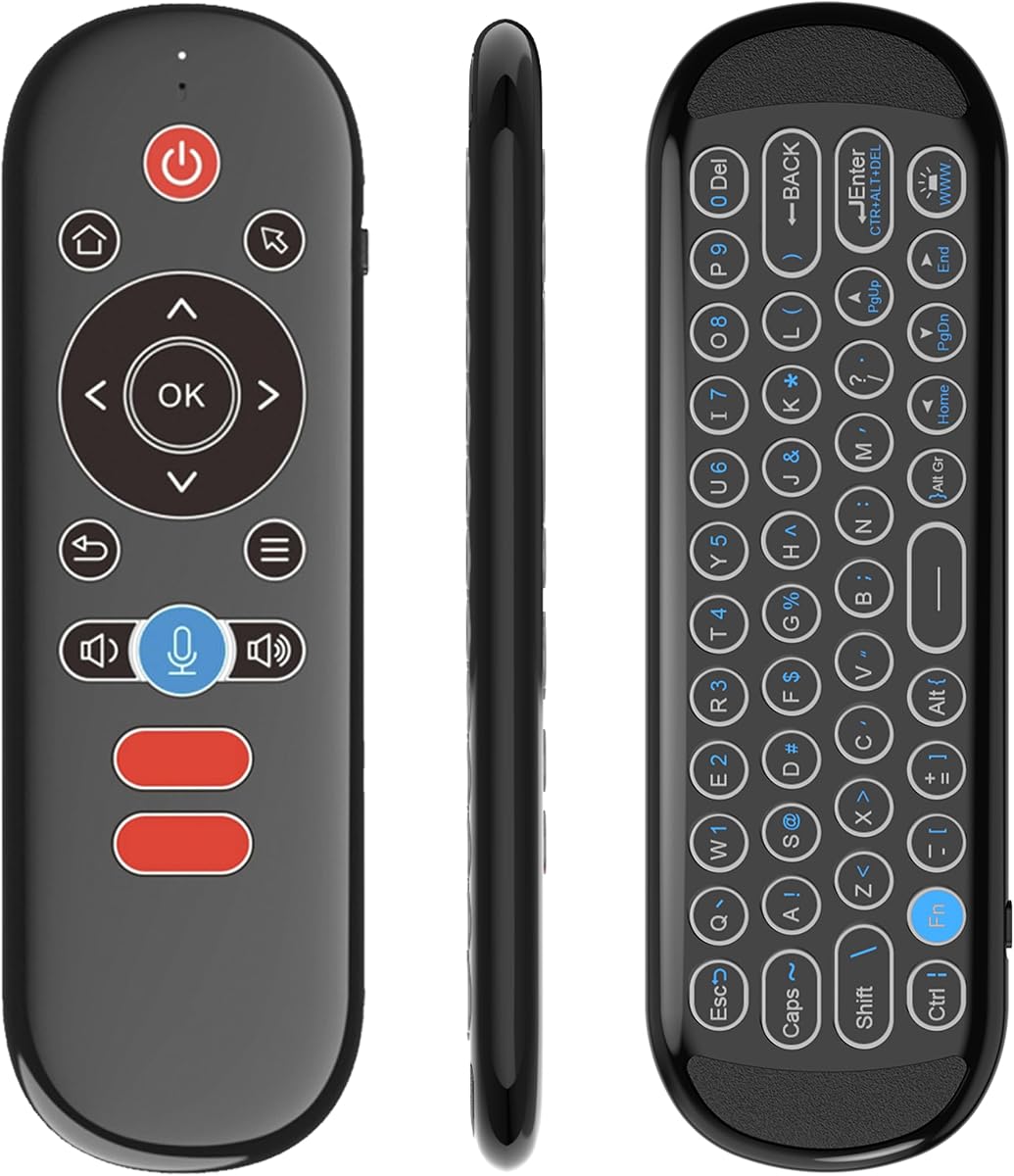
For those seeking an affordable entry into air mouse technology the MX3 Pro offers essential features without a high price tag. It has a rating of 3.8 stars reflecting its basic functionality which is often sufficient for casual users on a tight budget.
We may earn a commission when you buy through this link, at no additional cost to you.
The main advantage of this model is its simplicity and cost-effectiveness. It includes a mini keyboard on the back which helps when you need to type passwords or search terms. The 2.4G connection is stable enough for most daily tasks like navigating apps or changing channels.
Users have noted that the build quality is somewhat basic and the cursor control is not as smooth as higher-end models. The IR learning is limited to five keys which might not cover all your needs if you want to control multiple devices fully.
Choose this remote if you just need a functional replacement for a standard remote and want to save money. It is a solid choice for secondary rooms or for users who do not require advanced features like backlighting or voice control.
The low price makes it accessible for anyone wanting to upgrade from a standard remote without spending much money on advanced features.
Having a keyboard built into the back of the remote saves the need for a separate physical keyboard which is useful for text entry.
We may earn a commission when you buy through this link, at no additional cost to you.
This model elevates the standard air mouse experience with premium features like a rechargeable battery and a full backlit keyboard. With a rating of 4.3 stars it appeals to users who want convenience and better visibility during nighttime viewing sessions.
We may earn a commission when you buy through this link, at no additional cost to you.
The rechargeable battery is a significant upgrade over disposable battery models allowing you to charge via Type-C when needed. The 7-color backlight makes typing in the dark comfortable and efficient which is a common pain point with many budget remotes.
While it costs more than basic options the included features justify the investment for power users. The only downside is that you must remember to charge it which some might find inconvenient compared to swapping AA batteries quickly.
This is the best choice for users who frequently use their TV box in low-light conditions or who want to reduce battery waste. If you value long-term convenience and visibility this remote delivers a superior experience compared to standard alternatives.
The built-in rechargeable battery eliminates the need for constant battery replacements providing a more sustainable and convenient user experience.
The backlight allows you to see the keys clearly in the dark ensuring you can navigate and type accurately without turning on lights.
We may earn a commission when you buy through this link, at no additional cost to you.
The BPR1S Plus is designed with versatility in mind offering distinct firmware versions for PC and TV use. It holds a rating of 4.2 stars and is a solid choice for users who need one remote to manage both media centers and computers.
We may earn a commission when you buy through this link, at no additional cost to you.
Its voice input capability works well with various smart TV systems allowing for quick searches without typing. The motion sensor provides accurate cursor control which makes browsing web pages or navigating menus significantly faster than using arrow keys.
It is important to note that this device is not compatible with Fire Stick or some other proprietary boxes which limits its universal appeal. Also batteries are not included in the package so factor this into your initial setup costs.
Choose this remote if you need a versatile tool that adapts to different devices. Its PC mode functionality adds unique value for home theater PC setups where standard remotes might lack necessary keyboard features.
Switching between PC and TV modes allows you to optimize the remote for your specific hardware without needing two different devices.
The built-in voice assistant streamlines navigation and search making it easier to find content without tedious manual input.
We may earn a commission when you buy through this link, at no additional cost to you.
This EASYTONE model brings together a keyboard and mouse into one compact unit for efficient navigation. It has a rating of 3.8 stars indicating that while it is functional it may lack the polish of higher-rated competitors in the market.
We may earn a commission when you buy through this link, at no additional cost to you.
The multifunction design allows you to switch between typing and pointing modes easily which is useful for search input. The microphone enables voice input for compatible applications reducing the time spent entering text manually in browsers or streaming apps.
The voice search function is limited to specific apps which might not cover all your entertainment needs. Additionally the design is relatively simple which may not appeal to users looking for modern features like backlighting or rechargeable power.
It is a practical choice for users who need a basic air mouse for occasional use. If you are upgrading from a standard remote and want basic voice features this provides adequate performance at a competitive price point.
Combining keyboard and mouse functions in one device streamlines control for users who often need to enter text while browsing.
Voice input simplifies searching for content allowing you to speak queries rather than typing them out letter by letter.
We may earn a commission when you buy through this link, at no additional cost to you.
The iPazzPort Mini Air Mouse focuses on portability and style with a compact design and colorful backlighting. It has a rating of 3.7 stars suggesting that users have mixed experiences primarily centered around connectivity and compatibility issues.
We may earn a commission when you buy through this link, at no additional cost to you.
The vibrant RGB backlight is a standout feature that adds a modern touch to your setup and aids visibility. The compact form factor makes it easy to carry around which is great for users who travel or use multiple TVs in different rooms.
Compatibility with proprietary smart TV systems is limited which restricts its effectiveness for some users. The overall lower rating indicates that while the features are attractive the real-world performance may not always meet expectations consistently.
This option is best suited for users who value design and portability over robust universal compatibility. If you need a remote for a personal setup where you can test compatibility first this offers a unique look and feel.
The compact size and RGB lighting make this remote stand out visually while remaining easy to store and transport easily.
Rechargeable power ensures you have a consistent energy source for the backlight and wireless functions without buying batteries.
We may earn a commission when you buy through this link, at no additional cost to you.
The Rii MX3 is a classic option in the air mouse space known for its reliability and broad compatibility. It holds a rating of 4.0 stars reflecting a steady performance that many users trust for their home theater needs over time.
We may earn a commission when you buy through this link, at no additional cost to you.
Its 3 in 1 design combines a keyboard mouse and IR remote making it a comprehensive tool for controlling various devices. The motion sensor allows for interactive gaming which adds a layer of entertainment beyond simple navigation tasks on your TV.
Pairing can sometimes require a specific key sequence which might be confusing for new users. The IR learning functionality is functional but basic which might not be enough if you need to control complex device setups with many buttons.
This remote is a safe choice for users who want a proven performer without extra frills. It is particularly suitable for gaming on your TV box or for families who need a simple and effective control solution.
The motion sensor allows for interactive gaming experiences turning your remote into a controller for somatosensory games on your TV.
Support for a wide range of devices ensures that this remote works with most Android TV boxes and PCs without extra configuration.
We may earn a commission when you buy through this link, at no additional cost to you.
This MX3 Pro variant focuses on typing comfort with a backlit layout and a 2-in-1 design. It has a rating of 3.9 stars which suggests decent performance though some users report compatibility issues with major TV brands.
We may earn a commission when you buy through this link, at no additional cost to you.
The backlight and double-faced design make typing easier in dark environments compared to standard remotes. The 38 keys are arranged efficiently to allow full character entry without needing to switch modes constantly while navigating menus.
Users should be aware that this model is not compatible with many major TV brands which limits its universal utility. Batteries are not included which is a small inconvenience during initial setup but common in this category.
Choose this remote if you prioritize typing comfort and value a good layout. It is a strong option for users who frequently enter text on their TV and want a simple reliable backlighting feature.
The 38 key layout is designed to facilitate smooth and easy text entry making it better than standard remotes for search.
The company provides strong after sales service which offers peace of mind if you encounter any issues with the remote.
We may earn a commission when you buy through this link, at no additional cost to you.
The G20S PRO is designed with a focus on simplicity and stability for Android systems. With no rating yet listed it represents a newer option in the market that users are still evaluating for long-term reliability.
We may earn a commission when you buy through this link, at no additional cost to you.
The gyroscope algorithm is tuned to reduce tremors and shake ensuring that cursor movement remains stable during use. The button arrangement is designed to be wear resistant which is crucial for remotes that see frequent daily handling.
Bluetooth mode requires specific pairing steps which might be slightly complex for some users. The lack of a rating makes it harder to gauge real-world satisfaction compared to established products in this list.
This remote is a potential candidate for users looking for a durable specialized option. If you prioritize stability in cursor movement and a clean design this offers a streamlined approach to controlling your TV.
The compensation algorithm in the gyro helps eliminate jitter making for a much smoother cursor experience on the screen.
The buttons are designed to resist wear ensuring that the remote maintains its functionality over a long period of use.
We may earn a commission when you buy through this link, at no additional cost to you.
The Rock&Rown MX3 Pro is a flexible choice with broad compatibility across multiple system types. It has a rating of 4.0 stars indicating a generally positive user experience for those looking for a reliable basic remote.
We may earn a commission when you buy through this link, at no additional cost to you.
Its compatibility with Android TV Box IPTV and Raspberry Pi makes it a strong option for diverse setups. The motion sensor makes navigation efficient allowing you to point at the screen to move the cursor without relying on arrow keys.
To turn on your TV you must program the power key which adds a setup step. The basic design means it may not appeal to users looking for advanced features but it covers the core requirements well.
This remote is a solid choice for users who need a flexible tool for varied devices. If you value broad compatibility and a reliable return policy this model provides a good foundation for your TV control needs.
Support for multiple systems like IPTV and Raspberry Pi ensures this remote works with many devices beyond just standard Android boxes.
The motion sensor simplifies navigation reducing the time spent clicking through menus to find what you want to watch.
We may earn a commission when you buy through this link, at no additional cost to you.
Selecting the right air mouse requires balancing several factors to ensure compatibility with your specific setup and budget constraints.
Connectivity type determines how your remote communicates with the device. Most options offer 2.4G RF or Bluetooth. 2.4G uses a USB receiver which is universally compatible but requires a free port. Bluetooth is cleaner as it uses no dongle but may require pairing steps on some devices. Choose the type that best fits your available ports and pairing comfort level.
Always ensure your TV box has a free USB port if you plan to use an RF model.
Sensor technology impacts navigation precision. Look for a 6-axis gyroscope which detects tilt and rotation accurately. This ensures that moving your hand results in smooth cursor movement on screen. Cheaper remotes may lack these sensors leading to erratic or slow pointer response. Prioritize gyroscope support for comfortable long-term use.
A 6-axis sensor is the minimum standard for a comfortable user experience.
Keyboard layout affects typing efficiency. Many air mice include a mini QWERTY keyboard on the back for easy password entry. Check if the keys are well-spaced and if they have backlighting for dark room use. Some models offer full keyboard layouts while others are minimal. Consider how often you need to type to decide which layout suits you.
Look for well-spaced keys and optional backlighting for better visibility.
IR Learning features allow the remote to mimic standard infrared signals from your TV. This is essential if you want to control power or volume on your main screen without a second remote. Check how many keys can be learned and whether they support NEC protocol. Full IR learning is a significant convenience feature for unified control.
Ensure the remote supports IR learning for at least power and volume functions.
Battery power options vary between disposable AA cells and rechargeable internal packs. Rechargeable models reduce waste and long-term costs but require charging. Disposable models are convenient for swaps but need replacement. Weigh your preference for convenience versus eco-friendliness when choosing the power source for your new remote.
Decide if you prefer the simplicity of disposable batteries or the eco-friendly nature of rechargeable ones.
Voice Input support allows you to search using audio commands instead of typing. Not all models support this feature equally across all apps. Verify that the remote supports voice search on your specific streaming services like YouTube or Netflix. This feature can significantly speed up content discovery if implemented correctly.
Check that voice search works on your specific streaming apps before purchasing.
Compatibility Lists are critical to avoid frustration. Many remotes do not work with proprietary devices like Fire Stick or Apple TV. Always check the product description to ensure it supports your specific Android TV Box model. This step saves the hassle of returns and ensures the remote will function as advertised out of the box.
Always verify that the remote is explicitly listed as compatible with your device model.
Build Quality determines durability. Look for remotes made with robust plastic that can withstand regular handling. Some models offer wear resistant buttons which maintain tactile feedback over time. A well-built remote will last longer and feel more premium in hand. Check user reviews for feedback on long-term durability before committing.
Look for durable materials and wear-resistant buttons for long-term satisfaction.
To start using your new remote plug the USB receiver into your TV box port or pair via Bluetooth in settings. Ensure the batteries are installed or the device is charged before attempting to connect. Once connected the cursor should appear on your screen allowing you to navigate menus by moving the remote in the air.
For optimal performance keep the receiver visible and unobstructed by metal objects. If you use the keyboard feature press the designated mode switch to access typing functions. Clean the sensor area gently with a soft cloth to prevent dust from affecting the gyroscope accuracy over time.
Store the remote in a dry place away from extreme temperatures to protect the internal electronics. If the cursor becomes unresponsive try removing the batteries or rebooting the receiver. Always check the manual for firmware updates that may improve connectivity and add new features.
Most standard air mice designed for Android TV boxes are not fully compatible with Apple TV due to proprietary software restrictions. While some basic functions may work full mouse control often requires specific Apple-certified remotes. It is best to verify compatibility lists before purchasing.
Many air mice do not work with Fire Stick because Amazon uses a specific protocol that standard remotes cannot mimic. Always check the product description for Fire Stick compatibility before buying. Some brands explicitly exclude Fire Stick from their supported device list.
To learn IR keys you usually need to hold a specific combination of buttons on the air mouse and point it at your TV remote. Press the button on the TV remote to teach the air mouse the code. Repeat this for all keys you need to control such as power or volume.
The typical range for these wireless remotes is up to 10 meters or 33 feet in a clear line of sight. Obstacles like walls or furniture may reduce this range slightly. Most models use 2.4G technology which provides stable performance within a standard living room size.
Yes many air mice support motion sensing which allows for interactive games on compatible Android apps. The built-in gyroscope detects movement to act as a game controller for specific titles. Check the app store for games that support motion control to utilize this feature effectively.
Slow cursor movement can often be fixed by adjusting the sensitivity settings in the Android TV box configuration. Ensure the remote battery is fresh or fully charged as low power can affect performance. Also check for interference from other wireless devices nearby.
Most air mice are designed for plug and play use without requiring additional software installation. You simply plug in the USB receiver or pair via Bluetooth to start using it immediately. Some PC modes may require specific driver settings but standard TV usage is driver free.
Rechargeable models are worth the extra cost if you plan to use the remote frequently as they save on battery replacements over time. They often include a backlight which requires more power. If you use the remote casually disposable batteries might be more convenient for you.
We reviewed ten top options ranging from the budget-friendly MX3 Pro to the versatile BOXPUT BPR2S Plus. Each model offers unique features to balance cost and performance for your home theater setup.
Prioritize connectivity type and sensor quality to ensure smooth navigation. Compatibility with your specific TV box is the most critical factor to avoid return hassles.
Prices change often so check current listings before buying to secure the best deal for your specific needs.