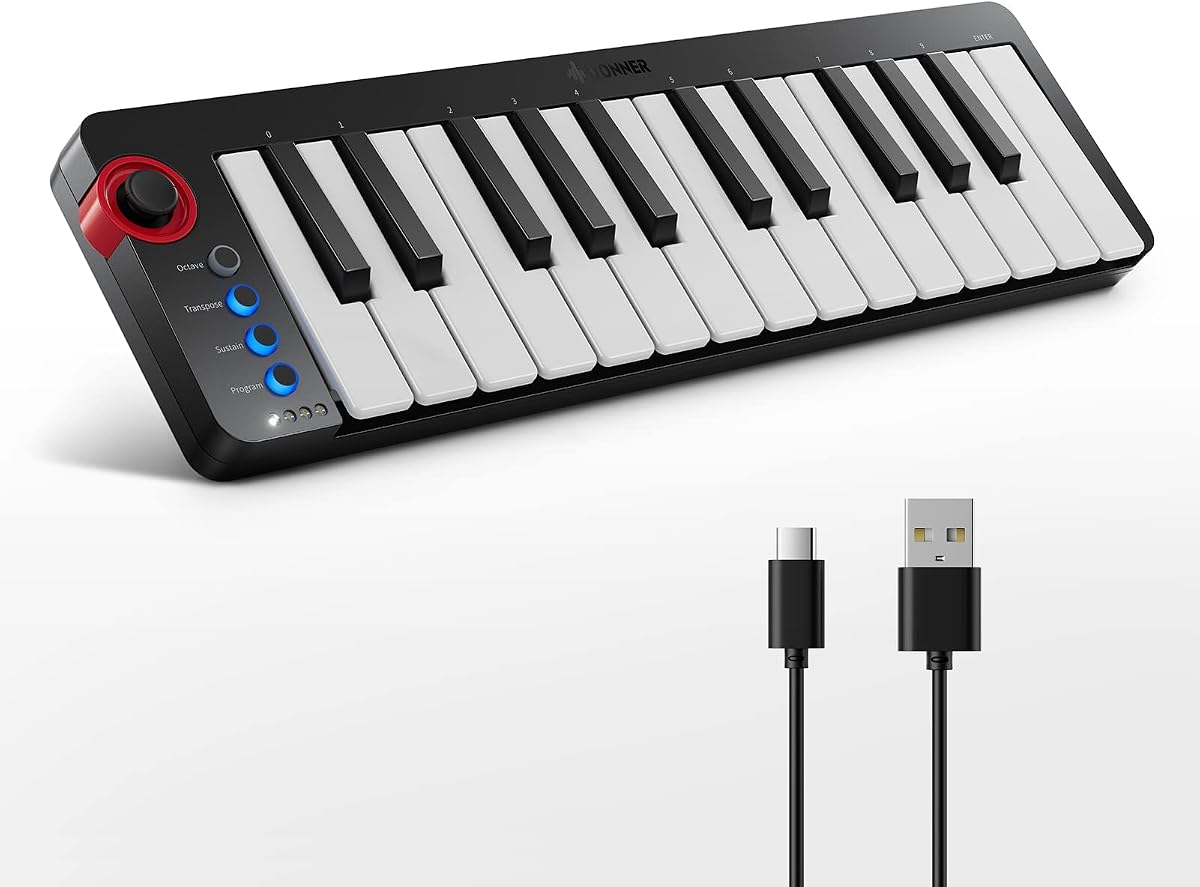
Donner Mini MIDI Keyboard N-25
4.1Editor score
Light-up rocker buttons
40 teaching courses
4 user programmable banks
Discover the top 25 key MIDI controllers for producers and musicians. We compare features, key feel, and DAW integration to help you choose.
Finding the right tool to bridge your musical ideas and digital software is essential for modern creators. A compact 25 key MIDI controller offers portability without sacrificing expressive control, making it ideal for home studios and live sets. These devices allow you to play virtual instruments, trigger samples, and manipulate parameters with tactile precision. Whether you are writing a melody or tweaking a synth patch, the right controller enhances your workflow significantly. We have evaluated the market to ensure you get reliable performance and robust connectivity for your setup.
To compile this list, we analyzed technical specifications, user feedback, and integration capabilities across major software platforms. Our process focused on build quality, key sensitivity, pad responsiveness, and the inclusion of essential controls like knobs and faders. We prioritized models that offer seamless plug-and-play compatibility with popular digital audio workstations. This ensures you spend less time configuring drivers and more time creating music. Each entry represents a distinct approach to production, catering to various budgets and skill levels.
Each pick in this guide showcases specific strengths, from budget-friendly options to advanced standalone units with built-in sounds. We highlight the unique features that set these controllers apart, such as arpeggiators, smart chord functions, and portable battery operation. Keep in mind that pricing and availability can shift frequently due to market dynamics. Always verify the current stock and bundle offers before making your final decision. Our goal is to provide a clear roadmap for selecting a tool that matches your creative needs.
4.1Editor score

4.6Editor score

4.6Editor score
This side-by-side comparison highlights the core specifications and standout capabilities of each model featured in our guide. Review the table to quickly identify which controller aligns with your specific workflow requirements and budget constraints.


The Akai Professional MPK Mini MK3 stands out as a premier choice for producers seeking a balance of portability and professional functionality. With a robust rating from users, it delivers reliable performance for both studio sessions and live performances. Its reputation is built on a track record of durability and intuitive layout that accommodates complex workflows without clutter.
We may earn a commission when you buy through this link, at no additional cost to you.
Key strengths include the innovative four-way thumbstick which provides dynamic pitch and modulation control with precision. The eight backlit velocity-sensitive MPC-style pads are perfect for finger drumming and sample triggering, offering a tactile experience that mirrors larger controllers. Additionally, the built-in arpeggiator allows for creative control over melodies, while the customizable knobs let you map parameters across your digital audio workstation software.
Despite its accolades, the controller does present some trade-offs. The keys are compact, which may feel restrictive for players accustomed to full-sized keys. The octave buttons help manage this, but the small size can limit expression for some. However, for the size and features provided, these compromises are generally acceptable to most users prioritizing desk space and flexibility.
This controller is ideal for anyone looking for a versatile production tool that integrates seamlessly with modern software environments. Whether you are a beginner or a seasoned pro, the MPK Mini MK3 offers a comprehensive suite of tools to enhance your creative process. We recommend it as a top-tier option for those valuing industry-standard compatibility and robust build quality.
The four-way thumbstick allows for expressive pitch bends and modulation without lifting your hand from the controller surface.
Eight backlit pads support note repeat and full level functions, enabling precise rhythmic control and performance triggering.
We may earn a commission when you buy through this link, at no additional cost to you.
The Akai Professional LPK25 is designed for musicians who need a straightforward and compact solution for playing melodies and bass lines. Its high rating reflects its ease of use and reliable connectivity across various platforms. This controller focuses on the core task of translating your musical ideas into digital signals efficiently without unnecessary complexity.
We may earn a commission when you buy through this link, at no additional cost to you.
Performance features include responsive keys that capture dynamics effectively for expressive playing. The dedicated octave buttons expand your range, while the sustain button adds depth to performances. The built-in arpeggiator and clock allow for creative control of sound sources directly through the controller. You can manage presets for different software instruments using the eight programmable slots available.
However, users should note that this model lacks drum pads which limits its utility for beat making. It is purely a keyboard interface for melodic and harmonic input. For those seeking a more feature-rich experience involving sampling or drum programming, other options might be better suited. Nevertheless, for pure melody composition, it remains a strong contender.
Ideal for beginners or mobile producers, the LPK25 offers a simple plug-and-play experience with Mac and PC systems. Its sleek design fits easily alongside other studio gear without taking up much room. We suggest this for those prioritizing simplicity and keyboard feel over comprehensive control features.
Responsive keys allow for expressive songwriting and playing of melodies with a natural feel for dynamics.
The USB powered design eliminates the need for external power adapters or battery replacement during sessions.
We may earn a commission when you buy through this link, at no additional cost to you.
The Novation Launchkey Mini 25 MK4 represents a high-end option for creators seeking advanced features in a compact form. With a solid rating, it is praised for its deep integration with major digital audio workstations. The inclusion of high-quality pads and expressive key features sets it apart from more basic models in its class.
We may earn a commission when you buy through this link, at no additional cost to you.
Standout features include the 16 responsive force-sensitive resistor pads which offer a premium feel for drumming and clip launching. The keys support polyphonic aftertouch allowing for nuanced control over sound parameters during a chord. Scale Mode helps you avoid wrong notes by highlighting keys in your chosen scale. Additionally, it works seamlessly with Native Instruments software via NKS support.
One trade-off is the price, which is higher than budget options. Some users may also require additional power for full functionality depending on their setup. These costs are justified by the superior build quality and advanced workflow tools provided. However, for those with strict budget constraints, the investment might be significant.
This controller is best suited for serious producers and performers who value tactile feedback and software integration. It provides a complete package with software bundles including Ableton Live Lite and various sound libraries. We recommend it for those looking to maximize their creative potential with professional-grade tools.
Polyphonic aftertouch allows each key to react individually to pressure for nuanced sound modulation.
Scale Mode lets you trigger lush chords and arpeggios without worrying about note conflicts.
We may earn a commission when you buy through this link, at no additional cost to you.
The Arturia MiniLab 3 is an intuitive controller designed to adapt to your workflow style and musical needs. Its high rating highlights user satisfaction with its fluid operation and comprehensive feature set. This model emphasizes a seamless transition between playing keys and manipulating other elements in your project.
We may earn a commission when you buy through this link, at no additional cost to you.
It features premium velocity-sensitive keys that offer great responsiveness for expressive playing. You can mute tracks and punch in your 8 pad drums easily. The inclusion of four physical faders allows for precise volume control which is rare in this category. The software suite included helps you discover fresh sounds and integrate quickly into your system.
While excellent, the design relies on proprietary software for some features which may require initial setup. The build material is primarily plastic which might feel less durable than metal alternatives to some users. These factors are minor considering the functional benefits and software support provided with the unit.
This controller suits users who prioritize workflow efficiency and need direct control over mix parameters. It is a versatile option for those creating music at home or on the go. We suggest it for producers looking for a balanced mix of keys and faders in one compact unit.
Four physical faders provide precise control over volumes and effects without needing to use a mouse.
Premium velocity-sensitive keys ensure that every note is played with dynamic nuance and feel.
We may earn a commission when you buy through this link, at no additional cost to you.
The Donner Mini MIDI Keyboard N-25 is an excellent entry-level option designed specifically for beginners. With a solid user rating, it provides a fun and engaging way to start producing music. The inclusion of educational resources makes it particularly valuable for those new to keyboards and music creation.
We may earn a commission when you buy through this link, at no additional cost to you.
It features 25 scaled-down velocity-sensitive keys and light-up buttons that provide visual feedback. You can use four user programmable banks and tools like an arpeggiator for creativity. The 40 entertaining keyboard-teaching courses cover essentials to help unleash your creativity. It is also compatible with various DAWs and smartphone apps via OTG.
The trade-off is that features are more basic compared to professional models. It lacks advanced routing and customization options found in higher-end units. For the price though, it offers significant value for beginners needing guidance. It serves as a gentle introduction to MIDI production without overwhelming complexity.
This model is perfect for students or hobbyists wanting to learn music production basics. It is also a great gift option given its educational features. We recommend it for anyone starting out who needs a supportive tool that grows with their skills.
Included teaching courses cover arrangement essentials to help beginners learn production skills quickly.
Light-up buttons provide a fun visual display of your playing for better engagement.
We may earn a commission when you buy through this link, at no additional cost to you.
The Rhymo 25 Key MIDI Keyboard is a slim and compact option powered directly via USB-C for convenience. Its rating reflects a good balance of features for on-the-go production. This model prioritizes portability and ease of connection for modern devices including tablets.
We may earn a commission when you buy through this link, at no additional cost to you.
It includes an X-Y joystick for pitch bend and modulation alongside a comprehensive arpeggiator. The octave buttons expand the range to 10 octaves offering full melodic flexibility. It supports Bluetooth MIDI for wireless connectivity with major DAWs. A 6.35mm sustain pedal interface ensures expressive performance options.
Potential downsides include basic software integration and build quality that may feel lighter than competitors. Some users might find the controls less intuitive compared to established brands. However, for travel and casual use, the form factor is highly convenient. It remains a practical choice for those prioritizing mobility.
This controller is best for mobile creators who need a versatile interface for various devices. It works seamlessly with Mac, PC, and iOS systems without extra drivers. We suggest it for users needing a lightweight solution for recording ideas while traveling.
Bluetooth MIDI enables wireless connectivity with Mac PC and iOS systems without extra drivers.
Octave buttons expand the range to 10 octaves for full melodic flexibility during performance.
We may earn a commission when you buy through this link, at no additional cost to you.
The M-VAVE 25 Key USB MIDI Keyboard offers a unique combination of wired and wireless capabilities for flexible production. Users appreciate its portability and battery life which allows for extended use without a computer. It includes essential controls like pads and knobs for a comprehensive setup.
We may earn a commission when you buy through this link, at no additional cost to you.
Key features include 8 RGB backlit velocity-sensitive pads and 8 assignable rotary encoders. The built-in battery works for about 16 hours making it ideal for travel. It supports smart chord and smart sound functions for quick performance setups. Compatibility extends across Windows, Mac, Android, and iOS devices.
Trade-offs involve some reports of connectivity issues and mixed feedback on software stability. The smart functions are useful but may require learning curve for effective use. However, the wireless freedom is a significant advantage for many users. It is a strong contender for those needing a battery-powered option.
This controller suits mobile musicians and producers who need a standalone portable solution. It integrates with popular DAWs and offers a range of sound libraries. We recommend it for users prioritizing wireless flexibility and extended battery life.
Built-in 2000 mAh battery supports about 16 hours of continuous use for studio or travel.
Smart chord function lets users choose quick sounds through keys for fast performance setups.
We may earn a commission when you buy through this link, at no additional cost to you.
The Akai Professional MPK Mini Play MK3 is a versatile standalone mini keyboard with built-in speaker capabilities. Its rating highlights its utility for practicing and creating anywhere without a laptop. It combines MIDI control features with onboard sounds for a complete portable experience.
We may earn a commission when you buy through this link, at no additional cost to you.
Standout features include an OLED display for easy navigation and selection of sounds. It offers over 100 internal drum and instrument sounds including pianos and synths. You can power it with batteries or USB for true mobility. It also retains MIDI controller functions for use with software when connected.
While powerful, it is a premium option compared to simple controllers. The built-in speakers are useful for reference but not for critical monitoring. These limitations are acceptable given the standalone capabilities offered. It is a significant investment for those valuing independence from a computer.
This controller is best for users who want to practice or produce on the go. It is ideal for songwriters and beat makers needing a portable studio. We suggest it for those seeking a comprehensive standalone solution with robust software included.
Built-in speaker and internal sounds allow for standalone operation without a computer connection.
OLED display provides clear navigation for selecting sounds and adjusting settings on the fly.
We may earn a commission when you buy through this link, at no additional cost to you.
The Akai Professional MPK Mini MK3 in Black provides the same robust features as the standard model with a sleek aesthetic. Its high rating confirms consistent performance across color variants. It is a reliable choice for producers looking for a classic look and professional workflow tools.
We may earn a commission when you buy through this link, at no additional cost to you.
It features eight backlit velocity-sensitive MPC-style beat pads and 360-degree knobs for precise control. The Full Level mode ensures consistent output regardless of key pressure which helps in programming. Included software and Splice credit enhance the production setup significantly. It integrates seamlessly with Native Instruments software.
The main difference is the color finish which suits specific studio setups. Functionally it mirrors the white model with similar learning curves for setup. For those preferring a darker finish it offers the same utility and quality. It remains a versatile tool for beat making and synthesis.
This controller is suited for anyone wanting a professional tool with a refined design. It is perfect for studio environments where aesthetics match the existing gear. We recommend it for users seeking the industry standard control experience.
Full Level mode ensures consistent output regardless of key pressure for precise programming.
Eight 360-degree knobs allow detailed control over plugins and synthesizer parameters.
We may earn a commission when you buy through this link, at no additional cost to you.
The Akai Professional APC Key 25 MK2 is tailored for live performance and production within Ableton Live. Its rating reflects strong performance for specific workflow users who value visual feedback and clip management. It offers a unique approach to control compared to traditional keyboard-centric devices.
We may earn a commission when you buy through this link, at no additional cost to you.
Key features include a bright 5×8 RGB pad matrix for launching clips with visual feedback. Four directional arrow buttons allow easy navigation through tracks and scenes. Eight assignable rotary knobs handle volume and effects settings seamlessly. It comes pre-mapped for 1-to-1 integration with Ableton Live for ease of use.
The trade-off is its focus on Ableton Live which limits utility with other software. The keyboard is functional but secondary to the clip launching features. For Ableton users this is a minor concern. It is a specialized tool for performance and live set management.
This controller is best for live performers and producers deeply integrated with Ableton Live. It allows for quick access to loops and samples during performance. We recommend it for users prioritizing clip control and visual feedback in their workflow.
Fifty RGB pads provide visual color feedback for triggering loops and samples instantly.
Four directional arrow buttons help scroll through tracks and scenes easily during performance.
We may earn a commission when you buy through this link, at no additional cost to you.
Selecting the right controller involves evaluating several factors to ensure it fits your creative process and technical setup.
Consider whether mini keys or semi-weighted keys suit your playing style. Mini keys save space but may feel smaller for larger hands. Semi-weighted keys offer better expression but add weight. Choose based on how you intend to play melodies and chords.
Focus on the tactile feel to ensure it matches your expectations for velocity and resistance.
Evaluate the number and type of additional controls such as knobs, faders, and buttons. More controls allow for deeper integration with your digital audio workstation software. Faders are useful for mixing while knobs are good for synth tweaking. Ensure the layout matches your workflow needs.
A balanced layout prevents clutter while providing necessary access to essential parameters.
Drum pads are crucial for beat makers and those using samples. Look for velocity-sensitive and backlit pads for better visibility and precision. Some models offer aftertouch on pads for expressive modulation. If you do not plan on programming drums, these might be less critical.
Prioritize pad quality if you intend to use them for performance and rhythmic control.
Check connectivity options like USB-C, standard USB, or Bluetooth. Modern controllers often include MIDI over Bluetooth for wireless use. Ensure compatibility with your computer or tablet operating system. Some models include sustain pedal inputs for expanded performance possibilities.
Select a connection type that supports your current hardware and port availability.
Many controllers come with software bundles including DAWs, virtual instruments, and plugins. These add significant value especially for beginners. Verify the software included is useful to you rather than just extras. Some bundles also include subscriptions to sample libraries.
A strong software suite can save money and streamline your setup process significantly.
If you plan to travel with your controller, weight and durability are key. Look for models with protective cases or sturdy construction. Battery operation is a plus for standalone devices. A compact design ensures it fits in your bag without issues.
Durable materials ensure longevity and reliability during transport and regular use.
Ensure the controller integrates well with your preferred digital audio workstation. Some are optimized for specific software like Ableton Live or Logic Pro. Universal compatibility is useful if you switch software often. Check for mapping software support for customization.
Seamless integration minimizes setup time and maximizes creative flow in your sessions.
Determine a budget that balances cost with the features you need. Entry-level models offer great value for basics while premium ones offer advanced controls. Consider long-term value rather than just initial price. Reviews can help gauge reliability relative to cost.
Investing wisely ensures you get a tool that serves your production needs effectively.
Connect your controller to your computer or tablet using a high-quality USB cable. If your device supports USB-C use that for faster data transfer and power. For Bluetooth models ensure your system is paired correctly before launching your software.
Launch your digital audio workstation and assign MIDI channels if necessary. Use the software editor provided by the manufacturer to map knobs and buttons to your preferred parameters. This customization allows you to control volume, effects, and instrument settings intuitively.
Keep your controller clean by wiping it with a dry cloth after use. Store it in a padded case if you transport it regularly to avoid damage. Avoid exposing the device to extreme temperatures or humidity which can affect the keys and electronics.
Most MIDI controllers require a computer or tablet to function as they send data to software. However some standalone models have built-in sounds and speakers for use without a computer. Check the product specifications to confirm if it can operate independently.
MIDI is data that tells software which notes to play while audio is the actual sound wave. A MIDI controller sends instructions to your digital audio workstation to generate sound. This allows you to change instruments and edit notes after recording.
Yes you can use octave buttons to access higher and lower notes for a full range. While 25 keys cover two octaves shifting octaves allows you to play any note needed. It is ideal for melody and bass lines but may take practice for complex chords.
Most MIDI controllers work with any digital audio workstation since MIDI is a universal standard. Some controllers offer optimized presets for specific DAWs like Ableton Live or Logic Pro. You may need to configure mappings manually for full control integration.
Basic needs include a USB cable and a computer or mobile device. Additional accessories like a sustain pedal or stand can enhance your setup. Ensure you have enough ports or a hub if connecting multiple devices.
Most controllers come with an editor software to map knobs and buttons. Download the software from the manufacturer and open it on your computer. Assign each control to a specific parameter in your digital audio workstation software.
Bluetooth MIDI is reliable for many setups but can introduce slight latency. Wired connections are generally preferred for live performance to avoid signal dropouts. If using wireless ensure you test stability in your specific venue.
Most modern controllers support firmware updates to fix bugs and add features. Visit the manufacturer website to find the latest update for your model. Use the provided tools to connect and update the firmware safely.
We have reviewed ten exceptional 25 key MIDI controllers ranging from budget options to premium standalone units. Our top picks highlight the MPK Mini MK3 for overall excellence, the LPK25 for simplicity, and the Launchkey Mini 25 MK4 for advanced features.
When making your decision prioritize the features that align with your workflow such as key feel, pad quality, and software compatibility. Consider how you will use the controller whether for live performance or studio production to narrow down your choices.
Remember that prices and availability change frequently so check current offers before purchasing. A well-chosen controller can significantly enhance your creative process and productivity. We hope this guide helps you find the perfect tool for your music.