
EMEET C960 1080P Webcam with Microphone, 2 Mics, 90° FOV, Computer Camera
4.4Editor score
1080p resolution with privacy cover
Dual omnidirectional microphones
90 degree wide angle lens
This guide compares the top 1080p webcams for 2026, evaluating video quality, microphones, privacy features, and compatibility to help you choose the right
Finding the right camera for video calls or streaming can be challenging with so many options available today. A good webcam delivers sharp visuals, clear audio, and reliable performance without requiring complex setup or expensive hardware upgrades.
We evaluated ten leading 1080p webcams based on image clarity, microphone quality, privacy features, and software compatibility. Our analysis focuses on real-world performance across common platforms like Zoom, Teams, and popular streaming software.
Each pick highlights specific strengths for different users, from budget buyers to professionals seeking advanced features. Prices and availability change frequently, so check current listings before purchasing to ensure you get the best value for your needs.
4.4Editor score

4.6Editor score

4.6Editor score
This side-by-side comparison highlights key specifications across all ten models to help you quickly identify which camera matches your specific needs for work, education, or content creation.




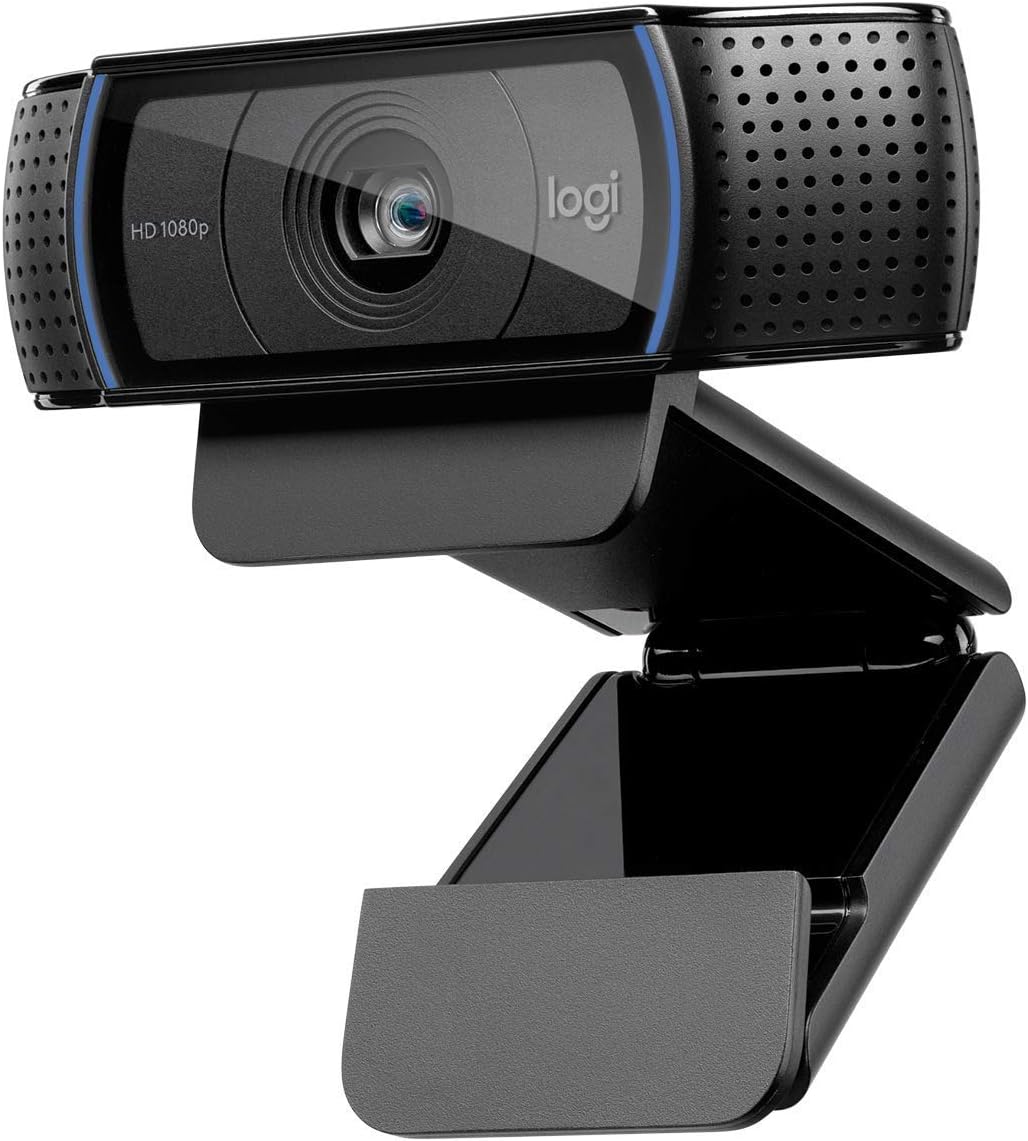


The Logitech C920x is a solid choice for anyone needing reliable video quality for meetings or casual streaming. It delivers crisp 1080p visuals at 30fps and handles variable lighting well thanks to its autofocus and light adjustment features.
We may earn a commission when you buy through this link, at no additional cost to you.
Its HD autofocus ensures you stay sharp during movement, while the dual microphones capture clear audio for calls. The included XSplit VCam license adds value for creators who want to manage backgrounds without a green screen.
While it lacks a built-in privacy shutter, which is a minor downside for security-conscious users, the optical quality and performance make up for it. The fixed focus range works best for seated desktop setups.
This camera is ideal for professionals and home users who prioritize video fidelity and ease of use. If you need a dependable webcam that integrates seamlessly with Zoom and Teams, the C920x delivers consistent results.
The HD lighting adjustment technology fine-tunes exposure automatically, ensuring bright and detailed images even when ambient light is limited.
Dual microphones work together to capture natural sound, reducing the need for external mics during video conferences or recordings.
We may earn a commission when you buy through this link, at no additional cost to you.
The C920S HD Pro brings essential privacy features to a proven design. With a snugly fitting shutter over the lens, it gives users control over when the camera is active. Video quality remains sharp and vibrant for calls and recordings.
We may earn a commission when you buy through this link, at no additional cost to you.
Its autofocus and light correction handle common room conditions well. The glass lens ensures crisp imagery, and stereo audio helps convey voice clarity without extra gear. This model builds on the reputation of the C920 series.
Unlike the X version, it does not include the XSplit VCam license. Users who need background removal features may need to purchase software separately. The shutter adds peace of mind for shared workspaces.
Ideal for users who want both quality and privacy protection. If you value having a physical cover for the lens, the C920S offers a reliable solution for home or office video conferencing.
The included shutter lets you visually confirm the lens is covered, offering a simple and reliable way to protect your privacy between calls.
A premium glass lens delivers detailed 1080p video that stays vibrant and sharp across a range of lighting scenarios.
We may earn a commission when you buy through this link, at no additional cost to you.
Designed for the workplace, the C920e features certification for major business platforms like Zoom and Microsoft Teams. This ensures seamless integration and reliable performance in enterprise environments where compatibility matters.
We may earn a commission when you buy through this link, at no additional cost to you.
Its 78-degree field of view balances framing individuals with sharing documents or objects on a table. The attachable privacy screen flips up and down for quick visual confirmation of camera status.
The sturdy clip and tripod threads offer mounting flexibility for various setups. While it does not include software tools, its core functions are optimized for professional video calls and meetings.
This model suits office workers and remote teams needing verified performance. If you rely on Teams or Zoom daily, the C920e provides a stable and certified solution for consistent communication.
Certification with leading platforms guarantees smooth operation and reduces troubleshooting during critical video conferences.
Built-in tripod threads and an adjustable clip allow secure placement on monitors or tripods for stable framing.
We may earn a commission when you buy through this link, at no additional cost to you.
The EMEET S600 stands out with its 4K sensor and phase detection autofocus, offering professional-grade imagery for streaming and content creation. It delivers smooth 60fps video at 1080p or crisp 4K at 30fps depending on your software.
We may earn a commission when you buy through this link, at no additional cost to you.
PDAF autofocus ensures quick and precise focus changes, ideal for moving presenters or dynamic setups. The adjustable field of view at 1080p lets you frame yourself and surroundings as needed.
While it includes a privacy cover, full customization requires using the EMEETLINK software. The build quality is durable with tilting joints that stay in place. This model is a step up for serious creators.
If you need higher resolution and advanced controls, the S600 is a strong candidate. It balances high-end optics with practical features like noise filtering and a robust design for long-term use.
Phase detection autofocus provides faster focus acquisition and better stability than traditional contrast-based systems, reducing delays during live streams.
The Sony 1/2.55-inch sensor captures detailed images with better low-light performance and dynamic range than standard webcams.
We may earn a commission when you buy through this link, at no additional cost to you.
For budget-conscious buyers, the EMEET C960 delivers solid 1080p video and dual microphones without breaking the bank. It includes a removable privacy cover and automatic light adjustment to maintain image stability.
We may earn a commission when you buy through this link, at no additional cost to you.
The 90-degree wide-angle lens captures more participants or background details, making it suitable for small group calls. USB connectivity options include Type-A and a Type-C adapter for broader compatibility.
Fixed focus limits flexibility for close-up shots, but works well for standard desk setups. It is not compatible with Windows Hello, so facial login requires a separate device. Audio clarity is good for casual use.
This webcam is ideal for students or home workers on a tight budget. If you need a simple plug-and-play solution with privacy protection and decent optics, the C960 offers reliable value.
The 90-degree field of view reduces the need for adjustments, accommodating more people in the frame during group discussions.
Automatic exposure and color optimization help keep your image balanced even when room lighting varies during the day.
We may earn a commission when you buy through this link, at no additional cost to you.
The Brio 101 focuses on core features with RightLight technology that boosts brightness to reduce shadows and improve image quality. It is made with significant recycled plastic and includes a slide cover for privacy.
We may earn a commission when you buy through this link, at no additional cost to you.
Its auto-light balance helps users look their best even in suboptimal conditions. The design is simple and reliable, with a built-in USB A cable for straightforward setup without extra accessories.
Framing and zoom are adjustable via the Logi Options+ app. However, it only supports USB A connectivity, which may limit users with only USB C ports. Audio is clear for standard calls.
This model fits well for users who prioritize privacy and light correction. If you want an affordable, sustainable webcam that works out of the box with major platforms, the Brio 101 is a good choice.
Automatic brightness boosts and shadow reduction help maintain a flattering image in dim or uneven lighting situations.
The chassis uses at least 77% post-consumer plastic, aligning with sustainability goals without sacrificing performance.
We may earn a commission when you buy through this link, at no additional cost to you.
The NexiGo N60 is designed for simplicity, ready to use within a minute on most systems without additional drivers. It features a glass lens optimized for typical indoor distances and includes a cover for lens protection.
We may earn a commission when you buy through this link, at no additional cost to you.
Its noise-cancelling microphone reduces background sounds during calls. Compatible with Windows, macOS, Linux, and Chrome OS, it works across many platforms including Zoom and YouTube. The privacy cover adds a layer of security.
Fixed focus limits performance for close-up tasks. It does not support gaming consoles like Xbox or PlayStation, so it is strictly for computer use. The lens quality is crisp within its range.
Ideal for users who want a hassle-free webcam for daily tasks. If you need a reliable camera that works across operating systems with minimal setup, the N60 delivers consistent performance at a fair price.
Support for USB 2.0 and 3.0 allows immediate recognition on most systems, removing the need for software installation.
The built-in noise cancellation helps reduce ambient noise, keeping voice transmission clear during virtual meetings.
We may earn a commission when you buy through this link, at no additional cost to you.
The Brio 105 brings business-ready features to an affordable price. With Google Meet certification and support for Logitech Sync, it allows remote deployment and consistent performance across work devices.
We may earn a commission when you buy through this link, at no additional cost to you.
RightLight 2 technology automatically improves image quality in poor lighting. The integrated cover ensures privacy, and its plug-and-play design works with standard USB-A ports. It is compatible with Chromebooks and major OS options.
Audio is limited to the built-in mic without stereo options. For high-end streaming, it lacks 4K resolution. However, it covers essential needs for video conferencing and collaboration.
This model is ideal for businesses needing a reliable, manageable webcam. If you want certified compatibility with Google Meet and remote device management, the Brio 105 is a cost-effective choice.
Logitech Sync enables IT teams to deploy and monitor devices remotely, ensuring all users have up-to-date and functioning equipment.
RightLight 2 adjusts exposure to maintain detail in both dark and bright areas of the frame for a natural look.
We may earn a commission when you buy through this link, at no additional cost to you.
The classic C920 remains a benchmark for webcam quality with its Full HD video and reliable autofocus. It has been a staple for desktop and laptop use, offering consistent performance for calls and recording.
We may earn a commission when you buy through this link, at no additional cost to you.
Its glass lens and light correction handle typical office lighting well. Dual microphones provide clear audio. While it lacks newer features like a privacy shutter, its performance remains competitive.
Being an older model, it does not include newer software features like background removal. Still, its core imaging performance holds up. Many users prefer it for its simplicity and reliability.
If you want a trusted camera that works well without extra software, the C920 is a safe choice. It fits well into setups where consistent quality and durability matter most.
Optimized for widescreen displays, the C920 ensures your video fills the frame properly during meetings and recordings.
The durable clip and hinge allow secure placement on monitors or laptops for stable framing over time.
We may earn a commission when you buy through this link, at no additional cost to you.
The Brio 100 Renewed offers a cost-effective way to access a reputable webcam. This certified refurbished unit provides 1080p video with a wide field of view that captures more of your surroundings.
We may earn a commission when you buy through this link, at no additional cost to you.
It supports plug-and-play installation with major conferencing apps. The built-in mic ensures simple audio capture. While it is a refurbished item, it meets quality standards for reliability.
Limited warranty may apply compared to new units. Ensure you understand return policies before purchase. For budget needs, this provides a reliable entry into Full HD conferencing.
Ideal for cost-sensitive buyers who want a trusted brand. If you want a dependable webcam at a lower cost and accept refurbished condition, the Brio 100 Renewed is a practical choice.
Certified renewed products undergo testing to ensure they meet performance and functionality standards for resale.
A 58-degree diagonal field of view captures more space around you, useful for sharing your environment during calls.
We may earn a commission when you buy through this link, at no additional cost to you.
Selecting the right webcam depends on your specific needs such as video quality, audio performance, privacy requirements, and compatibility with your devices and software.
1080p resolution provides sharp visuals for most video calls and streaming. Frame rates of 30fps are standard, but 60fps offers smoother motion for active presenters or gaming content.
Prioritize 1080p at 30fps or higher for clarity and smoothness.
Autofocus ensures your image stays sharp as you move. Light correction technologies like RightLight help adjust exposure so you look good even in varied lighting.
Look for HD autofocus and light balance features for consistent image quality.
Clear audio is as important as video. Dual mics with noise cancellation reduce background noise and improve voice transmission during calls.
Choose models with stereo or dual mics for better sound.
Privacy shutters or cover slides let you physically block the lens when not in use. This adds a layer of security and peace of mind, especially in shared environments.
Opt for webcams with built-in privacy covers if security is a priority.
A wider angle like 90 degrees captures more participants or space, while narrower angles focus on you. Adjustable FOV adds flexibility for different scenarios.
Pick a FOV that matches your typical setup and group size.
Certification with platforms like Zoom or Teams guarantees optimized performance and easier integration for business users.
If you rely on a specific app, look for certified models.
Check mounting options like clips or tripod threads. Ensure the webcam supports your computer's ports with USB-A or USB-C connections.
Select a webcam with the right connector and mounting for your desk.
Some models include apps for customizing brightness, zoom, or backgrounds. Basic webcams may require third-party tools for advanced settings.
Consider whether you need proprietary software or prefer plug-and-play simplicity.
Connect the webcam to a USB port and wait for automatic drivers to install. Open your video calling app and select the camera as the input device in settings.
Clean the lens with a soft, dry cloth to remove dust or fingerprints. Avoid using harsh chemicals that may damage the lens or privacy shutter.
Position the camera at eye level for a natural perspective. Use the clip or a stand to stabilize the device and prevent accidental movement during calls.
1080p offers 1920×1080 pixels which is sufficient for most video calls. 4K provides higher detail but requires more bandwidth and storage. For meetings, 1080p is typically ideal.
Most listed models support Windows 10/11 and macOS. Check product specs for Linux or Chrome OS compatibility. Plug-and-play setup usually works without extra drivers.
Ensure room lighting is adequate and check for light correction features. Move closer to a window or use artificial lighting. Software settings may also need adjustment for exposure.
Yes, many models are suitable for streaming on platforms like Twitch or YouTube. For higher quality, consider options with 60fps or 4K support for better motion capture.
Use the privacy shutter or slide cover included on many models. If your model lacks a cover, consider a third-party sticker or sliding clip that fits your lens.
External mics often provide clearer audio but built-in mics are convenient for most users. If your built-in mic struggles with noise, consider a USB microphone for better quality.
Our top picks include the C920x for overall quality, the EMEET C960 for budget buyers, and the C920e for business professionals. Each delivers reliable performance tailored to specific needs.
Focus on features like autofocus, microphone clarity, and privacy covers to match your environment. Consider your typical usage whether meetings, teaching, or streaming to narrow options.
Prices and availability vary by retailer and time. Check current listings and read user reviews before purchasing to ensure you choose the best webcam for your setup.