
Integral 4GB Crypto-197
4.1Editor score
FIPS 197 Certified Security
Auto Lock On Disconnect
Waterproof Double Layer Design
This guide compares the top encrypted USB flash drives for security, speed, and durability to help you choose the best hardware-encrypted drive for your data
Secure data storage is more critical than ever in our digital age. Encrypted USB flash drives provide a robust solution for protecting sensitive files from unauthorized access. These devices use advanced hardware encryption to ensure your information remains safe even if the drive is lost or stolen.
We have evaluated the leading models on the market based on encryption standards, build quality, and user experience. Our analysis focuses on drives that meet government certification levels and offer reliable performance across various operating systems. This list covers options for individuals and enterprises alike.
Each pick highlights specific strengths such as biometric access, PIN protection, or rugged design. Note that pricing and availability can change frequently. We recommend checking current listings before making a final decision to ensure you get the best value for your security requirements.
4.1Editor score
4.6Editor score

4.6Editor score
The following table provides a side-by-side comparison of the top ten encrypted USB flash drives. We have extracted key specifications from each product to highlight differences in encryption standards, interface types, and unique security features. This overview helps you quickly identify which model aligns with your specific protection and connectivity needs.


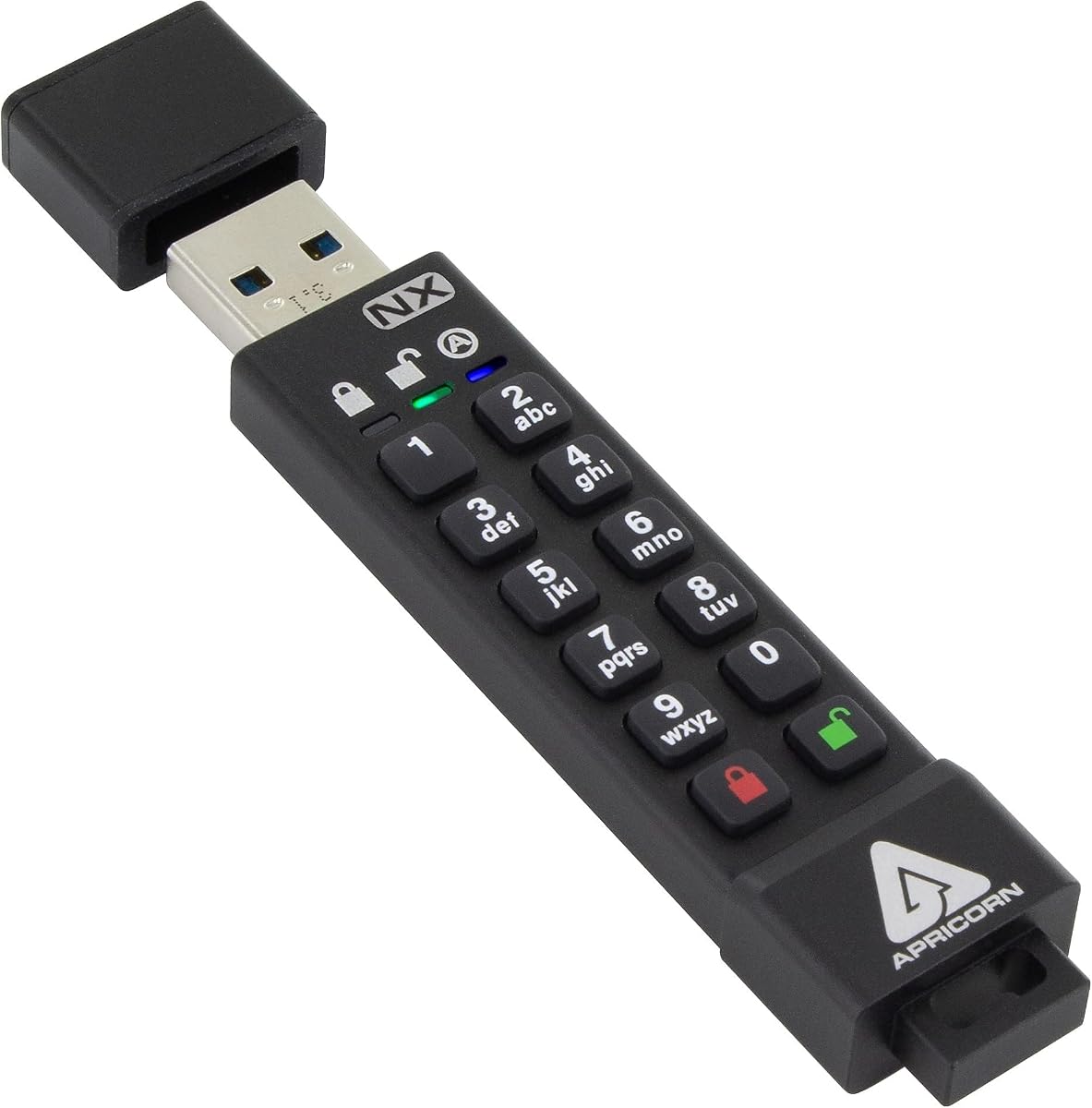
This drive stands out as the top choice for users requiring certified security standards. With FIPS 140-2 Level 3 validation, it offers robust protection for sensitive corporate or personal data. The hardware-based encryption ensures that your files remain secure even if the device falls into the wrong hands.
We may earn a commission when you buy through this link, at no additional cost to you.
The separation of admin and user modes allows for flexible management of access rights. This feature is particularly useful for businesses that need to monitor usage without compromising user privacy. The drive also supports read-only modes which can prevent accidental data corruption during transfers.
While the build quality is excellent, the device is slightly larger than typical flash drives. This added bulk is a trade-off for the internal hardware required to maintain high security standards. Users should consider the physical size when planning to carry it on a keychain.
Ideal for government contractors and enterprise users, this drive meets strict compliance requirements. The included Aegis Configurator software provides additional control over security settings. For those prioritizing data integrity above all else, this is the recommended choice.
The FIPS 140-2 Level 3 certification means this drive meets rigorous federal standards for cryptographic modules. This validation is often required for handling classified or sensitive government information.
Separate admin and user modes let administrators set policies while users access data independently. This structure supports secure collaboration without exposing underlying configuration settings to end users.
We may earn a commission when you buy through this link, at no additional cost to you.
The Vault Privacy 50 delivers enterprise-level security with a focus on protecting against modern cyber threats. Its digitally signed firmware guards against BadUSB attacks which are designed to exploit trust in USB devices. This makes it a safe choice for connecting to public or untrusted computers.
We may earn a commission when you buy through this link, at no additional cost to you.
Users can choose between complex passwords or longer passphrases for easier recall. The dual read-only settings prevent accidental overwrites of critical files during data transfer. This functionality is especially helpful for archiving important documents that should not be altered.
Setting up the drive may require some technical knowledge due to its advanced features. Firmware updates are recommended to keep security patches current which adds a maintenance step for users. However the robust protection features justify the extra effort for security-conscious individuals.
Best for professionals handling confidential business data, this drive ensures compliance with procurement standards. The TAA compliance makes it suitable for government contracts requiring domestic origin products. It balances high security with practical features for daily office use.
BadUSB attacks mimic standard peripherals to inject malware into connected systems. This drive's signed firmware prevents unauthorized code execution even if the device is compromised.
Support for both complex passwords and passphrases allows users to choose based on their memory habits. This flexibility increases the likelihood of maintaining strong credentials over time.
We may earn a commission when you buy through this link, at no additional cost to you.
Designed for modern laptops and mobile devices, this drive features a USB Type-C connector. It maintains the same high security standards as its USB-A counterparts ensuring compatibility with newer hardware. The 128GB capacity provides ample space for large media or project files.
We may earn a commission when you buy through this link, at no additional cost to you.
Authentication is handled entirely by hardware which eliminates the need for software installation on host machines. This feature is ideal for shared environments where administrative rights are restricted. The internal power source ensures the encryption chip functions reliably during use.
The physical design is robust but the Type-C interface limits use on older systems without adapters. Users should verify their device ports before purchasing to ensure seamless connectivity. The build quality suggests it can withstand the rigors of daily travel.
This model is perfect for tech professionals and students using recent MacBook or Android devices. The combination of speed and security makes it a strong contender in the premium category. Its design future-proofs your investment as Type-C becomes the industry standard.
The USB Type-C connector aligns with the trend towards reversible and universal ports. This allows direct connection to many modern ultrabooks and tablets without dongles.
An internal battery powers the encryption engine ensuring consistent performance regardless of host power fluctuations. This design adds reliability during long file transfer sessions.
We may earn a commission when you buy through this link, at no additional cost to you.
Affordability meets security with this compact drive that meets government information security standards. Despite the low cost, it does not compromise on encryption strength which uses 256-bit AES hardware protection. The zero footprint design means no drivers are needed to operate the device.
We may earn a commission when you buy through this link, at no additional cost to you.
One of its most impressive features is the automatic data erasure after failed login attempts. If someone tries to guess the password repeatedly the drive resets to prevent brute force attacks. This ensures that even if physical security is breached, the data remains inaccessible.
The main limitation is the small storage capacity which restricts it to text documents or small files. It is not suitable for large backups or media libraries. Users needing more space will need to consider higher tier options with more expensive price tags.
Best for personal use or lightweight business tasks, this drive offers peace of mind at a low entry cost. The waterproof design adds durability for users in outdoor or construction environments. It is an excellent choice for those prioritizing security over storage volume.
After a set number of incorrect password attempts the cryptographic data is erased automatically. This acts as a last line of defense against unauthorized access attempts.
A dual layer waterproof design protects internal electronics from immersion and physical impact. This robust build allows the drive to survive accidental drops or wet conditions.
We may earn a commission when you buy through this link, at no additional cost to you.
This device features a physical keypad that allows users to enter a PIN directly on the drive. This design eliminates the need for keyboard interception software which can be a security risk on public computers. It is highly intuitive for users who prefer tactile input over typing.
We may earn a commission when you buy through this link, at no additional cost to you.
The drive is certified to FIPS standards and offers resistance to dust and water. This durability ensures it can handle challenging environments without losing functionality. It works across major operating systems including Windows macOS Linux and Android without additional software.
Users must keep the internal battery charged to maintain the PIN functionality. Charging is done via USB and typically requires periodic attention. However the independence from host software makes the maintenance a worthwhile trade-off for increased security.
Ideal for field workers or travelers, this drive offers security that is visible and manageable. The keypad allows for easy password changes without accessing a computer interface. It is a strong choice for organizations needing reliable offline security solutions.
Physical entry prevents malware on the host computer from logging keystrokes. This feature is critical when using the drive on shared or compromised machines.
The IP57 rating ensures the drive can withstand temporary immersion and dust exposure. This makes it suitable for construction sites or outdoor fieldwork.
We may earn a commission when you buy through this link, at no additional cost to you.
This drive offers a convenient automatic lock feature that secures data after inactivity. If the device is disconnected or idle for thirty seconds it re-encrypts itself immediately. This helps prevent theft when users forget to lock their drive before walking away.
We may earn a commission when you buy through this link, at no additional cost to you.
The aluminum alloy shell provides both heat dissipation and physical protection for the internal chip. With 64GB storage it balances capacity and security for standard user needs. The USB 3.0 protocol ensures that transfers are not bottlenecked by the encryption process.
It lacks some of the rigorous government certifications found in other models. While it uses standard AES encryption, it is not FIPS validated which may limit enterprise adoption. This makes it more suitable for personal or small business use rather than government contracts.
Recommended for users who value convenience alongside security, the auto-lock feature adds a layer of safety. It is a good option for everyday carry where forgetting to lock is a common risk. The durable shell ensures it lasts through daily use cycles.
The drive locks automatically if unplugged or idle to ensure data is never left open. This passive security reduces the burden on users to manually lock the device.
The alloy casing helps dissipate heat generated during transfers and protects against physical impact. This design choice extends the lifespan of the internal components.
We may earn a commission when you buy through this link, at no additional cost to you.
The standout feature of this model is the integrated fingerprint sensor for access. Users can store up to ten fingerprints which allows for shared access among family members or teams. This removes the need to remember complex passwords for quick data access.
We may earn a commission when you buy through this link, at no additional cost to you.
Performance is a strong suit with read speeds reaching up to 400MB/s. This high throughput is ideal for transferring large video files or virtual machine images quickly. The USB 3.2 Gen 1 standard ensures compatibility with most modern ports.
The fingerprint sensor requires occasional cleaning to maintain accuracy. Additionally users may need to install software to manage fingerprint data. This dependence on drivers can be a drawback when using the drive on restricted systems.
Best for users who prefer biometric security over passwords, this drive offers a modern experience. It is particularly useful for creatives needing fast access to large project files. The convenience of fingerprint login outweighs the driver requirements for many.
Fingerprint recognition takes less than a second which speeds up the login process significantly. This rapid access encourages regular use of the encrypted drive.
Supporting ten unique fingerprints allows multiple users to access the same drive easily. This makes it suitable for shared workspaces or family use.
We may earn a commission when you buy through this link, at no additional cost to you.
This is the most robust version of the datAshur line offering superior protection against water and dust. The IP68 rating means it can withstand submersion making it perfect for extreme environments. It retains the same high security standards as the previous PRO model.
We may earn a commission when you buy through this link, at no additional cost to you.
Security is managed through a PIN code entered on the drive itself. This approach avoids the risks associated with software-based entry. The metal casing is designed to resist physical damage during transport or accidental drops.
Like other PIN drives it requires charging which adds a maintenance step. The capacity is somewhat limited compared to modern high density drives. Users with very large file needs might find 32GB insufficient for backup purposes.
For outdoor professionals or those in hazardous environments this drive provides unmatched physical protection. The combination of water resistance and FIPS validation makes it a top choice for field operations. It ensures data safety even in the most challenging conditions.
IP68 certification ensures the drive is fully waterproof against prolonged immersion. This feature is vital for marine or construction workers.
The metal body protects the electronics from impact and harsh elements. This durability extends the physical life of the device significantly.
We may earn a commission when you buy through this link, at no additional cost to you.
This model pushes the boundaries of portable security with features aimed at high-risk users. The pending FIPS 140-3 certification indicates it meets the latest standards for cryptographic modules. It is designed to resist sophisticated attacks including BadUSB exploitation.
We may earn a commission when you buy through this link, at no additional cost to you.
A unique feature is the dual hidden partition which allows users to separate public and private data. This functionality enhances privacy by hiding sensitive files within an invisible partition. The zinc casing provides a premium feel and strong resistance to physical attacks.
The storage capacity is limited which may be a consideration for bulk data users. The price is also among the highest in the category. However for those needing maximum security the cost is justified by the protection levels.
Best for high-net-worth individuals or security professionals this drive is a fortress on a stick. The hidden partition feature adds a layer of stealth for sensitive operations. It represents the pinnacle of current USB drive security technology.
This feature allows two distinct volumes one visible and one hidden for maximum secrecy. It provides an extra layer of privacy for highly sensitive files.
The zinc body is designed to resist physical destruction attempts. This robust build ensures the drive survives impact and tampering.
We may earn a commission when you buy through this link, at no additional cost to you.
The D300S offers a streamlined approach to security focusing on reliability and simplicity. It uses hardware encryption to protect data without relying on external software. The small size makes it easy to keep with you at all times.
We may earn a commission when you buy through this link, at no additional cost to you.
While it lacks modern features like biometric login it performs its core function well. The AES 256 XTS encryption is a strong standard that resists various forms of attack. It is a practical choice for users who need basic but effective security.
The limited storage means it is best suited for documents rather than media. Users looking for high capacity may find it insufficient for their needs. However for text and code files the 8GB is often adequate.
Ideal for enterprise environments requiring strict compliance this drive is a workhorse. It is reliable and consistent which makes it a safe choice for business deployment. For simple secure transport this drive delivers on its promises.
The use of XTS AES 256 encryption provides a high level of data protection. This standard is trusted by enterprises globally.
Its small size ensures it fits easily on any keychain or pocket. This design supports constant portability and access.
We may earn a commission when you buy through this link, at no additional cost to you.
Selecting the right encrypted USB drive requires understanding your specific security needs and usage scenarios. We have outlined key factors to consider before making a purchase.
Look for drives that use 256-bit AES encryption to ensure strong data protection. Government certified standards like FIPS 140-2 add an extra layer of trust for sensitive data.
Prioritize hardware encryption over software solutions to prevent unauthorized access.
Ensure the drive has the correct interface for your devices such as USB-A or Type-C. Some drives offer dual connectors to maximize compatibility across different hardware platforms.
Match the drive interface to your primary devices to avoid needing adapters.
Consider how you want to access the data with PIN keypads or biometrics. Physical PIN entry can prevent keylogging while fingerprints offer quick access.
Choose an authentication method that balances security with your daily workflow.
Rugged designs with waterproof ratings protect against accidental damage in harsh environments. Metal casings provide better protection for internal components than plastic.
Select a build quality that matches the physical conditions where you use the drive.
Evaluate how much data you need to store to choose the right size. High capacity drives often come at a higher price point than smaller options.
Balance storage requirements with budget constraints when selecting capacity.
Ensure the drive works on all your operating systems without requiring specific software. Some drives are optimized for Windows while others support macOS and Linux.
Check system compatibility to avoid access issues on different machines.
Look for features that lock the drive after multiple failed login attempts to prevent guessing. Some models will erase data automatically if too many wrong tries occur.
Ensure the drive has anti-brute force mechanisms to secure your password.
Higher security often comes with a higher cost so determine your budget carefully. Review warranty terms to ensure long-term support for the hardware.
Invest in a product with a solid warranty to protect your purchase over time.
Always store your PIN or passphrase in a safe location separate from the drive itself to prevent loss of access. Remember that forgetting this information usually results in permanent data loss as security is designed to prevent recovery.
Keep the connection port clean from dust and debris to ensure a stable link with your computer. If using a model with a battery ensure it is charged before critical transfers to avoid authentication failure.
Safely eject the drive from your operating system to prevent data corruption during writes. Regularly check for firmware updates if available to maintain the latest security protections.
Most modern encrypted drives support multiple operating systems including Windows, macOS, and Linux. However some hardware drivers may need to be installed for full functionality. Always check product specs for cross-platform compatibility before buying.
If you forget your PIN or password you will not be able to access the data without specific recovery methods. Many drives are designed to erase data after failed attempts for security. Some models offer recovery PINs that must be stored separately.
Hardware encrypted drives typically do not require software for standard operation. They authenticate the PIN or key directly on the device. Some advanced features may offer optional software for management and updates.
Look for the FIPS certification label and number in the product description. Valid certifications are listed publicly on NIST or vendor websites. Ensure the level meets your specific compliance needs like level 3 for government use.
Most standard encrypted drives do not have GPS tracking capabilities. Some enterprise models may offer management tools to track status but personal drives are typically offline. Ensure physical security as tracking is limited on most consumer units.
Hardware encryption is generally more secure as it does not rely on the host computer's operating system. It reduces the risk of malware intercepting passwords on the keyboard. Software encryption can be effective but is more vulnerable to host attacks.
We have reviewed ten top options ranging from budget-friendly to enterprise-grade solutions. The Apricorn Aegis Secure Key leads the category for certified security while the Integral Crypto-197 offers great value.
Prioritize the encryption standard and authentication method that best fits your daily workflow. Ensure the physical durability matches your environment to prevent loss of data due to damage.
Prices and availability change so verify current offers before finalizing your order. Choosing the right drive ensures your sensitive files remain protected wherever you go.