
UT681 HDMI Cable Tester
4.8Editor score
Supports HDMI 1.2 to 2.0V
Lightweight portable design
Clear LED indicator zones
This guide compares the top HDMI Signal Tester models for 2026 to help you choose the right device for testing cable integrity and signal quality.
Finding a reliable HDMI Signal Tester is essential for technicians and home enthusiasts who need to verify cable performance. These devices help diagnose connection issues quickly without needing a full display setup.
We evaluated ten top-rated models based on their testing capabilities, portability, and ease of use. Our analysis covers everything from basic continuity checks to advanced signal generation features.
Each pick highlights specific strengths like resolution support or battery life. Prices may vary by retailer so check current listings before purchasing your next testing tool.
4.8Editor score

4.0Editor score

The following table provides a side-by-side overview of all ten models to help you compare their core specifications and features.


This device stands out as a versatile tool for HDMI testing needs. It serves both as a signal generator and a display emulator making it ideal for integration work. The rating of 4.0 reflects its solid performance in real world scenarios.
We may earn a commission when you buy through this link, at no additional cost to you.
The unit allows users to set specific video resolutions using a physical DIP switch. It supports 4K outputs at various refresh rates which is critical for modern AV setups. You can also control HDCP settings to match specific display requirements accurately.
While it covers major video formats it does not support the absolute latest 8K standards. This trade-off is acceptable for most current installations where 4K is the standard. The device focuses on reliability and ease of use over cutting edge specs.
Professional installers will find this tool invaluable for verifying set top box outputs. It removes the need for a full TV setup during initial testing phases. We recommend this for anyone needing robust signal generation capabilities.
You can switch between HDMI signal generation and display emulation modes seamlessly for flexible testing.
The DIP switch allows precise control over HDCP content settings to match your display capabilities.
We may earn a commission when you buy through this link, at no additional cost to you.
This tester offers a straightforward approach to diagnosing HDMI cable issues. With a rating of 4.3 it is well regarded for its simplicity. It helps you identify if a cable is the cause of video problems quickly.
We may earn a commission when you buy through this link, at no additional cost to you.
The unit connects directly to the source or display end of your system. It displays the status of each HDMI signal component to pinpoint faults. This feature is particularly useful when dealing with color shifts or missing pictures.
Since it focuses on cable testing it does not generate video signals itself. This limits its use to passive checks rather than active signal verification. However for basic continuity and signal path checks it is highly effective.
Technicians who need a quick tool to verify cable integrity will appreciate this model. It fits easily into a toolkit and requires no external power. We suggest it for routine maintenance and troubleshooting tasks.
Simply plug cables into the DVI or HDMI ports to see immediate status indicators.
Its compact size makes it easy to carry for on site troubleshooting and repairs.
We may earn a commission when you buy through this link, at no additional cost to you.
This multi-function tester covers both HDMI and network cables in one device. It holds a rating of 4.4 due to its broad utility. The inclusion of a remote unit makes it practical for testing installed cables.
We may earn a commission when you buy through this link, at no additional cost to you.
The main unit scans up to 19 wires to identify open or short circuits. You can use it with a single AAA battery or via USB power supply. This flexibility ensures you can keep working even in remote locations without outlets.
While it handles wiring checks well it does not offer deep signal quality metrics. It focuses on connectivity rather than visual output verification. This makes it a great secondary tool for network and AV techs.
If you work on various cabling types this tester provides good value. It simplifies the process of checking wiring integrity without needing multiple tools. We recommend it for general purpose testing needs.
Switch between testing HDMI connections and RJ45 network cables with the same unit.
Choose between battery power or your phone charger for continuous operation.
We may earn a commission when you buy through this link, at no additional cost to you.
This handheld device offers a unique benefit by including an integrated HD LCD screen. With a rating of 4.5 it is praised for its durability and utility. You can view video and audio without needing a separate monitor.
We may earn a commission when you buy through this link, at no additional cost to you.
The unit is designed to withstand rough handling with a shock-proof housing. It supports three HDMI ports which allows for pass-through testing. This is ideal for verifying set top box installations in confined spaces.
While it is a premium tool it may be too expensive for casual home users. The weight is also slightly higher than basic testers due to the screen. These factors are acceptable trade-offs for professionals needing standalone verification.
We suggest this model for installers who frequently work in the field. It eliminates the need to carry a display for quick checks. The built-in battery ensures you can work for hours without interruption.
Check audio and video output directly on the unit using the included HD screen.
The tempered glass screen and rugged housing protect the device from job site hazards.
We may earn a commission when you buy through this link, at no additional cost to you.
This analyzer is the top choice for professional testing of next generation HDMI standards. It supports 8K resolutions and 40Gbps bandwidth which is essential for modern AV systems. The lack of a specific rating reflects its newness in the market.
We may earn a commission when you buy through this link, at no additional cost to you.
The device includes 64 resolutions and 33 patterns for thorough signal validation. It handles advanced features like HDR and CEC control with ease. The battery life and support structure make it a long term investment for shops.
The price is significantly higher than other options on this list. This investment is justified only for those needing to test HDMI 2.1 compliant devices. Most home users will not find this level of performance necessary.
For high end AV integration teams this tool provides unmatched precision. It ensures that your cables and gear meet the latest standards reliably. We recommend it for professionals dealing with premium home theater setups.
Verify full bandwidth capabilities of 40Gbps cables for future proof setups.
Check HDR color formats and encryption standards with detailed analysis tools.
We may earn a commission when you buy through this link, at no additional cost to you.
This unit combines generation and analysis capabilities into a single device. It carries a rating of 4.2 for its ability to handle standard 4K signals. It is useful for verifying bandwidth compliance across different devices.
We may earn a commission when you buy through this link, at no additional cost to you.
The device allows you to test cables against 18Gbps bandwidth requirements. It also supports scaling to match various display resolutions. This flexibility is helpful when working with mixed resolution environments.
While it handles 4K well it does not support the latest 8K specifications. The price reflects its advanced features which might be too much for simple checks. It is a solid choice for professional AV shops.
If you need to test both generation and cable compliance this model fits well. It reduces the need to buy two separate tools for testing and validation. We suggest it for users needing comprehensive signal analysis.
Test cables to ensure they meet the required 18Gbps bandwidth for 4K signals.
Use the built-in scaler to match outputs to different display resolutions easily.
We may earn a commission when you buy through this link, at no additional cost to you.
This tester provides a simple way to check cable connectivity for HDMI and network wires. It has a rating of 3.9 which indicates decent value for its low price. It is suitable for quick checks on basic setups.
We may earn a commission when you buy through this link, at no additional cost to you.
You can choose between fast scan and full display modes depending on your needs. The device automatically shuts down to save power after periods of inactivity. This feature helps extend battery life during daily use.
The device is not designed for high resolution signal validation or deep analysis. It focuses purely on physical continuity and wiring order. This makes it a good budget option for general maintenance.
For users who need a cheap tool to verify cable connections this is a good fit. It saves time by quickly identifying open or short circuits. We recommend it for those on a tight budget.
Use the scan mode to quickly check connections without waiting for full display updates.
The auto shut down feature ensures you do not drain the battery unnecessarily.
We may earn a commission when you buy through this link, at no additional cost to you.
This tool is designed for professional inspection of standard and Mini HDMI cables. It holds a rating of 4.4 for its reliability in the field. The detachable remote unit makes it ideal for testing installed cables.
We may earn a commission when you buy through this link, at no additional cost to you.
The device checks each wire pair to identify shorts or opens accurately. You can view individual connections or all at once depending on the mode. This flexibility helps when troubleshooting complex wiring setups.
While it is robust it requires a 9V battery which is not included. The interface is straightforward but lacks advanced visual feedback. These small details are worth noting when purchasing for professional use.
Installers who frequently test long or installed cables will find this useful. It allows you to separate the main unit from the connector for better access. We suggest it for network and AV technicians.
Separate the remote unit to test cables that are installed in walls or ceilings.
See each individual wire connection tested in scan mode for precise diagnostics.
We may earn a commission when you buy through this link, at no additional cost to you.
This is one of the most popular budget testers available today with a rating of 4.8. It supports multiple HDMI versions from 1.2 to 2.0V making it versatile for older and newer devices. The price is very competitive for the features offered.
We may earn a commission when you buy through this link, at no additional cost to you.
The device analyzes 19 wires to detect short circuits or disconnections quickly. A small LED warns you when the battery is low so you are never caught off guard. It also turns off automatically after ten minutes to save power.
Since it is a budget device it lacks advanced features like LCD screens or signal generation. It focuses purely on physical continuity which is what most users need. The trade-off in price for functionality is very good.
We highly recommend this for homeowners or students who need a quick tool. It is easy to carry and use for any cable check. For the price it offers excellent value and reliability.
Work with both standard Type A and Type C mini interfaces with ease.
LED lights show exactly which pins are faulty so you can fix issues fast.
We may earn a commission when you buy through this link, at no additional cost to you.
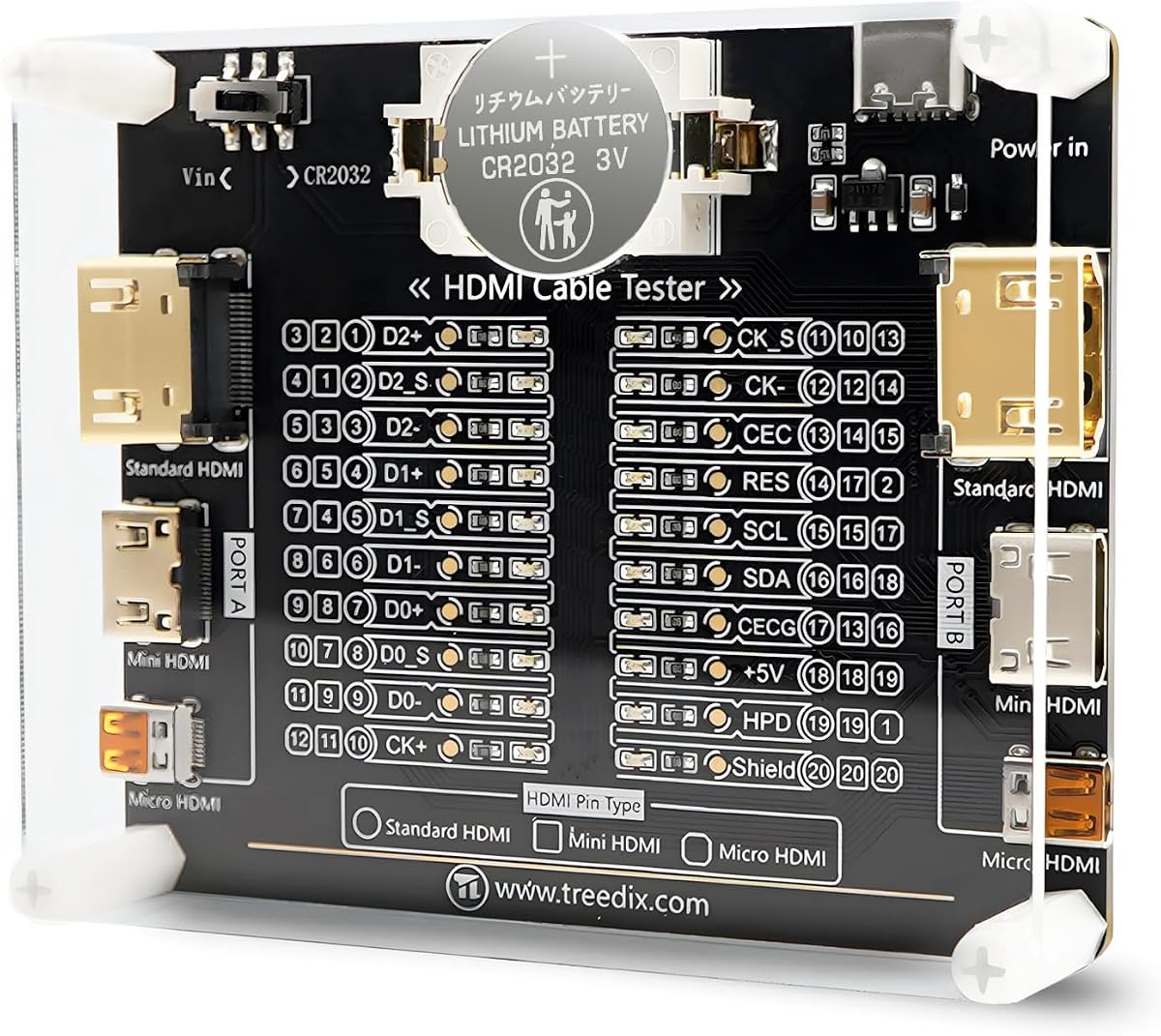
This tester is designed as a compact board with LED indicators for each pin. It has a rating of 4.6 for its simplicity and clear feedback. It is great for checking wiring order quickly without needing a large device.
We may earn a commission when you buy through this link, at no additional cost to you.
The unit supports Standard Mini and Micro interfaces covering most connector types. You can power it with a battery or an external supply giving you flexibility. The acrylic case protects the internal components during transport.
Because it is a board it may be less durable than a handheld unit. It is best suited for controlled environments like workbenches. However it provides clear visual data on pin connections which is helpful.
If you need a low cost way to check pin integrity this works well. It is small enough to fit in any toolbox for quick checks. We suggest it for hobbyists and basic repair work.
Twenty LED lights show the status of every pin for detailed wiring checks.
The acrylic housing keeps the board safe from dust and physical damage.
We may earn a commission when you buy through this link, at no additional cost to you.
Choosing the right tester depends on your specific needs from basic continuity checks to advanced signal generation.
Different testers offer varying levels of analysis from simple continuity checks to full signal generation. If you only need to check if a cable is physically broken a basic continuity tester will suffice. However if you need to verify video output or color accuracy you should look for a device with an integrated display or generator.
Look for units that match your required resolution support such as 4K or 8K capabilities.
For field work a handheld device with a rugged case is essential. These models are designed to withstand drops and rough handling. Consider the size and weight since you may be carrying it in a bag for long periods.
Choose a compact model with a protective housing if you travel frequently.
Most testers use standard batteries but some offer USB charging or external power options. This flexibility ensures you can work for extended periods without needing to buy new batteries. Rechargeable units are more eco friendly and cost effective over time.
Prioritize models with long battery life or USB charging for convenience.
Ensure the tester supports the connector types you use most frequently. Standard Type A is common but Mini and Micro HDMI connectors are also used in portable devices. A versatile tester will handle multiple interface types with adapters or multiple ports.
Select a device that covers all the HDMI variants you encounter in your projects.
Higher resolution support is critical if you work with modern 4K or 8K displays. Basic testers might only handle 1080p signals which limits their utility. Advanced analyzers often include bandwidth checks to ensure cables meet HDMI 2.1 standards.
Match the tester resolution to the highest resolution device you plan to connect.
The interface should be intuitive so you can get readings quickly. LED indicators are simpler than screens but screens provide more detail. Look for features like auto shut off or clear warnings for battery status.
Choose a model that fits your technical comfort level for faster workflow.
A robust housing protects the internal electronics from damage. Look for features like rubber bumpers or shockproof screens for field use. This factor is especially important if the tool will be dropped often or used in dusty environments.
Invest in a model with a rugged build if you work in challenging conditions.
Prices range from basic low cost boards to high end analyzers. Determine how often you need the tool to decide how much to spend. For occasional home use a budget model is usually sufficient for most tasks.
Balance your required features against the total cost of ownership.
Always start by ensuring the device has power before connecting it to your cables. Insert the cable firmly into the port and wait for the indicators to settle. This prevents false readings caused by loose connections during initial checks.
Keep the unit dry and avoid exposing it to extreme temperatures which can damage the electronics. Use the provided case to store the device when not in use to prevent scratches. Regularly check the battery level and replace or recharge it as needed.
Update the firmware if your model supports it to ensure compatibility with new HDMI versions. If you notice inconsistent readings check the ports for debris or damage. Proper care extends the life of the tool and keeps your results accurate.
An HDMI Signal Tester verifies that cables are working correctly and carrying the expected signals. It helps identify shorts open circuits or wiring errors that cause display issues. These tools are essential for AV technicians and home installers.
If you frequently switch devices or deal with long cables a tester can save time troubleshooting. For simple occasional use it may not be strictly necessary but it is helpful for verifying connections quickly.
Basic continuity testers only check wiring. Advanced analyzers can verify signal quality like resolution and HDR support. Choose a model with a display if you need to check video fidelity.
Look for a tester that explicitly mentions 4K or 18Gbps bandwidth support. Basic testers might pass continuity but fail to confirm high speed data transmission required for 4K content.
HDMI 2.1 testers support higher bandwidths like 40Gbps for 8K resolution. HDMI 2.0 testers typically max out at 18Gbps for 4K. Ensure you buy a tester matching the latest standards you need to verify.
Most handheld models are designed to be portable and fit in a pocket or bag. Board style testers are smaller but less rugged so keep them in a case to avoid damage during transport.
We reviewed ten models that range from basic continuity checks to advanced signal analysis. The UT681 and Monoprice models offer excellent value for most common testing needs.
Prioritize features like portability and resolution support based on your specific work environment. A rugged device with clear indicators will serve you best on busy job sites.
Prices and availability can change quickly so check current listings before making a final decision. This guide helps you narrow down the right tool for your next project.