
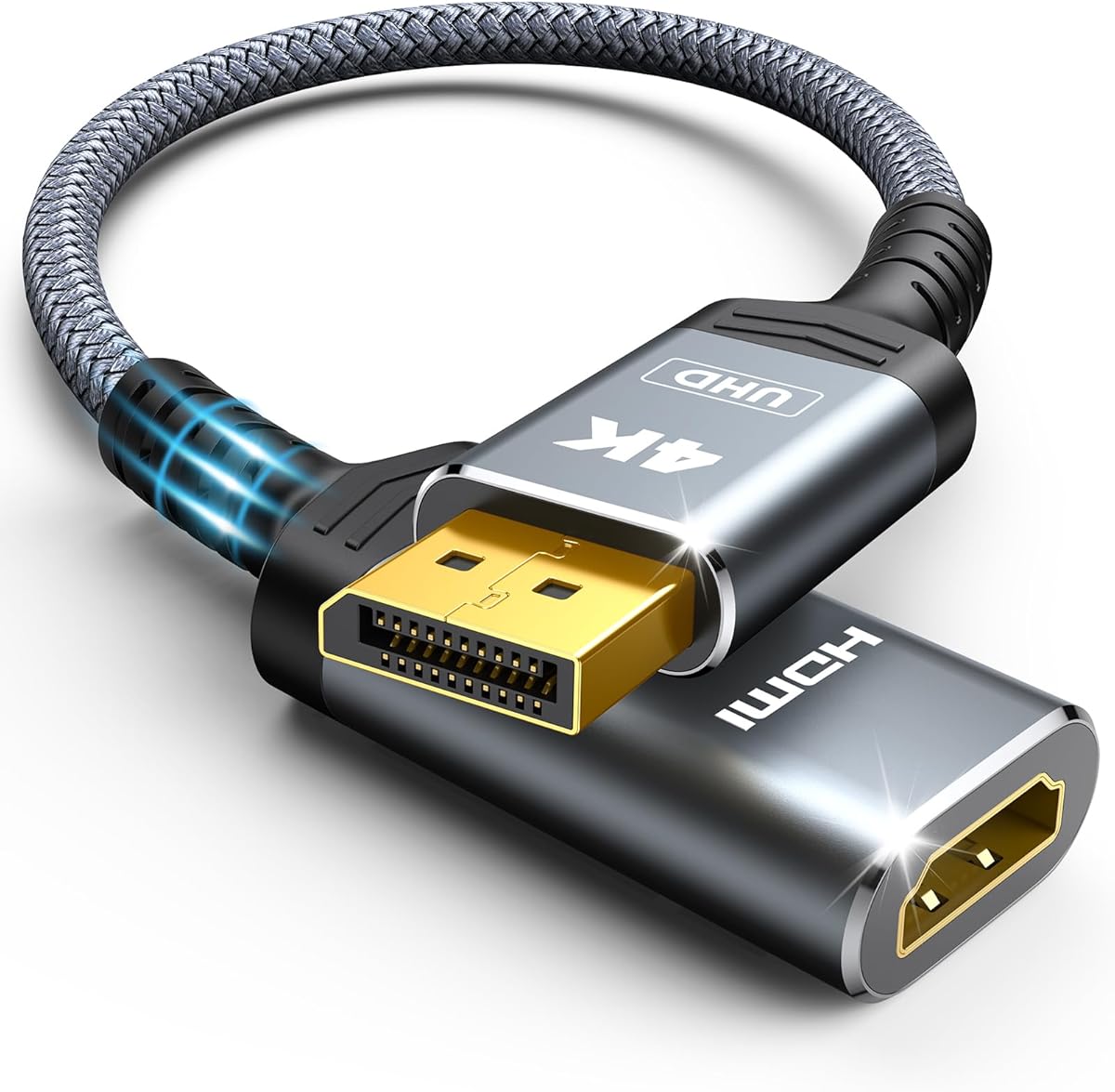
Moread 4K DisplayPort to HDMI Adapter
4.6Editor score
Passive DP to HDMI conversion
4K@30Hz resolution output
Secure latching connector design
Five-year warranty protection
This comprehensive guide compares the top HDMI to Displayport converters available in October 2026 to help you choose the right adapter for your display setup.
Finding the right HDMI to Displayport converter is essential for connecting modern devices to legacy monitors or vice versa. These adapters bridge the gap between different video standards, ensuring compatibility across various hardware configurations without sacrificing video quality or performance.
We evaluated ten leading models based on resolution support, build quality, compatibility, and user feedback. Our analysis focuses on passive versus active conversion, signal stability, and real-world performance across gaming, office work, and home entertainment scenarios.
Each pick highlights specific strengths like high refresh rates or compact design. Prices and availability change frequently, so verify current listings before purchasing. Our goal is to provide clear, factual insights to help you make an informed decision for your specific display needs.
4.6Editor score

4.4Editor score

5.0Editor score
This side-by-side comparison details the technical specifications and capabilities of each model. We examine resolution limits, directional flow, power requirements, and build materials to help you distinguish between passive adapters and active converters tailored for specific use cases.



The Highwings adapter stands out as a reliable passive solution for connecting DisplayPort sources to HDMI displays. With a strong rating, it delivers consistent 4K@30Hz output suitable for streaming and general productivity tasks. Its construction emphasizes durability with military-grade nylon and gold-plated ports.
We may earn a commission when you buy through this link, at no additional cost to you.
Key strengths include robust signal transmission that maintains audio and video synchronization. The adapter works seamlessly with graphics cards from NVIDIA and AMD, as well as desktops from major manufacturers. Users benefit from a design that withstands frequent plugging and bending without signal degradation.
Trade-offs involve its unidirectional nature, meaning it cannot convert HDMI outputs to DisplayPort inputs. Additionally, laptops must support DisplayPort Alternate Mode for compatibility. High-resolution transmission may cause heat buildup, which is normal but worth monitoring during extended use.
This adapter is ideal for users needing a cost-effective way to connect laptops to HDMI TVs or monitors. It is particularly well-suited for stationary office setups where the connection remains secure. For those needing higher refresh rates or bidirectional support, consider active alternatives.
Ensures synchronized high-definition audio and video for an immersive streaming or gaming experience.
Features SR Flexible Strength Design and 24K gold-plated ports for long-term reliability.
We may earn a commission when you buy through this link, at no additional cost to you.
The BENFEI adapter is designed for portability and stability. It connects DisplayPort devices to HDMI monitors easily. Its compact form factor makes it perfect for travel and business presentations. The internal IC chip ensures reliable signal conversion.
We may earn a commission when you buy through this link, at no additional cost to you.
Superior stability is achieved through an advanced integrated circuit. The gold-plated DisplayPort connector resists corrosion and abrasion over time. The latch design provides a secure connection that prevents accidental disconnection during use. This adds to its overall reliability.
While effective for DP to HDMI conversion, it does not support HDMI sources. Users should confirm their device has a DisplayPort output. The 18-month warranty offers additional peace of mind for long-term usage.
Best for professionals who need a lightweight solution for presentations. It handles standard office resolutions well. The secure latch design ensures consistent performance even with frequent moves. A solid choice for general connectivity needs.
Tuck this lightweight gadget into pocket to do a presentation or extend your desktop.
DisplayPort connector with latches provides a secure connection during usage.
We may earn a commission when you buy through this link, at no additional cost to you.
The Cable Matters adapter is a rare active HDMI to DisplayPort converter. It connects HDMI sources to DisplayPort monitors. Many standard adapters work the other way. This makes it essential for specific setups like older laptops with HDMI only. USB power ensures stable performance at high resolutions.
We may earn a commission when you buy through this link, at no additional cost to you.
Key strengths include support for 4K at 30Hz and high refresh at 1080p. It works with various HDMI-output laptops and desktops. The USB cable is recommended to prevent flickering. The build quality is durable with gold-plated connectors.
Trade-offs include needing a USB port for power and not supporting 60Hz at 4K. It is not designed for gaming consoles requiring VRR. The price is higher due to the active chip inside. It is worth it for specific compatibility needs.
Ideal for users who need to connect an HDMI-only PC to a DisplayPort monitor. It is perfect for office workstations and home desktops. Active power delivery ensures stability. Verify your display supports the output specs.
Use this active HDMI-to-DisplayPort adapter to add a second monitor or mirror your screen.
Connect the included USB power cable is recommended for stable performance.
We may earn a commission when you buy through this link, at no additional cost to you.
The Answin adapter excels at converting HDMI 2.0b signals to DisplayPort 1.4. It supports up to 4K at 60Hz. This is vital for gaming and smooth video. It works with Xbox, PS5, and PCs. The active chip handles complex signals well.
We may earn a commission when you buy through this link, at no additional cost to you.
Key strengths include universal compatibility with many HDMI devices. You can connect game consoles to monitors. The USB power cable ensures stable transmission. It avoids lag compared to screen casting. This is a strong choice for entertainment.
Trade-offs involve needing an external power source. It cannot be used with KVM switches. The price is higher than basic adapters. However the performance justifies the cost. It provides a clear viewing experience.
Ideal for gamers and home theater users needing high refresh rates. It handles 4K content smoothly. Plug and play operation simplifies setup. Ensure your monitor supports the refresh rates for full benefits.
Offers 4K resolutions up to 3840×2160 at 60Hz with smooth gaming support.
Ready to use without drivers or software installation for easy setup.
We may earn a commission when you buy through this link, at no additional cost to you.
The Moread adapter is a compact passive solution for DP to HDMI connections. It supports 4K video and multi-channel audio. The build uses reinforced ABS housing. It is reliable for daily office or home use. A five-year warranty adds value.
We may earn a commission when you buy through this link, at no additional cost to you.
Key strengths include audio support for up to 7.1 channels. This enhances streaming and gaming experiences. The latches provide secure connection preventing drops. It works with most major PC brands easily. Gold connectors resist corrosion effectively.
Trade-offs include inability to convert HDMI sources. It requires DisplayPort Alternate Mode on laptops. This limits use to specific setups. Despite this it remains a top budget pick. Users value its long-term reliability.
Best for users needing to extend desktops on laptops. It is great for home streaming. The durable design withstands daily wear. Ensure your laptop supports DP mode for success.
Supports uncompressed digital 7.1, 5.1 or 2 audio channels surround sound.
Built for long-lasting use with reinforced ABS housing and strain relief.
We may earn a commission when you buy through this link, at no additional cost to you.
This adapter delivers vivid 4K video to displays. It features an aluminum housing for heat dissipation. Gold-plated connectors ensure clarity. It is compliant with HDCP 2.2. This makes it suitable for streaming services and protected content.
We may earn a commission when you buy through this link, at no additional cost to you.
Key strengths include slim design and lightweight one-piece build. Signal loss is minimized with shielding. It works with many PCs and consoles. Plug and play makes it easy to use. No software is needed.
Trade-offs include lack of 1440p at 144Hz. It may not work with VR headsets. Switch consoles are limited to 1080p. Despite these it is solid for general use. The build quality is reliable.
Best for users needing HDMI source to DP display. It is good for home setups. Ensure your monitor supports the refresh rates for full benefits. The aluminum case helps with heat management.
Deliver 4K@60Hz video directly to your HDTV or monitor with vivid 3D effects.
Slim and lightweight one-piece aluminum housing is corrosion resistant.
We may earn a commission when you buy through this link, at no additional cost to you.
This pack provides two adapters to convert DP ports to HDMI. It is great for multiple screens. The aluminum housing protects against corrosion. It is lightweight and durable. Users can connect multiple laptops or PCs easily.
We may earn a commission when you buy through this link, at no additional cost to you.
Key strengths include support for 4K and multi-channel audio. The design prevents damage with no buckle. It improves heat dissipation. The slim profile does not block ports. It is compatible with major graphics cards.
Trade-offs include inability to work with HDMI sources. It works for DP output devices only. It does not support docking stations with HDMI outputs. Still it offers value in quantity and build.
Ideal for users needing extra HDMI ports on PCs. It is useful for home and office. The two-pack allows backups or different setups. Verify your laptop supports DP mode.
First plug the adapter into DP source to create an HDMI port for multiple screens.
Made of aluminum and lightweight and anti-corrosion to extend usage.
We may earn a commission when you buy through this link, at no additional cost to you.
This cable version turns a DP port into HDMI. It is short at 0.66 feet to keep things tidy. The braided sheath ensures flexibility and durability. It protects the original port from wear. It supports standard 4K outputs well.
We may earn a commission when you buy through this link, at no additional cost to you.
Key strengths include strain relief and EMI shielding. This ensures stable signal transmission. It works with major graphics cards and Steam Machines. Plug and play is supported for daily use. It resolves single HDMI port limits.
Trade-offs include fixed length and passive limitations. It does not support HDMI source devices. It is not for KVM stations. But for PC to monitor it is excellent. The build is very robust.
Best for users needing a neat solution at desktops. It is great for home entertainment. The design prevents port damage. Ensure your monitor matches the supported specs.
Slim and lightweight aluminum housing is resistant to corrosion for best heat dissipation.
Compatible with Valve Steam Machine and AMD NVIDIA graphics cards.
We may earn a commission when you buy through this link, at no additional cost to you.
This BENFEI model connects HDMI sources to DisplayPort monitors. It handles high resolutions up to 4K at 60Hz. It is useful for laptops and game consoles. Braided nylon adds durability. The design is non-slip for easier plug.
We may earn a commission when you buy through this link, at no additional cost to you.
Key strengths include support for 2K at 144Hz. Audio supports up to 192kHz. It is compatible with Apple and major PC brands. The warranty ensures satisfaction. Customer service is easy to reach.
Trade-offs include needing USB cord for power. It does not improve native resolution of games. Verify power supply voltage. It works well for specific setups. The build is user-friendly.
Ideal for users with HDMI laptops wanting DP monitors. It is good for office use. Ensure power is connected for stability. Check specs for gaming needs.
Connects a computer with HDMI port to a monitor with DisplayPort port.
Output resolution up to 3840*2160@60Hz with 8 channels digital audio.
We may earn a commission when you buy through this link, at no additional cost to you.
This BENFEI adapter connects HDMI devices to DisplayPort displays. It supports up to 4K at 60Hz. Compact design makes it portable. Aluminum casing protects against heat. It is compatible with many devices.
We may earn a commission when you buy through this link, at no additional cost to you.
Key strengths include support for 1080p at 165Hz. Digital audio is supported up to 24 bits. It works with PS4 and laptops easily. The design ensures stable signal transfer. It has a warranty.
Trade-offs include inability to convert DP sources. It is unable to improve native resolution. Ensure proper setup. It is useful for business presentations. The warranty adds security.
Best for users with HDMI outputs needing DP inputs. It is good for laptops and TVs. Verify compatibility with your devices. It offers solid stability and convenience.
Built-in advanced IC chip converts HDMI TMDS signal to DisplayPort digital signal.
Image resolution up to 3840*2160@60Hz with high bit rate audio.
We may earn a commission when you buy through this link, at no additional cost to you.
Selecting the right adapter requires understanding technical specifications. We break down key factors to simplify your choice.
Determine if you need DP to HDMI or HDMI to DP. Most converters are unidirectional. Passive adapters usually work from DP source to HDMI display. Active converters are needed for HDMI source to DP display.
Choose based on your source device. Verify if you have DisplayPort or HDMI output. This ensures you buy the correct direction.
Check the maximum resolution supported by the adapter. Many passive adapters support 4K@30Hz. Active ones may support 4K@60Hz. Your monitor must support the output resolution.
Align the adapter's max resolution with your monitor's native resolution. This prevents display issues or reduced quality.
Passive adapters rely on the source's existing signal. Active converters have internal chips to convert signals. Active adapters are necessary for HDMI sources to DP monitors. They often require external power.
Select passive for DP to HDMI and active for HDMI to DP. This distinction is critical for functionality.
Gamers should look for higher refresh rates like 120Hz or 144Hz. Not all 4K adapters support high refresh rates. Check if it supports HDMI 2.0b or DP 1.4. This affects gaming smoothness.
Prioritize high refresh rates for gaming. Verify specs match your monitor and source. This ensures smooth gameplay.
Ensure the adapter supports audio pass-through. Some models support multi-channel audio. This is important for home theater setups. Look for HDMI audio support.
Select adapters that match your audio needs. This ensures clear sound with video.
Durable materials protect your investment. Look for gold-plated connectors. Aluminum housings dissipate heat better. Nylon braided cables resist fraying.
Prioritize build quality for longevity. This prevents connection failures over time.
Compact adapters are easier to carry. Small designs fit in bags. Consider length if space is tight. Some models include cases or short cables.
Choose size based on mobility needs. This helps for travelers or presentations.
Long warranties indicate manufacturer confidence. Some offer 18 months. Others offer 5 years. Check customer service availability.
Select brands with strong support. This ensures help if issues arise.
Start by confirming your source has the correct output. For HDMI to DP you need a HDMI source and DP display. For DP to HDMI you need DP source and HDMI display. Connect the adapter directly without hubs if possible. This ensures stable power delivery.
Plug the USB power cable for active adapters. Without it you may see flickering or no signal. Ensure your USB port has enough power. Some devices need wall power. Check if your device supports DP Alternate Mode for passive adapters.
Store adapters in a safe place to avoid bends. Avoid twisting cables sharply. Dust connectors before use. Clean with a dry cloth. Check for wear on latches regularly. Replace if connectors bend to prevent damage.
Most issues stem from using a passive adapter for HDMI source. Active converters are required for HDMI to DP. Ensure you connect the USB power cable if needed. Check that your monitor supports the output resolution. Verify DisplayPort Alternate Mode for passive DP to HDMI.
Many active HDMI to DP adapters work with Xbox and PS5. Passive adapters will not work with consoles as they are HDMI source. Use active converters to connect to DP monitors. Check if your monitor supports required refresh rates for gaming.
No drivers are required for plug-and-play adapters. They are hardware-based. Windows or Mac recognize them automatically. Install no software. Just connect and restart if needed. Active adapters may need power.
Flickering often occurs due to insufficient power. Connect the included USB power cable for active adapters. Ensure your USB port is powered. Check cable quality for signal loss. Try lowering resolution if issues persist.
Only specific active adapters support 144Hz. Check product specs for 1440p at 144Hz support. Many 4K adapters only support 30Hz. Ensure your monitor and source support these rates. Some models explicitly mention high refresh rates.
Yes if your monitor uses DisplayPort. The adapter converts to HDMI so you need a HDMI cable. If converting HDMI to DP you need a DisplayPort cable. Verify which ports your devices have and buy matching cables.
MacBooks with Thunderbolt support DisplayPort Alternate Mode. For passive adapters ensure your MacBook supports this. Active HDMI to DP adapters generally work well. Check if your MacBook has HDMI or DP ports.
Most adapters do not support VR headsets. Some active HDMI to DP models may work with VR. Verify VR requirements for resolution and refresh. Generally KVM switches are not supported by these adapters.
We compared ten HDMI to Displayport converters ranging from passive to active. The Cable Matters HDMI to DisplayPort Adapter leads for HDMI to DP. The Moread adapter offers great value for DP to HDMI. The Answin adapter delivers high refresh rates for gamers.
Prioritize direction and power needs. Ensure the adapter supports your resolution and refresh rates. Check build quality and warranty. Verify compatibility with your specific device. These factors ensure smooth integration.
Prices and availability change frequently. Verify current listings before purchasing. Check if your devices match the specs. Ensure you have required cables for setup. This guide helps simplify your decision.