
4K AI-Powered Conference Webcam
4.1Editor score
120 degree wide angle view
Presenter tracking for business
Physical lens cover included
Compare the best auto tracking conference camera models for 2026. This guide reviews top AI-enabled PTZ systems, webcams, and speakerphone kits for seamless
Modern remote work demands high-quality video solutions that adapt to dynamic meeting environments. An auto tracking conference camera uses intelligent sensors to follow speakers automatically, ensuring every participant stays in focus without manual adjustments.
This guide evaluates ten top-rated systems ranging from compact webcams to professional PTZ kits. We compare tracking accuracy, video resolution, audio clarity, and ease of integration with popular conferencing platforms.
Each review highlights specific strengths and limitations to help you select the right fit for your space. Prices fluctuate frequently, so verify current costs before purchasing to ensure you get the best value available today.
4.1Editor score

4.8Editor score

4.6Editor score
The following table provides a side-by-side comparison of all ten selected auto tracking conference camera systems. It highlights key specifications such as resolution, zoom capabilities, connection types, and primary use cases to help you identify the most suitable option for your specific meeting requirements.




This system offers a complete solution for professional meeting environments with its high-resolution 4K sensor and intelligent auto-tracking capabilities. It achieves a strong 4.8-star rating from users who praise its clarity and reliable performance across various platforms.
We may earn a commission when you buy through this link, at no additional cost to you.
The camera uses advanced AI algorithms to track speakers based on facial and humanoid recognition. This ensures the subject remains centered even when moving around the room. Combined with a 3X optical zoom and 93-degree field of view, it captures every detail without losing image quality.
While the video performance is excellent, the audio system has some limitations. The Bluetooth speakerphone picks up sound up to 16.4 feet, which is adequate for small to medium rooms but may fall short in larger spaces without additional microphones.
This kit is ideal for businesses seeking a plug-and-play solution that integrates seamlessly with major conferencing software. It supports Windows and Mac systems easily and offers robust support. For most conference rooms under 40 square meters, this camera provides reliable video conferencing.
The 4K resolution and 30fps output deliver sharp visuals suitable for presentations and detailed remote collaboration.
AI tracking ensures the active speaker is always framed correctly, reducing the need for manual adjustments.
We may earn a commission when you buy through this link, at no additional cost to you.
Designed specifically for small conference rooms, this webcam delivers solid 4K performance at a competitive price point. Users appreciate its wide-angle lens that captures everyone without squeezing into the frame.
We may earn a commission when you buy through this link, at no additional cost to you.
The AI auto-framing feature adjusts the view to keep all attendees centered. It also tracks the active presenter during presentations. This dual functionality makes it versatile for team meetings and client interactions.
The audio quality is decent with dual AI noise-canceling microphones, though it may not match dedicated speakerphone systems. The physical lens cover provides peace of mind for privacy during sensitive discussions.
If you need a reliable, cost-effective solution for small teams, this webcam is an excellent choice. Its simple USB connection and Zoom certification make setup straightforward.
A 120-degree lens ensures even large groups fit comfortably within the frame.
The built-in shutter allows you to block the lens when the camera is not in use.
We may earn a commission when you buy through this link, at no additional cost to you.
This all-in-one system combines an HD 1080P PTZ camera with a Bluetooth speakerphone for a complete conferencing experience. The 60fps video ensures smooth motion during active meetings.
We may earn a commission when you buy through this link, at no additional cost to you.
The camera tracks presenters precisely using advanced AI algorithms. It maintains a clear view of the subject even when they move. The speakerphone covers up to 16.4 feet effectively.
While it lacks 4K resolution, the 60fps frame rate provides fluid video that looks professional. The all-in-one design simplifies setup significantly for small to medium rooms.
For those prioritizing fluid motion over maximum pixel count, this kit delivers strong performance. It supports Windows and Mac systems easily and works with major platforms like Zoom and Teams.
The 60fps output reduces motion blur during dynamic presentations or gestures.
The full-duplex microphone array picks up voices clearly while reducing echo.
We may earn a commission when you buy through this link, at no additional cost to you.
This system introduces unique gesture controls that allow users to start tracking or zoom in without touching a device. It adds an interactive layer to meetings, making it engaging for training sessions.
We may earn a commission when you buy through this link, at no additional cost to you.
The 4K resolution ensures crisp video quality, while the AI tracking follows presenters accurately. The speakerphone offers clear audio with noise reduction capabilities.
While the gesture controls are innovative, they may require some time to master fully. However, the remote control provides a traditional backup for those who prefer standard operations.
Ideal for dynamic environments like classrooms or creative studios, this camera adds flexibility to standard conferencing. It works seamlessly with OBS and YouTube for streaming needs.
Simple hand gestures can switch tracking modes or zoom in on key speakers.
USB3.0 and HDMI outputs ensure compatibility with various conferencing setups.
We may earn a commission when you buy through this link, at no additional cost to you.
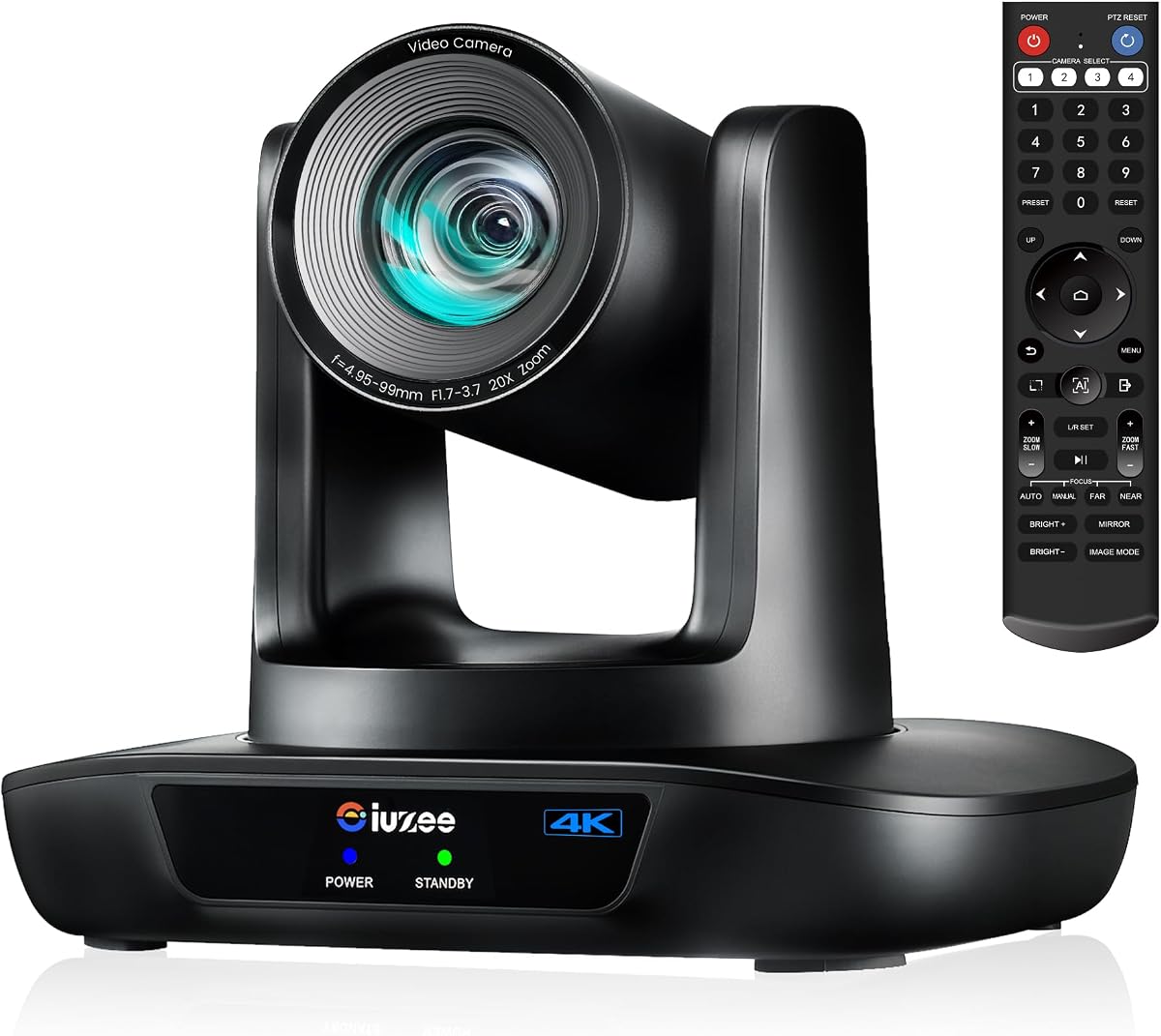
This system is built for larger spaces like churches or auditoriums, featuring a powerful 20X optical zoom that captures details from afar. The tracking algorithm ensures speakers are always visible.
We may earn a commission when you buy through this link, at no additional cost to you.
The speakerphone delivers full-duplex audio with noise reduction. The battery supports 6 to 8 hours of continuous work. LAN and PoE options provide flexible deployment in large venues.
While it offers immense zoom capability, it might be overkill for small conference rooms. The setup requires more technical attention than simpler webcams.
For organizations needing high-zoom coverage and robust connectivity, this is a strong choice. It integrates well with streaming software and supports remote education needs effectively.
20X optical zoom allows close-ups of speakers even from the back of large rooms.
PoE support simplifies cabling by transmitting power and data over a single cable.
We may earn a commission when you buy through this link, at no additional cost to you.
This camera targets professional broadcast scenarios, offering simultaneous USB, HDMI, and LAN outputs. Its 4K resolution and 20X zoom make it ideal for high-quality events.
We may earn a commission when you buy through this link, at no additional cost to you.
Advanced AI tracking uses 2D/3D noise reduction to maintain clarity. It supports MJPEG and H.265 encoding for smooth streaming. The absence of a built-in mic requires an external audio solution.
Users appreciate the PoE support which reduces cabling clutter. However, the configuration options can be daunting for non-technical users.
For live streaming and professional education, this camera offers unmatched flexibility. It is a powerful tool for those needing robust video production capabilities.
Support for RTMP and RTSP protocols allows direct streaming to social platforms.
2D/3D noise reduction ensures clean video even in lower light conditions.
We may earn a commission when you buy through this link, at no additional cost to you.
This premium camera features official NDI integration, simplifying professional video production workflows. It supports SDI outputs for long cable runs without extra hardware.
We may earn a commission when you buy through this link, at no additional cost to you.
The 4K resolution and 20X optical zoom deliver high-quality visuals. AI tracking ensures smooth framing even when subjects are briefly obscured. It works seamlessly with vMix and OBS.
Its advanced features come with a higher price tag and complexity. However, for professional setups, the reliability and connectivity options justify the investment.
This is the top choice for broadcast studios or high-end churches. It bridges the gap between conference needs and professional video production.
NDI integration allows easy video sharing over standard networks without compression loss.
SDI connections support cable runs up to 300 feet, ideal for large venues.
We may earn a commission when you buy through this link, at no additional cost to you.
This PTZ camera delivers 4K clarity and robust zoom, making it perfect for large rooms and churches. It tracks presenters smoothly and supports multiple connection options.
We may earn a commission when you buy through this link, at no additional cost to you.
The PoE capability simplifies installation significantly. Users can control pan and tilt via software or remote. Its durability is suitable for daily professional use.
Default HDMI settings may require adjustment for non-4K monitors. The remote control is necessary for full functionality since it lacks built-in audio.
For those needing reliable video for remote teaching or services, this camera is a solid investment. It offers professional-grade features at a competitive price.
PoE allows single-cable power and data, reducing cable clutter and installation effort.
20X optical zoom provides clear close-ups from the back of large meeting spaces.
We may earn a commission when you buy through this link, at no additional cost to you.
Built for medium to large rooms, this system combines camera, microphones, and speakers into one device. It uses AI auto-framing to keep everyone centered without manual adjustments.
We may earn a commission when you buy through this link, at no additional cost to you.
The 4-mic array reduces background noise effectively. The wide angle lens captures the entire room easily. It simplifies setup by eliminating external audio devices.
While the integration is convenient, it offers less customization compared to modular kits. It may not suit users who want separate microphone placement.
For hybrid meetings where simplicity is key, this solution works well. It supports major platforms like Teams and Zoom seamlessly with plug-and-play functionality.
Integrating audio and video simplifies the meeting setup for all participants.
The wide-angle lens ensures all participants are visible without cramping the frame.
We may earn a commission when you buy through this link, at no additional cost to you.
This compact webcam combines video, audio, and speaker functions into one portable unit. It uses a 4K sensor and digital zoom to capture clear visuals on a desk.
We may earn a commission when you buy through this link, at no additional cost to you.
The adjustable field of view lets you switch between wide and narrow settings easily. Voice tracking helps focus on the speaker. The privacy cover protects the lens when not in use.
Digital zoom lacks the quality of optical zoom for distant shots. However, for desktop use, the convenience of a single device is appealing.
Ideal for home offices or small meetings, this webcam saves space and setup time. It connects directly via USB and works with popular apps like Teams and Google Meet.
The compact size fits easily on any desk without cluttering the workspace.
The included cover ensures your privacy by blocking the lens when not in use.
We may earn a commission when you buy through this link, at no additional cost to you.
Selecting the right auto tracking conference camera requires balancing technical specifications with the needs of your specific environment.
Resolution determines image clarity. Look for cameras that support at least 1080P at 60fps or 4K for premium quality. Optical zoom is superior to digital zoom because it maintains image detail when magnifying distant subjects.
Prioritize optical zoom for large rooms to avoid pixelation.
Effective AI tracking should recognize both faces and bodies. This ensures the camera follows the speaker even if their body is partially blocked. Some models offer presenter tracking versus full room framing modes.
Choose models with advanced recognition algorithms to keep speakers centered.
A wider field of view (FOV) like 120 degrees captures more people in the frame. For large conference rooms, ensure the lens width is sufficient to cover all seats without blind spots.
Match the FOV to your room dimensions to avoid cutting out participants.
Audio quality is as important as video. Decide if you need an all-in-one speakerphone or an external audio solution. Check the pickup range to ensure voices are clear across the entire table.
Ensure the audio range covers the maximum distance of your participants.
USB 3.0 is standard for plug-and-play functionality. Advanced setups may require HDMI or LAN/PoE for long-distance transmission. NDI or RTSP support is useful for streaming workflows.
Verify that your system supports the required connection types for your infrastructure.
Most cameras offer flexible mounting via desk stands, wall mounts, or tripod mounts. Ceiling mounts are useful for wide coverage but may require professional installation.
Choose a camera that supports your preferred mounting style for easy setup.
Ensure the camera is certified for the conferencing platforms you use regularly like Zoom or Microsoft Teams. Compatibility guarantees drivers are recognized automatically without extra configuration.
Look for certification labels to avoid driver conflicts with your software.
Physical privacy covers are essential for security-conscious organizations. They allow you to block the lens physically when meetings are not in progress.
Prioritize models with physical shutters to prevent unauthorized recording.
To ensure optimal performance, connect the camera via USB 3.0 or HDMI before launching your conferencing software. If using a PTZ model, install any required drivers or web interfaces to unlock full functionality.
Position the camera at eye level or higher to capture the entire room evenly. Adjust the angle using the remote control or software settings to align with the main seating area.
Keep the lens clean with a soft microfiber cloth to prevent smudges that degrade image quality. Regularly update firmware through the manufacturer portal to benefit from tracking algorithm improvements.
Auto framing adjusts the frame to include all attendees in the room, keeping everyone visible. Auto tracking focuses on the active speaker, following their movements to maintain a close-up view. Some cameras offer both modes depending on the meeting context.
Many models include a built-in microphone or speakerphone, making them all-in-one solutions. However, for larger rooms or high-fidelity audio, an external microphone array may be necessary to capture all voices clearly.
Yes, many of these cameras support streaming protocols like RTMP or NDI. They are designed to integrate with software like OBS or vMix, making them suitable for live broadcasts and virtual events.
Most tracking algorithms process data locally on the camera or connected device, so an active internet connection is not required for tracking to work. However, internet access is needed for cloud-based conferencing applications.
Ensure the camera lens is clean and properly aligned. Check that the lighting in the room is adequate to help the sensor detect faces. Reset the camera via the control menu to recalibrate tracking parameters.
Most modern auto tracking cameras support macOS via USB without extra drivers. Verify the specific system requirements for your model to ensure full feature compatibility with your operating system version.
Look for warranties that cover at least one to three years of manufacturing defects. Some brands offer extended support or remote assistance which can be crucial for maintaining professional equipment over time.
Yes, most PTZ models include a remote control or software interface for manual zoom control. This allows you to override auto tracking to focus on specific details or documents on a whiteboard.
The ten cameras reviewed above offer a diverse range of capabilities suitable for every type of meeting environment. From budget-friendly webcams to professional NDI-enabled systems, each model brings unique strengths to the table.
When making your final decision, consider your room size and primary use case. Ensure you prioritize video resolution and audio clarity to meet the demands of professional remote collaboration effectively.
Always check current prices and availability before purchasing as models and costs may change. We hope this guide helps you choose the perfect auto tracking conference camera for your team.