
ASUS Z170 PRO Gaming
4.1Editor score
LGA1151 socket support
SupremeFX audio technology
USB 3.1 and M.2 slots
This guide compares the top 1151 Z170 Skylake gaming motherboards for performance, features, and value to help you choose the right board.
Choosing the right motherboard is crucial for any gaming PC build. The 1151 Z170 Skylake chipset offers robust performance for 6th and 7th gen Intel processors. It supports DDR4 memory, M.2 storage, and advanced connectivity options for modern gamers.
We evaluated ten top models based on specifications, user feedback, and feature sets. Our comparison focuses on VRM quality, expansion slots, audio solutions, and overall build durability. This ensures you find a board that meets your specific gaming and overclocking needs effectively.
Each pick highlights key strengths and potential trade-offs for informed decisions. Prices fluctuate frequently so always check current listings before purchasing. We aim to provide transparent insights to help you invest wisely in your next system upgrade today.
4.1Editor score

4.2Editor score

4.2Editor score
The following table presents a side-by-side comparison of all ten selected motherboards. It highlights key specifications such as chipset support, memory slots, and expansion options to simplify your selection process.


The Asus ROG Maximus VIII Hero stands out as a top contender for enthusiasts seeking high performance. With a rating of 4.2 stars it delivers reliable stability for gaming workloads. Its standout qualities include advanced power management and premium audio features that enhance immersion.
We may earn a commission when you buy through this link, at no additional cost to you.
Key strengths lie in its Extreme Engine DIGI+ technology ensuring precise voltage regulation during overclocking. The SupremeFX 2015 audio system provides crystal clear sound without external DACs. USB 3.1 Type A and C ports offer fast data transfer speeds compatible with modern peripherals.
Honest trade-offs include a steeper learning curve for BIOS settings compared to simpler boards. The price is higher than entry-level options but justified by feature density. These compromises are acceptable for users prioritizing performance and longevity over budget constraints.
Gamers and content creators should buy this board for its comprehensive feature set and reliability. It pairs well with high-end Intel Core i7 processors. We recommend it as a final choice for building a powerful and future-ready gaming station today.
The SupremeFX 2015 codec ensures immersive sound quality with noise suppression for competitive gaming advantages.
Extreme Engine DIGI+ technology provides stable power delivery allowing safe overclocking of supported processors effectively.
We may earn a commission when you buy through this link, at no additional cost to you.
This Gigabyte model offers genuine performance despite industrial packaging which reduces retail costs. Users rate it highly with a perfect 5.0 score reflecting satisfaction. It supports 6th and 7th gen Intel processors with robust memory and storage capabilities.
We may earn a commission when you buy through this link, at no additional cost to you.
Key strengths include support for up to 64GB of DDR4 memory across four slots. The inclusion of two M.2 sockets allows for fast NVMe SSD installations. Expansion slots support multi-GPU setups enabling enhanced graphics performance for demanding titles.
Honest trade-offs involve the lack of original retail packaging which may matter to collectors. A BIOS update is required for 7th generation processors adding a setup step. These issues are minor given the hardware quality and pricing advantages.
Buyers seeking value without sacrificing core features should choose this motherboard. It suits builders who prioritize functionality over box aesthetics. We recommend verifying BIOS compatibility before installation to ensure smooth operation with newer CPUs.
Support for 64GB DDR4 ensures ample room for heavy multitasking and future software demands.
Dual M.2 connectors alongside SATA Express ports provide diverse storage configurations for speed and capacity.
We may earn a commission when you buy through this link, at no additional cost to you.
The ASUS Z170 PRO Gaming delivers essential gaming features at an accessible price point. Rated 4.1 stars it balances performance with value effectively. It includes HDMI, DVI-D, and DP outputs for versatile display options without extra adapters.
We may earn a commission when you buy through this link, at no additional cost to you.
Key strengths involve SupremeFX audio technology ensuring immersive sound for gameplay. Intel Gigabit Ethernet with LANGuard protects network stability during online matches. M.2 and USB 3.1 slots provide fast data access for modern storage solutions.
Honest trade-offs include fewer advanced BIOS tweaks compared to flagship models. The number of USB ports may not satisfy users with many peripherals. These limitations are acceptable for casual gamers focused on core performance and stability.
Budget-conscious builders should buy this board for its reliable performance and essential features. It fits well with mid-range Intel Core processors. We recommend it as a smart entry point into Z170 gaming builds today.
LANGuard technology ensures protected networking preventing lag spikes during critical gaming moments.
Multiple video ports including HDMI and DP allow flexible monitor connections for different setups.
We may earn a commission when you buy through this link, at no additional cost to you.
This motherboard emphasizes durability and performance for serious gaming sessions. While specific ratings vary its design focuses on stability. Upgraded power standards ensure consistent operation even under heavy loads during marathon play.
We may earn a commission when you buy through this link, at no additional cost to you.
Key strengths include advanced cooling solutions that maximize processor potential. Connectivity is seamless allowing easy integration of peripherals and storage. The battle-tested design aims to reduce failure rates over extended use periods.
Honest trade-offs involve limited public data on specific features or BIOS capabilities. Buyers may need to verify compatibility with existing components carefully. These uncertainties are offset by claims of high-quality storage and power engineering.
Users prioritizing system stability should consider this board for its rugged design. It suits long-term gaming stations where reliability is key. We recommend checking detailed specifications before purchase to confirm it meets your needs.
Upgraded power design ensures consistent voltage delivery for stable processor performance over time.
Advanced cooling features help maintain optimal temperatures during intense gaming sessions effectively.
We may earn a commission when you buy through this link, at no additional cost to you.
The Gigabyte GA-Z170X-Gaming 7 targets enthusiasts needing advanced graphics features. Rated 4.2 stars it excels in multi-GPU configurations. It supports 2-Way NVIDIA SLI and 3-Way AMD Crossfire for enhanced rendering power.
We may earn a commission when you buy through this link, at no additional cost to you.
Key strengths include seven USB 3.0 ports plus additional legacy support for versatile peripheral connectivity. The four DDR4 DIMM sockets allow up to 64GB of system memory. Expansion slots support multiple graphics cards without compromising bandwidth significantly.
Honest trade-offs involve a higher price point and a BIOS interface that requires familiarity. The complexity ensures fine-tuned control but may overwhelm novice users. These factors are acceptable for advanced users managing complex builds.
Gamers seeking peak graphical performance should buy this board for its SLI and Crossfire support. It pairs best with high-end processors. We recommend it for dedicated gaming rigs demanding maximum visual fidelity today.
Support for dual SLI and triple Crossfire setups enables massive performance boosts in supported titles.
Multiple USB ports ensure all your devices connect easily without requiring additional hubs.
We may earn a commission when you buy through this link, at no additional cost to you.
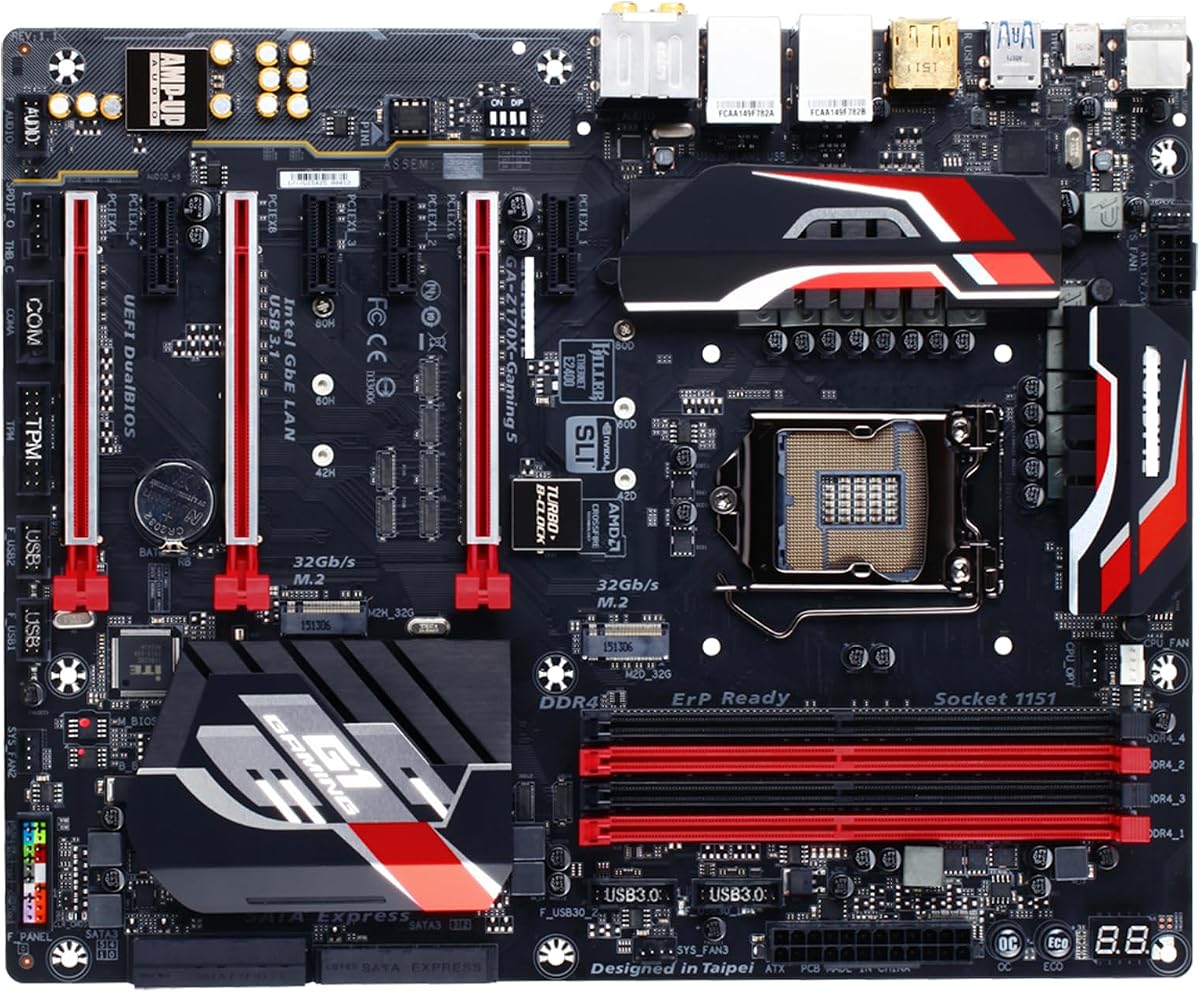
This GIGABYTE model provides a standard mid-range option for Z170 builds. With a rating of 3.7 it offers reliability with fewer premium features. It supports 6th generation Intel Core processors with robust memory capacity.
We may earn a commission when you buy through this link, at no additional cost to you.
Key strengths include expansion slots that support 2-Way SLI and 3-Way Crossfire for graphics flexibility. Three SATA Express connectors alongside six SATA 6Gb/s ports offer diverse storage configurations. The ATX form factor fits most standard PC cases easily.
Honest trade-offs involve a lower rating compared to competitors indicating potential user experience issues. The feature set is adequate but lacks cutting-edge connectivity options. These drawbacks suit users with simpler requirements and tighter budgets.
Builders needing a functional board without high-end extras should choose this one. It is suitable for general gaming and office tasks. We suggest comparing with other models to ensure it meets your specific feature needs.
Support for multi-GPU setups allows upgrading graphics performance when needed without replacing the motherboard.
Mix of SATA Express and standard ports enables versatile drive installation options for various storage needs.
We may earn a commission when you buy through this link, at no additional cost to you.
The ASRock Z170 EXTREME4 balances features and affordability effectively. Rated 4.2 stars it offers substantial expansion capabilities. It supports 64GB of DDR4 memory and includes premium audio for an immersive experience.
We may earn a commission when you buy through this link, at no additional cost to you.
Key strengths include three PCIe x16 slots enabling versatile multi-GPU configurations. Realtek ALC1150 codec delivers high-definition 7.1 channel audio for gaming and media. Six SATA3 ports support various storage configurations including RAID arrays.
Honest trade-offs involve PCIe bandwidth sharing when multiple slots are populated. This requires planning if using multiple add-in cards simultaneously. These limitations are minor for most users prioritizing core performance and value.
Users wanting extensive expandability without premium pricing should buy this board. It works well with mainstream Intel processors. We recommend it for builders who need flexible expansion slots for future upgrades.
ALC1150 codec ensures high quality sound output for movies and competitive gameplay.
Multiple PCIe slots allow adding capture cards, sound cards, or extra graphics cards easily.
We may earn a commission when you buy through this link, at no additional cost to you.
The MSI Z170 Krait Gaming focuses on memory speed and stability. Rated 3.9 it provides decent features for mid-tier builds. It includes DDR4 Boost for better memory performance out of the box.
We may earn a commission when you buy through this link, at no additional cost to you.
Key strengths include MSI Steel Armor on PCIe slots preventing heavy card damage. Audio Boost 3 ensures clear sound for gaming and calls. Support for 3-way CrossFire and 2-way SLI offers graphics flexibility.
Honest trade-offs include an older BIOS interface that lacks modern visual improvements. The user rating suggests mixed experiences with reliability or support. These issues are manageable for users familiar with MSI software suites.
Gamers prioritizing memory stability should consider this board for its DDR4 Boost. It suits users with compatible memory kits. We recommend checking BIOS updates before purchase to ensure optimal compatibility.
DDR4 Boost technology automatically tunes memory settings for better stability and faster speeds.
Steel Armor protects PCIe slots from heavy graphics card damage ensuring long term reliability.
We may earn a commission when you buy through this link, at no additional cost to you.
The Asus Z170-A is known for its intelligent tuning software. Rated 4.3 it simplifies optimization for average users. It includes Dual Intelligent Processors 5 for automated performance adjustments based on workload.
We may earn a commission when you buy through this link, at no additional cost to you.
Key strengths include USB 3.1 Boost ensuring fast file transfers. 5X Protection II provides hardware-level safeguards against damage. DTS Studio Sound delivers immersive audio for media consumption and gaming alike.
Honest trade-offs involve limited M.2 options compared to newer boards. The cooling solution is standard which may need upgrades for high-end CPUs. These constraints are acceptable for general gaming builds prioritizing ease of use.
Users wanting hassle-free performance should buy this board for its 5-Way Optimization. It suits mainstream gamers without overclocking needs. We recommend it for straightforward builds needing reliable protection and performance.
5-Way Optimization automatically adjusts fan speeds and overclocking settings for optimal performance.
5X Protection II guards against power surges and moisture ensuring long board lifespan.
We may earn a commission when you buy through this link, at no additional cost to you.
This Asus ROG MAXIMUS VIII GENE delivers full flagship features in a smaller form factor. Rated 4.0 it is a Certified Refurbished model offering value. It includes Extreme Engine DIGI+ and SupremeFX 2015 audio.
We may earn a commission when you buy through this link, at no additional cost to you.
Key strengths include mATX design fitting compact cases without sacrificing connectivity. USB 3.1 Type A and C provide modern data speeds. RGB lighting control allows aesthetic customization to match your build theme.
Honest trade-offs involve limited PCIe slots due to smaller size. Refurbished status means potential prior use though tested for function. These are acceptable for builders prioritizing small form factors and high-end features.
Small PC enthusiasts should buy this board for its compact ROG design. It suits users needing premium features in a tight space. We recommend verifying refurbishment details before finalizing your purchase.
mATX form factor allows smaller cases while keeping top tier power delivery features.
USB 3.1 Type C support enables future proof connectivity for latest peripherals and devices.
We may earn a commission when you buy through this link, at no additional cost to you.
Selecting the right motherboard requires understanding specific features that impact performance and compatibility. We detail key factors to consider before purchasing a 1151 Z170 gaming motherboard today.
Ensure the motherboard supports LGA1151 socket for 6th and 7th gen Intel Core processors. Check BIOS update requirements if using 7th gen chips as some boards need updates to run them smoothly. Mismatched sockets prevent installation entirely so verify this first.
Always confirm processor compatibility before buying to avoid installation issues.
Look for at least four DDR4 DIMM slots for future upgradability. Most gaming boards support up to 64GB total capacity which is sufficient for modern games. Dual channel architecture ensures better bandwidth for CPU performance.
Choose boards with flexible memory slots for your storage needs.
The Z170 chipset enables overclocking and supports multiple graphics cards. Compare how many PCIe slots are available for expansion. Boards vary in USB port counts and SATA connectivity options significantly.
Prioritize chipset features that match your expansion and upgrade plans.
Integrated audio codecs like SupremeFX or Realtek ALC1150 enhance immersion without extra hardware. Check if the board supports high-definition audio formats. Good isolation reduces background noise during gaming sessions.
Invest in boards with quality audio for better sound experience.
Strong VRM designs ensure stable power for overclocked processors. Look for features like Extreme Engine DIGI+ or similar power optimization tech. Efficient power delivery reduces heat and increases system reliability.
Select boards with robust power systems for peak stability.
Verify USB 3.1 Type-C support for fast peripheral speeds. Check for M.2 slots to accommodate high speed SSD storage. Sufficient ports reduce need for external hubs during setup.
Ensure enough ports exist for all your required devices.
ATX boards offer maximum expansion while mATX fits compact cases. Match the motherboard size with your PC chassis dimensions carefully. Physical space affects cable management and component clearance.
Choose the form factor that fits your case best.
Check warranty terms especially for refurbished or industrial packages. Reliable manufacturers offer better BIOS updates and technical support. Certified refurbished items should come with minimum guarantees for peace of mind.
Prioritize products with strong warranty coverage for protection.
Begin by installing the motherboard into the case ensuring standoffs align correctly with screw holes. Connect the 24-pin and 8-pin power cables securely to avoid loose connections during operation. Double check all SATA and PCIe connections are fully seated.
Boot the system and enter BIOS to update firmware to the latest version if needed. Configure memory profiles like XMP for optimal performance and adjust fan curves for thermal management. Save settings before exiting to apply changes immediately.
Keep the board clean by dusting periodically with compressed air to prevent overheating. Avoid exposure to excessive moisture or static electricity during handling. Monitor temperatures via software tools to ensure long term system stability.
Yes but you may need to update the BIOS first depending on the manufacturer. Some boards ship with support already integrated while others require a processor with an older gen CPU to update. Check the manufacturer website for specific BIOS instructions.
Most Z170 boards support up to 64GB of DDR4 memory across four slots. Some entry-level models may cap at 32GB so verify specifications before purchasing. Speeds up to 3466MHz are achievable with overclocking on high end boards.
Many models include M.2 slots that support PCIe NVMe drives for faster storage. Check the specific board specs to confirm M.2 speed compatibility. Some slots share bandwidth with SATA ports so plan your storage layout carefully.
Yes most Z170 boards support 2-way SLI or Crossfire configurations with compatible GPUs. Higher tier boards may support 3-way Crossfire for AMD setups. Verify PCIe lane availability since using multiple GPUs can reduce slot speeds.
ATX boards are larger with more expansion slots while mATX boards fit compact cases. Both support similar chipsets but mATX may have fewer SATA or USB ports. Choose based on your case size and expansion requirements.
Use anti-static precautions and follow manual instructions for standoffs and screw placement. Ensure all connectors are seated firmly before powering on. Test components outside the case first to rule out hardware faults easily.
We reviewed ten excellent options covering budget to premium needs for gaming builds. The Asus ROG Maximus VIII Hero leads as our top pick for overall performance and features. Budget seekers will appreciate the value of the ASUS Z170 PRO Gaming.
Prioritize compatibility with your CPU and desired expansion options before finalizing your choice. Consider future upgrades like SSD storage or additional graphics cards when selecting slots. Investing wisely ensures your system remains relevant longer.
Prices change regularly so compare current listings to get the best deal available. Use our guide to verify specifications match your specific gaming requirements accurately. We hope this article helps you build a powerful and reliable gaming PC today.