
Harvopu for iPad A16
4.3Editor score
Seven color RGB backlight
Multi-gesture trackpad
Long life rechargeable battery
Discover the top 10 iPad A16 Folio Case with Keyboard options for productivity and protection. Compare features, trackpads, and design to find your ideal match.
Finding the right iPad A16 Folio Case with Keyboard transforms your tablet into a powerful workstation. You need seamless integration, reliable typing, and sturdy protection for daily tasks and creative projects.
We evaluated ten leading models based on compatibility, trackpad quality, battery life, and build materials. Each entry offers unique strengths tailored to students, professionals, and casual users seeking versatility.
Every selection highlights key features, pros, and cons to help you decide quickly. Keep in mind that availability and stock levels may vary over time as retailers update their inventory regularly.
4.3Editor score

4.4Editor score

4.4Editor score
This side-by-side comparison details the core specifications and unique attributes of each featured model. We focus on compatibility, connectivity, battery capacity, and protective features to highlight differences clearly.




The Apple Magic Keyboard Folio stands out as the premier choice for iPad A16 users seeking a native experience. Its seamless integration ensures that every tap and swipe feels natural without lag or connectivity issues.
We may earn a commission when you buy through this link, at no additional cost to you.
Users appreciate the versatile two-piece design that allows the keyboard to detach while keeping the protective back panel attached. The built-in trackpad supports multi-touch gestures, making navigation intuitive and efficient for daily tasks.
While the price is higher than third-party alternatives, the lack of pairing requirements and reliable performance justify the investment. The adjustable stand provides smooth viewing angles for both typing and media consumption scenarios.
Ideal for professionals and creatives who prioritize stability and quality, this case offers long-term reliability. It is the best fit for those willing to invest in a premium ecosystem accessory.
Direct compatibility ensures instant setup without extra drivers or apps. The magnetic connection is robust yet easy to remove when you need to use the iPad as a tablet.
The 14-key function row offers quick access to essential commands. The trackpad enables complex gestures that mimic desktop computing, boosting workflow speed significantly.
We may earn a commission when you buy through this link, at no additional cost to you.
Harvopu offers an accessible entry point for users seeking a full keyboard and case solution without breaking the bank. It covers both the 11th and 10th generation iPad models effectively.
We may earn a commission when you buy through this link, at no additional cost to you.
The illuminated typing feature stands out with seven color backlight options, making it easy to type in dim environments. The trackpad allows multi-finger gestures to streamline navigation across apps.
While the keyboard requires initial Bluetooth pairing, it reconnects automatically once set up. The protective case includes a honeycomb design for heat dissipation which helps keep the device cool.
This model is perfect for students or home users who want style and function at a lower cost. It balances practicality with enough premium features to impress casual users.
Keys are spaced well to avoid accidental presses. The backlight brightness levels can be adjusted to suit your environment without draining the battery quickly.
Connection is established via Bluetooth by holding the Fn and C buttons. This process is straightforward and leads to stable performance during active use.
We may earn a commission when you buy through this link, at no additional cost to you.
The typecase Edge brings a unique floating magnetic stand that mimics a real laptop feel. This design elevates the iPad above the keys which creates space for wrist comfort.
We may earn a commission when you buy through this link, at no additional cost to you.
Its precision trackpad features palm rejection to prevent accidental cursor movements while typing. The eleven-color backlighting offers more customization than standard single-color options found elsewhere.
Although it is heavier than ultrathin models, the stability it provides is worth the trade-off. Users can work for hours without neck strain due to the adjustable viewing angles.
Recommended for heavy typists and remote workers, this case combines function with a premium aesthetic. It is a strong choice for those who want a full laptop substitute.
The floating mechanism keeps the screen at eye level. This reduces fatigue during long writing sessions or coding marathons.
Vegan leather provides a sleek look while shielding the device. Magnetic closure keeps everything secure when carrying the case in a bag.
We may earn a commission when you buy through this link, at no additional cost to you.
Typecase Folio balances weight and protection with an ultra-light design. It is built for portability without sacrificing the core features needed for a productive workflow.
We may earn a commission when you buy through this link, at no additional cost to you.
The scissor-style keys offer a quiet typing experience which is ideal for libraries or quiet offices. The seven-color backlight provides visual appeal without being too flashy.
A built-in pencil holder ensures your stylus is always within reach. This small but useful feature adds convenience for note-takers and designers.
If you prefer a sleek look and feel, this model delivers on both fronts. It is a reliable pick for those who carry their iPad frequently throughout the day.
The slim profile fits easily into backpacks. The TPU edges protect corners effectively without adding bulk.
Charging is done via USB-C for modern convenience. Battery life lasts long enough for daily use without constant plugs.
We may earn a commission when you buy through this link, at no additional cost to you.
CHESONA supports switching between two devices with a single click. This feature is perfect if you use both a tablet and a smartphone or another tablet regularly.
We may earn a commission when you buy through this link, at no additional cost to you.
The keyboard holds a 500mAh battery which provides extended standby time of up to 120 days. Auto sleep mode ensures power is saved when the device is idle.
Multi-touch gestures are supported to enhance navigation. The design includes a pencil holder to keep your accessories organized and secure.
This option is great for users who manage multiple gadgets. It offers a blend of functionality and efficiency for a multi-device setup.
Pairing allows seamless transitions between screens. You can type a message on one device then switch to another instantly.
Sleep mode kicks in after fifteen minutes of inactivity. The long standby time means less frequent charging interruptions.
We may earn a commission when you buy through this link, at no additional cost to you.
Logitech Rugged Folio is built to withstand harsh environments. It meets military standard drop tests ensuring your tablet stays safe during active fieldwork.
We may earn a commission when you buy through this link, at no additional cost to you.
The Smart Connector connects the keyboard instantly without Bluetooth pairing. It draws power directly from the iPad for continuous use without charging.
A durable membrane protects against spills and crumbs. This waterproof feature allows for easy cleaning after accidental accidents during meals or drinks.
Field professionals and outdoor users will find this case invaluable. Its robust build ensures reliability even in challenging conditions.
Shock-absorbent materials absorb impact well. The four modes let you use it in various positions for different tasks.
Connection is automatic when you open the case. No settings need adjustment every time you use it.
We may earn a commission when you buy through this link, at no additional cost to you.
This model adapts to your workflow with portrait and landscape flexibility. You can use it in low angles for writing or upright for viewing.
We may earn a commission when you buy through this link, at no additional cost to you.
The seven-color backlight adds style while keeping keys visible. Precision trackpad gestures help navigate apps efficiently without touching the screen.
Precise cutouts ensure access to all ports and buttons. The slim profile keeps the weight manageable for travel or commuting.
It is suitable for travelers and daily commuters. The 12-month warranty adds peace of mind for your purchase.
Portrait mode works well for reading and writing. Landscape mode supports standard productivity tasks comfortably.
Well-spaced keys prevent fatigue. The full row of shortcuts speeds up common tasks.
We may earn a commission when you buy through this link, at no additional cost to you.
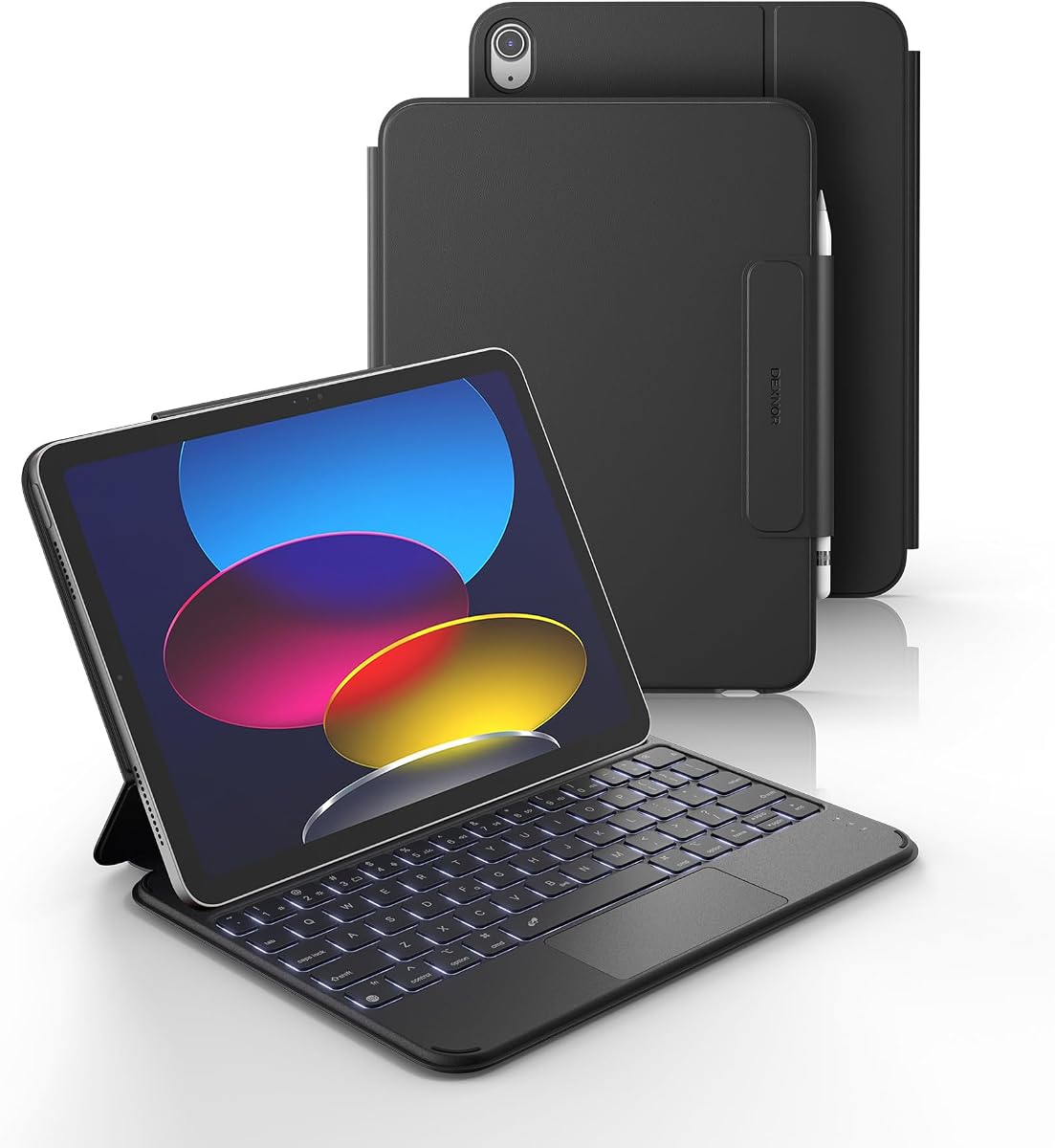
Dexnor excels with a massive 650mAh battery that lasts up to 200 hours of typing. This ensures minimal charging breaks even during long work sessions.
We may earn a commission when you buy through this link, at no additional cost to you.
The 120-degree ergonomic viewing angle supports note-taking and streaming comfortably. Magnetic stability keeps the iPad secure on uneven surfaces like beds or couches.
You can disable the trackpad to prevent accidental input. Power-saving features automatically wake the keyboard when you open the case.
For frequent travelers who cannot access power often, this is a top choice. The battery life provides freedom from chargers for days.
Standby time reaches 1200 hours. Charging takes a few hours for a full top-up.
Reinforced magnets prevent slipping during typing. The design ensures the iPad stays in place when moving.
We may earn a commission when you buy through this link, at no additional cost to you.
ESR offers an extra-large precision trackpad that supports intuitive gestures. This makes navigating and switching apps significantly smoother than smaller pads.
We may earn a commission when you buy through this link, at no additional cost to you.
The slim 6.9mm profile keeps the setup lightweight for daily use. Two viewing angles are available for working or sketching purposes.
Air Guard corners provide protection from drops without adding bulk. Precise cutouts allow access to ports without removing the case.
Users who value trackpad performance will enjoy this model. It is ideal for those who prefer precision control while browsing or editing.
The trackpad is 65% larger than standard sizes. Multi-finger gestures work seamlessly for complex commands.
Thickness is minimal for easy portability. The magnetic attachment is strong enough to prevent sliding.
We may earn a commission when you buy through this link, at no additional cost to you.
CC Store delivers a large capacity battery for over 200 hours of working time. This endurance is great for extended work trips or school days.
We may earn a commission when you buy through this link, at no additional cost to you.
The adjustable kickstand provides multiple tilt angles for ideal viewing. Detachable magnetic design allows you to store the keyboard when not needed.
A pencil holder is integrated into the design for convenience. PU leather protects against scratches and spills effectively.
Budget-conscious users looking for long battery life will appreciate this choice. It offers solid utility for everyday tasks without extra features.
Charging is quick and lasts a long time. This reduces the need to carry a charger daily.
Pencil slots keep accessories secure. The magnetic connection ensures stability during use.
We may earn a commission when you buy through this link, at no additional cost to you.
Choosing the right case involves balancing portability, features, and budget. We break down the key factors to consider before making your purchase.
Ensure the case lists support for your specific iPad model number. The A16 and 10th generation models have unique dimensions and button placements that must match.
Always verify the model number on the back of your tablet before ordering to avoid fit issues.
A multi-touch trackpad transforms your iPad into a laptop replacement. Look for smooth scroll support and gesture recognition for efficient navigation.
If you type often, a reliable trackpad saves screen taps and boosts productivity.
Keyboard battery life varies significantly between brands. High capacity cells reduce charging frequency during long days away from a power source.
Look for models with sleep mode features to maximize the battery lifespan.
Backlit keys help you type in low-light environments like airplanes or dim rooms. Adjustable brightness levels are useful to balance visibility and battery drain.
Color options can add personal style but standard white is often sufficient.
The case should shield your device from scratches and impacts. Materials like TPU corners or vegan leather offer durability without adding bulk.
A secure magnetic closure ensures the case stays shut when carried in a bag.
Detachable keyboards offer flexibility to switch between typing and reading modes. This feature keeps the weight down when you only need the screen.
Strong magnets are required to prevent accidental dislodging during typing.
Bluetooth pairing provides wireless freedom while Smart Connector offers instant power and data transfer. Evaluate which method fits your workflow best.
Wireless connections require pairing steps but allow remote use.
Premium models cost more but offer better build quality and reliability. Budget options may lack certain features like advanced trackpads or durable materials.
Determine your priorities to find the best balance for your budget.
Connect the keyboard by following the pairing instructions in the user manual. For Bluetooth models, hold the function key for the required seconds to enter pairing mode.
Clean the case surface with a soft microfiber cloth to remove dust. Avoid harsh chemicals that may damage the protective coating or screen.
Store the case in a cool dry place when not in use. Regularly check for any wear on the magnetic closure to ensure proper alignment.
Most models feature a built-in rechargeable battery that charges via USB-C cable. Some premium options draw power directly from the iPad so no separate charging is needed.
Yes, most cases accommodate screen protectors. Check the product description to ensure the case frame does not lift the protector.
Bluetooth offers wireless independence but requires pairing. Smart Connector connects instantly and draws power from the iPad but is model-specific.
Not all models allow detachment. Some are one-piece designs while others split into two magnetic parts for flexibility.
Many mid-range and premium cases include a dedicated slot for the Apple Pencil. Budget options often omit this feature to save on materials.
Battery life ranges from 50 to 200 hours depending on usage. Models with backlighting may drain faster than those without lighting.
We reviewed ten top options that balance typing quality and durability. Whether you need rugged protection or lightweight portability there is a model here for you.
Prioritize features like trackpad responsiveness and battery life based on your daily workflow. A higher price often reflects better materials and long-term reliability.
Stock levels change frequently so check current availability before finalizing your order. Make the right choice today to enhance your tablet experience.