
Redragon K617 HE Wired Hall-Effect Rapid Trigger Magnetic Gaming Keyboard
4.3Editor score
Hall Effect magnetic switches
8000Hz hyper-polling
Software adjustable actuation
Discover the top keyboards for Counter Strike 2 including Hall Effect rapid trigger models and pro-grade options for competitive FPS players and enthusiasts.
Finding the right keyboard for CS2 means prioritizing speed, accuracy, and consistency. Players need devices that respond instantly to every input without lag or ghosting during intense firefights and strategic rounds.
We compared ten top keyboards using real-world performance metrics including polling rates, actuation adjustment, and build quality. Each pick balances features like rapid trigger and adjustable sensitivity to suit different playstyles and budgets.
Each review highlights key specs, pros, cons, and ideal use cases to help you decide quickly. Prices and stock fluctuate frequently, so always verify current availability and deals before making your final purchase decision today.
4.3Editor score
4.4Editor score
4.5Editor score
This comparison table lists all ten keyboards with their key specs so you can see differences at a glance and choose the right fit for your CS2 setup and budget.



The Redragon K617 HE is a budget-friendly Hall Effect keyboard built for CS2 players seeking rapid trigger performance without breaking the bank. It rates well for value and delivers consistent inputs thanks to magnetic sensing that avoids physical wear.
We may earn a commission when you buy through this link, at no additional cost to you.
Its 8000Hz polling and adjustable actuation help you fine-tune every key for precise peek-and-fire timing in CS2. The 60% layout gives your mouse more room while keeping essential keys within reach for fast-paced competitive play.
The main trade-off is the simple software and compact size which may not suit everyone. Still the magnetic switches and high polling are rare at this price and justify the minor compromises for most budget-focused gamers.
If you want rapid trigger tech and strong performance for a low cost this keyboard is the top pick. It brings competitive features to players who need speed and accuracy without spending on premium brands.
Hall Effect switches detect presses without physical contact so keys stay smooth and responsive over long sessions.
You can set actuation from 0.1 to 3.4mm to balance speed and accuracy for different keys in CS2.
We may earn a commission when you buy through this link, at no additional cost to you.
The Redragon K686 HE builds on the K617 by adding better sound and feel with dual-module floating structure and noise dampening. It keeps the rapid trigger and 8000Hz polling so CS2 movement stays crisp and responsive.
We may earn a commission when you buy through this link, at no additional cost to you.
UltraMag POM switches give a soft Hi-Fi bounce that reduces fatigue during long grinds. The one-knob design lets you adjust volume and brightness quickly without memorizing combos which helps during clutch moments in ranked games.
Its higher price over the K617 reflects the improved build and typing experience. The web driver is simple though some may prefer desktop software for advanced profiling across different titles or setups.
Choose this if you value a quieter and smoother keyboard with rapid trigger tech. It is a solid mid-tier option for CS2 players who want comfort and speed in one compact package.
Dampening layers and floating structure reduce harsh clacks for a smoother and quieter typing experience.
Dynamic key activation removes redundant keystrokes so you can change direction fast without input lag.
We may earn a commission when you buy through this link, at no additional cost to you.
The Redragon K673 HE brings rapid trigger magnetic switches and 8000Hz polling to CS2 at an accessible price. It focuses on movement precision with adjustable actuation and PRCS to reduce redundant inputs during strafes.
We may earn a commission when you buy through this link, at no additional cost to you.
Its anti-wobble plate and floating structure give keys a stable feel which helps maintain accuracy under pressure. The one-knob simplicity lets you manage lighting and media quickly without leaving the game interface or pausing matches.
The lower rating compared to K686 suggests minor build or feel trade-offs. Still the core rapid trigger and polling features make it a strong pick for players who prioritize speed and value over premium typing feel.
This keyboard works well for CS2 players who want magnetic tech and compact design. It delivers fast inputs and solid stability for competitive play without needing a high budget.
Software lets you save actuation profiles between 0.1 and 3.4mm for different keys and playstyles.
Hall Effect sensors reset keys at the slightest finger lift for instant direction changes in CS2.
We may earn a commission when you buy through this link, at no additional cost to you.
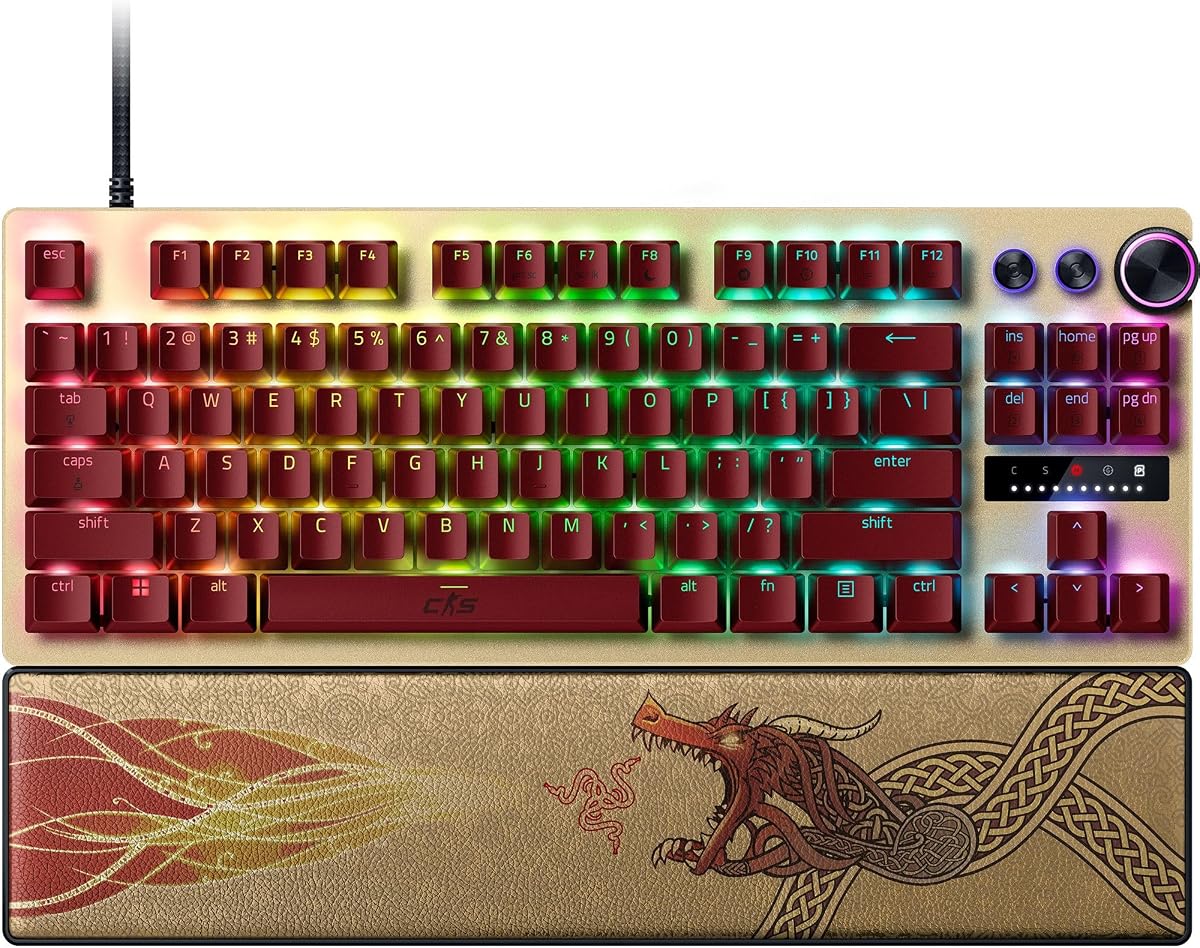
The Razer Huntsman V3 Pro TKL CS2 is the top pick for competitive players wanting pro-grade features and durability. Its analog optical switches and rapid trigger provide the speed needed for advanced movement and precise timing in CS2.
We may earn a commission when you buy through this link, at no additional cost to you.
Snap tap mode prioritizes the latest input between two keys so you can switch directions without releasing the first key. Onboard LED adjustments let you tweak actuation and sensitivity quickly without opening software or pausing games.
The higher price reflects the esports engineering and durable PBT keycaps that resist shine during intense play. Firmware requirements for snap tap mean you must stay updated to access all features and maintain performance.
If you play ranked CS2 and need reliable speed and durability this keyboard is the best overall choice. It brings pro tools and strong build quality to help you perform at your peak during competitive matches.
Snap tap lets you swap keys like A and D instantly for smoother counter-strafes without finger release.
Use the onboard LED array and dial to adjust settings quickly without needing external software.
We may earn a commission when you buy through this link, at no additional cost to you.
The Corsair Clipper PRO MINI 60 delivers fast hall effect performance with FlashTap SOCD and 8000Hz polling for precise CS2 movement. Its compact 60% form frees up mouse space while keeping essential keys within easy reach.
We may earn a commission when you buy through this link, at no additional cost to you.
MGX Hyperdrive switches offer adjustable actuation from 0.2 to 3.8mm and 100M keystroke durability for reliable play. IP57 rating gives water and dust resistance so accidental spills or messy desks wont stop your sessions or damage the unit.
The 60% layout means fewer keys and may require learning new macros for some users. Still the sound dampening and fast polling make it a strong compact pick for players who value space and input accuracy.
Choose this keyboard if you need a durable and fast compact option with hall effect tech. It is ideal for low-sensitivity players who want more mouse room and consistent inputs in CS2.
FlashTap ensures cleaner directional inputs so your counter-strafes land exactly when you intend.
Dust and water resistance protect the keyboard during long sessions and accidental spills.
We may earn a commission when you buy through this link, at no additional cost to you.
The Redragon K745 HE combines hall effect rapid trigger with five-layer dampening for a quiet and responsive keyboard. It keeps 8000Hz polling and adjustable actuation to help with quick movement and precise inputs in CS2.
We may earn a commission when you buy through this link, at no additional cost to you.
The anti-wobble plate and noise dampening reduce harsh clacks and stabilize keypresses. RGB lighting adds a vibrant eSports feel while the magnetic switches maintain consistent performance during long and fast-paced gaming sessions.
Its rating is lower than K686 suggesting minor compromises in feel or software. Still the core rapid trigger features and value make it a solid choice for players who want hall tech without premium costs.
This model suits CS2 gamers who need reliable rapid trigger and decent build quality. It balances performance and cost well for budget conscious players wanting faster inputs.
Five-layer dampening gives a soft bounce and reduces harsh sounds during extended play.
Magnetic switches reset instantly so you can change direction fast without key ghosting.
We may earn a commission when you buy through this link, at no additional cost to you.
The Keychron C0 HE 8K is a one-handed keypad built for players who want extra programmable keys without full desk clutter. Its rapid trigger hall switches and 8K polling offer low latency inputs suitable for CS2.
We may earn a commission when you buy through this link, at no additional cost to you.
You can customize 35 keys for macros and commands which helps with complex actions or stream controls. Web-based setup works on Windows and macOS so you can configure mappings without installing extra drivers or software.
This keypad works best paired with another keyboard since it lacks a full typing layout. Still the hall tech and compact form make it a great tool for advanced players who need quick access to many commands.
Use this as a secondary device for macros or if you want hall effect tech in a small form. It delivers fast inputs and flexible customization for streamers or power users playing CS2.
35 programmable keys give quick access to macros and commands without needing a full keyboard.
Configure actuation and RGB in a browser on Windows or macOS without installing drivers.
We may earn a commission when you buy through this link, at no additional cost to you.
The Razer Huntsman V3 Pro TKL Renewed brings the same pro features as new at a lower price. Its analog optical switches and rapid trigger support fast movement while onboard adjustments let you tweak settings without software.
We may earn a commission when you buy through this link, at no additional cost to you.
The aluminum top plate ensures durability during intense matches and the digital dial gives quick access to volume or switch settings. Renewed units save money but may show minor cosmetic wear or have limited warranty compared to new.
For budget aware players who want pro gear this is a smart pick. The features match the new version so performance in CS2 remains high while the price fits tighter budgets better.
Choose this if you trust refurbished gear and want snap tap and analog switches without paying full price. It keeps the build and speed of the pro model with savings for competitive gamers.
Use the digital dial to adjust volume or actuation settings quickly from the keyboard.
Snap tap mode lets you prioritize the latest input between two keys for faster directional swaps.
We may earn a commission when you buy through this link, at no additional cost to you.
The Corsair K55 RGB PRO is an affordable membrane keyboard with dedicated macro keys and RGB lighting. It is a solid budget option for CS2 players who dont need hall switches but want customizable keys and spill resistance.
We may earn a commission when you buy through this link, at no additional cost to you.
Six macro keys let you bind commands and shortcuts while IP42 protection guards against dust and spills. The detachable palm rest adds comfort during long sessions and the RGB effects brighten your desk setup.
Lack of rapid trigger and hall tech means inputs are slower than magnetic options. Still the low price and durability make it a good entry pick for casual players or secondary setups.
Choose this if you want a cheap and sturdy keyboard with macros and RGB. It is best for players on tight budgets who need reliable performance without advanced hall features.
Six dedicated keys let you set up commands for quick access during games.
IP42 rating protects the keyboard from dust and accidental spills so play can continue.
We may earn a commission when you buy through this link, at no additional cost to you.
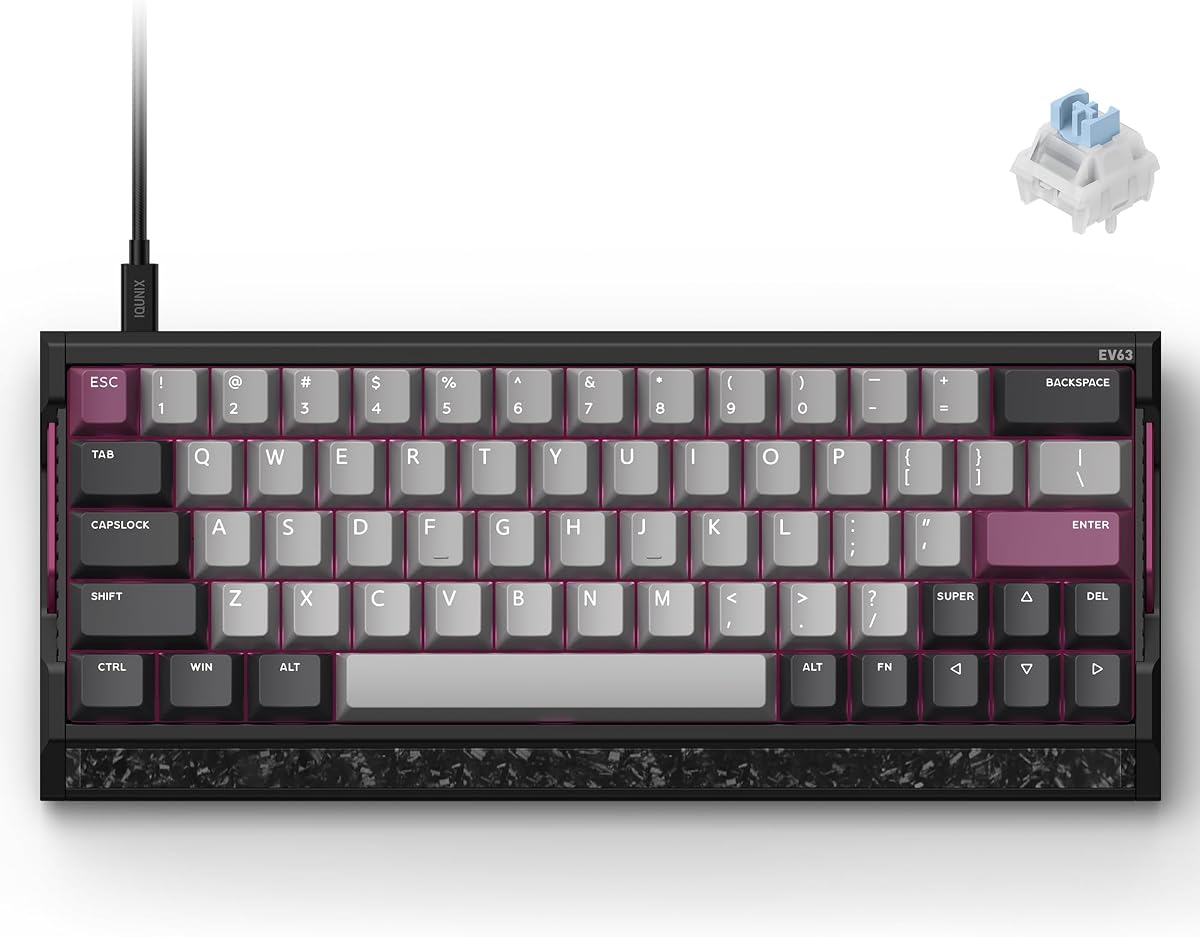
The IQUNIX EV63 is a premium hall effect keyboard designed for top-tier FPS performance. Its 0.01mm rapid trigger and 8000Hz polling deliver ultra-low latency inputs while aluminum and forged carbon provide a solid and stable chassis.
We may earn a commission when you buy through this link, at no additional cost to you.
Magnetic X Ultra switches offer adjustable actuation with minimal drift and long durability. EV Driver 3.0 includes pro-tuned presets and fine controls for actuation and SOCD so you can match pro player settings.
The compact 64-key layout and small right shift require some adjustment but save desk space for mouse movement. The build is heavy and stable which helps prevent unwanted movement during fast plays.
For players seeking the best hall effect performance and build quality this keyboard stands out. It justifies its cost with stable inputs and pro-grade tuning for competitive CS2 play.
M.A.T. 2.0 checks each key in real time to reduce missed inputs and unintended triggers.
Use pro presets or fine-tune actuation and RGB with the EV Driver software suite.
We may earn a commission when you buy through this link, at no additional cost to you.
Choosing the right keyboard for CS2 involves weighing speed, build quality and features that match your playstyle. This guide breaks down key factors to help you find the best fit.
Hall Effect or magnetic switches detect keypresses without physical contact which enables rapid trigger and adjustable actuation. This is ideal for CS2 because it reduces latency and allows you to reset keys faster during movement.
Opt for hall or optical switches over membrane to gain speed and durability. Magnetic switches also offer longer lifespans and consistent performance over time.
Polling rate measures how often the keyboard reports inputs to your PC. For CS2 a rate of 8000Hz or higher is recommended to minimize input lag and ensure every move registers instantly.
Look for keyboards advertising ultra-low latency and fast polling. This helps with counter-strafing and precise aiming in competitive rounds.
Adjustable actuation lets you set the point where a key registers. This helps balance speed for movement and accuracy for shooting. Rapid trigger adds quick resets when you release a key slightly.
Choose models allowing fine-tuned adjustment for individual keys. This flexibility helps tailor your board to your unique playstyle and comfort.
Compact layouts like 60% or TKL free up desk space for wider mouse movements which is crucial for low-sensitivity aiming in CS2. Full-size boards offer more keys but reduce room.
Decide based on how much mouse space you need. Smaller boards may take time to learn but support better aiming control for competitive play.
Durable materials like aluminum and PBT keycaps withstand long sessions and reduce keycap shine. Look for water and dust resistance if spills or messy desks are a concern.
Prioritize keyboards with sturdy cases and rated protection. Strong builds maintain consistent performance through intense and extended gaming use.
Software should offer actuation tuning, RGB controls and profile saving. Onboard memory is useful if you dont want to rely on drivers during matches.
Choose boards with intuitive software and onboard options. Good customization ensures your settings stay consistent across different PCs and tournaments.
Tools like snap tap help you swap inputs faster without releasing keys. This is valuable for rapid direction changes in CS2 movement.
Check for competitive extras like snap tap or SOCD support. These features give you small advantages in speed and consistency during ranked games.
Hall effect keyboards range from budget to premium. Determine how much you can spend and balance cost against needed features like rapid trigger and polling rate.
Aim for keyboards that offer the features you need without excess. Mid-range models often provide strong value without premium costs.
First connect your keyboard and install drivers. Calibrate actuation and set up actuation in the software before playing. This ensures keys register precisely and your settings match your playstyle.
Second clean the keys regularly with compressed air to remove dust and debris. Avoid spills and use a spill-resistant model if possible. Regular cleaning maintains switch feel and prevents input issues over time.
Third store the keyboard flat in a dry place when not in use. Avoid heavy loads or pressure on the keys. Proper storage protects switches and internal parts so the keyboard performs well for years.
A good CS2 keyboard offers hall or optical switches for rapid trigger and adjustable actuation. High polling rates like 8000Hz reduce input lag so your movements and shots register instantly. Durability and compact layout also help with aiming and comfort during long matches.
Rapid trigger is highly beneficial for CS2 because it resets keys faster when you lift your finger. This allows quicker direction changes and strafes which are critical in competitive movement and counter-strafing scenarios.
60% keyboards free up desk space for wider mouse movements which helps low-sensitivity aiming. They are often better for competitive play but take time to learn since keys like arrows and function keys are absent.
Hall Effect switches detect keypresses using magnets instead of physical contact. This allows adjustable actuation and rapid trigger because the sensor reads magnetic field changes rather than mechanical actuation points.
Aim for 8000Hz polling for the fastest input response in CS2. Higher polling rates reduce input lag so your keyboard registers every tap and move more quickly during competitive matches.
You can use a membrane keyboard but hall or optical switches provide faster and more consistent inputs. Membrane boards lack rapid trigger and adjustable actuation which can slow movement and timing in competitive play.
Onboard memory saves your settings directly on the keyboard so you do not need drivers during matches. This ensures consistent actuation and profile settings when switching PCs or during tournaments.
Snap tap mode lets you prioritize the latest input between two keys without releasing the first. It helps with fast directional swaps in CS2 movement when your input is faster without finger release.
The best keyboards for CS2 combine hall or optical switches with rapid trigger and high polling rates. Our top picks offer adjustable actuation and durable builds to keep your movements precise and consistent during ranked matches.
Prioritize polling rate, rapid trigger, and layout when choosing. If budget allows opt for premium models with better materials and onboard memory to maximize performance and long-term reliability.
Always check current prices and availability since deals change frequently. Verify warranty terms and return policies to ensure you get a keyboard that meets your needs and performs well in competitive play.