
Epson EcoTank Photo ET-8550
4.0Editor score
Six-color Claria ET Premium ink
Cartridge-free printing system
Prints up to 13×19 inches
This guide compares the top A3 printers for quality speed and value helping you find the best wide-format option for your home office or business needs.
Finding the right A3 printer can transform how you handle large documents and creative projects at home or in the office. These wide-format machines offer more than standard printers delivering vibrant colors and sharp text for professional results.
We evaluated ten leading models based on print quality speed connectivity and total cost of ownership. Each product was assessed for its ability to handle heavy workloads while maintaining consistent performance over time.
Every pick highlights specific strengths like ink efficiency wireless setup or paper handling. Please note that prices change frequently so check the current listing before making your final decision.
4.0Editor score

4.2Editor score

3.8Editor score
Explore the side-by-side comparison of all ten selected A3 printers to quickly identify which model fits your specific workspace requirements and printing demands.

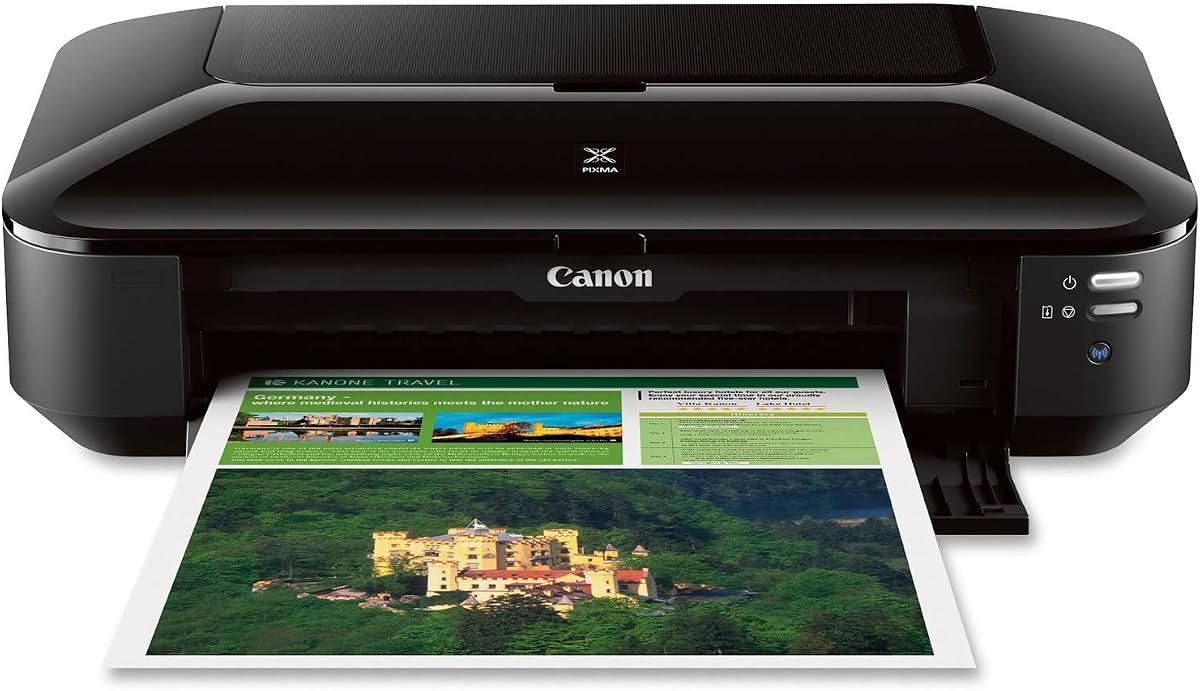


The Epson EcoTank Photo ET-8550 stands out as a premium choice for anyone needing lab-quality photos and creative projects on A3 paper. With a 4.0 rating from users it delivers exceptional value through its cartridge-free system.
We may earn a commission when you buy through this link, at no additional cost to you.
Its six-color Claria ET Premium ink system ensures vibrant colors and sharp text for all your printing needs. The printer supports up to 6200 color pages per set reducing frequent refill needs significantly.
While the initial investment is higher than standard printers the long-term savings on ink make it worthwhile. The large physical size requires dedicated space but supports diverse media types including thick card stock.
Photographers and creative professionals should prioritize this model for its reliable performance and low per-page costs. It remains the top recommendation for high-volume photo and graphic printing tasks.
Each replacement ink bottle set equals about 100 individual cartridges reducing waste and ongoing expenses.
The printer handles everything from standard paper to thick card stock up to 13×19 inches without issues.
We may earn a commission when you buy through this link, at no additional cost to you.
This model excels in office environments where speed and reliability matter most. Users appreciate the rapid first-page-out time and consistent output for professional documents.
We may earn a commission when you buy through this link, at no additional cost to you.
PrecisionCore Heat-Free Technology reduces downtime while DURABrite Ultra pigment inks ensure sharp text that resists fading. The 250-sheet capacity helps maintain workflow efficiency without constant refills.
The requirement for genuine Epson cartridges may increase long-term costs but ensures warranty compliance. Some users find the interface slightly complex but the Smart Panel App simplifies mobile tasks.
Offices needing robust performance for heavy document volumes will find this printer meets their demands effectively. It balances speed with quality well for daily professional use.
Technology streamlines workflow by enabling fast prints without warm-up delays or high energy consumption.
The Epson Smart Panel App allows quick navigation and control from any smartphone or mobile device.
We may earn a commission when you buy through this link, at no additional cost to you.
For those seeking a reliable A3 printer without a steep price tag this Workforce Pro model delivers solid performance. It balances cost with essential features for productive home or small office use.
We may earn a commission when you buy through this link, at no additional cost to you.
The 500-sheet paper capacity ensures minimal interruptions during large jobs while PrecisionCore technology maintains consistent speed and output quality. Two trays and a rear feed offer flexible paper handling options.
A small 2.4 display requires more setup via the Smart Panel App but wireless connectivity remains seamless. It is less versatile than premium models but handles standard document tasks efficiently.
Small businesses and individuals needing high-volume printing capabilities on a budget should consider this option. It provides excellent reliability for daily document production without breaking the bank.
Engineered for durability and reliability to handle heavy workloads with minimal downtime for users.
Wi-Fi Direct allows easy setup and control from smart devices without needing a network connection.
We may earn a commission when you buy through this link, at no additional cost to you.
This Canon model remains a popular choice for users prioritizing wireless flexibility and high-resolution output. It integrates well with various mobile platforms ensuring convenient printing from any device.
We may earn a commission when you buy through this link, at no additional cost to you.
The five individual ink tank system allows cost-effective replacement of colors as needed. High resolution up to 9600 x 2400 dots per inch produces crisp text and detailed graphics for professional documents.
While the auto sheet feeder handles 150 sheets the smaller tray size means more frequent refills compared to newer competitors. The compact dimensions fit better in tighter spaces than bulkier A3 options.
Users valuing mobile connectivity and color accuracy will appreciate this printer's reliable performance. It serves as a solid mid-range option for light to moderate office printing.
AirPrint and Google Cloud Print compatibility ensures seamless printing from iOS Android and cloud services.
Full photolithography inkjet nozzle engineering delivers precise color placement and sharp text output.
We may earn a commission when you buy through this link, at no additional cost to you.
The ET-15000 combines EcoTank savings with professional features ideal for heavy office use. Its strong user rating reflects satisfaction with reliability and print quality across diverse document types.
We may earn a commission when you buy through this link, at no additional cost to you.
A monthly duty cycle of 33000 pages ensures it can handle intense workloads without strain. The 4800 x 2400 dpi resolution delivers readable text and clear graphics for business reports.
Faxing and scanning functions are included alongside printing making it a true all-in-one solution. LAN and USB 2.0 ports offer secure and direct connectivity for networked environments.
Businesses needing a robust supertank solution for frequent wide-format printing should choose this model. It balances capacity and cost effectively for ongoing professional demands.
Designed to handle 33000 pages monthly ensuring consistent performance under heavy daily usage.
Full suite of printing scanning copying and faxing capabilities simplifies office workflows.
We may earn a commission when you buy through this link, at no additional cost to you.
For offices requiring fax capabilities alongside wide-format printing this model offers a comprehensive solution. The 500-sheet capacity reduces interruptions while handling high-volume document tasks daily.
We may earn a commission when you buy through this link, at no additional cost to you.
PrecisionCore Heat-Free technology supports fast printouts and DURABrite Ultra ink ensures quick drying for smudge-free results. Connectivity options including 802.11ac Wi-Fi keep devices connected efficiently.
The initial setup process may take longer due to extensive network features but ongoing operation remains smooth. Users note that print quality remains consistent even on larger paper sizes.
Small to medium businesses needing a single device for faxing and large document printing will find this valuable. It provides dependable performance for professional office workflows.
Complete duplex solution supports auto 2-sided printing copying scanning and faxing from one unit.
Epson Connect Solutions enable productive mobile printing including Email Print and Remote Print apps.
We may earn a commission when you buy through this link, at no additional cost to you.
The OfficeJet Pro 9135 stands out for its HP AI capabilities that optimize print formatting automatically. This reduces wasted pages and awkward layouts making it ideal for email and web printing.
We may earn a commission when you buy through this link, at no additional cost to you.
With print speeds up to 25 ppm black it maintains high productivity for professional documents. Dual-band Wi-Fi ensures reliable connection stability while Wolf Pro Security protects data from threats.
Users appreciate the sustainable design featuring over 40% recycled plastic content. The large touchscreen interface simplifies navigation though cartridge restrictions apply after firmware updates.
Offices seeking smart features and strong security will find this printer a powerful addition. It balances performance with environmental considerations effectively.
HP AI easily removes unwanted content to optimize print formatting for emails and web pages.
HP Wolf Pro Security bolsters protection helping keep networks safe from cyber threats.
We may earn a commission when you buy through this link, at no additional cost to you.
This Brother model is engineered specifically for small business productivity with impressive print speeds of 31 ppm. The INKvestment system provides long-lasting ink yields reducing frequent replacement needs.
We may earn a commission when you buy through this link, at no additional cost to you.
With two trays totaling 500 sheets and a multipurpose tray it handles varied media types efficiently. Cloud scanning to apps like Google Drive enhances workflow flexibility for remote or hybrid teams.
The Brother Mobile Connect app simplifies device management though the touchscreen remains modest at 2.7 inches. Reliability and speed make it a strong contender for high-demand work environments.
Small business owners needing fast reliable and connected printing should prioritize this option. It delivers consistent value for daily operational tasks.
INKvestment Technology provides reliable performance with high-yield cartridges for sustained output.
Print from and scan to cloud apps including Google Drive Dropbox Box and OneDrive easily.
We may earn a commission when you buy through this link, at no additional cost to you.
The WF-7710 maintains a high user rating thanks to reliable PrecisionCore technology and borderless printing up to 13×19 inches. It is a solid choice for users needing high-quality wide output.
We may earn a commission when you buy through this link, at no additional cost to you.
A 250-sheet tray holds photo paper or envelopes alongside standard documents offering great flexibility. Ethernet support ensures stable network connections while Amazon Dash Replenishment keeps ink stocked.
Duplex speeds are slower than some newer models but the quality remains sharp and consistent. Users appreciate the straightforward setup and long-term reliability for home offices.
Those prioritizing borderless photo printing and dependable performance will enjoy this model. It balances features and quality well for diverse creative tasks.
PrecisionCore technology lets you create borderless prints up to 13×19 inches in size.
Amazon Dash Replenishment Ready ensures you never run out of ink unexpectedly for prints.
We may earn a commission when you buy through this link, at no additional cost to you.
This model stands out with the world's first wide-format printer featuring P3 color gamut for vibrant screen-accurate prints. It is ideal for mood boards floorplans and spreadsheets needing true color fidelity.
We may earn a commission when you buy through this link, at no additional cost to you.
HP AI optimizes formatting to avoid wasted pages while dual-band Wi-Fi ensures reliable connections. Instant Ink trial provides delivery convenience though fees apply after three months unless cancelled.
Print speeds are slightly lower than some competitors but color accuracy compensates for design tasks. Sustainable design with recycled plastic aligns with modern office values.
Designers and professionals needing precise wide-format color should choose this printer. It delivers reliable and vibrant results for creative work.
Print true to screen with the world's first wide-format printer with P3 color gamut.
Get ink delivered directly to your office door before you run out with included trial.
We may earn a commission when you buy through this link, at no additional cost to you.
Selecting the right A3 printer involves balancing several key factors to match your specific workflow and budget requirements.
High resolution ensures sharp text and vibrant colors especially for graphics and photos. Look for DPI ratings above 4800 x 2400 for detailed professional output.
Prioritize models with pigment or specialized photo inks for long-lasting vivid results.
Consider how many pages you print daily to choose a machine that handles the load. Speeds above 20 ppm help maintain productivity during busy periods.
A high monthly duty cycle prevents wear and tear for heavy office environments.
Check per-page costs and ink cartridge or tank options before buying to save money. Tank printers offer lower costs over time but have higher initial prices.
Cartridge systems are convenient but add up quickly for frequent wide-format printing.
Wireless options like Wi-Fi Direct and Ethernet ensure easy connection from various devices. Mobile apps simplify remote printing and scanning without needing a computer.
Verify compatibility with your operating system and cloud storage services for smooth workflow.
Multiple trays and high capacity reduce interruptions when handling large volumes of documents. Rear feeds are essential for thick media like cardstock or photo paper.
Auto duplex printing saves paper and time for standard document tasks in busy offices.
Secure wireless and data erase features protect sensitive information from unauthorized access. Look for models with built-in security protocols for networked office environments.
These safeguards are vital for businesses handling confidential documents regularly.
Measure your available workspace since A3 printers are larger than standard desktop models. Ensure enough clearance for paper trays and output stacks to prevent jams.
Compact designs may be necessary for smaller home offices or limited desk areas.
Check warranty length and customer service reputation to ensure help is available when needed. Some brands offer extended support plans for business-grade machines.
Reliable support minimizes downtime and keeps your printing operations running smoothly.
Proper placement on a stable flat surface prevents jams and ensures accurate alignment for wide prints. Keep the area free of dust and debris to maintain print head health.
Run regular cleaning cycles using the printer's maintenance menu to prevent clogged nozzles. This keeps colors vibrant and text sharp especially if printing infrequently.
Use genuine or recommended ink supplies to avoid damage and ensure warranty coverage. Always keep paper trays covered when not in use to protect paper from humidity and damage.
A3 printers handle documents wider than standard letter size making them ideal for architectural blueprints large spreadsheets and professional posters. They deliver superior quality for graphic design and presentation materials.
Yes they typically consume more ink per page due to larger print areas but tank models significantly reduce this cost. Using high-yield ink tanks helps manage expenses for frequent wide-format needs.
Absolutely A3 printers support A4 and smaller paper sizes often with dedicated trays or automatic feeders. This flexibility allows them to serve as a single solution for various document types.
Many modern A3 printers are compact enough for home offices especially those designed for quiet operation. Look for models with smaller footprints and energy-saving features for home setups.
Inkjet A3 printers excel in color photo quality and handling diverse media while lasers are faster for text. Consider your primary document types to decide which technology fits your workflow best.
Keep it in a dust-free environment and perform routine head cleaning cycles regularly. Using original ink and paper prevents damage and ensures consistent performance over time.
Most modern models include wireless options but some older or budget units may only offer USB connections. Verify connectivity specs before purchasing to ensure compatibility with your devices.
Yes if you regularly create flyers banners or large spreadsheets it saves outsourcing costs and time. High-volume models offer durability and efficiency that support growing business needs.
The Epson EcoTank Photo ET-8550 leads as the best overall choice for its photo quality and cost efficiency over time. For budget-conscious buyers the Epson Workforce Pro WF-7310 offers reliable speed and capacity.
Prioritize factors like ink costs print speed and connectivity to match your specific workflow needs. High-duty cycles and security features matter more for busy offices than for casual home use.
Always check the latest prices and promotions since costs fluctuate frequently for these versatile devices. The right A3 printer can greatly enhance your productivity and output quality.