
X9 Large Print Backlit Computer Keyboard
4.5Editor score
7-color backlight options
Full size 107 keys
Plug and play USB
This guide compares the top ten backlit illuminated keyboards for visibility and comfort, featuring large print options, RGB lighting, and ergonomic designs
Finding the right backlit illuminated keyboard can transform your typing experience, especially in low-light environments. Whether you need large print for better visibility or colorful RGB for style, these keyboards offer enhanced functionality. They ensure keys remain visible regardless of ambient lighting conditions, reducing eye strain significantly.
We evaluated ten top-rated models based on lighting quality, key visibility, ergonomic design, and overall durability. Each product was assessed for its unique features, such as backlight colors, connectivity options, and user-friendly layouts. Our goal is to help you find the perfect match for your specific workspace requirements and personal preferences easily.
Each pick highlights distinct strengths, from budget-friendly options to premium ergonomic solutions tailored for comfort. Note that prices and availability fluctuate frequently, so verify current details before purchasing. This guide provides a comprehensive overview to streamline your decision-making process for the best backlit illuminated keyboard available today.
4.5Editor score

4.9Editor score

4.1Editor score
This side-by-side comparison highlights the key specifications and unique attributes of each backlit illuminated keyboard model. You will find details on layout size, lighting options, connectivity types, and special features like large print or spill resistance to aid your selection process efficiently.





This TECURS keyboard stands out with its impressive 4.9 rating, offering a perfect blend of large print visibility and backlighting. It is designed to help users see keys clearly in any lighting condition, reducing eye strain during extended work sessions.
We may earn a commission when you buy through this link, at no additional cost to you.
The oversized printed letters are four times larger than standard keyboards, making it ideal for seniors or anyone with low vision. The 7 adjustable brightness levels ensure you can customize the light to suit your environment perfectly. Additionally, the silent membrane structure reduces noise significantly.
While the wired connection limits mobility compared to wireless models, it ensures a stable and responsive typing experience without battery concerns. The spill-resistant design adds durability, protecting against accidental liquid damage which is common in office settings.
This keyboard is best for users who prioritize visibility and comfort over wireless flexibility. It is highly recommended for home offices, shared workspaces, and individuals who need clear key recognition to minimize typing errors effectively.
The large print design ensures characters are easy to read, making typing faster and more accurate for everyone.
The silent membrane keys minimize noise, creating a peaceful environment for libraries or quiet home offices.
We may earn a commission when you buy through this link, at no additional cost to you.
The X9 keyboard offers a budget-friendly solution without sacrificing essential features like backlighting and large print. With a 4.5 rating, it is a reliable choice for users seeking basic functionality and clear visibility. The seven-color backlight adds a touch of style to your setup.
We may earn a commission when you buy through this link, at no additional cost to you.
This model features oversized keys that are easy to see, ideal for those who struggle with standard font sizes. The USB connection allows for instant setup without needing drivers, making it perfect for quick deployments in offices or schools. Brightness levels can be adjusted to suit different lighting needs.
While it lacks wireless connectivity, the wired design ensures consistent performance and eliminates the need for batteries. The full-size layout includes a number pad, which is crucial for data entry tasks. It is built to withstand daily use in various environments.
Ideal for students, seniors, or anyone on a tight budget, this keyboard provides excellent value. It balances cost and performance well, offering a comfortable typing experience with visual aids that enhance productivity and ease of use significantly.
Choose from seven distinct colors to match your desk aesthetic or personal preference easily.
Simply connect the USB cable and start typing immediately without any software installation required.
We may earn a commission when you buy through this link, at no additional cost to you.
The HP 400 brings a premium feel with its slim design and warm white LED illumination. Rated 4.1 stars, it targets professionals who need a space-saving yet functional keyboard. The warm light reduces eye fatigue during long working hours, creating a pleasant visual environment.
We may earn a commission when you buy through this link, at no additional cost to you.
Its programmable shortcuts allow you to customize workflows by assigning specific commands to keys. This feature is valuable for users who rely on specific key combinations frequently. The spill-resistant and sanitizable surface makes it hygienic for shared workspaces or public areas.
Though the price is higher than basic models, the build quality and design justify the investment for office environments. The included USB-C cable with USB-A adapter ensures compatibility across various devices. It is lightweight and portable, making it easy to carry between locations.
This keyboard is best suited for hybrid workers or office professionals who value aesthetics and productivity. It offers a refined typing experience that aligns with modern desk setups while providing practical features like programmable keys for efficiency.
Program keys to automate frequent tasks, enhancing speed and reducing repetitive strain on your hands.
The sanitizable surface allows for easy cleaning, ensuring a clean workspace in shared or public environments.
We may earn a commission when you buy through this link, at no additional cost to you.
Arteck delivers a reliable keyboard with scissors X structure for comfortable and quiet typing. The 4.4 rating reflects its solid performance for general use. It features elegant LED backlighting with three brightness levels to adapt to various lighting conditions effectively.
We may earn a commission when you buy through this link, at no additional cost to you.
The ultra-thin design makes it easy to store in bags or tight desk spaces. Despite its compact footprint, it retains full-size keys including a number pad and arrow keys. Media hotkeys provide quick access to volume and playback controls, enhancing multimedia functionality.
While it lacks large print options, the low-profile keys offer a smooth typing experience. The USB connection ensures stable performance without the latency issues sometimes found in wireless devices. It is lightweight and portable, suitable for travel or home office use.
This model is a strong choice for users who want a slim keyboard with backlighting and media controls. It balances style and function well, making it a practical addition to any PC or laptop setup where ergonomics matter.
The X-structure keys minimize noise, providing a quiet typing experience for shared environments.
Control music and videos directly from the keyboard without needing to open software applications manually.
We may earn a commission when you buy through this link, at no additional cost to you.
KOPJIPPOM focuses on visibility with fonts four times larger than standard keyboards. Rated 4.5 stars, it is tailored for seniors or visually impaired users who need clear key recognition. The white LED backlight ensures keys are visible in dim or dark environments.
We may earn a commission when you buy through this link, at no additional cost to you.
The spill-proof design protects the internal components from accidental liquid spills, increasing the lifespan. Ergonomic tilt feet reduce hand fatigue during long typing sessions. It is compatible with various Windows versions and even Raspberry Pi, offering broad usability.
While the design is simple, its functionality is robust. The full QWERTY layout ensures all necessary keys are accessible. The durable ABS key printing resists wear over time. It is a straightforward, reliable tool for daily computing tasks without unnecessary complexity.
This keyboard is ideal for libraries, schools, or special needs departments where readability is paramount. It provides a practical solution for users who struggle with standard key sizes, enhancing independence and ease of use in digital environments effectively.
High contrast keys and large fonts ensure characters are easily distinguishable, reducing typing errors.
Spill-resistant construction safeguards the keyboard from coffee or water accidents, extending its usable life.
We may earn a commission when you buy through this link, at no additional cost to you.
TECKNET offers a quiet typing experience ideal for libraries or shared offices. With a 4.5 rating, the low-profile membrane keys reduce noise significantly while maintaining responsiveness. The RGB lighting adds vibrant style with seven colors and multiple brightness modes.
We may earn a commission when you buy through this link, at no additional cost to you.
The keyboard includes 12 FN shortcut keys for quick media and volume control. A spill-resistant film protects against water damage, ensuring durability. It comes with a lifetime warranty, reflecting confidence in its build quality and reliability for daily use.
Although the RGB lighting is customizable, some users may prefer a simpler look. The wired connection ensures no battery anxiety, making it a constant reliable tool. The anti-slip pads provide stability during intense typing or data entry sessions.
Best for users who prioritize silence and durability, this keyboard balances functionality with modern lighting features. It is a great choice for late-night work or environments where noise levels need to be kept low consistently.
Low-profile keys minimize sound output, creating a focused workspace without disturbing others nearby.
Choose from static or breathing modes to personalize your desktop setup with dynamic lighting effects.
We may earn a commission when you buy through this link, at no additional cost to you.
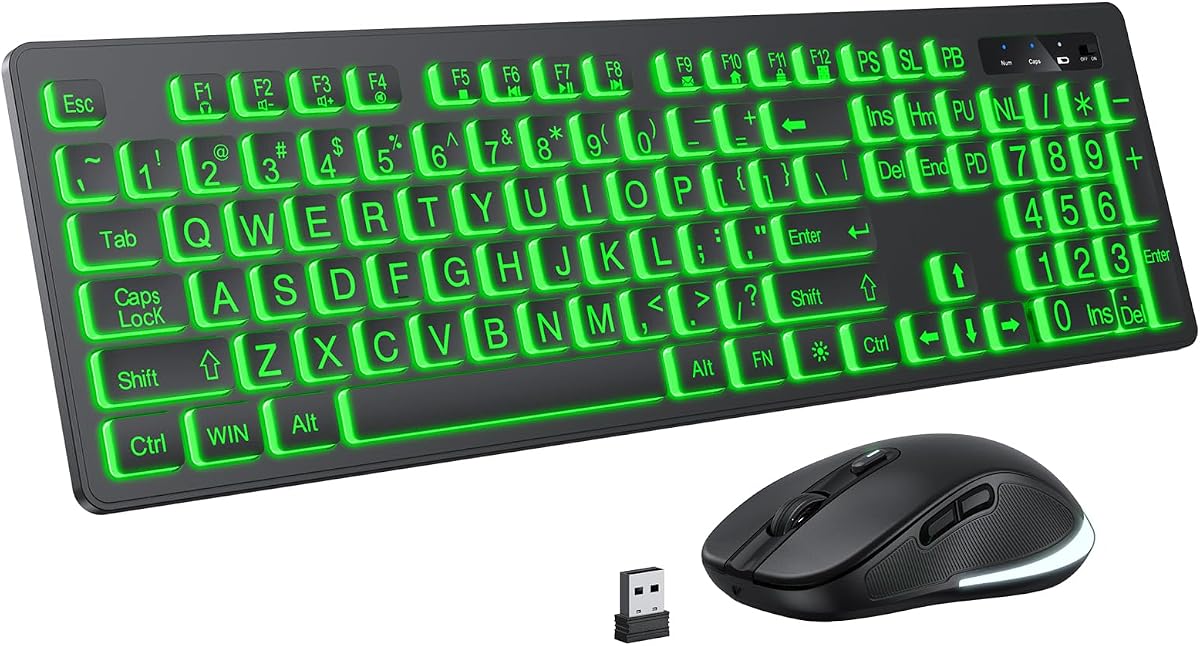
This wireless combo eliminates cable clutter while offering large print keys and backlighting. Rated 4.2 stars, it provides flexibility for users who move around their workspace. The shared USB receiver simplifies connection, and the rechargeable battery supports long usage.
We may earn a commission when you buy through this link, at no additional cost to you.
The oversized letters make it easy to see keys without strain. The 7-color backlight adds visual appeal and utility in low light. With up to 2000 hours of standby time, it requires infrequent charging. The included mouse matches the keyboard's design.
Wireless technology can introduce slight latency compared to wired, though this model uses stable 2.4GHz. The smart energy-saving feature turns off lights after inactivity to conserve power. It is suitable for desktops, laptops, and even smart TVs.
Ideal for users wanting mobility without sacrificing visibility, this set covers both input needs. It is excellent for home offices or media centers where a clean desk setup and easy-to-see controls are priority for comfort and convenience.
Wireless connectivity allows you to type from a distance, reducing desk clutter and improving comfort.
Built-in rechargeable battery reduces waste from disposable batteries, offering long-lasting power for daily use.
We may earn a commission when you buy through this link, at no additional cost to you.
Perixx focuses on utility with large print keys and a slim profile. Rated 4.3 stars, it is designed for environments like libraries or schools where readability is critical. The white LED backlight supports typing in low light without distracting colors.
We may earn a commission when you buy through this link, at no additional cost to you.
Low-profile keys provide a smooth and quiet typing experience. The 5.25-foot USB cable allows flexible desk placement, reaching further than standard cables. ABS key printing resists wear, ensuring the print stays clear over time. It is plug-and-play compatible with Windows.
While it lacks advanced features like programmable macros, it excels at core functions. The 12-month warranty adds peace of mind for institutional buyers. The design is straightforward, minimizing learning curves for all users including those with limited technical skills.
Best for public spaces or home offices needing simple visibility tools, this keyboard ensures clear access to text. It offers a reliable, no-fuss solution for users who prioritize durability and key recognition above aesthetic customization or extra features.
Extra-long USB cable allows placement flexibility, accommodating different desk layouts and user preferences easily.
High-quality ABS material ensures the large print keys remain visible even after years of frequent use.
We may earn a commission when you buy through this link, at no additional cost to you.
This model targets low-vision users with a large font and included cover for protection. Rated 4.4 stars, it ensures keys are easy to see and find during typing. The white backlight provides consistent illumination to reduce strain in dim environments.
We may earn a commission when you buy through this link, at no additional cost to you.
A foldable tripod and wrist support enhance ergonomics during long sessions. The cover prevents dust and liquid damage, extending the life of the keys. The quick rebound keys reduce fatigue and improve typing speed. It supports Windows and Mac systems easily.
The backlight does not turn off when the computer is on, which can drain battery if used wirelessly. However, as a wired keyboard, power supply is constant. The design prioritizes function and protection, making it highly practical for daily use.
Ideal for seniors or those with visual impairments, this keyboard offers comprehensive support for comfortable typing. It is recommended for home or office use where protection and visibility are key priorities for maintaining productivity and ease of access.
Included cover shields keys from dust and liquids, ensuring longevity in shared or messy environments.
Foldable feet and wrist rest reduce strain, allowing for comfortable typing during extended work sessions.
We may earn a commission when you buy through this link, at no additional cost to you.
This keyboard combines large print with a wrist rest for superior comfort. Rated 4.4 stars, it focuses on reducing fatigue during long typing sessions. The colorful backlight allows personalization with seven options and three brightness levels to suit your mood.
We may earn a commission when you buy through this link, at no additional cost to you.
The ergonomic typing angle helps maintain a natural wrist position. Soft-touch keys provide a quiet and comfortable experience. The oversize letters ensure visibility, making it easier to type accurately. Plug-and-play connectivity ensures instant use without installation.
While the wrist rest is integrated, it might limit customization for those with specific ergonomic needs. The wired design ensures reliability but limits mobility. However, the overall value for comfort and visibility is strong, making it a versatile option for various users.
Best for users seeking ergonomic support alongside clear visibility, this keyboard is an excellent choice. It is recommended for home offices or gaming setups where comfort and key recognition are essential for maintaining focus and reducing physical strain over time.
Built-in wrist rest promotes natural hand positioning, reducing strain during extended typing or gaming sessions.
Seven color options let you adjust the lighting to match your desk theme or personal preference easily.
We may earn a commission when you buy through this link, at no additional cost to you.
Selecting the right backlit illuminated keyboard requires considering several factors to ensure it meets your specific needs. This guide outlines key aspects to evaluate before making your purchase decision for maximum satisfaction.
Look for keyboards that offer adjustable brightness levels to suit different lighting conditions. Some models provide single-color white or warm light for readability, while others offer RGB options for personalization. Ensure the lights are evenly distributed to avoid dark spots on keys.
Choose a lighting type that matches your aesthetic preference and functional needs. White light is generally better for reading, while RGB adds style.
If you have vision issues, opt for large print keyboards with oversized fonts. Standard keyboards may be difficult to read in dim light. Check the font size ratio compared to standard keys to ensure adequate visibility.
Prioritize large print models if you are a senior or have low vision to minimize eye strain and typing errors.
Decide between wired and wireless connections. Wired keyboards provide stable performance without battery concerns. Wireless models offer flexibility and reduce cable clutter but require charging. Ensure compatibility with your operating system.
Choose wired for reliability and wireless for portability based on your workspace layout preferences.
Consider keyboards with wrist rests, tilt feet, and soft-touch keys. Good ergonomics prevent hand fatigue during long typing sessions. A comfortable layout reduces repetitive strain injuries over time.
Prioritize ergonomic features if you type frequently to maintain long-term health and comfort.
Look for spill-resistant or waterproof designs to protect against accidental liquid damage. Check key life ratings to ensure longevity. Durable materials resist wear from daily use.
Select models with spill protection if you work in environments with drinks or dust to extend lifespan.
Decide between full-size with number pads or compact layouts. Full-size offers better productivity for data entry. Compact models save desk space. Ensure key spacing allows for comfortable reach.
Choose a full layout for work and compact for limited desk space needs.
Check compatibility with Windows, Mac, or Linux systems. Look for multimedia keys or shortcuts if you need quick access to volume or apps. Ensure plug-and-play setup is available.
Verify OS compatibility to avoid driver issues or limited functionality with special keys.
Compare prices against features offered. Higher prices often mean better ergonomics or durability. Budget models may lack advanced lighting or comfort features. Determine what features are essential for you.
Prioritize value by selecting features that directly impact your productivity and comfort daily.
To start using your keyboard, plug the USB cable into your computer. If wireless, insert the receiver and turn on the switch. Most keyboards light up immediately. Adjust brightness using dedicated keys or function shortcuts to suit your environment.
Maintain your keyboard by regularly wiping keys with a soft, dry cloth. Use compressed air to remove dust from gaps. Avoid placing liquids near it. If spill-resistant, dry it quickly after exposure to prevent damage.
Store wired keyboards in a cool place to prevent cable fraying. For wireless, recharge when indicators show low battery. Adjust tilt feet to match your wrist angle. Avoid excessive force to preserve key switches.
Backlit keyboards can reduce eye strain in low light by illuminating keys. However, excessively bright lights may cause discomfort. Adjust brightness to comfortable levels and take regular breaks to prevent strain during long sessions.
Large print keyboards are designed to be easier to use for those with vision difficulties. The oversized keys make it easier to find and press the correct key. Some users may need a short adjustment period if they are used to standard layouts.
Most backlit keyboards work with Mac via USB. However, some multimedia keys may have limited functionality. Check product compatibility notes before purchasing to ensure all features work with your specific macOS version.
LED backlights last tens of thousands of hours. Brightness can be reduced to save power. In wireless models, using backlight reduces battery life. Adjust brightness settings to balance visibility and battery conservation.
Many models are spill-resistant, not fully waterproof. They can handle small splashes but should not be submerged. Dry immediately after exposure. For full waterproofing, check specific product ratings for IP protection.
Most keyboards are plug-and-play, requiring no drivers. Windows or Mac detects them instantly. Some models offer software for customization. Check product details if you want advanced feature configuration options.
We reviewed ten top models offering varying features from large print to ergonomic designs. Our top picks include the TECURS for visibility, the X9 for budget, and the HP 400 for premium feel. Each caters to specific user needs effectively.
Prioritize visibility and comfort features if you work long hours or have vision challenges. Choose wired for reliability or wireless for flexibility based on your workspace. Ensure compatibility with your devices before purchasing.
Prices and availability change frequently. Always check current product details and user reviews before buying to ensure the model meets your current needs and expectations effectively for your specific typing environment.