
Redragon K585 Wired One-Handed RGB Gaming Keypad
4.4Editor score
42-Key Tactical Layout
Hot-Swappable Switches
Detachable Wrist Rest
Discover the top 10 gaming keypads for 2026, comparing ergonomic designs, programmable keys, and performance features to find your perfect match.
Gaming keypads offer a streamlined solution for players seeking enhanced control without the bulk of a full keyboard. These compact devices focus on essential keys, allowing for faster access to macros and commands during intense sessions.
We evaluated ten standout models based on build quality, switch type, customization options, and overall comfort. Each product was analyzed for its unique strengths, ensuring our list caters to diverse gaming styles and budget constraints effectively.
Each pick highlights specific features that make it stand out in a crowded market. Please note that pricing and availability can fluctuate, so checking the latest details on the product pages is always recommended before purchasing.
4.4Editor score

4.3Editor score

4.3Editor score
The following table provides a side-by-side comparison of all ten selected gaming keypads to help you quickly identify the model that best fits your specific gaming needs and preferences.




The Razer Tartarus V2 stands out as a top choice for gamers seeking precision and comfort. With a rating of 4.3 stars, it delivers a unique blend of mechanical feel and membrane comfort suitable for long sessions.
We may earn a commission when you buy through this link, at no additional cost to you.
Its 32 programmable keys and mecha-membrane switches provide the tactile feedback needed for quick actions without the noise of full mechanical switches. The 8-way directional thumbpad enhances movement controls, making it ideal for console players transitioning to PC.
While it requires Razer Synapse software to unlock its full potential, the customization options are extensive. Users can map complex commands and sync lighting with other Razer hardware, creating a seamless gaming ecosystem.
This keypad is best suited for gamers who value customization and brand ecosystem integration. The ergonomic design reduces strain, making it a reliable companion for daily gameplay and creative work.
The mecha-membrane switches bridge the gap between mechanical precision and membrane comfort for a superior typing experience.
The analog thumbpad allows for nuanced movement control, perfect for games that require precise character positioning.
We may earn a commission when you buy through this link, at no additional cost to you.
The Redragon K585 offers incredible value for budget-conscious gamers. Rated at 4.4 stars, it provides a tactical 42-key layout that covers essential commands without taking up much desk space.
We may earn a commission when you buy through this link, at no additional cost to you.
A standout feature is the hot-swappable switch design, allowing users to customize the feel without soldering. This flexibility is rare at this price point and extends the device's lifespan significantly.
The inclusion of a USB pass-through port and detachable wrist rest adds practical utility. It keeps the desk organized and ensures comfort during extended gaming sessions.
Ideal for students or casual gamers, this keypad balances cost and functionality. The robust macro software supports complex keybindings, ensuring you don't miss out on features found in pricier models.
Swap switches to match your preferred typing feel without needing specialized tools or technical skills.
The compact layout frees up desk space for mouse movement, improving accuracy in FPS games.
We may earn a commission when you buy through this link, at no additional cost to you.
For those seeking freedom from cables, the Redragon K585 PRO delivers reliable wireless performance. With a 4.2 rating, it combines the functionality of the wired model with the convenience of Bluetooth and 2.4GHz connectivity.
We may earn a commission when you buy through this link, at no additional cost to you.
Its battery life supports all-day gaming sessions, and the ability to swap switches remains intact. This ensures you can still tailor the tactile feel to your preference despite the wireless form factor.
While wireless devices sometimes suffer from latency, this model is well-optimized for general gaming. The software allows for deep customization of lighting and macros to suit your specific needs.
This keypad is perfect for gamers who value a clutter-free desk. It maintains the robust feature set of its wired counterpart while adding the mobility needed for modern setups.
Switch between devices effortlessly using Bluetooth or the included receiver for maximum versatility.
The long-lasting battery ensures you won't be interrupted mid-match by a dying device.
We may earn a commission when you buy through this link, at no additional cost to you.
The AZERON Cyborg II represents the pinnacle of one-handed gaming peripherals. Its advanced analog thumbstick and 30 programmable keys offer control levels unattainable with standard keyboards.
We may earn a commission when you buy through this link, at no additional cost to you.
Designed for right-handed gamers, it allows the mouse to remain on the right while handling all movement and commands on the left. The Hall Effect technology ensures no stick drift, maintaining precision over time.
The software allows for advanced calibration, adjusting sensitivity and dead zones to match your playstyle. This level of control makes it a favorite for competitive players and enthusiasts.
While the investment is significant, the ergonomic benefits and unique capabilities justify the cost for serious gamers. It transforms the way you interact with games, offering a truly immersive experience.
The thumbstick allows for varying speeds of movement, just like a controller, adding depth to your gameplay.
Adjustable parts ensure the keypad fits your hand perfectly, reducing fatigue during long sessions.
We may earn a commission when you buy through this link, at no additional cost to you.
The RedThunder One Handed Gaming Keyboard is designed for gamers who need reliability on the go. Rated at 4.4 stars, it features a compact 35-key layout that includes essential macro recording capabilities.
We may earn a commission when you buy through this link, at no additional cost to you.
Its driver-free plug-and-play setup makes it incredibly easy to use across different systems without configuration hassles. The build is durable enough for travel, making it suitable for LAN parties or office use.
While it lacks advanced software customization, the built-in macro keys cover most needs for casual gamers. The RGB lighting adds a touch of style without compromising the practical design.
This model is best for those prioritizing portability and ease of use. It delivers consistent performance without requiring complex setup or technical knowledge.
Simply plug in and start gaming without downloading drivers or configuring settings.
Its small footprint ensures it fits easily in bags and on small desks.
We may earn a commission when you buy through this link, at no additional cost to you.
The Keychron C0 HE is built specifically for competitive FPS players who demand speed. Its 8K polling rate and Hall Effect magnetic switches ensure that every input is registered instantly with zero latency.
We may earn a commission when you buy through this link, at no additional cost to you.
The web-based configurator eliminates the need for heavy software installations. You can adjust actuation points and map keys directly in the browser, making customization seamless across Windows and macOS.
Rapid trigger technology allows keys to reset immediately upon release, enabling faster double-tapping and movement. This feature provides a distinct advantage in high-speed tactical games.
Ideal for esports enthusiasts, this keypad offers professional-grade features at an accessible price point. The magnetic switches ensure consistency and longevity for intense gaming habits.
Magnetic switches offer adjustable actuation points for a truly customized response speed.
Manage your settings through a browser, keeping your system clean and organized.
We may earn a commission when you buy through this link, at no additional cost to you.
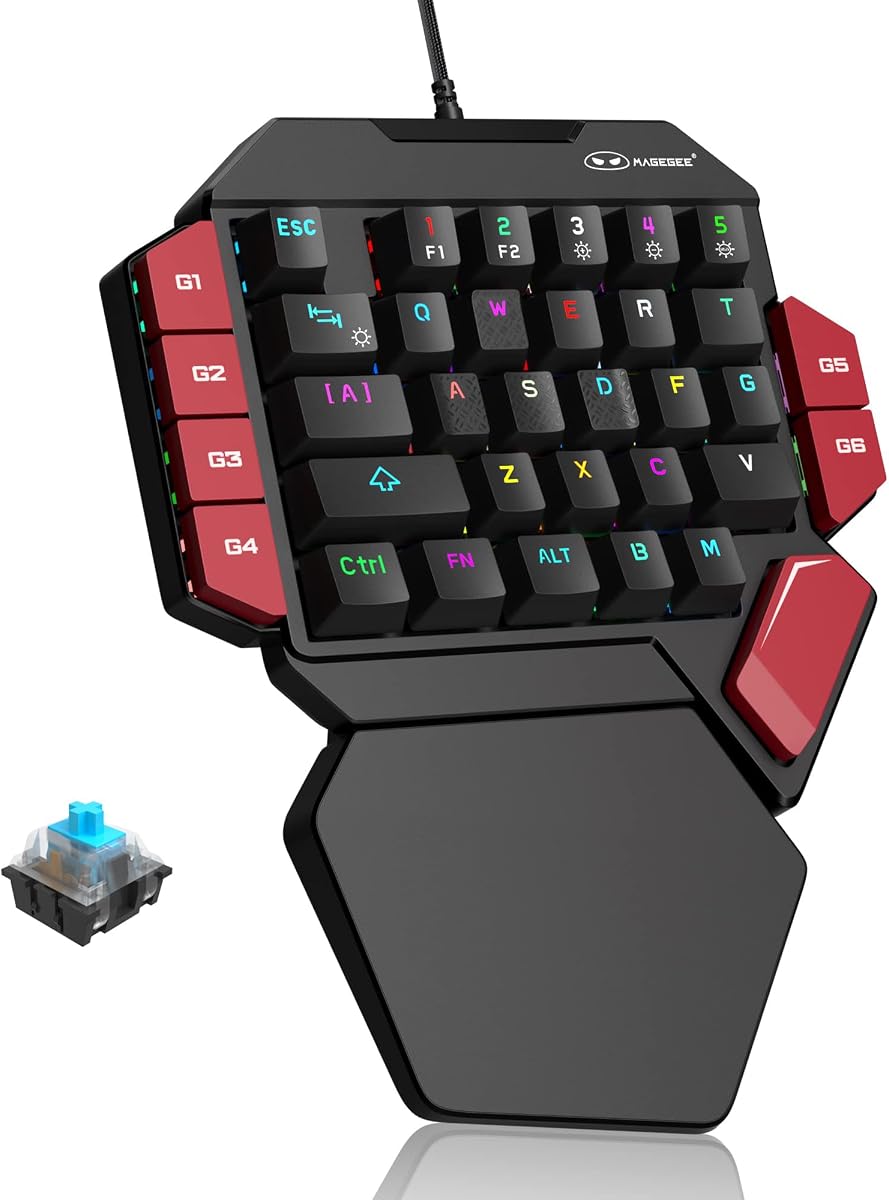
The MageGee One Handed Keyboard brings true mechanical feel to a compact form factor. With blue switches, it provides strong tactile feedback and an audible click that many typists and gamers enjoy.
We may earn a commission when you buy through this link, at no additional cost to you.
Six dedicated macro keys allow for quick access to complex commands without software. This simplicity is appreciated by users who prefer immediate functionality over deep customization menus.
The RGB lighting is vibrant and supports various modes, adding aesthetic value to your setup. The ergonomic design with a wrist rest ensures comfort during extended periods of use.
This keypad is perfect for those who love mechanical switches but need a smaller footprint. It delivers a satisfying typing and gaming experience without requiring additional software.
Blue switches provide clear feedback on each keystroke, ensuring accuracy and satisfying tactile response.
Record macros directly on the keypad for instant access without needing PC software.
We may earn a commission when you buy through this link, at no additional cost to you.
The AJAZZ AK029 is designed for gamers who want the absolute minimum footprint. With only 29 keys, it frees up maximum desk space for mouse movement, which is crucial for low-sensitivity FPS players.
We may earn a commission when you buy through this link, at no additional cost to you.
Equipped with Hall Effect magnetic switches, it offers rapid trigger and zero debounce delay. This ensures that every keystroke is registered instantly, providing a competitive edge in fast-paced games.
The aluminum-reinforced build offers durability and a premium feel despite the small size. The web driver allows for quick customization without installing heavy software on your PC.
This model is best for competitive FPS players who prioritize mouse space above all else. It combines portability with high-end performance features typically found in larger devices.
The compact design clears your desk for larger mouse movements, improving aim and tracking.
Rapid trigger and 8K polling deliver professional-level responsiveness for serious competitors.
We may earn a commission when you buy through this link, at no additional cost to you.
The standard Razer Tartarus V2 is a reliable choice for gamers seeking a trusted brand. With 32 programmable keys and a thumbpad, it covers the essential needs of MMO and strategy games effectively.
We may earn a commission when you buy through this link, at no additional cost to you.
Its mecha-membrane switches offer a balance between comfort and feedback, making it suitable for long gaming sessions. The Chroma RGB support ensures it integrates well with other lighting in your setup.
While it relies on software for macros, the ecosystem provides extensive customization. The build quality is robust, ensuring it stands up to daily use without significant wear and tear.
This keypad is ideal for users already invested in the Razer ecosystem. It provides a seamless experience across your hardware while delivering consistent performance for various game genres.
Syncs easily with other Razer devices for a unified lighting and control experience.
The angled design and wrist rest reduce strain, keeping your hand comfortable for hours.
We may earn a commission when you buy through this link, at no additional cost to you.
The Redragon RM104 offers a unique twist with its multifunction smart control knob. This feature allows you to adjust volume or RGB modes quickly, adding utility beyond just key presses.
We may earn a commission when you buy through this link, at no additional cost to you.
With tri-mode wireless connectivity, it connects seamlessly via Bluetooth, 2.4GHz, or USB-C. This flexibility supports multi-device setups and ensures a clean desk environment without cable clutter.
The 4000mAh battery supports long-term wireless use without frequent charging. The software enables you to customize keys and create profiles tailored to specific games or applications easily.
While not a traditional keypad, its versatility makes it a strong contender for users who want flexibility and style. The combination of wireless freedom and practical control features stands out in this category.
The dedicated knob simplifies media and lighting adjustments without leaving the keyboard.
Switch between devices effortlessly to use your gaming setup on multiple computers or consoles.
We may earn a commission when you buy through this link, at no additional cost to you.
Selecting the right gaming keypad depends on several critical factors that influence performance and comfort. Understanding these aspects ensures you invest in a device that truly enhances your gaming experience.
The type of switch determines the tactile and auditory feedback you receive. Mechanical switches provide a distinct click and tactile bump, while membrane or mecha-membrane switches offer a quieter and softer feel suitable for long sessions.
Consider your preference for noise and resistance when choosing. If you need rapid response times for competitive play, magnetic Hall Effect switches are a superior choice due to their adjustability and speed.
Keyboards range from 29 to 42 keys, affecting how many commands you can access without switching layers. A higher key count is beneficial for MMOs requiring frequent ability rotations, while fewer keys suit FPS players focused on mouse space.
Evaluate your primary game genres to find the right balance. If you play games with complex macro requirements, ensure the layout supports easy access to these commands without excessive finger stretching.
Connectivity dictates how the device interacts with your computer. Wired connections offer consistent low-latency performance, while wireless models provide freedom of movement and reduce cable clutter.
If you choose wireless, verify the battery life and connection stability. Bluetooth is great for multi-device use, but 2.4GHz wireless often ensures better performance for real-time gaming.
Software support is crucial for unlocking a keypad's full potential. Look for models that allow easy remapping of keys, creating macros, and adjusting lighting without requiring complex installations.
Web-based configurators are becoming popular for reducing bloatware. Ensure the software is user-friendly and compatible with your operating system to avoid headaches during setup.
Comfort is paramount for long gaming sessions. Look for ergonomic designs that support your wrist and reduce strain. Detachable wrist rests are a significant plus for adjustability.
Consider the build quality and materials used. A sturdy frame prevents unwanted movement during intense play, ensuring that your inputs remain accurate and consistent.
RGB lighting enhances the visual appeal of your setup and can serve functional purposes by highlighting specific keys. Ensure the lighting is customizable to match your personal style or game events.
Look for models that support sync with other peripherals if you are already invested in a specific ecosystem. This creates a unified look and allows for reactive lighting during gameplay.
Pricing varies significantly based on features and brand. Set a clear budget before searching to narrow down options. Sometimes, mid-range options offer better value than premium models with unnecessary features.
Consider the longevity of the device. A slightly higher upfront cost for better switches or build quality can save money in the long run compared to cheaper alternatives that may fail sooner.
Ensure the keypad is compatible with your operating system. Some devices work better with Windows, while others offer robust support for macOS or Linux environments.
If you travel frequently or switch computers, portability is key. Lightweight devices with detachable cables or wireless connectivity are ideal for gamers who move their setups regularly.
To get started, connect the keypad via USB or wireless dongle and ensure it is recognized by your computer. If using a driver, download it from the manufacturer's official website to unlock all features.
Customize your key bindings based on your most frequent in-game actions. Utilize macro functions to simplify complex sequences, but avoid overcomplicating them to prevent accidental inputs during critical moments.
Maintain your device by keeping it clean and free of debris. Use compressed air to remove dust from key switches and wipe down the surface regularly to prevent oil buildup from hands.
Most modern gaming keypads offer cross-platform support including macOS. Check the product specifications to confirm compatibility and ensure any required drivers are available for your specific operating system version.
Yes, they can be effective for typing. However, the layout may require adjustment if you rely on standard key positions. Many models allow remapping to accommodate standard QWERTY setups for general productivity.
Most quality switches are rated for 50 million keystrokes or more. Proper maintenance such as keeping dust out can extend this lifespan significantly, ensuring reliable performance for years of use.
Absolutely. In fact, this is a common setup. Gamers use the full keyboard for standard inputs and the keypad for complex macros or movement to maximize efficiency and comfort simultaneously.
Some keypads have onboard memory to store macros without software. However, advanced features usually require proprietary software. Look for models with hardware-based macro storage if you frequently change computers.
High-quality wireless models using 2.4GHz technology typically do not suffer from noticeable lag. Bluetooth may have slight delays, so check for specific latency claims if you play competitive fast-paced games.
We have highlighted ten exceptional gaming keypads that cater to various needs from budget-friendly options to premium competitive models. Each device offers unique strengths that can transform how you interact with your games.
Prioritize ergonomics and switch type to ensure comfort and responsiveness during long sessions. Consider your specific gaming genres and whether wireless or wired connectivity fits your desk setup best.
Prices and availability can change quickly, so verify current stock and pricing before making a final decision. Investing in the right tool can significantly elevate your gaming experience and performance.