
Ordilend Keyboard Cleaner Kit
4.6Editor score
Retractable Large Brush
Keycap Puller Included
Multi Function Tools
This guide compares the best laptop fan cleaning kits to help you choose the right electric air duster or brush set for keeping your devices dust free and cool.
Keeping your laptop running smoothly requires regular maintenance to prevent overheating and performance throttling. Dust buildup inside cooling fans and vents is a common culprit that reduces airflow and stresses internal components. Using a dedicated cleaning kit ensures you can safely remove debris without damaging sensitive electronics.
We evaluated ten top-rated products designed specifically for laptop and PC maintenance. Our comparison focuses on motor power, battery life, nozzle variety, and overall versatility for different cleaning tasks. Each option offers unique benefits whether you prefer cordless electric blowers or comprehensive manual brush sets.
This guide highlights the strengths and weaknesses of every model to help you make an informed decision. We review real-world performance, build quality, and included accessories for each product. Please note that availability and pricing may change so always check the current listing before purchasing.
4.6Editor score
4.4Editor score

4.5Editor score
Below is a side-by-side comparison of all ten products reviewed in this guide. Each entry lists key specifications and features to help you quickly identify the model that best fits your specific cleaning needs and budget constraints.




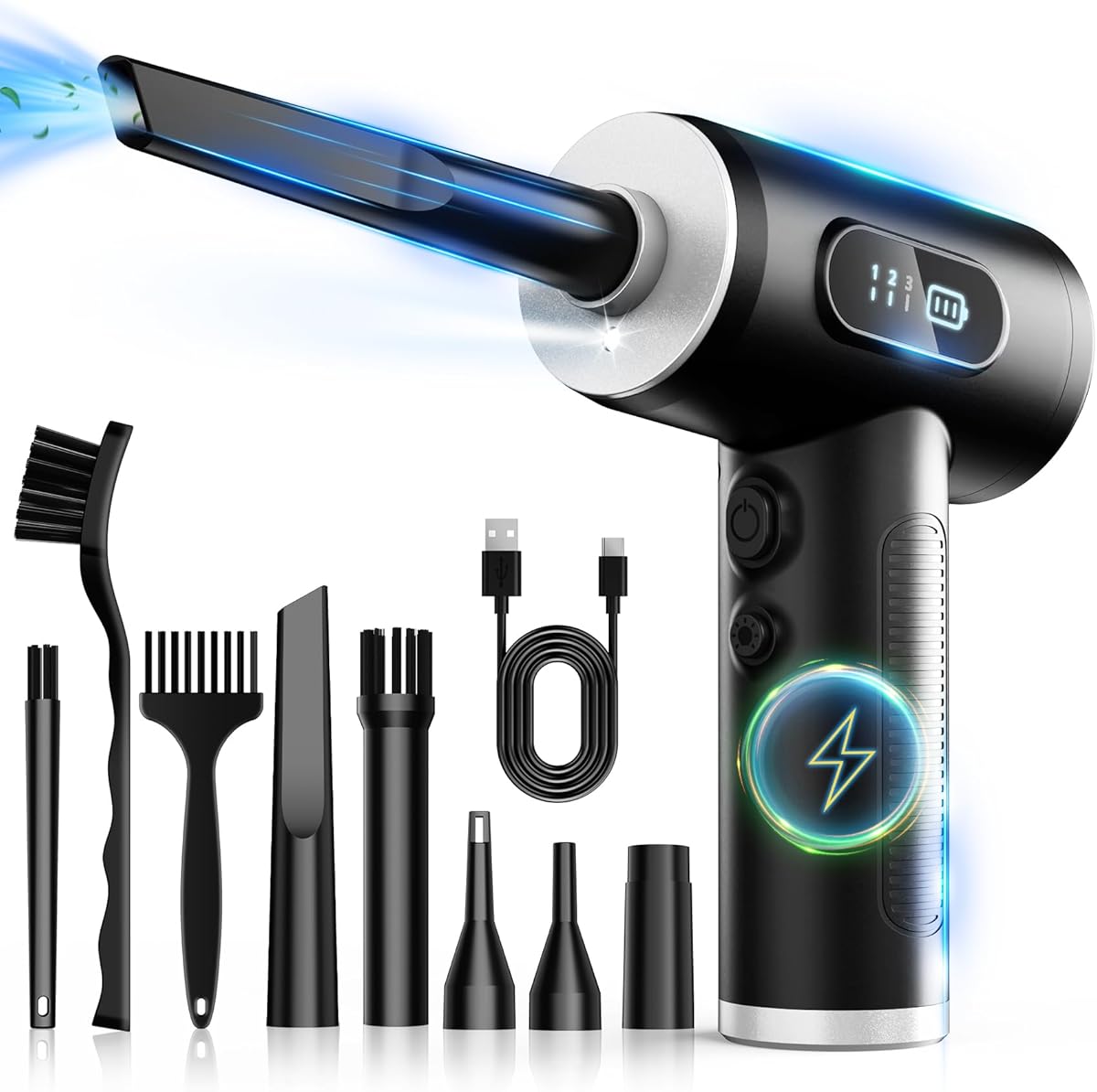
The FRESMOL Compressed Air Duster stands out as a top choice for maintaining laptop cooling systems and other electronics. With a rating of 4.4 stars users appreciate its powerful motor and convenient rechargeable design. This kit replaces disposable cans with a robust electric solution that delivers consistent airflow.
We may earn a commission when you buy through this link, at no additional cost to you.
Its 100000 RPM motor provides strong enough pressure to dislodge stubborn dust from deep within fan grilles and keyboard crevices. The three adjustable speed settings allow for gentle cleaning on delicate surfaces or high power for tough jobs. The smart LED display ensures you always know your battery status before starting a cleaning session.
While the device is effective, the battery duration may feel short when using maximum speed settings for extended periods. However, the fast charging capability minimizes downtime and the included nozzles and brushes cover almost every cleaning scenario you might encounter. The built-in light is a valuable addition for dark ports.
This duster is ideal for gamers, office workers, and anyone seeking a reliable tool for regular device maintenance. It balances power and portability better than many rivals in its class. If you want a versatile electric blower that lasts longer than canned air, this model delivers consistent performance for years.
The high RPM motor ensures dust is expelled rather than pushed deeper into vents, protecting internal components from overheating.
The LED display shows real-time battery levels so you never run out of power mid-cleaning task unexpectedly.
We may earn a commission when you buy through this link, at no additional cost to you.
For those seeking a budget friendly option, the Ordilend Keyboard Cleaner Kit offers remarkable value without sacrificing essential tools. With a 4.6 star rating it is praised for its variety of accessories tailored for laptops and desktops. This kit focuses on manual cleaning rather than electric air power.
We may earn a commission when you buy through this link, at no additional cost to you.
The retractable brush is effective for sweeping dust between keys and the included keycap puller helps deep clean mechanical keyboards thoroughly. Microfiber cloths and lens pens ensure screens stay streak-free while the metal pen tip removes stubborn stains from surfaces. The packaging keeps everything organized for travel.
The main trade-off is the lack of an electric air blower which means you cannot blast out deep dust from cooling fans as easily. This makes it better suited for surface cleaning and keyboard maintenance than deep internal fan repair. However, the included tools are sufficient for routine upkeep.
This kit is perfect for students, travelers, or anyone who needs a portable solution for daily touchups. It is an excellent gift for friends or family who own laptops or gaming rigs. If you prioritize cost and portability over high-powered air blasts, this set covers your basic needs effectively.
Includes everything from brush caps to lens pens ensuring you can clean every part of your device without buying extra items.
You get a wide range of accessories at a fraction of the cost of electric dusters making it ideal for tight budgets.
We may earn a commission when you buy through this link, at no additional cost to you.
The MiaEpic Z3 Electric Air Duster represents the high end of cleaning power with its 280000 RPM brushless motor. Rated 4.5 stars it is designed for users who demand maximum performance for PC towers and heavy-duty tasks. This premium tool eliminates the need for disposable cans entirely.
We may earn a commission when you buy through this link, at no additional cost to you.
The intelligent LCD screen provides real-time updates on battery status and speed levels preventing interruptions during critical cleaning sessions. With four adjustable settings you can choose low power for dusting or turbo mode for clearing thick debris from heatsinks. The Type-C fast charging ensures minimal downtime between uses.
While the power is impressive, it may be more than necessary for simple laptop keyboard dusting. The premium price tag also means you are investing in long-term durability rather than a cheap solution. The runtime on lower settings is substantial, making it worth the cost for frequent users.
This duster is best suited for IT professionals, serious gamers, or tech enthusiasts who maintain multiple devices. It offers a professional-grade experience that rivals industrial equipment while remaining portable. If you need a reliable heavy hitter for complex hardware cleaning this model delivers unmatched airflow performance.
The high-speed motor creates intense airflow that clears heavy dust buildup faster than standard electric blowers on the market.
By replacing hundreds of disposable cans this reusable unit reduces waste and saves money over its operational lifetime.
We may earn a commission when you buy through this link, at no additional cost to you.
The WOLFBOX MegaFlow 50 combines high speed with an extremely lightweight design for easy handling during cleaning tasks. With a 4.6 rating it is favored for its quick charging time and portable build. This duster uses a 110000 RPM motor to clear dust efficiently from various surfaces.
We may earn a commission when you buy through this link, at no additional cost to you.
Weighing only 0.45 lb this blower causes minimal hand fatigue even during extended use. The three-speed gears let you adjust power output based on the task at hand. Its compact size makes it easy to carry in a bag for on-the-go cleaning or storage in tight drawers.
The runtime on higher speeds is somewhat limited compared to battery-heavy rivals. Users should be mindful of battery levels when tackling large jobs like cleaning an entire car interior. However, the fast charging feature mitigates this issue significantly for most daily cleaning scenarios.
This model is an excellent choice for those who value portability and quick maintenance sessions. It is perfect for office workers who need to clean their desks regularly without bulk. If you prefer a light tool that charges fast, this duster provides strong performance in a compact package.
Its ultra-lightweight build ensures you can use it comfortably for long periods without wrist strain or fatigue.
Type-C fast charging restores battery levels quickly so you are ready to clean again in just a few hours.
We may earn a commission when you buy through this link, at no additional cost to you.
The Ordilend Keyboard Cleaner Kit focuses on providing a full suite of manual tools for all-around device hygiene. Its 4.6 star rating reflects user satisfaction with the variety of included accessories. This set is designed for those who prefer wiping and brushing over air blowing.
We may earn a commission when you buy through this link, at no additional cost to you.
You receive a retractable brush, polishing cloths, a keycap puller, and a lens cleaning pen in one package. The specialized tools help remove debris from key gaps and polish screens without streaks. The design emphasizes ease of use and quick cleanup after messy spills.
While effective for surface dust, it lacks the force needed for deep cooling fan cleaning. This means you may need to pair it with an air duster for complete internal maintenance. The plastic components feel functional but less durable than metal alternatives.
This kit is ideal for students or travelers who need a versatile cleaning solution in a backpack. It covers all the bases for screen and keyboard care without taking up much space. If you want a complete set for daily touchups, this manual kit offers great utility.
Includes every necessary accessory from brushes to wipes ensuring you can clean every part of your laptop in one go.
Specialized cloths and pens are designed to clean delicate screens without leaving streaks or damaging anti-glare coatings.
We may earn a commission when you buy through this link, at no additional cost to you.
This electric air duster features a 130000 RPM motor that delivers exceptional airflow for heavy-duty cleaning tasks. Rated 4.6 stars it is praised for its long battery life and versatile accessory set. The design emphasizes power and safety for reliable performance on sensitive electronics.
We may earn a commission when you buy through this link, at no additional cost to you.
The 8000mAh battery supports extended runtimes which is rare for handheld electric dusters. With four gears you can tailor the wind speed to specific tasks from gentle dusting to powerful blast cleaning. The included storage bag keeps all ten detail brushes organized and accessible.
The added weight from the larger battery might make it less comfortable for overhead cleaning tasks. Users should handle it with care to avoid dropping heavy components near equipment. However, the safety features like overheat protection provide peace of mind during intensive use.
This model suits users who need a reliable workhorse for multiple devices or large spaces. It is particularly good for car interiors where battery life matters most. If you want a balance of power and endurance, this duster provides consistent results over long sessions.
The large battery capacity ensures you can clean multiple devices without needing to stop and recharge frequently.
Built-in AI chips protect against overheating and overcharging extending the lifespan of the tool significantly.
We may earn a commission when you buy through this link, at no additional cost to you.
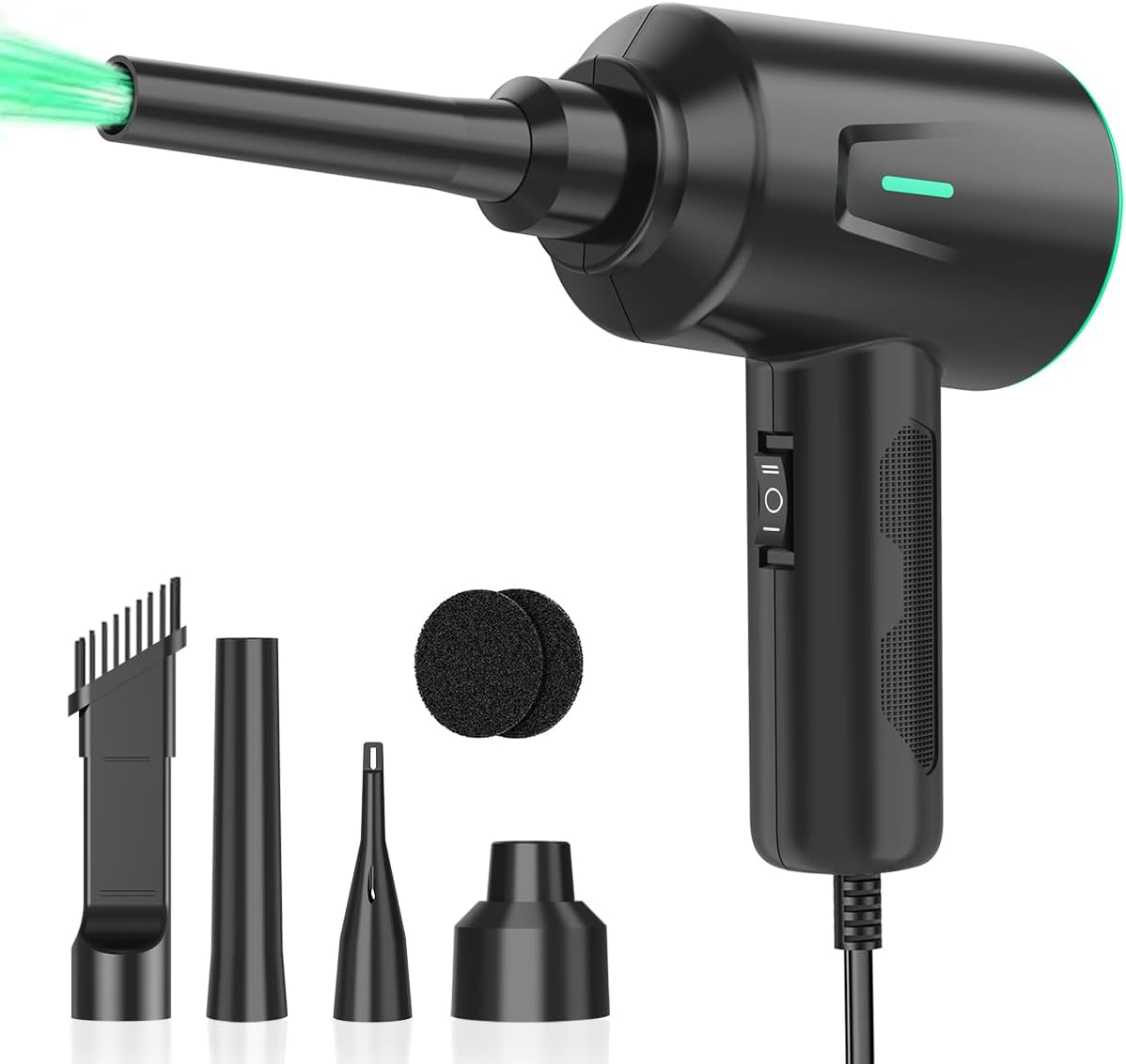
The Meudeen Air Duster offers a unique corded solution for users who prioritize consistent power over portability. With a 4.5 rating it is valued for its high-speed motor and steady airflow without battery limits. This model connects directly to mains power for unlimited runtime.
We may earn a commission when you buy through this link, at no additional cost to you.
The 8.2 foot cord provides ample reach around desks and workstations without needing extension cords. Its 200000 RPM motor delivers strong air pressure capable of cleaning deep into fan grilles. The two-speed settings allow for flexibility in different cleaning situations.
The main drawback is the reliance on a power outlet which limits its use for outdoor or travel tasks. Users must plan their cleaning area around available sockets. However, the steady performance makes it ideal for static workstations where mobility is not a primary concern.
This duster is perfect for home office setups or workshop environments where a power source is always nearby. It removes the worry of battery degradation over time. If you want a tool that always works at full power, this corded model is a practical choice.
Since it plugs into the wall you never have to worry about battery dying mid-task or charging times.
The motor speed ensures powerful airflow that clears dust quickly without needing prolonged blowing on the same spot.
We may earn a commission when you buy through this link, at no additional cost to you.
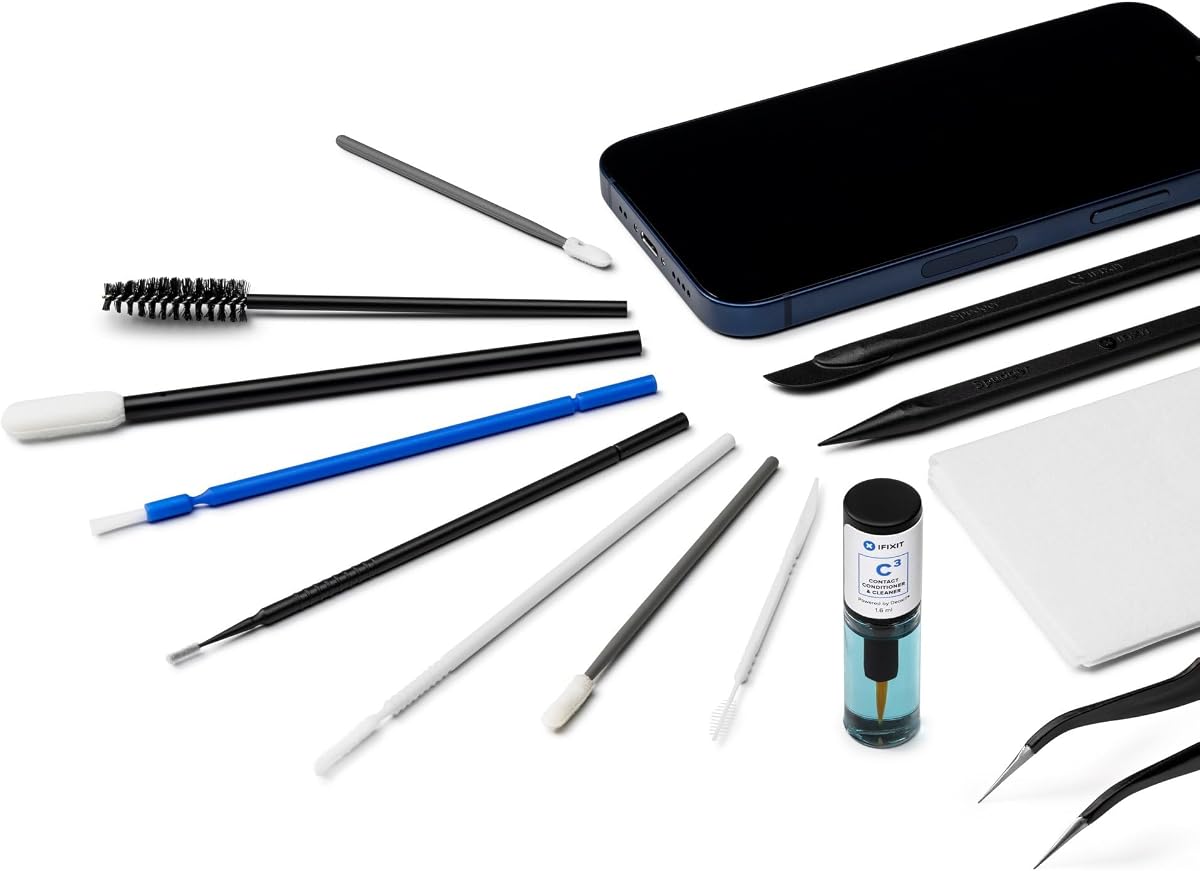
This kit from iFixit includes precision tools designed for detailed maintenance and repair work. With a 4.3 rating it is appreciated by tech enthusiasts for its specialized quality. The contents include chemical solutions and physical tools for hard-to-reach areas.
We may earn a commission when you buy through this link, at no additional cost to you.
Tools like the spudger and angled tweezers allow for precise removal of debris from ports and connectors. The inclusion of DeoxIT D100L adds a layer of protection for contacts during cleaning. The lint-free wipes ensure no residue is left behind on sensitive components.
While excellent for deep cleaning, the tools are often overkill for simple dust removal tasks. The learning curve for using some tools properly might be steep for casual users. However, for those who build PCs or repair devices, the precision is invaluable.
This kit is best suited for hobbyists, repair professionals, or advanced users. It provides a level of detail that standard dusting tools cannot match. If you need tools for intricate electronic work, this set offers professional-grade components and materials.
Includes specific chemical agents like DeoxIT that protect contacts while cleaning ensuring long-term device health.
Includes tweezers and picks designed to remove debris from narrow gaps without scratching surrounding components.
We may earn a commission when you buy through this link, at no additional cost to you.
This set offers ten different brush sizes tailored for various electronic cleaning needs. Rated 4.4 stars users appreciate the range of tools for different tasks. The focus is on physical removal of dust without air power.
We may earn a commission when you buy through this link, at no additional cost to you.
The anti-static feature is crucial for safely cleaning motherboards without risking electrical damage. Soft bristles protect delicate screens and lenses while hard brushes tackle heavy debris. This variety ensures you have the right tool for any small space.
The downside is the lack of air power which makes deep fan cleaning difficult. You must physically brush dust out rather than blast it away. This may take more time for large areas compared to an electric blower.
This kit is perfect for detailed cleaning work like camera sensors or PC internals. It is an affordable addition to any tech enthusiast's toolbox. If you need a brush set for sensitive components, this variety offers excellent coverage and safety.
Nylon materials prevent static discharge that could damage sensitive electronic parts during manual cleaning.
Ten sizes allow you to access everything from wide vents to tiny ports with the right fit.
We may earn a commission when you buy through this link, at no additional cost to you.
This electric blower provides a reliable balance of power and convenience for everyday tasks. With a 4.4 rating it is valued for its cordless design and LED feature. It handles everything from laptops to car interiors effectively.
We may earn a commission when you buy through this link, at no additional cost to you.
The built-in LED light illuminates dark crevices making it easier to see where dust is hiding. Five nozzles and four brushes offer enough versatility for most cleaning needs. The ergonomic grip ensures comfortable handling during longer sessions.
While functional, the power output is standard compared to ultra-high RPM models. It might not clear extremely stubborn debris as quickly as heavier units. However, for general maintenance, it performs well without unnecessary bulk.
This duster is ideal for general users who want a simple tool for multiple areas. It is great for quick cleanups on weekends or travel. If you want a versatile and light tool for daily dusting, this model offers consistent and convenient performance.
The integrated light helps you spot dust in dark corners ensuring thorough cleaning every time.
The design fits naturally in your hand reducing strain during repetitive cleaning motions.
We may earn a commission when you buy through this link, at no additional cost to you.
Choosing the right cleaning kit depends on your specific needs and preferences. Consider these factors to find the perfect match for your devices.
The power of the motor determines how effectively dust is removed from tight spaces. Higher RPM ratings generally mean better performance for deep cleaning. Look for motors above 100000 RPM for tough jobs.
Choose higher power for internal fans and lower power for delicate screens.
For cordless units, battery life is crucial for uninterrupted cleaning. Check the runtime on different speed settings to match your usage. Fast charging options reduce downtime significantly.
Prioritize models with long runtime if you clean large spaces regularly.
Different attachments allow you to reach various angles and surfaces. A good kit includes nozzles for vents and brushes for keyboards. Flexibility is key to comprehensive cleaning.
Ensure the kit includes tools specifically designed for laptop ports and vents.
A durable build ensures the tool lasts for years of regular use. Look for high-quality materials that resist wear and tear. Reputable brands often offer better warranty support.
Invest in a sturdy model to avoid frequent replacements.
If you travel frequently, a lightweight design is essential. Heavy tools can cause fatigue during extended cleaning sessions. Compact cases help keep everything organized.
Choose a lighter model if portability is a top priority.
User-friendly interfaces like displays or simple buttons enhance the cleaning experience. Complicated controls can make the process frustrating. Clear instructions help get the most out of the tool.
Look for intuitive designs that make setup and usage simple.
Safety features like anti-static materials or overheat protection protect your devices. These prevent accidental damage during the cleaning process. Always check for certifications before purchasing.
Safety features are critical when cleaning sensitive electronics.
Start by powering off your laptop and unplugging all cables to ensure safety. Turn on your cleaning tool and select the appropriate speed setting for the task.
Use nozzles to direct airflow into cooling vents and ports while keeping the device upright to avoid pushing dust further in.
Store your kit in a dry place after use and charge the battery periodically if it is rechargeable to maintain performance.
Electric dusters are more cost-effective and eco-friendly since they are reusable. They also provide consistent airflow without freezing risks. Most users prefer them for regular maintenance tasks.
Yes, but use soft brushes or specific nozzle attachments to avoid scratching. Always start with a gentle setting to protect the coating. Many kits include lens-safe tools.
It depends on your environment. If you are in a dusty place, clean every three months. Otherwise, a semi-annual check is usually enough to prevent overheating.
Most kits designed for laptops also work on consoles like PS5 or Xbox. Just use the correct nozzle settings for vents. Always power off the device first.
Always turn off devices before cleaning to avoid electrical damage. Do not spin fans with air pressure as this can damage bearings. Wear eye protection if blowing dust aggressively.
Most models use Type-C cables for fast charging. Plug the unit into a standard USB adapter. Ensure the battery is fully charged before first use for best results.
We have reviewed ten top options ranging from powerful electric dusters to comprehensive manual kits. Each model offers unique benefits suited for different cleaning needs and budgets.
Consider your priority whether it is speed, portability, or detailed control when making your decision. Investing in a quality tool ensures your devices stay cool and perform well.
Remember to check the latest availability and pricing on the product pages before buying. Prices may fluctuate and new models are released regularly to enhance your cleaning options.