
Hyperkin Trooper 2 Premium USB Game Controller
4.1Editor score
Classic Atari Feel
Ergonomic Design
10 Foot USB Cable
Discover the top Mac game joysticks for 2026. Our guide compares controllers for flight sims, retro arcade, and modern gaming on macOS systems.
Finding the right Mac game joysticks can transform your gaming experience on macOS. Whether you prefer flight simulators or classic arcade action, the right controller offers precision and comfort. We have selected ten top options to help you choose.
This guide evaluates products based on compatibility, build quality, and user feedback. Each item has been reviewed for its performance with macOS and its overall value. Our comparisons highlight key features like connectivity, ergonomics, and specialized functions for different game genres.
Each pick shows what makes a product stand out in the crowded market. You will find detailed specs and honest pros and cons for every model. Please note that prices can fluctuate, so checking the current listing is always recommended before buying.
4.1Editor score

4.3Editor score

4.0Editor score
Here is a side-by-side comparison of all ten Mac game joysticks to help you decide quickly based on key features and compatibility.




The abxylute C6 Wireless PC Controller stands out as a top choice for Mac users seeking precision. With a rating of 4.3 stars, it delivers on durability and performance for various gaming needs.
We may earn a commission when you buy through this link, at no additional cost to you.
Its Hall Effect joysticks ensure no drift, making it reliable for long sessions. The 1000Hz polling rate minimizes lag, giving you a competitive edge in fast-paced games on your Mac.
While Bluetooth is convenient, the wired or dongle mode offers better responsiveness. Some users may find the button layout takes time to adjust to if coming from other brands.
This controller is ideal for gamers who want modern features without a high price tag. We recommend it for anyone looking for a versatile Mac game joystick.
Hall Effect technology uses magnets to detect stick position, preventing the wear and tear that causes drift in traditional controllers.
Choose between wired, Bluetooth, or 2.4G wireless to match your setup and latency preferences on your Mac or other devices.
We may earn a commission when you buy through this link, at no additional cost to you.
The Hyperkin Trooper 2 offers a nostalgic gaming experience at a budget-friendly price. Rated 4.1 stars, it appeals to retro gamers and casual users alike.
We may earn a commission when you buy through this link, at no additional cost to you.
Its ergonomic design and long USB cable make it easy to use for extended periods. The classic feel brings back memories of arcade cabinets while working on modern Mac systems.
While it lacks modern wireless features, the reliability of a wired connection ensures consistent performance. Some may miss advanced customization options found in pricier models.
This is the perfect pick for those on a tight budget who still want quality. It is a solid Mac game joystick for emulation and retro play.
Designed to mimic classic controllers, this device brings old school charm to your modern Mac gaming setup.
Chamfered corners and soft grips reduce hand fatigue during long gaming sessions.
We may earn a commission when you buy through this link, at no additional cost to you.
The Thrustmaster T-Flight Stick X provides immersive flight simulation control. With a 4.2 rating, it offers features essential for pilots in the sky.
We may earn a commission when you buy through this link, at no additional cost to you.
Its adjustable resistance and weighted base give precise command over maneuvers. The integrated throttle and rudder twist add realism without needing extra pedals on your desk.
Mac users should verify driver compatibility as it is marketed heavily towards Windows. However, basic functionality often works out of the box for many sim titles.
Flight enthusiasts will appreciate the realistic feel and durability. Consider this Mac game joystick if you prioritize aviation simulations.
Tune the stick tension to match your flying style, from gentle turns to aggressive dogfights.
Save desk space with a built-in throttle and rudder twist instead of buying separate accessories.
We may earn a commission when you buy through this link, at no additional cost to you.
The MAYFLASH F300 brings arcade authenticity to your Mac. Rated 4.5 stars, it is built for fighting game enthusiasts who demand speed.
We may earn a commission when you buy through this link, at no additional cost to you.
Its design allows for easy customization with Sanwa parts, ensuring it matches your personal style. It supports Turbo functions and works across many consoles including Mac.
Due to its size, ensure you have enough desk space. While it is versatile, some users might need an adapter for newer PlayStation consoles.
This is a top choice for competitive fighters on Mac. Its solid build ensures it handles intense gaming sessions well.
The platform is accessible for swapping buttons and joysticks to suit your playstyle.
Activate rapid-fire attacks with different speed settings for a competitive edge.
We may earn a commission when you buy through this link, at no additional cost to you.
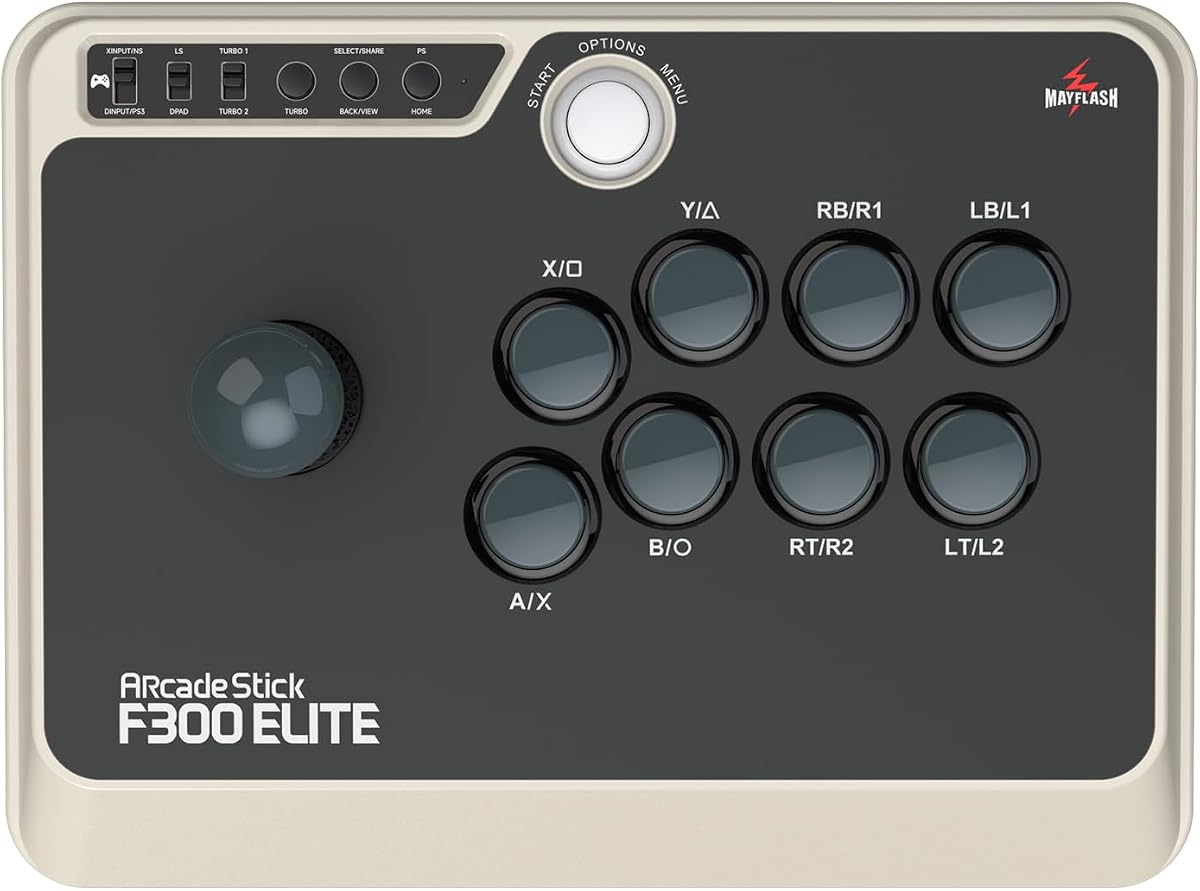
The MAYFLASH F300 Elite offers premium quality with Sanwa components. Rated 4.6 stars, it ensures peak performance for serious arcade gamers on Mac.
We may earn a commission when you buy through this link, at no additional cost to you.
Its nine buttons and precision joystick deliver reliable strikes every time. The accessible interior allows for future customization to adapt to evolving needs.
While heavier and more expensive than the standard model, the build quality justifies the cost. It is a significant upgrade for those who play daily.
Invest in this Mac game joystick for a professional feel. It stands out as a high end option for fighting games.
Using top-tier Sanwa components means faster inputs and a longer lifespan.
The accessible design lets you upgrade parts later without replacing the whole unit.
We may earn a commission when you buy through this link, at no additional cost to you.
The Thrustmaster SimTask FarmStick is designed specifically for farming sims. With a 3.7 rating, it targets a niche but dedicated group of users.
We may earn a commission when you buy through this link, at no additional cost to you.
Its 3-axis joystick and Hall Effect sensors offer precise control for heavy machinery. The many programmable inputs allow management of functions without a keyboard.
It works well with racing wheels to build a full cockpit. While effective, it is less versatile for general gaming compared to other models.
Farm sim fans will find this Mac game joystick indispensable. Check compatibility with your specific simulation software before purchasing.
Experience lifelike operation of tractors and loaders with a smooth 3-axis joystick.
Pair with a steering wheel for a full cockpit experience tailored to your playstyle.
We may earn a commission when you buy through this link, at no additional cost to you.
The 8Bitdo Ultimate 2 Wireless Controller blends performance and convenience. Rated 4.5 stars, it appeals to those who value wireless freedom on Mac.
We may earn a commission when you buy through this link, at no additional cost to you.
Its TMR joysticks provide high sensitivity and durability. The exclusive 2.4G technology ensures stable connections with minimal lag for responsive gameplay.
Included back paddles and a charging dock add value to the package. Some users may find the physical design substantial on smaller desks.
This Mac game joystick is great for modern gaming across devices. Consider it if wireless reliability is your top priority.
Tunnel Magnet Resistance sticks offer higher sensitivity and longer life than traditional analog sticks.
The multifunctional charging dock keeps your controller ready to play without cluttered cables.
We may earn a commission when you buy through this link, at no additional cost to you.
The Moonag Wireless PC Controller combines modern tech with visual flair. Rated 4.3 stars, it offers Hall Effect precision and RGB lighting for immersive play on Mac.
We may earn a commission when you buy through this link, at no additional cost to you.
Its anti-drift design ensures longevity and smoother control. The ergonomic shape and textured grip reduce fatigue during extended sessions.
While the lighting adds style, customization options might be limited compared to other brands. It remains a strong contender for general gaming needs.
This Mac game joystick suits those who want style and substance. It delivers solid performance for the price.
Dynamic RGB lighting around the sticks and buttons creates a vivid gaming atmosphere.
Sensors prevent stick drift, ensuring your inputs stay accurate over time.
We may earn a commission when you buy through this link, at no additional cost to you.
The Logitech G X56 H.O.T.A.S is a powerhouse for flight enthusiasts. With a 4.0 rating, it offers military-grade precision for combat and space simulations.
We may earn a commission when you buy through this link, at no additional cost to you.
Its 189 programmable controls and adjustable spring system allow for deep customization. The RGB lighting adds a high-end touch to your setup.
Complex setup may require patience, and the price is steep. Mac users should verify system requirements carefully before committing to this large unit.
This Mac game joystick is for serious simmers ready to invest. It represents the top tier of flight control hardware.
Hall-effect sensors and 16-bit axes deliver the exact performance demanded by aspiring pilots.
Four spring options let you tailor the stick force to your personal strength and preference.
We may earn a commission when you buy through this link, at no additional cost to you.
The SPEEDLINK Competition PRO brings back the charm of classic arcade machines. With a 3.9 rating, it is a nostalgic choice for retro gaming on Mac.
We may earn a commission when you buy through this link, at no additional cost to you.
Its design mirrors original arcade sticks, delivering a familiar feel for vintage titles. The included game collection adds extra value for collectors.
It lacks modern features like wireless or advanced customization. Users seeking a digital stick for retro platforms may appreciate its simplicity.
This Mac game joystick is perfect for retro enthusiasts. It captures the essence of old school gaming well.
Taken from the original Competition Pro, it brings authentic arcade visuals and feel.
The Anniversary Edition includes a collection of twenty retro games for download.
We may earn a commission when you buy through this link, at no additional cost to you.
Selecting the right Mac game joysticks involves considering compatibility, game type, and budget. Here are key factors to help you decide.
Ensure the controller supports macOS to avoid driver issues. Check product descriptions for explicit Mac OS support before buying.
Always verify compatibility with your specific macOS version and game titles.
Choose between wired and wireless based on your needs. Wired options reduce latency, while wireless offers flexibility.
Consider Bluetooth or dongle options for a clean setup on your desk.
Pick a joystick suited to your favorite games. Flight sims need specialized sticks, while arcade games need fight sticks.
Match the device type to the genre for the best experience.
Look for durable materials like metal or reinforced plastic. High quality construction ensures the device lasts through heavy use.
Check reviews for feedback on long term durability.
Comfort is key for long gaming sessions. Look for comfortable grips and balanced weight.
Ensure the controller fits well in your hands.
Advanced users may want mappable buttons or swappable parts. Check if the controller supports software mapping.
Customization adds flexibility to your setup.
Set a realistic budget before shopping. Prices vary widely from simple USB sticks to complex flight systems.
Balance cost with the features you really need.
Hall Effect sensors prevent drift better than traditional potentiometers. Look for this tech if you play often.
It ensures long term accuracy and reliability.
Connect your joystick via USB or Bluetooth. Wait for macOS to recognize the device automatically before launching your game.
Calibrate settings through system preferences if needed. This ensures inputs match your movements perfectly.
Keep connectors clean and avoid placing heavy objects on wires to maintain longevity.
Most modern controllers work with recent macOS versions, but you should verify compatibility. Older devices might need drivers that are not available for new systems.
Wired controllers often provide lower latency, which is crucial for competitive play. Wireless offers convenience, but dongles can reduce lag effectively.
Yes, many flight sticks support macOS but check driver availability. Some models require software configuration to work smoothly on Apple systems.
Hall Effect uses magnets to detect stick position, preventing drift over time. It offers higher durability compared to traditional resistive sticks.
Many arcade sticks work natively on Mac via USB. However, console specific models may need adapters for PC compatibility.
First try recalibrating the stick in system settings. If that fails, consider a controller with Hall Effect sensors to prevent the issue permanently.
Retro controllers are excellent for emulation and nostalgia. They are simple to set up but lack advanced features of modern devices.
Basic models start under $30 while premium ones can exceed $200. Choose a price range that matches your gaming needs and budget constraints.
The abxylute C6, Hyperkin Trooper 2, and Logitech G X56 lead our list for different needs. Each option brings unique strengths to the table for Mac users.
Prioritize compatibility and game genre when making your decision. A good match ensures you get the most out of your hardware investment.
Prices can fluctuate, so review current listings before purchasing. Check the provided links to ensure you get the best deal available today.