
Computer Speakers for Desktop PC Monitor
4.2Editor score
USB-C adapter included
Clip-on monitor mount
Touch control buttons
This guide compares the top external speakers for MacBook users seeking improved audio clarity, bass response, and seamless connectivity for work and entertainm
Finding the right external speakers for your MacBook can transform your audio experience significantly. Whether you are editing videos, attending meetings, or enjoying media, quality sound matters. This guide explores the best options available to enhance your desktop workspace effectively.
We evaluated various models based on connectivity, sound quality, design, and compatibility with macOS. Our selection includes USB, Bluetooth, and hybrid options to suit different needs. Each product was chosen for its ability to integrate smoothly with Apple ecosystems and deliver reliable performance.
Every pick highlights key features, pros, and cons to help you decide quickly. Prices and availability change frequently, so verify details before purchasing. We aim to provide clear, honest insights to support your buying decision without overwhelming you with technical jargon.
4.2Editor score

4.5Editor score
4.5Editor score
The following table provides a side-by-side comparison of all ten selected speakers. It highlights core specifications and connectivity features to help you identify the best match for your MacBook setup quickly and efficiently.




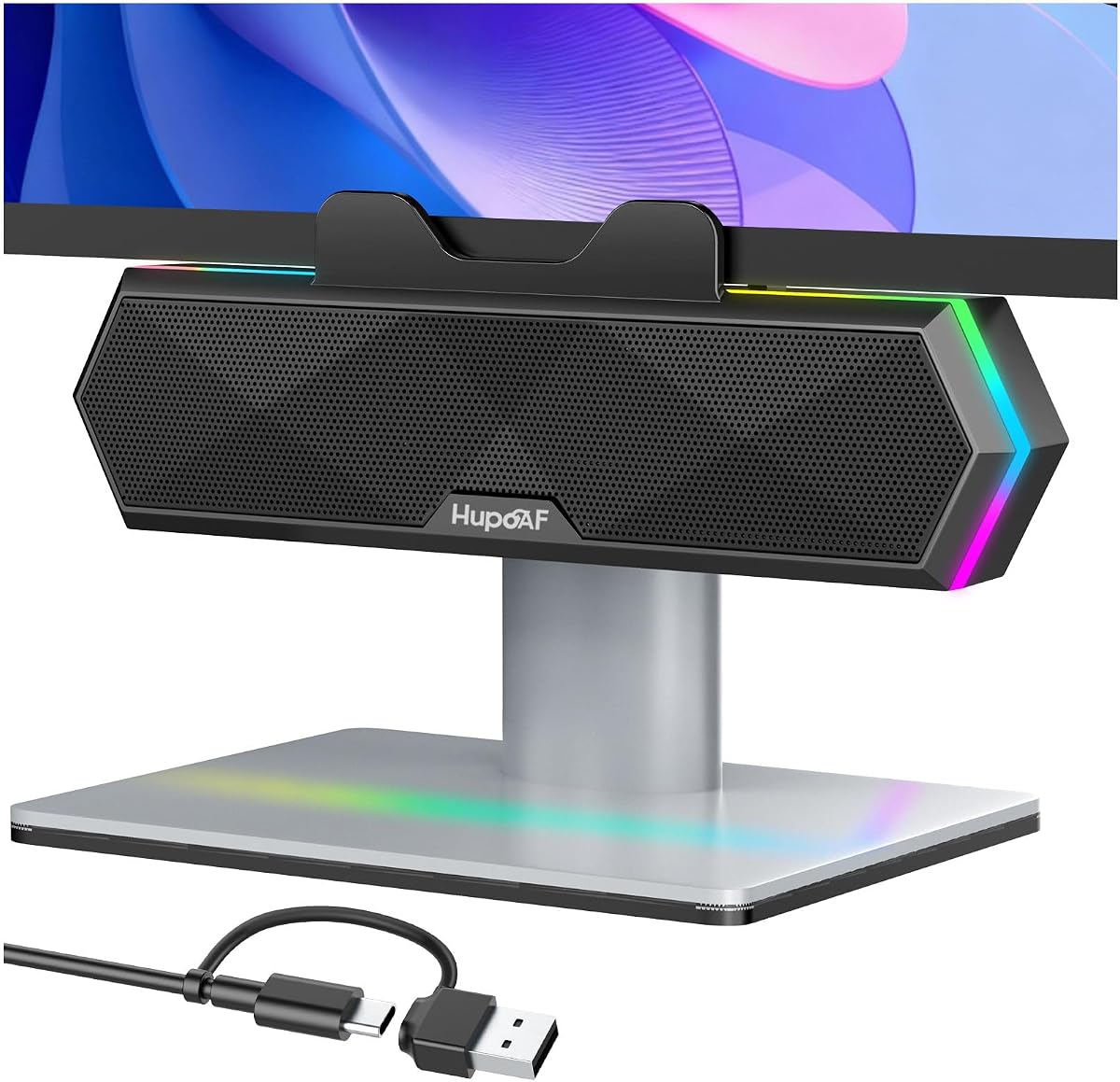
This compact speaker system offers an accessible entry point for MacBook users seeking external audio. It combines a USB-C adapter with a versatile clip-on design, making it ideal for laptops and desktops alike. The rating reflects consistent performance in casual listening environments.
We may earn a commission when you buy through this link, at no additional cost to you.
The dual ultra-magnetic drivers deliver surprisingly loud sound with deep bass despite the small footprint. Adaptive-channel-switching ensures left and right audio remain correct regardless of mounting position. Touch controls simplify volume adjustments without reaching for your keyboard or mouse.
While the build feels plastic and volume has limits, the value proposition is strong for students or home offices. The clamp design saves desk space effectively. It is a practical choice if you prioritize simplicity and cost over audiophile-grade fidelity.
Buy this if you need immediate plug-and-play audio enhancement without cluttering your workspace. It fits well with modern MacBook setups lacking traditional ports. The included adapter ensures compatibility with newer devices while maintaining a clean cable profile.
The clip-on mount attaches securely to monitors, freeing up valuable desk surface for other peripherals or documents.
Included adapter ensures seamless connection to MacBooks with only USB-C ports, eliminating the need for dongles.
We may earn a commission when you buy through this link, at no additional cost to you.
Amazon Basics delivers a straightforward stereo solution that works well with MacBooks via standard ports. These speakers rely on USB for power and a 3.5mm jack for audio, ensuring broad compatibility. The rating indicates dependable performance for everyday tasks.
We may earn a commission when you buy through this link, at no additional cost to you.
The inline volume control provides quick access without digging into system settings. Blue LED lights indicate power status clearly. The bottom radiator enhances bass response slightly above typical budget expectations. Metal finishes add a touch of durability to the plastic housing.
Sound quality is adequate for calls and videos but lacks richness for music enthusiasts. The absence of Bluetooth limits wireless convenience. However, the simplicity ensures fewer points of failure and easy troubleshooting if issues arise during use.
Choose this if you need a no-fuss replacement for weak built-in MacBook speakers. It suits workstations where wired reliability outweighs premium features. The price point makes it easy to recommend for shared offices or temporary setups.
Using USB and aux connections avoids pairing issues, ensuring consistent audio output during important meetings or playback.
Inline dial allows immediate adjustments without interrupting your workflow or switching active windows on your screen.
We may earn a commission when you buy through this link, at no additional cost to you.
Logitech Z207 offers a blend of wired and wireless options suitable for versatile MacBook environments. The Easy-Switch feature lets you toggle between devices seamlessly, which is useful for multi-device setups. Ratings highlight consistent clarity and ease of use.
We may earn a commission when you buy through this link, at no additional cost to you.
Bluetooth 4.2 provides stable connections for music and videos. Passive radiators extend bass frequency range without requiring amplification. A dedicated headphone jack on one speaker allows private listening. Controls on the unit simplify pairing and power management.
The design is larger than modern ultra-thin MacBook desks, which might impact aesthetics. Bluetooth version is older than current standards but remains functional. Still, the convenience of wireless streaming often outweighs the space trade-off for many users.
Opt for this if you want flexibility between your MacBook and other devices without multiple dongles. It suits those who value brand reliability and straightforward controls. The headphone jack adds utility for private calls in shared spaces.
Easy-Switch allows pausing on one device and playing on another instantly, streamlining workflow across phone and computer.
Passive radiators amplify low frequencies physically, delivering deeper sound without needing extra power or large cabinets.
We may earn a commission when you buy through this link, at no additional cost to you.
Creative Pebble V3 combines USB-C direct power with Bluetooth 5.0, matching modern MacBook ports effectively. Its compact design fits neatly under monitors or on small desks. The rating reflects appreciation for its clean setup and balanced sound profile.
We may earn a commission when you buy through this link, at no additional cost to you.
The 45-degree elevated drivers direct audio straight to ear level for optimal stereo imaging. A gain switch boosts volume when connected to higher wattage ports. Clear Dialog audio processing enhances speech clarity during conferences without raising background noise unnaturally.
It requires a capable USB-C port for maximum volume, which may not work on older Macs without converters. The aux cable is sold separately, adding slight extra cost. Despite these minor points, it remains a top contender for contemporary setups.
Select this if you prioritize a tidy desk with minimal cabling and strong wireless capabilities. It works well for MacBooks with USB-C ports as the primary power source. The elevated drivers ensure you hear sound directly rather than reflecting off surfaces.
Angled drivers aim sound directly at your head, improving stereo separation and reducing need for high volume levels.
Toggle gain mode to extract maximum volume from high-power USB ports, useful for larger rooms or louder environments.
We may earn a commission when you buy through this link, at no additional cost to you.
Edifier M60 delivers high-end audio performance with 66W RMS output and Hi-Res certification. Its design supports both wired and wireless high-fidelity streams via LDAC codec. This makes it a standout for creators and enthusiasts using MacBook Pro or Air for serious projects.
We may earn a commission when you buy through this link, at no additional cost to you.
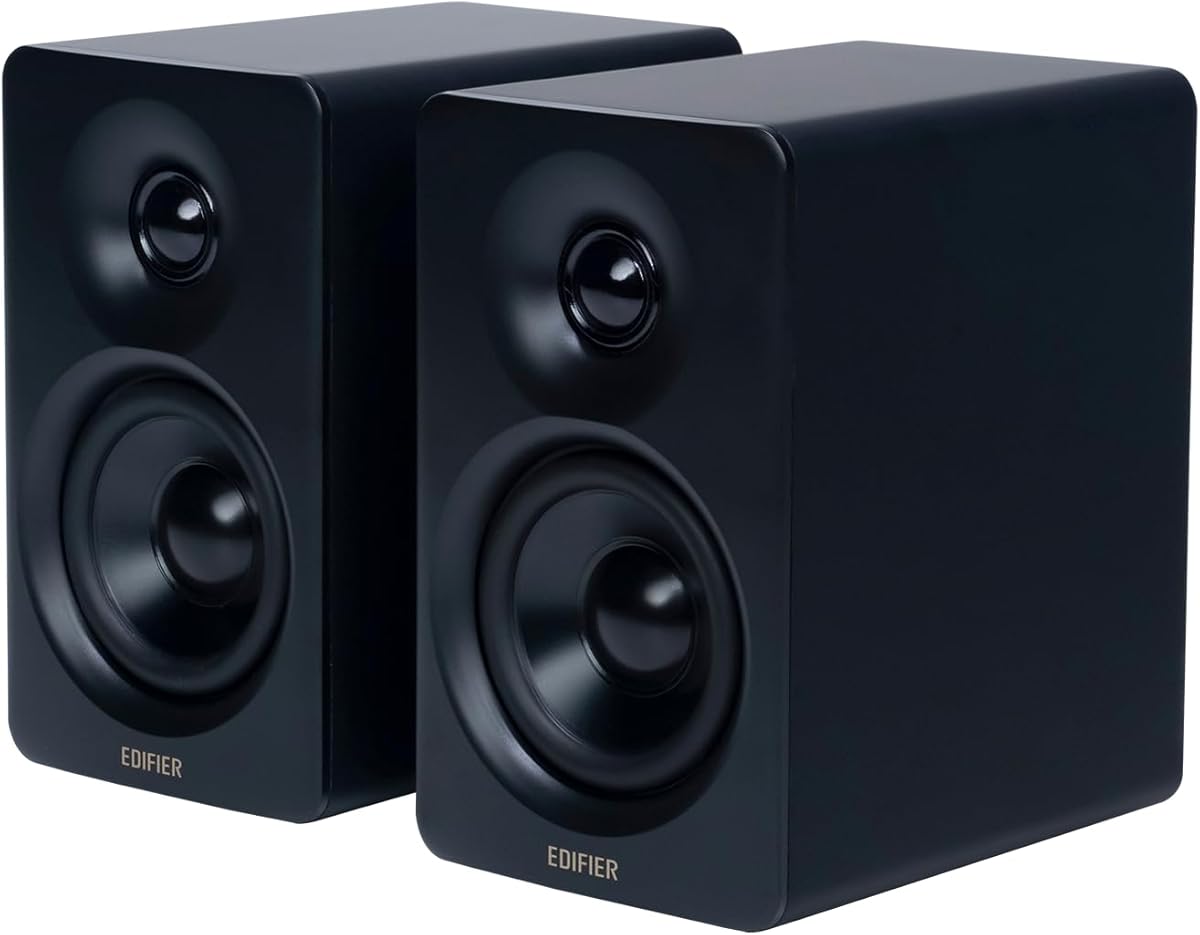
The built-in DSP ensures precise crossover and dynamic range control for accurate sound. Aluminum stands elevate speakers to ear level to reduce distortion. Capacitive touch panels offer intuitive volume and playback control without visible knobs that break visual flow.
While powerful, it occupies significant desk space and costs more than entry-level options. Wireless streaming quality depends on source device support for LDAC, which some Macs lack natively. Still, the sound fidelity justifies the investment for critical listening sessions.
Invest in this if you need studio-quality sound for mixing, editing, or immersive media. The stands and high-resolution support provide a complete professional solution. It suits those prioritizing audio precision over compact size or budget constraints.
Support for high-resolution files ensures you hear every detail in your media without compression artifacts losing quality.
Aluminum stands position drivers at ear height, directing sound paths for better imaging and reduced floor reflections.
We may earn a commission when you buy through this link, at no additional cost to you.
Edifier MR3 is designed for accurate monitoring with a flat frequency response from 52Hz to 40kHz. It includes TRS, RCA, and AUX inputs for broad connectivity with various audio sources. The rating reflects strong performance in professional and daily usage scenarios.
We may earn a commission when you buy through this link, at no additional cost to you.
MDF cabinets reduce resonance and distortion compared to plastic alternatives. Customizable EQ modes let you tailor sound via the companion app. Bluetooth supports multi-point connection, allowing simultaneous pairing with phone and Mac for seamless switching during calls.
Bass extension stops short of subwoofer territory, which may disappoint bass-heavy genres. Calibration via app requires time to optimize for room acoustics. Yet, the accuracy and connectivity options make it a balanced choice for hybrid work environments.
Choose this if you need neutral sound for editing or precise audio playback across devices. It bridges the gap between consumer speakers and professional monitors effectively. The multi-point Bluetooth adds significant convenience for users juggling multiple devices.
Connect two devices simultaneously and switch audio sources without re-pairing, ensuring smooth transitions during work.
Flat response ensures audio sounds as intended without artificial boosting, essential for video and music production accuracy.
We may earn a commission when you buy through this link, at no additional cost to you.
These upgraded USB speakers offer a compact and effective solution for MacBook users who prefer wired simplicity. They plug directly into USB ports for power and audio, eliminating separate aux cables. The rating shows satisfaction with loud output and setup ease.
We may earn a commission when you buy through this link, at no additional cost to you.
Dual 3W drivers with passive radiators provide enhanced bass without distortion. They work across Windows, macOS, and Linux without driver installations. The single cable reduces clutter significantly compared to traditional stereo pairs needing separate connections for power and audio.
High frequencies lack some detail compared to more expensive units, which affects music clarity. The absence of Bluetooth means no wireless convenience. However, for focused work or gaming where latency matters, the wired connection ensures consistent performance.
Pick this if you want a no-fuss wired setup that saves space and time. It suits environments where Bluetooth is unreliable or unnecessary. The broad OS compatibility ensures it remains useful if you switch systems in the future.
USB carries both power and audio signals, reducing cable clutter and simplifying connection to a single port.
Passive radiators resonate with driver movement to deepen bass without requiring extra power or larger speaker enclosures.
We may earn a commission when you buy through this link, at no additional cost to you.
FUNLOGY brings a palm-sized speaker with 14W output and 30-degree tilt to direct sound upward. This compact design suits minimal MacBook desks where space is premium. The rating indicates solid build quality and clear sound for casual listening.
We may earn a commission when you buy through this link, at no additional cost to you.
The tilt design optimizes audio delivery to ear level without needing adjustable stands. Noise-reducing components minimize static during startup. A volume dial provides precise control. Japanese quality standards suggest durable construction and reliable customer support over time.
Bass is punchy for size but lacks depth for cinematic experiences. Output power is lower than larger alternatives, so not ideal for large rooms. Still, the design focus on ergonomics and clarity makes it strong for focused tasks.
Choose this if desk real estate is limited and you prioritize clear mids and highs. It fits well beside laptops without obstruction. The volume dial ensures easy adjustments without relying on on-screen menus during presentations or meetings.
Upward tilt angles sound directly toward your ears, improving perceived volume and stereo clarity from a small package.
Premium components minimize background hiss, ensuring silence remains silent without interference during quiet audio moments.
We may earn a commission when you buy through this link, at no additional cost to you.
Dell Speakerphone SP3022 is built for business collaboration with Teams and Zoom certifications. It uses AI noise cancellation to isolate voices during calls, making group meetings clearer. Ratings reflect high utility for professionals relying on daily video conferences with MacBooks.
We may earn a commission when you buy through this link, at no additional cost to you.
Full duplex audio allows multiple speakers to talk simultaneously without cutting off. LED lights indicate call and mute status clearly. USB-C or USB-A ports ensure compatibility with modern MacBooks without extra adapters. Mute buttons offer quick access during active discussions.
It is optimized for voice, not music or entertainment, so fidelity is limited. Bass response is minimal to prioritize speech clarity. Still, for remote workers needing reliable conferencing hardware, this is a targeted solution that integrates smoothly.
Select this if your primary use is business meetings and collaboration on Mac. It simplifies setup for Teams and Zoom users needing hands-free operation. The certification ensures compliance with corporate software standards for enterprise environments.
AI filters background noise so speakers hear voices clearly, reducing distractions from typing or ambient office sounds.
Multiple people can talk at once without audio being cut, ensuring smoother conversational flow during group calls.
We may earn a commission when you buy through this link, at no additional cost to you.
These clip-on speakers bring a blend of audio performance and aesthetic appeal to your desk. RGB lights add visual flair, while dual ultra-magnetic drivers provide crisp highs and deep bass. The rating is among the highest, reflecting satisfaction with ease and design.
We may earn a commission when you buy through this link, at no additional cost to you.
The spring clamp mounts securely to monitor edges without scratches, saving desk space effectively. Multifunction controls handle volume, mute, and lighting on the unit. USB plug-and-play ensures instant audio without driver hassle for Mac users.
RGB lights can be distracting for focused work, but you can turn them off easily. It lacks a built-in microphone, so you need separate peripherals for calls. Still, the audio quality and visual customization make it popular for home setups.
Choose this if you want audio and style without cluttering your workspace. It suits personal desktops where visual customization enhances the environment. The plug-and-play setup ensures you get started immediately after unboxing with your MacBook.
Cycle through six lighting modes to match your mood or gaming setup while keeping audio quality consistent throughout.
Mount securely on monitor edges, freeing up desk surface for keyboard, mouse, or documents without instability issues.
We may earn a commission when you buy through this link, at no additional cost to you.
Selecting the right speakers involves balancing connectivity, sound quality, and design to fit your MacBook workflow. This section outlines critical factors to evaluate before making a purchase decision for your workspace.
MacBooks increasingly rely on USB-C and Thunderbolt ports, so choosing speakers that support USB-C directly simplifies cabling. Bluetooth offers wireless convenience but may introduce latency during video calls. AUX inputs remain useful for devices lacking modern digital ports.
Prioritize USB-C or Bluetooth 5.0+ for best integration. Ensure the included adapters or cables work with your specific MacBook model without needing extra dongles.
For creative work, flat frequency response ensures accurate audio for editing. For entertainment, look for bass extension and high wattage RMS. Balanced sound matters more than peak volume when listening for long periods.
Choose models with passive radiators for bass or studio monitors for accuracy. Avoid tiny speakers if you plan to watch movies or mix audio regularly.
Compact speakers save desk space, while larger ones offer better audio dispersion. Clip-on mounts free up workspace but depend on monitor thickness. Consider your desk layout before committing to fixed or portable units.
Measure available area and check clamp limits if selecting clip-on models. Minimal designs suit clean aesthetics while RGB options add visual appeal.
USB-powered speakers draw power directly from the laptop or hub, reducing outlet clutter. AC adapters ensure stable volume but add cable complexity. Consider how many ports your MacBook supports when selecting power methods.
Select USB-C powered options for simpler setups. Ensure your hub or MacBook can provide sufficient wattage for maximum volume output.
Controls like dials or touch panels improve usability. LED indicators help identify connection status. Microphones enable conference use without extra peripherals. App support allows advanced EQ customization.
Pick units with tactile controls for convenience. If meetings are frequent, check for microphone quality or certification with collaboration platforms.
Entry-level speakers offer basic amplification at low costs while premium models deliver Hi-Res audio and advanced connectivity. Define your audio needs to avoid overspending on features you won't use or under-investing in critical tasks.
Allocate budget based on usage intensity. Casual listening may not justify studio monitors, but frequent creators will benefit from higher fidelity options.
Ensure drivers are not required for plug-and-play operation on macOS. Some Windows-focused speakers may have limited functionality without extra software. Cross-platform support ensures longevity if you switch devices.
Test macOS support before purchase. Look for explicit mentions of macOS in compatibility lists to avoid potential connection issues.
Materials like aluminum or MDF cabinets improve sound and durability. Warranty length signals manufacturer confidence. Check reviews for long-term reliability reports to avoid frequent replacements.
Choose models with durable finishes and at least one year warranty. Metal builds last longer than plastic in shared environments.
Connect speakers to your MacBook using the provided USB-C or USB-A cable. Select the external speakers in System Settings under Sound preferences to set them as the output device. Ensure volume is balanced between system and speaker controls.
For Bluetooth models, pair via Bluetooth settings on your MacBook and confirm successful connection before media playback. Position speakers at ear level for best stereo imaging and reduce listening fatigue over long sessions.
Clean dust with a soft cloth regularly and avoid liquid spills to preserve electronic components. Keep cables organized with ties to prevent strain on ports. If unused for long periods, disconnect from power to extend lifespan.
Yes, but you may need a USB-C to USB-A adapter if your MacBook lacks USB-C ports. Most speakers support both ports. Check package contents to see if adapters are included before purchasing to ensure compatibility.
Check if the device appears in Sound Output settings and ensure the cable is securely connected. Restart your MacBook and try another port. Update macOS to the latest version for improved driver compatibility.
Yes, all listed models work with Mac Mini and iMac via USB, aux, or Bluetooth. The setup process mirrors laptop connections. Ensure ports match or use appropriate adapters for seamless integration.
Bluetooth 5.0+ models minimize latency, making it suitable for most media. For professional editing or gaming, wired connections eliminate lag entirely. Test your setup if precise sync is critical.
Choose speakers with inline dials or touch panels for direct control. Some apps allow custom shortcuts. This reduces reliance on system volume keys during presentations or calls for efficiency.
Larger models with higher wattage or professional monitors suit conference rooms best. Ensure adequate coverage for all participants. Consider models with full-duplex capabilities for clear multi-person conversations.
Lower volume levels to prevent clipping and check for cable issues. Ensure software equalizers are not boosting frequencies excessively. Reboot your MacBook to refresh audio drivers.
USB speakers draw power from the connected port, eliminating the need for outlets unless using a hub with limited wattage. Most MacBooks supply enough power for standard use.
We reviewed ten external speaker options ranging from budget-friendly to premium professional models. Each offers unique strengths in connectivity, sound, and design to match varying MacBook workflows and desk spaces.
Prioritize your specific needs like video editing accuracy or wireless convenience. A balanced approach ensures you invest in speakers that enhance productivity without unnecessary clutter or expense.
Verify current prices and availability before purchase as they fluctuate frequently. This guide serves as a foundation to make informed decisions aligned with your audio and workspace requirements.