
Polymaker Polydryer Filament Storage Box
4.4Editor score
Sealed storage design
Built-in hygrometer
Compatible with most filaments
This guide compares the top filament dryer box models for 2026 to help you choose the best storage and drying solution for your 3D printing materials.
Finding the right filament dryer box is essential for maintaining print quality and preventing moisture-related defects in your 3D prints. Whether you work with standard PLA or advanced engineering materials, keeping your spools dry ensures consistent extrusion and smoother surface finishes.
We evaluated ten leading filament dryer boxes based on heating efficiency, capacity, temperature control, and user feedback. Our comparison focuses on models that offer reliable performance across different filament types and printing environments to help you make an informed purchasing decision.
Each product selection highlights key strengths and potential trade-offs to guide your choice based on specific needs. Remember that prices and availability can change frequently, so verify current details before finalizing your purchase to ensure you get the best value available.
4.4Editor score

4.6Editor score

4.6Editor score
The following table provides a side-by-side comparison of all ten filament dryer boxes analyzed in this guide. Review the specifications to identify which model best fits your printing volume, material requirements, and workspace constraints.



The SUNLU Filament Dryer Box S1 Plus is designed to solve common printing issues like stringing and clogging caused by wet filament. It features an upgraded fan design that speeds up the discharge of excess water, reducing the impact of humid conditions on your prints. With a 2-inch LCD screen, you can accurately monitor temperature and humidity in real time. This model is highly compatible with various filament diameters and brands, making it a versatile addition to any 3D printing setup. Its adjustable settings allow for precise control, ensuring your filament remains dry and ready for high-quality production.
We may earn a commission when you buy through this link, at no additional cost to you.
One of the standout features of the SUNLU S1 Plus is its active fan system, which significantly enhances drying efficiency compared to passive models. The visual display provides clear feedback on environmental conditions inside the box, allowing you to make adjustments quickly. Users can customize temperature and time settings to suit different materials, from PLA to TPU. The box is designed to be compact yet functional, fitting well on standard workspaces. By maintaining a dry environment, it helps achieve smoother surfaces and better layer adhesion, which are critical for professional-looking prints. The design also ensures that you can easily track the drying process without opening the enclosure.
While the SUNLU S1 Plus offers many benefits, it is limited to holding a single spool at a time, which may not suit high-volume users. The maximum temperature of 55 degrees Celsius is sufficient for most standard filaments but might not be ideal for advanced materials requiring higher heat. Additionally, the fan can introduce slight noise during operation, though it is generally acceptable. However, these trade-offs are minor considering the improved print quality and ease of use it provides. For hobbyists or professionals needing a reliable solution for occasional drying, this model delivers excellent value and performance.
If you are looking for a straightforward and effective way to keep your filament dry during printing, the SUNLU S1 Plus is a strong candidate. It is particularly suitable for those who work with a variety of filament types and need precise control over drying conditions. The visual feedback and adjustable settings make it user-friendly for both beginners and experienced users. By preventing moisture-related defects, this dryer helps extend the life of your filament and ensures consistent results. We recommend adding it to your cart to secure a reliable drying solution for your 3D printing needs.
The built-in fan accelerates moisture removal, ensuring faster drying times and consistent filament quality throughout the print.
The 2-inch LCD screen displays accurate temperature and humidity readings, giving you full visibility into the drying conditions.
We may earn a commission when you buy through this link, at no additional cost to you.
The Creality Space Pi X4 Filament Dryer Box is engineered for high-volume users who need to keep multiple spools dry and ready for printing. It can hold up to four standard 1kg spools or two larger 2kg spools, making it ideal for busy workspaces. The dual independent heating chambers allow you to dry different types of filament at different temperatures simultaneously, which is a unique feature in its class. With 200W PTC heaters, it heats up to 85°C, removing moisture significantly faster than single-chamber dryers. The silicone-sealed enclosure ensures that your filament stays moisture-free even during long printing pauses, maintaining print-ready conditions 24/7.
We may earn a commission when you buy through this link, at no additional cost to you.
This model stands out due to its ability to handle advanced engineering filaments like ABS, PC, and PAHT thanks to its high-temperature capability. The illuminated window allows you to monitor spools without breaking the humidity control seal, which helps prevent re-absorption of moisture. The touch UI provides precise control over drying scenes, enabling customization for specific materials like PLA or TPU. Users appreciate the dual functionality as both a dryer and a storage unit, streamlining their workflow. The construction is robust, ensuring durability and consistent performance over time, which is essential for professional environments.
The primary downside of the Creality Space Pi X4 is its higher price compared to single-spool options, which may be a consideration for budget-conscious buyers. Additionally, its larger size requires more workspace, so it might not fit well on compact desks. However, the efficiency gains and capacity justify the investment for those printing frequently or with multiple machines. The dual chambers offer flexibility that reduces downtime, allowing you to switch between filament types seamlessly. Overall, the benefits of improved print quality and reduced waste make it a worthwhile upgrade for serious users.
For users seeking a premium solution that combines high capacity with advanced drying technology, the Creality Space Pi X4 is highly recommended. It is perfect for shops or individuals managing multiple projects simultaneously who need reliable filament storage. The dual heating feature saves time and ensures your filament is always ready for optimal printing conditions. By protecting your filament investment, this unit helps maintain consistency and quality in your final products. We suggest exploring this option to see if its features align with your production needs and budget constraints.
Independent heating chambers allow simultaneous drying of different filament types, optimizing workflow and reducing wait times.
The sealed enclosure with silicone gaskets ensures that filament remains dry even when not actively drying, preserving quality for future prints.
We may earn a commission when you buy through this link, at no additional cost to you.
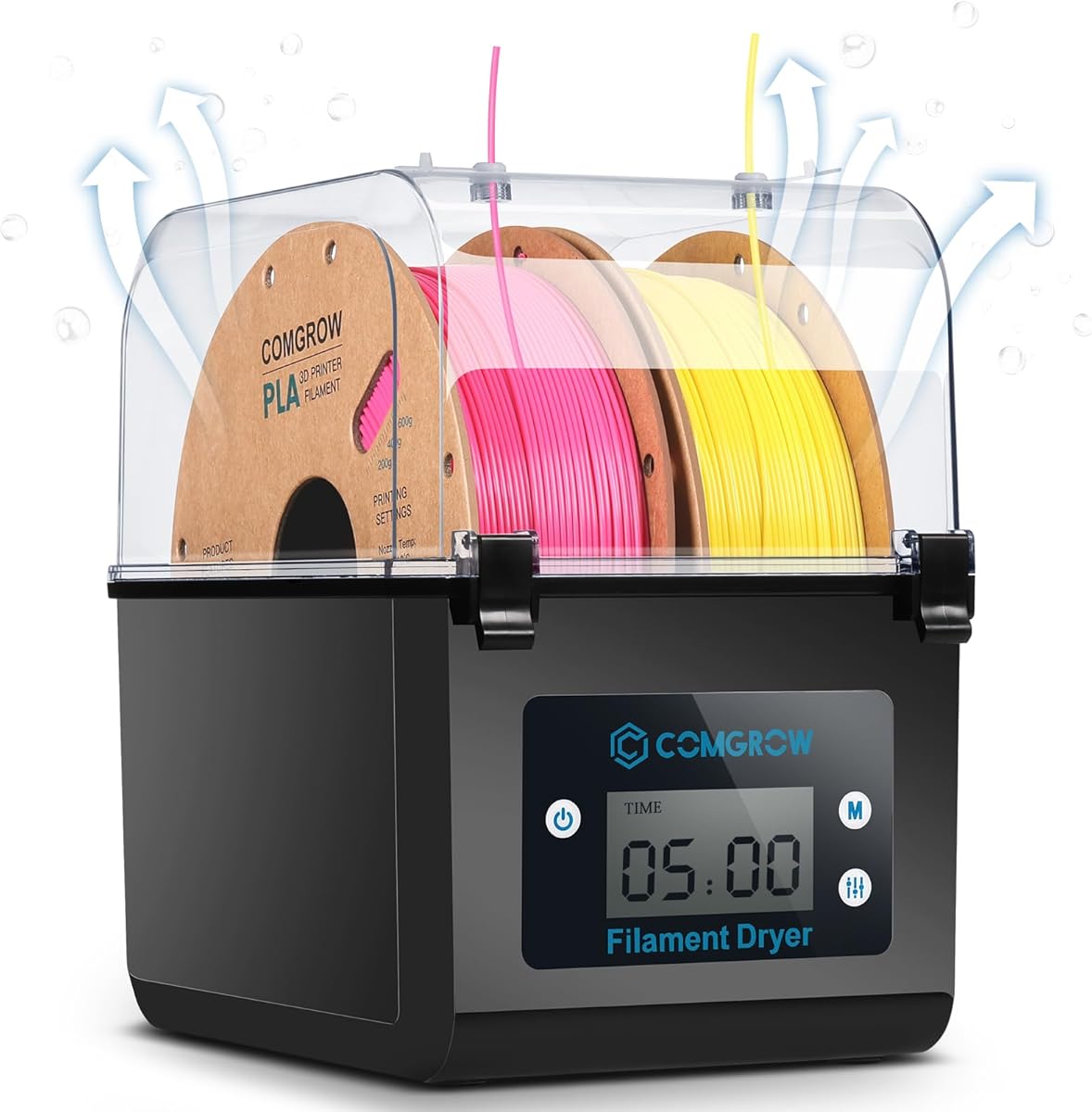
The Comgrow SH01 Filament Dryer Box is a practical solution for keeping your filaments dry during 3D printing. It offers a large storage volume capable of holding two rolls of 1kg spools, which is ideal for medium-volume users. The device features a 2-inch LCD screen that displays real-time temperature and humidity, allowing you to monitor conditions easily. With adjustable temperature settings from 40°C to 50°C, it accommodates most common filaments like PLA, PETG, and ABS. The outlet structure uses a silicone cable sheath and Teflon tube to ensure smooth filament feeding and effective sealing when not in use.
We may earn a commission when you buy through this link, at no additional cost to you.
One of the key advantages of the Comgrow SH01 is its sealing performance, which prevents moisture from re-entering the box once it is closed. The snap button structure on the upper cover ensures a tight fit, enhancing the overall drying efficiency. Users can set the drying time from 6 to 12 hours, providing flexibility based on filament humidity levels. The touch buttons make it easy to operate, and the clear display helps avoid confusion during setup. By keeping filament dry, it helps avoid issues like entanglement, clogging, and poor adhesion, leading to more reliable prints.
However, the Comgrow SH01 has a maximum temperature limit of 50°C, which might not be sufficient for materials that require higher drying temperatures. Additionally, users need to follow specific setting notes to ensure the motherboard operates correctly, as it may shut down if the work state is not displayed. These limitations are minor but worth noting if you work with advanced materials. Despite these constraints, the device performs well for standard filaments and offers good value for its price point. It is a reliable option for those looking to improve print quality without breaking the bank.
If you need a dependable filament dryer that balances functionality with affordability, the Comgrow SH01 is a great choice. It is suitable for hobbyists and small studios that use a variety of common filament types. The real-time monitoring and sealing features ensure that your prints remain consistent and free from moisture-related defects. By maintaining a dry storage environment, you can extend the lifespan of your filament and reduce waste. We recommend considering this model if it fits your specific printing requirements and workspace setup.
The silicone and Teflon outlet design ensures smooth feeding and prevents moisture ingress when the dryer is not in use.
A clear LCD screen and touch buttons simplify the process of setting temperature and time for different drying cycles.
We may earn a commission when you buy through this link, at no additional cost to you.
The Polymaker Polydryer Filament Storage Box is designed to provide consistent protection for moisture-sensitive filaments between uses. Unlike active dryers, it relies on a sealed enclosure combined with desiccant support to lock out moisture. The built-in hygrometer allows you to track storage conditions easily without guessing whether the environment is suitable. It supports printing without breaking the seal, meaning your filament stays dry even during pauses or overnight storage. This model is compatible with a wide range of common filaments and diameters, making it a versatile addition to your workspace.
We may earn a commission when you buy through this link, at no additional cost to you.
One of the main benefits of the Polydryer is its simplicity and ease of use. It does not require power or complex settings, making it a low-maintenance solution for storage. The transparent design lets you check on filament levels without opening the box, preserving the dry environment. By reducing exposure to humid air, it helps lower issues like stringing and uneven layer results, contributing to more consistent printing. The practical design fits neatly into most workspaces, ensuring that your storage setup remains organized and efficient.
However, since the Polydryer does not have an active heating element, it cannot actively dry damp filament on its own. It is best used for storing filament that is already dry or after it has been dried by another means. Users must manage desiccant packs to maintain optimal humidity levels, which requires periodic checks and replacement. While these constraints limit its functionality compared to active dryers, it remains a cost-effective way to protect your filament investment. For those who prioritize storage over active drying, it offers solid performance.
If you are looking for a simple and effective way to keep your filament dry between prints, the Polymaker Polydryer is a strong option. It is ideal for users who want a low-tech solution that still provides reliable moisture protection. The ability to print without breaking the seal makes it convenient for long jobs or intermittent use. By extending filament shelf life and reducing waste, it adds value to your printing workflow. We recommend this for anyone needing a straightforward storage solution without active heating.
Airtight construction with desiccant support keeps moisture out, preserving filament quality for long-term storage.
The visible hygrometer reading allows you to monitor conditions easily and adjust your storage strategy as needed.
We may earn a commission when you buy through this link, at no additional cost to you.
The SUNLU Filament Dryer S2 is designed to significantly enhance 3D printing results by removing moisture from filaments. It serves as both a filament spool holder and a dryer, allowing you to keep filament dry during printing. This feature is especially valuable for users in humid environments who want to avoid print failures due to wet filament. With a large capacity of 265x274x118mm, it accommodates various filament diameters and can revive old, damp filament. The touch screen makes it easy to set temperatures and times, ensuring precise control for different material types.
We may earn a commission when you buy through this link, at no additional cost to you.
One of the key strengths of the SUNLU S2 is its built-in spindle, which ensures that filament spins continuously for even drying. This feature helps avoid cold spots and ensures consistent moisture removal throughout the spool. Users can customize drying times from 0 to 99 hours and temperatures up to 70 degrees Celsius, providing flexibility for various needs. The translucent lid allows you to check on the filament without opening the lid, maintaining the drying environment. By optimizing the printing process, it helps achieve higher quality prints with fewer defects.
The primary drawback of the SUNLU S2 is its limited capacity to a single spool, which may be restrictive for high-volume printing. Additionally, its price is higher than basic dryer boxes, though this is offset by its advanced features and build quality. Some users may find the spindle mechanism requires careful loading to avoid tangling, but it generally performs well. Despite these minor issues, the device delivers reliable performance and extends the life of your filament. It is a robust option for those prioritizing print quality over bulk storage.
If you need a reliable solution to improve print quality and protect your filament, the SUNLU S2 is highly recommended. It is suitable for both home users and professionals who need precise control over drying conditions. The ability to revive old filament saves money and reduces waste, making it a smart investment for any 3D printing setup. By ensuring consistent drying, it helps achieve better results every time. We suggest evaluating this model to see if its features meet your specific printing requirements.
The built-in spindle ensures continuous rotation for even heat distribution and consistent moisture removal from the filament.
Touch screen controls allow you to set specific temperatures and durations tailored to different filament types and conditions.
We may earn a commission when you buy through this link, at no additional cost to you.
The Comgrow SH02 Filament Dryer Box offers an upgrade from the SH01 with a 150W PTC heater that heats up faster and more efficiently. It is designed to dry two rolls of 1kg filament simultaneously, making it ideal for users with multiple printers or higher volume needs. The 360° circulation ensures uniform heating, effectively drying moisture from filaments. With one-key settings for nine different filament types, it simplifies the process for common materials. Intelligent safety protections automatically cut off heating if temperatures exceed 130°C, ensuring safe operation during use.
We may earn a commission when you buy through this link, at no additional cost to you.
One of the standout features of the SH02 is its energy-efficient design, which reaches 50°C within 7 minutes and 70°C within 25 minutes. This rapid heating capability means less wait time before filament is ready for printing. The sealing rings used in the construction help maintain a dry environment, preventing moisture from entering when not in use. Users appreciate the one-key setup for different filament types, which reduces the complexity of manual configuration. The large capacity allows for drying multiple spools, saving both space and time in the workflow.
However, the maximum temperature is limited to 70°C, which may not be sufficient for advanced engineering filaments that require higher heat. Some users may also notice fan noise during operation, though this is typically not disruptive. Despite these limitations, the SH02 offers excellent value for its functionality and build quality. The safety features provide peace of mind, and the sealing design ensures that your filament stays dry. It is a practical choice for users looking to upgrade from single-spool solutions without excessive cost.
If you need a balanced solution that offers multiple spool capacity and efficient drying, the Comgrow SH02 is a solid choice. It is suitable for users who want reliable performance with minimal setup complexity. The safety features and sealing design ensure that your filament is protected during and after the drying process. By improving print quality and reducing downtime, it adds value to your printing setup. We recommend this model for those seeking an efficient and user-friendly drying experience.
The 150W PTC heater provides rapid and uniform heating, ensuring effective moisture removal from all sides of the filament.
Pre-configured settings for nine filament types simplify operation, allowing you to start drying with a single button press.
We may earn a commission when you buy through this link, at no additional cost to you.
The Creality Space PI Filament Dryer utilizes advanced PTC heating technology to ensure uniform drying of your filament. Unlike models with heating pads that can result in uneven results, this dryer warms up the space evenly for consistent moisture removal. The 3.7-inch touch screen makes it simple to track drying conditions and switch between temperature units easily. With one-key settings for 12 filament types, it supports both common and high-performance composites. The 48-hour timer function allows for flexible drying durations, and the memory function saves your settings even after a power outage.
We may earn a commission when you buy through this link, at no additional cost to you.
One of the key advantages of this model is its ability to handle high-performance composites like PLA-CF and PA-CF effectively. The PTC heater is durable, energy-saving, and eco-friendly, making it a sustainable choice for your workspace. Users appreciate the ease of operation, with a clear display that simplifies adjustments during the drying process. The ability to remember settings prevents the need for reconfiguration after interruptions. By ensuring consistent drying, it helps maintain the quality of your filament and improves overall print results.
However, this model is limited to one spool at a time, which may not suit users with high-volume needs. Additionally, it does not feature an active fan system, relying on natural air circulation which can be slower. These constraints might make it less ideal for advanced users requiring multiple spool management. Despite these limitations, the device performs well for standard and composite filaments. The touch screen and memory features add convenience, making it a good choice for hobbyists or small studios.
If you need a reliable dryer that offers precise control and supports a wide range of filament types, the Creality Space PI is worth considering. It is suitable for users who prioritize ease of use and consistent drying results. The memory function and touch screen enhance the user experience, reducing the hassle of manual adjustments. By keeping your filament dry and consistent, it ensures better prints and less waste. We suggest checking this model to see if it meets your specific drying requirements.
The 110W PTC heater ensures even temperature distribution, preventing hot spots and ensuring consistent moisture removal.
Power-off memory saves your settings, while the 48-hour timer allows for extended drying periods for difficult materials.
We may earn a commission when you buy through this link, at no additional cost to you.
The Creality Space PI Filament Dryer Plus is an enhanced version designed to support dual-spool drying for increased efficiency. It features a 3.7-inch touch screen for easy operation and monitoring of drying conditions. The 360° hot-air heating ensures uniform drying, and the real-time humidity monitor helps you track environmental conditions accurately. With one-key settings for 12 filament types, it supports both common and composite materials. The adjustable temperature range from 45°C to 70°C provides flexibility for various drying needs, ensuring optimal results.
We may earn a commission when you buy through this link, at no additional cost to you.
One of the main benefits of the Plus model is its real-time humidity monitor, which allows you to make informed decisions about the drying process. The dual-spool capability means you can dry two filaments simultaneously, reducing overall time and increasing productivity. The touch screen simplifies adjustments, allowing you to switch between temperatures in Celsius or Fahrenheit easily. Users appreciate the even air circulation, which prevents uneven drying and ensures consistent filament quality. The memory function also helps retain settings after power interruptions, adding convenience to daily use.
The primary limitation is that it may not support independent chamber temperatures, which limits flexibility compared to dual-chamber systems. Additionally, the price is higher than single-spool options, though this is justified by the added capacity and features. For users managing multiple printers or projects, the dual-spool design is a significant advantage. By maintaining a dry environment, it helps prevent printing failures and extends filament lifespan. It is a robust solution for those needing more capacity than basic models.
If you need a dryer that balances capacity with precise monitoring, the Creality Space PI Plus is highly recommended. It is suitable for users who work with diverse filament types and require consistent results. The humidity monitor and dual-spool features add value, making it a versatile choice for any 3D printing setup. By ensuring your filament is dry and ready, it supports high-quality production. We suggest considering this model if it fits your workflow and budget requirements.
The built-in humidity monitor provides accurate feedback on internal conditions, helping you optimize the drying environment.
Support for two spools simultaneously increases efficiency, allowing you to manage multiple filaments at once.
We may earn a commission when you buy through this link, at no additional cost to you.
The Creality Space PI X4L Filament Dryer Box is designed for high-volume users who need to keep multiple spools dry and ready for printing. It can hold up to four standard 1kg spools or two larger 2kg spools, making it ideal for busy workspaces. The dual independent heating chambers allow you to dry different types of filament at different temperatures simultaneously, which is a unique feature in its class. With 200W PTC heaters, it heats up to 85°C, removing moisture significantly faster than single-chamber dryers. The silicone-sealed enclosure ensures that your filament stays moisture-free even during long printing pauses, maintaining print-ready conditions 24/7.
We may earn a commission when you buy through this link, at no additional cost to you.
This model stands out due to its ability to handle advanced engineering filaments like ABS, PC, and PAHT thanks to its high-temperature capability. The illuminated window allows you to monitor spools without breaking the humidity control seal, which helps prevent re-absorption of moisture. The touch UI provides precise control over drying scenes, enabling customization for specific materials like PLA or TPU. Users appreciate the dual functionality as both a dryer and a storage unit, streamlining their workflow. The construction is robust, ensuring durability and consistent performance over time, which is essential for professional environments.
The primary downside of the Creality Space PI X4L is its larger size, which requires more workspace than single-spool models. Additionally, the cost is higher than basic options, though the efficiency gains justify the investment for frequent users. The dual chambers offer flexibility that reduces downtime, allowing you to switch between filament types seamlessly. Overall, the benefits of improved print quality and reduced waste make it a worthwhile upgrade for serious users. It is a robust solution for those needing high capacity and precision.
For users seeking a premium solution that combines high capacity with advanced drying technology, the Creality Space PI X4L is highly recommended. It is perfect for shops or individuals managing multiple projects simultaneously who need reliable filament storage. The dual heating feature saves time and ensures your filament is always ready for optimal printing conditions. By protecting your filament investment, this unit helps maintain consistency and quality in your final products. We suggest exploring this option to see if its features align with your production needs and budget constraints.
Independent heating chambers allow simultaneous drying of different filament types, optimizing workflow and reducing wait times.
The sealed enclosure with silicone gaskets ensures that filament remains dry even when not actively drying, preserving quality for future prints.
We may earn a commission when you buy through this link, at no additional cost to you.
The Official Creality Filament Dryer Space Pi X4 revolutionizes filament drying by allowing four spools to dry and print at once. With eight filament holes and PTFE tubing, it meets the need for drying multiple filaments simultaneously. Each chamber is equipped with an independent PTC heater, allowing simultaneous drying of two filament types at different temperatures. The dual 200W PTC heaters paired with insulated chambers improve efficiency, allowing temperatures to reach up to 85°C. This ensures continuous and effective drying of engineering filaments such as PA, PAHT, and PC.
We may earn a commission when you buy through this link, at no additional cost to you.
One of the key benefits of this model is its flexible and energy-efficient drying modes. You can choose between single or dual chamber modes, saving up to 40% energy when using single-chamber operation. This eco-friendly feature makes it cost-effective for regular use without compromising on performance. The sealed enclosure ensures that filament stays dry during long periods, reducing waste and extending shelf life. Users appreciate the ability to manage multiple projects without frequent filament changes or drying waits. It is a premium solution designed for high-efficiency environments.
The primary limitation is the premium price point, which may be a barrier for some users. Additionally, the device is large and requires significant workspace, which may not fit smaller setups. However, the capacity and efficiency gains justify the cost for those who print frequently. The independent temperature control offers flexibility that reduces downtime and enhances productivity. Overall, the benefits of high-volume drying and precision make it a top choice for professionals. It is a robust investment for maintaining consistent quality.
For users seeking a premium solution that combines high capacity with advanced drying technology, the Official Creality Space Pi X4 is highly recommended. It is perfect for shops or individuals managing multiple projects simultaneously who need reliable filament storage. The dual heating feature saves time and ensures your filament is always ready for optimal printing conditions. By protecting your filament investment, this unit helps maintain consistency and quality in your final products. We suggest exploring this option to see if its features align with your production needs and budget constraints.
Dual independent heating chambers allow you to dry different filament types at specific temperatures simultaneously.
Choose between single or dual chamber modes to save energy and reduce operational costs without sacrificing drying efficiency.
We may earn a commission when you buy through this link, at no additional cost to you.
Choosing the right filament dryer box requires consideration of your specific printing needs and workspace constraints.
Evaluate how many spools you typically use. Single-spool boxes are compact and affordable, while multi-spool models support high-volume production. Choose a model that accommodates your current workflow without limiting future growth.
Select a capacity that matches your printing volume to avoid frequent reloading or storage bottlenecks.
Ensure the dryer supports the temperatures needed for your filament types. Standard PLA requires lower heat, while engineering materials like ABS or PA need higher temps. Check the max temperature specification before purchasing.
Verify the temperature range covers both your common and advanced filament requirements.
PTC heaters offer efficient and uniform heating compared to older heating pads. Look for models with circulating air fans to prevent hot spots and ensure consistent drying. Advanced units may have dual chambers for different temperatures.
Prioritize units with PTC heaters and airflow systems for reliable and even moisture removal.
A tight seal is essential to prevent moisture from re-entering the box during storage. Look for silicone gaskets or tight-fitting lids that maintain a dry environment. Some units also include hygrometers for monitoring internal conditions.
Check for effective sealing mechanisms to ensure your filament stays dry when the dryer is not in use.
User-friendly interfaces like touch screens or presets simplify the drying process. One-key settings for common filament types can save time and reduce manual adjustments. Look for clear displays that show temperature and humidity readings.
Choose models with intuitive controls and preset settings to streamline your workflow.
Ensure the device has safety protections like thermal cutoffs to prevent overheating. Models with alarms for fan failures or temperature spikes add an extra layer of security. Check for certifications that indicate reliable manufacturing standards.
Look for thermal protection and fan monitoring features to ensure safe operation.
Consider the cost relative to the features offered. While basic models are cheaper, investing in higher capacity or advanced control may save money in the long run. Evaluate the total cost of ownership including energy usage and potential filament waste.
Balance upfront costs with long-term benefits like energy efficiency and print quality improvements.
Confirm the dryer works with your specific filament types. Most units handle standard PLA and PETG, but advanced filaments like PC or ASA may require specific capabilities. Check for compatibility lists provided by the manufacturer.
Ensure the dryer supports all the materials you currently use and plan to use in the future.
Before using your filament dryer box, ensure the power supply matches the unit's requirements. Place the dryer on a stable, heat-resistant surface away from flammable materials. Close the lid securely to maintain the dry environment during operation.
Load your filament carefully, following the manufacturer's instructions for threading. Set the appropriate temperature and time based on your filament type. Monitor the display for any alerts during the drying process to ensure smooth operation.
Regularly clean the dryer to prevent dust buildup that can affect performance. Check seals and gaskets periodically to ensure they remain tight. Replace desiccant packs if using passive models to maintain effective moisture control.
Filament absorbs moisture from the air, leading to print defects like stringing and bubbling. A dryer box removes moisture to ensure consistent extrusion and better print quality. It also helps extend the shelf life of your filament.
Yes, but ensure the dryer supports higher temperatures. Engineering filaments like ABS or PA require temperatures above 60°C. Check the max temperature specification to confirm compatibility before purchase.
Drying time depends on the moisture content and filament type. Most models take between 4 to 12 hours for effective drying. Advanced units may reduce this time with faster heating technology.
Not all dryers require active power. Some storage boxes rely on passive sealing and desiccants. However, active dryers use power to heat and circulate air for faster results.
Yes, many modern dryers are designed to allow printing during the drying process. This ensures continuous filament protection without interrupting your workflow.
If the seal breaks, moisture can re-enter the box. This compromises the drying process and may require re-drying the filament. Inspect gaskets and seals regularly to prevent issues.
Selecting the right filament dryer box ensures consistent print quality and reduces waste from moisture issues. The top picks offer a range of capacities and features to suit different needs and budgets.
Prioritize features like temperature range and sealing effectiveness to match your specific filament requirements. High-volume users may benefit from multi-spool models, while casual users can opt for simpler options.
Prices and availability can change, so verify current details before making a purchase. Investing in the right dryer now helps maintain your filament quality for future projects.